


MTellevik
Members
-
Joined
-
Last visited
-
Yes they do! Had not thought to check that. Thanks!
-
Some are uner the other folders, that's I think I should have everything under the ISY forlder. (Which I think I should rename to "Home" or something like that.
-
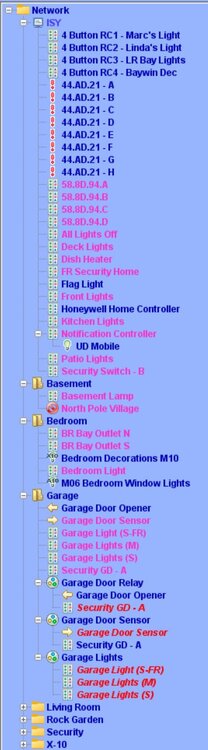
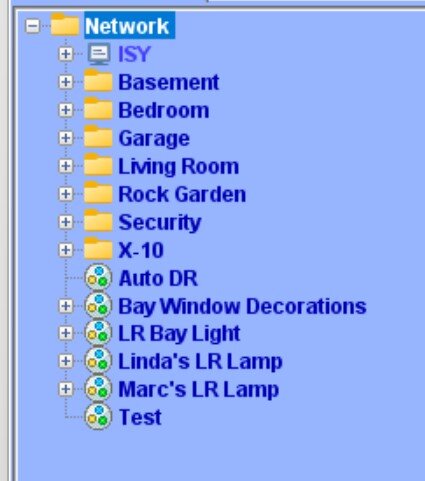
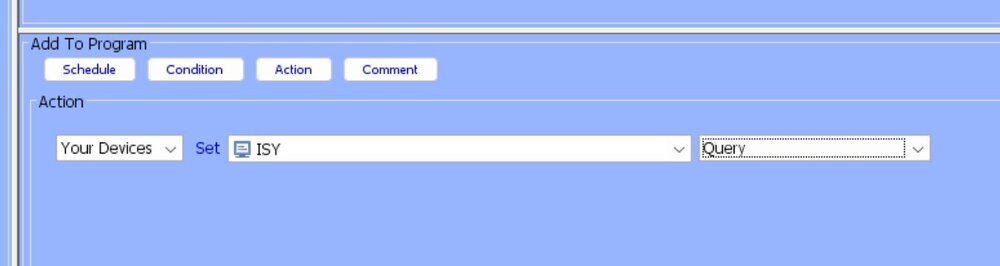
My folder tree starts with "Network" then under that is "ISY" I also have folders under network for different rooms and scenes. I'm still working through a setup that makes sense. (See Main Listing below) Shoud they all be under the ISY folder? Under the ISY folder I have a bunch of individual units that I have not put in folders yet. Should they all be under the ISY folder? I'm thinking that the query command I've set will only query the ISY folder and none of the others? (see Query below) Thank for all the info! Just really started digging into what this system can do and trying to streamline things.
-
So I checked my old ISY and the NODE is the Mac address of the 994i. So I need to change the line to my current mac address. but not sure how to load the line to say <cmd NODE="**:**:**:**:**:**" ID="QUERY"/> Any Ideas?
-
I migrated my ISY994i to an EISY a while ago. Everything seems to be working fine, but from the very begining there was a "Query All" program that had the comment line "Factory Query Program" that was there from the start and I never messed with it. I just noticed that in my EISY the program shows yellow and it has the lines: " //Warning: Unrecognized Action (program may not run) ''<cmd NODE="00:21:b9:02:3f:3b" ID="QUERY"/>" Not sure what the program was for and if it is even needed anymore. Has anyone else seen this?
-
Thanks, I will try that and see if it helps
-
Interesting, But it's in a triple gang box but with a blank next to it and a standard switch in the third position.
-
OK, this just took a weird turn... My mistake, the bulbs are not LED, they are 100 watt incandesent, 3 of them not 4. (Downsairs has 4) Took all of the bulbs out except in 1st fixture - works as it should. Put one back in fixture 2 - not working right Took bulb out of fixture 1 - works as it should. Had a spare bulb so I tried putting that in. Didn't matter what combination of bulbs and fixtures I used with one bulb it worked. More than one bulb No Go! May go and get three replacement bulbs and try that.
-
Yes, they are. There was previously a 2476D Dimmer Switch controling them, and it worked fine. But, that one was wearing out and you had to puch the button several times to get it to work.
-
Load is 4 25W LED lights in outdoor fixtures 2334-232 6 Button Dimmer Switch
-
I installed a 6 button keypad link to control my outdoor lights. When i press the On button the lights flash on to 100% before dropping back to off and then come on at my set ramp rate. I've tried removing the swittch from the EISY using the admin console, then doing a factory reset on the switch and then relinking the switch. and resetting the ramp rate. Flicker is still there. I'm a bit of a newbie to this so am I doing something wrong or is it a defective switch?
-
This sounds like it would be the easiest option. I will start with this. Might play around with scenes later to see how that would work. Thanks!
-
Thanks, I'll check this out when I get home. MT
-
I could go two ways with this. I want to create a program called "away" and have certain lights and actions happen while I'm "Away". The "Home" button would turn off "Away". The Home button woill have a green color and the away will be red. Or I could have the KPL buttons activate another On/Off Switch. Could not figure out how to do this in programing the Keypad.
-
I Apologize if this is in the wrong spot, let me know and I'll repost it correctly. Newbie question: I have a 6 Button Keypad Linc 2487S I would like the C and D buttons to be mutually exclusive. If I press C then C would be on and D would be off If I press D then D would be on and C woiuld be off. I know this should be simple but I just cannot get it working. 😡

