


CPrince
Members
-
Joined
-
Last visited
-
@paulbates I forgot about the life of the smoke detectors. I think they run 8 years or so. Freaked me out when they "died". I had 2 and they died in a week of each other. I knew it was sending a code, but could not reference it. I finally did and the code was "end of life". I replaced them with the First Alert SCO500B in December 2021. I bought theses on Amazon. I see that these are hard to find now. Company below has some. ElectricBargainStores.comBRK Electronics First Alert SCO500B OneLink Wireless Batt...
-
Yes, @Guy Lavoie I would agree. All the z-wave devices that were on battery showed up as placeholders after the migration. Between the non functioning Insteon battery devices and the Z-wave battery devices, I threw in the towel. I went back to a working configuration on the Polisy. Actually it is working better. I must have cleared some links doing the restore. I am going to reset the eisy and Zmatter to factory. When I receive the new Serial PLM cable from UD, I will try again. This way if most all insteon devices, wall powered z-wave devices and battery insteon device (using the current PLM that I will transfer) work, I should not have too much work to do with z-wave battery devices. I am curious if there will still be support for insteon sirens, I/O links and smoke detectors in eisy.
-
@Guy Lavoie Thanks for bringing this to my attention. I removed the PLM from the eisy and brought it back up to look at the z-wave. Just about all wall powered z-wave devices (10) worked (migrated) fine. Only found 1 that didn't. I don't have any locks. The rest of my z-wave (15) are battery operated temp, flood, motion or environmental sensors. They did not work.
-
@Guy Lavoie Thanks, that is just the encouragement I was looking for. LOL, Since I have two setups eisy and Polisy, I am thinking of doing the migration from Policy with Zooz 700 and serial PLM to eisy with Zmatter and USB PLM using the wiki link above. Make my backup file on Polisy. Restore eisy from my backup. In theory it should work. I just don't want to get suck in the middle. Well, I got stuck in the middle. It all went fast and well until I restored the PLM, as I was using a new PLM on the eisy. Actually the restore PLM part went Okay. I just have a lot of battery devices. The list was crazy long. The battery devices would have to be reset one at a time. Zwave appears to have migrated too. I was out of time. I disconnected the eisy and fired up the Policty. It turns out I had broken most all the links on my connected modules. So I had to restore, write and test every module. I am going to try this again using the UD serial to USB cable. This way I won't have to mess with PLM. I just have to physically move it.
-
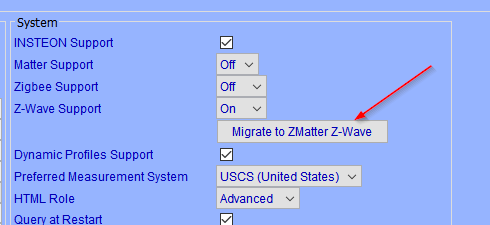
I have a Polisy with a Zooz 700 version 5.9.1 that is working fine. I have not upgraded to ver 6.0.0 as I don't know how to migrate the Zooz 700. Step one is backup your Z-wave. I have read a lot about it here, but few have the Zooz 700. I can't back up the Zooz 700 as the option is not available. This could all be behind me now. I also have an Eisy with a Zmatter dongle. My ultimate goal is to move to the Eisy with Zmatter. So I am thinking that if I can factory reset my used Zmatter dongle using the Eisy then I can do a Zmatter upgrade on the Polisy with the Zmatter I just reset. After that, the upgrade should be pretty straight forward. This is my step 1.
-
I know this is a crazy place to post this but.... So my Blue Iris seems to have fits about every 8 weeks or so. It stops recording. I just don't know when or why. To fix I have tried to restart Blue Iris and Code Project services with poor results. Reboots are a %100 fix. I am thinking Code Project is the culprit. Code Project monitoring screen is all messed up. Half the process are stopped or are in lala land. The question is, I guess, any way I can monitor when Code Project goes off the rails or someway to poke Blue Iris to see if it is still functioning? Blue Iris is still alive and well according to Polisy. Maybe activate a camera and see if it records? I don't know, I am on a fishing expedition here. If I reboot BI computer once a month I probably could eliminate this problem. I also can crash the BI computer as it has a Insteon power module on it. Not really my fist choice!
-
I figured there is a lot more to this. So where can I go to learn more about this?
-
@mmb I hate learning new stuff! It seems you are using BI to trigger EISY. We are using EISY to trigger BI. This is interesting. I have done some research and see that REST is an API. I think i figured this out. I was able to set a variable in EISY through a browser with this knowledge. I like this. So now I assume: 192.168.0.106 is the EISY. (I thought it was BI) /rest calls the API /vars is the variable location on EISY /set is to set a variable /2 is state variable /38 is your variable /1 is the data
-
Glad I asked. Now I know why some of my programs don't work till the next day after a reboot. Keep forgetting about change of state. I will add in the repeat.
-
@apostolakisl Thanks for the the reply. Seems you have made this routine bullet proof and repetitive. I am trying to better understand the logic. Run on start up, why? Shouldn't the if 'Blue Iris' NodeServer Online is not Connected Or 'Blue Iris' Server Status is not Green be enough? I thought of run on startup too, but didn't know why. Then if the logic is true, it runs every hour; sending a notification and Re-Discover for ever? I changed mine to combine 2 programs in to 1 using reverse logic as suggested, changed the duration and position of the wait and added the run on start up. I didn't add the repeat as I was unsure what it was repeating. Thanks for you help Blue Iris watchdog - [ID 0100][Parent 0001][Run At Startup] If 'Blue Iris' NodeServer Online is not Connected And 'Blue Iris' Server Status is not Green Then Wait 1 minute Set 'Blue Iris' Re-Discover Else - No Actions - (To add one, press 'Action')
-
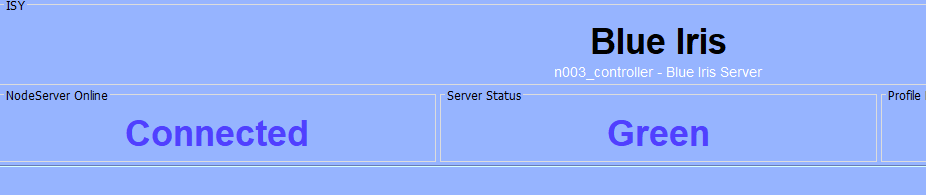
I have a massive Blue Iris system. While it is not prefect I figured I would help it out a bit with IoX triggers. Example. I have a camera pointed at a door. Blue Iris fails to see someone at the door for what ever reason. At the door I have a motion sensor to turn the light on at might when someone shows up after porch light hours. So I have the IoX fire off a Blue Iris trigger any time the motion sensor goes off. It works really nice. I have other things like this setup. Like when the mail man opens my mailbox. Smile mail man! (Normal status shown below) Here is the problem. For what ever reason "Server Status" or "Node Server Online" may change state to "Disconnected". This causes the triggers to stop working. Clicking "Re-Connect" on Blue Iris Plugin will fix either disruption. So I figured I would write a few programs. Blue Iris Reconect - [ID 00FE][Parent 0001] If 'Blue Iris' NodeServer Online is Disconnected Then Set 'Blue Iris' Re-Discover Wait 5 minutes Else - No Actions - (To add one, press Action') And this second program Blue Iris watchdog - [ID 0100][Parent 0001] If 'Blue Iris' Server Status is Disconnected Then Set 'Blue Iris' Re-Discover Wait 5 minutes Else - No Actions - (To add one, press 'Action') These programs never run. Maybe it runs once and never again? I have to go in and manually click "Re-Discover". Do I have to set these to run at startup? Maybe set my wait to 1 minute?

-
@Athlon I had to do that too. I just used the IP address:8443 instead of polisy.local:8443 . Lots of info in that file!
-
@Guy Lavoie I would agree. This code was left over from some old sensors with actual heartbeats. Rather than remove some in-depth code and rewrite some new code; I patched the old. I was being lazy. But at the same token it was why reinvent the wheel. I was like it is all here, just use the "Else"!
-
@larryllix Thanks. "If anything triggers evaluation the two times with never be true and Else will always get run." This is exactly where I got stuck and did not know how to fix. My problem is my lack of good knowledge of integer and state variables. I changed the $SouthGate and $NorthGate variables to integer.
-
I kind of get why this is happening but I don't. Just can't wrap my head around it. I thought of breaking it up into 2 programs but don't think that will work. I am looking to clean up this program. It works fine with the exception that it runs the “Else” part at 3:01 AM when I update my flag in another program. The flag is a heartbeat flag. If the flag stays the same, it still runs at 3:01 AM. These are unnecessary messages. I only wat the 8:55 and 5:55 message. My gate sensor does not have a heartbeat. It does have a Unix time stamp. So, I look to see if yesterday’s stamp is less than today’s stamp and if so, set my flag to 1. If not, I set it to 2. Gate Sensor Problem - [ID 0076][Parent 006C] If ( Time is 8:55:00AM Or Time is 5:55:00PM ) And ( $sSouthGate is not 1 Or $sNorthGate is not 1 ) Then Send Notification to 'Chris email' content 'Gate Sensor Problem' Wait 5 seconds Send Notification to 'Pushover' content 'Gate Sensor Problem' Wait 5 seconds Set 'Notification Controller / UD Mobile' Send Message Content 20 Notification ID (ID=20) Else Send Notification to 'Chris email' content 'Gate Sensor Normal' Wait 5 seconds Send Notification to 'Pushover' content 'Gate Sensor Normal' Wait 5 seconds Set 'Notification Controller / UD Mobile' Send Message Content 21 Notification ID (ID=21)

