


KHenningsen
Members
-
Joined
-
Last visited
-
As I just replied to Geddy, I think I'm making progress on getting UD Mobile to work, and I don't think that involves any subscription costs, at least for just the local functionality I seek. I looked into Mobilinc Pro (and X; HD is no longer available, apparently). Both have a plethora of subscription options, and I'm unclear whether I can achieve my local-only functionality without signing up for one of them. (Pro costs $19.95 up front, which suggests that may be the only expense for what I need. X is free, but appears to require a subscription at any level.) Can you illuminate? Thanks, ~Ken
-
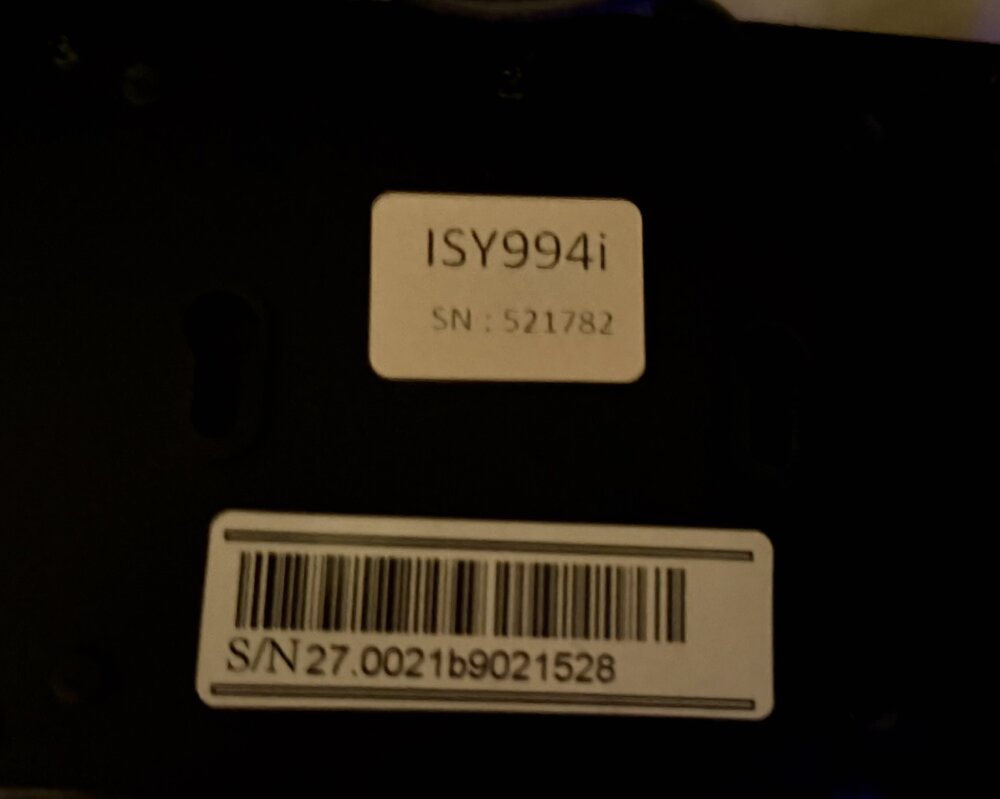
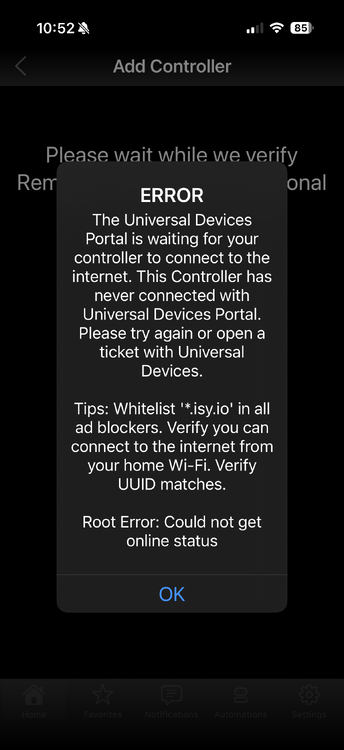
Hey Geddy, thanks for the quick response and the tips; the key one was keeping Safari from auto-unzipping the firmware files (I was unaware that it did so by default, and just learned how to stop it; part of what confused me about that was that there were still zipped files in subfolders). I'm pretty sure my ISY doesn't have a zwave board (S/N in attached photo, if that's any help; I couldn't find a cross-reference). After reviewing a few discussions, I decided to go for it and upgrade to 5.3.4, which seemed to go smoothly once I fed it the zipped file. I was expecting more radical changes in the Admin Console, but it relaunched with no apparent changes except the expected reversion to the default User ID/Password. I also verified that I can still control my Insteon modules from the console. (The latter is now running on my M3 MacBook Air; the 1TB SSD on my 11-year-old iMac took a dump on me yesterday, and so far appears to be unrecoverable. It's said that trouble comes in threes; I'm holding my breath...) BTW, I tried to heed your advice about backing up my programs, but can't find the “my programs” root to which you refer; I wonder if I'm running into Mac/PC differences. (Right-clicking ain't a normal Mac action, but Ctrl-click allegedly does the same thing. However nothing I right-click on yields what you're describing.) Am I looking for some files outside of the Admin Console ("Finder" files, in Mac parlance)? I then launched UD Mobile with high hopes, and it progressed nicely until it tried to connect to the UD Portal, yielding the following error message: In the Admin Console I found an "Enable Internet Access" command, which I did and got a success message. However, UD Mobile still errors out with the above message. I don't have any active content blockers to my knowledge, and the UUID is correct. On the theory that UD Mobile might have gotten corrupted with all my unsuccessful tries, I deleted and reinstalled it, but with the same results. I also power-cycled the ISY to see if that would help; no joy. I'm now wondering if I need to get involved with port-forwarding and/or static IPs. BTW, the very first time I launched UD Mobile and selected my 994i, I got a message offering a 30-day trial of Remote Access. I wasn't particularly interested (I'm mainly looking for iPhone control of my stuff around the house), but there was no apparent way to decline and proceed, so I accepted. Interestingly, that message hasn't reappeared in multiple subsequent attempts to activate UD Mobile, even when I deleted and reinstalled the app. Any advice, other than to open a UD ticket as suggested in the error message? (And if I try, will I just get told the 994i is no longer supported?) Thanks, ~Ken
-
I have a 994i that's been running flawlessly for over a decade, controlling a number of lights, sensors, and (most importantly), my swimming pool pump, heater and cleaner. I've been programming it with a 2014 iMac that has been equally reliable, but I now have the Admin Console running on an M3 MacBook Air as well. Over that decade I've largely converted from X-10 to Insteon, and only control the latter with the 994i. Along the way, I found a little iPhone app called Agave, which I programmed to remotely control my most-used functions like a TV remote. This combination provides all the home automation control I need (an upgrade to eisy would be expensive overkill), and I hope to continue using it more or less indefinitely. However, when I upgraded my iPhone 14 Pro to a 17 Pro, the Agave app didn't transfer, as it's no longer available in the App Store. When I try to access the website to download it directly, I get dire warnings about possible malware (I'm not sure if these are legitimate or simply the result of an expired certificate of a developer who's no longer maintaining the site.) I really miss this app, so I started looking for alternatives, starting with UD Mobile. (Another alternative would be the Insteon Hub, which I gather supports remote control; at $100 it's more affordable than eisy, but I assume the 994i remains the more robust choice.) After downloading UDM, I attempted to add a new controller; it instantly found my 994i,but when I try to add it I get a message that it can't determine the firmware version. This apparently is because my firmware is still at 4.9.0, and the last version for the 994i (5.3.4) is needed to support UDM. No problem, I thought; I just need to download and manually install that version. Unfortunately, that's where things got frustrating. There are two download links; the first (and most promising-sounding) yields a folder called Insteon_5, with a bunch of subfolders and files—none of which is an obvious installer. I've tried to open a dozen or so of those that offer an active Open button (including those in the other installer link, udi_oadr_5), but all yield an error (mostly a message about being unable to open a Zip file) or nothing at all. I'm used to dealing with geekware (my HA adventure started in 1978, controlling X-10 modules with a Radio Shack TRS-80), but I'm stuck here; what am I doing wrong? Thanks, ~Ken


