


Oakland Jeff
Members
-
Joined
-
Last visited
-
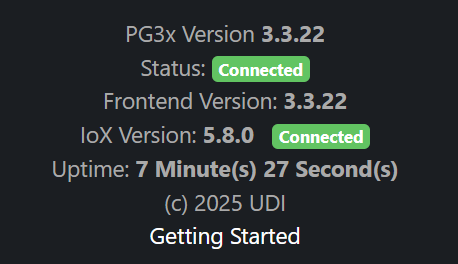
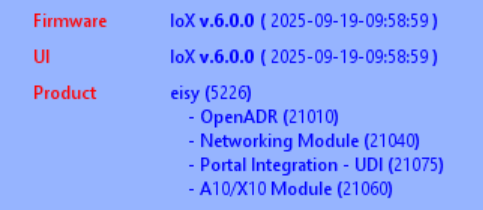
I'm having the same https problems... no secure connection, even with :8443 appended. I'm also confused why the admin console reports IoX 6.0.0, but web ui reports 5.8.0 And where are we supposed to be able to see the OS 14.3 version number?
-
I have several triggerlincs of various vintages. I recently upgraded my eisy to 5.9.1, and noticed the following: Some of my triggerlincs cannot send Only On anymore. They used to. I observe that AC reports both ON and OFF state for Open, even though they are in Multi-Scene and I expect the AC to only ever show ON like it used to. The scenes in which they are controllers now unfortunately react to the Open now sending OFF. Some of my triggerlincs no longer show me an Options button! I can no longer configure them in the AC. Interestingly, even though the AC reports the Open status for these unconfigurable units as both ON and OFF, the scenes that they are part of still behave as if only ON was being sent! I already tried removing and re-linking the configurable unit that insists on sending OFFs in Multi-scene mode and it didn't solve anything. Ideas? Thanks in advance, Jeff


-
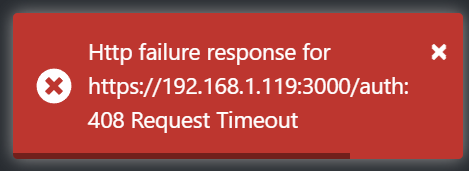
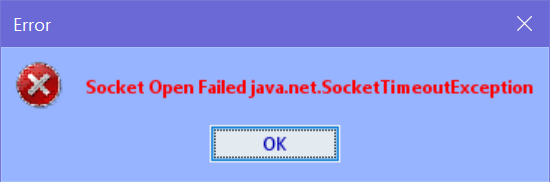
I'm on 5.8.4 trying to go to 5.9.1. I've done my IoX backup. Two symptoms of my update problems: I'm unable to log into PG3. When I try, using my Admin Console credentials, I get a 408 error (image attached). When I boldly try to update the eisy without a PG3 backup, I click the "Upgrade Packages" from the admin console and the dialog immediately disappears. I don't get the "warning box" screen that I'm supposed to get according to the instructions. Instead a minute or so later, I get a dialog saying "Socket Open Failed java.net.SocketTimeoutException" (image attached) Please advise. Thanks in advance, Jeff
-
Since I tried starting from scratch with the bedroom switch (deleted it from AC, factory rest it) I am unable to re-link it, so there is nothing for me to try to restore. However, Patti's Room Recessed is still giving me !. Here is the Level 3 Event Viewer during a Restore on Patti's Room Recessed. Wed 11/01/2023 02:46:38 PM : [ 1E 62 F6 1] Preparing Device 'Patti's Room Recesse' for Restore Wed 11/01/2023 02:46:38 PM : [ 1E 62 F6 1] Device 'Patti's Room Recesse' ready for Full Restore Wed 11/01/2023 02:46:38 PM : [All ] Writing 150 bytes to devices Wed 11/01/2023 02:46:38 PM : [INST-TX-I2CS] 02 62 14 BE B1 1F 2F 00 00 00 00 00 01 00 00 00 00 00 00 00 00 D0 Wed 11/01/2023 02:46:38 PM : [INST-ACK ] 02 62 14.BE.B1 1F 2F 00 00 00 00 00 01 00 00 00 00 00 00 00 00 D0 06 (00) Wed 11/01/2023 02:46:42 PM : [ Time] 14:46:43 0(0) Wed 11/01/2023 02:46:47 PM : [INST-TX-I2CS] 02 62 14 BE B1 1F 2F 00 00 00 00 00 01 00 00 00 00 00 00 00 00 D0 Wed 11/01/2023 02:46:47 PM : [INST-ACK ] 02 62 14.BE.B1 1F 2F 00 00 00 00 00 01 00 00 00 00 00 00 00 00 D0 06 (00) Wed 11/01/2023 02:46:56 PM : [INST-TX-I2CS] 02 62 14 BE B1 1F 2F 00 00 00 00 00 01 00 00 00 00 00 00 00 00 D0 Wed 11/01/2023 02:46:56 PM : [INST-ACK ] 02 62 14.BE.B1 1F 2F 00 00 00 00 00 01 00 00 00 00 00 00 00 00 D0 06 (00) Wed 11/01/2023 02:47:00 PM : [INST-TX-I2CS] 02 62 14 BF 3B 1F 2F 00 00 00 00 00 01 00 00 00 00 00 00 00 00 D0 Wed 11/01/2023 02:47:00 PM : [INST-ACK ] 02 62 14.BF.3B 1F 2F 00 00 00 00 00 01 00 00 00 00 00 00 00 00 D0 06 (00) Wed 11/01/2023 02:47:09 PM : [INST-TX-I2CS] 02 62 14 BF 3B 1F 2F 00 00 00 00 00 01 00 00 00 00 00 00 00 00 D0 Wed 11/01/2023 02:47:09 PM : [INST-ACK ] 02 62 14.BF.3B 1F 2F 00 00 00 00 00 01 00 00 00 00 00 00 00 00 D0 06 (00) Wed 11/01/2023 02:47:12 PM : [ Time] 14:47:13 0(0) Wed 11/01/2023 02:47:18 PM : [INST-TX-I2CS] 02 62 14 BF 3B 1F 2F 00 00 00 00 00 01 00 00 00 00 00 00 00 00 D0 Wed 11/01/2023 02:47:18 PM : [INST-ACK ] 02 62 14.BF.3B 1F 2F 00 00 00 00 00 01 00 00 00 00 00 00 00 00 D0 06 (00) Wed 11/01/2023 02:47:22 PM : [INST-TX-I2CS] 02 62 21 D0 FD 1F 2F 00 00 00 00 00 01 00 00 00 00 00 00 00 00 D0 Wed 11/01/2023 02:47:22 PM : [INST-ACK ] 02 62 21.D0.FD 1F 2F 00 00 00 00 00 01 00 00 00 00 00 00 00 00 D0 06 (00) Wed 11/01/2023 02:47:32 PM : [INST-TX-I2CS] 02 62 21 D0 FD 1F 2F 00 00 00 00 00 01 00 00 00 00 00 00 00 00 D0 Wed 11/01/2023 02:47:32 PM : [INST-ACK ] 02 62 21.D0.FD 1F 2F 00 00 00 00 00 01 00 00 00 00 00 00 00 00 D0 06 (00) Wed 11/01/2023 02:47:41 PM : [INST-TX-I2CS] 02 62 21 D0 FD 1F 2F 00 00 00 00 00 01 00 00 00 00 00 00 00 00 D0 Wed 11/01/2023 02:47:41 PM : [INST-ACK ] 02 62 21.D0.FD 1F 2F 00 00 00 00 00 01 00 00 00 00 00 00 00 00 D0 06 (00) Wed 11/01/2023 02:47:42 PM : [ Time] 14:47:44 0(0) Wed 11/01/2023 02:47:45 PM : [INST-TX-I2CS] 02 62 14 D6 91 1F 2F 00 00 00 00 00 01 00 00 00 00 00 00 00 00 D0 Wed 11/01/2023 02:47:45 PM : [INST-ACK ] 02 62 14.D6.91 1F 2F 00 00 00 00 00 01 00 00 00 00 00 00 00 00 D0 06 (00) Wed 11/01/2023 02:47:54 PM : [INST-TX-I2CS] 02 62 14 D6 91 1F 2F 00 00 00 00 00 01 00 00 00 00 00 00 00 00 D0 Wed 11/01/2023 02:47:54 PM : [INST-ACK ] 02 62 14.D6.91 1F 2F 00 00 00 00 00 01 00 00 00 00 00 00 00 00 D0 06 (00) Wed 11/01/2023 02:48:03 PM : [INST-TX-I2CS] 02 62 14 D6 91 1F 2F 00 00 00 00 00 01 00 00 00 00 00 00 00 00 D0 Wed 11/01/2023 02:48:03 PM : [INST-ACK ] 02 62 14.D6.91 1F 2F 00 00 00 00 00 01 00 00 00 00 00 00 00 00 D0 06 (00) Wed 11/01/2023 02:48:07 PM : [INST-TX-I1 ] 02 62 21 59 44 0F 0D 00 Wed 11/01/2023 02:48:07 PM : [INST-ACK ] 02 62 21.59.44 0F 0D 00 06 (00) Wed 11/01/2023 02:48:12 PM : [ Time] 14:48:14 0(0) Wed 11/01/2023 02:48:16 PM : [INST-TX-I1 ] 02 62 21 59 44 0F 0D 00 Wed 11/01/2023 02:48:16 PM : [INST-ACK ] 02 62 21.59.44 0F 0D 00 06 (00) Wed 11/01/2023 02:48:25 PM : [INST-TX-I1 ] 02 62 21 59 44 0F 0D 00 Wed 11/01/2023 02:48:25 PM : [INST-ACK ] 02 62 21.59.44 0F 0D 00 06 (00) Wed 11/01/2023 02:48:29 PM : [INST-TX-I2CS] 02 62 31 AE CD 1F 2F 00 00 00 00 00 01 00 00 00 00 00 00 00 00 D0 Wed 11/01/2023 02:48:29 PM : [INST-ACK ] 02 62 31.AE.CD 1F 2F 00 00 00 00 00 01 00 00 00 00 00 00 00 00 D0 06 (00) Wed 11/01/2023 02:48:38 PM : [INST-TX-I2CS] 02 62 31 AE CD 1F 2F 00 00 00 00 00 01 00 00 00 00 00 00 00 00 D0 Wed 11/01/2023 02:48:38 PM : [INST-ACK ] 02 62 31.AE.CD 1F 2F 00 00 00 00 00 01 00 00 00 00 00 00 00 00 D0 06 (00) Wed 11/01/2023 02:48:41 PM : [ Time] 14:48:44 0(0) Wed 11/01/2023 02:48:47 PM : [INST-TX-I2CS] 02 62 31 AE CD 1F 2F 00 00 00 00 00 01 00 00 00 00 00 00 00 00 D0 Wed 11/01/2023 02:48:47 PM : [INST-ACK ] 02 62 31.AE.CD 1F 2F 00 00 00 00 00 01 00 00 00 00 00 00 00 00 D0 06 (00) Wed 11/01/2023 02:48:51 PM : [INST-TX-I2CS] 02 62 31 B6 54 1F 2F 00 00 00 00 00 01 00 00 00 00 00 00 00 00 D0 Wed 11/01/2023 02:48:51 PM : [INST-ACK ] 02 62 31.B6.54 1F 2F 00 00 00 00 00 01 00 00 00 00 00 00 00 00 D0 06 (00) Wed 11/01/2023 02:49:00 PM : [INST-TX-I2CS] 02 62 31 B6 54 1F 2F 00 00 00 00 00 01 00 00 00 00 00 00 00 00 D0 Wed 11/01/2023 02:49:00 PM : [INST-ACK ] 02 62 31.B6.54 1F 2F 00 00 00 00 00 01 00 00 00 00 00 00 00 00 D0 06 (00) Wed 11/01/2023 02:49:09 PM : [INST-TX-I2CS] 02 62 31 B6 54 1F 2F 00 00 00 00 00 01 00 00 00 00 00 00 00 00 D0 Wed 11/01/2023 02:49:09 PM : [INST-ACK ] 02 62 31.B6.54 1F 2F 00 00 00 00 00 01 00 00 00 00 00 00 00 00 D0 06 (00) Wed 11/01/2023 02:49:11 PM : [ Time] 14:49:14 0(0) Wed 11/01/2023 02:49:14 PM : [INST-TX-I2CS] 02 62 31 B4 65 1F 2F 00 00 00 00 00 01 00 00 00 00 00 00 00 00 D0 Wed 11/01/2023 02:49:14 PM : [INST-ACK ] 02 62 31.B4.65 1F 2F 00 00 00 00 00 01 00 00 00 00 00 00 00 00 D0 06 (00) Wed 11/01/2023 02:49:23 PM : [INST-TX-I2CS] 02 62 31 B4 65 1F 2F 00 00 00 00 00 01 00 00 00 00 00 00 00 00 D0 Wed 11/01/2023 02:49:23 PM : [INST-ACK ] 02 62 31.B4.65 1F 2F 00 00 00 00 00 01 00 00 00 00 00 00 00 00 D0 06 (00) Wed 11/01/2023 02:49:32 PM : [INST-TX-I2CS] 02 62 31 B4 65 1F 2F 00 00 00 00 00 01 00 00 00 00 00 00 00 00 D0 Wed 11/01/2023 02:49:32 PM : [INST-ACK ] 02 62 31.B4.65 1F 2F 00 00 00 00 00 01 00 00 00 00 00 00 00 00 D0 06 (00) Wed 11/01/2023 02:49:36 PM : [31 AD B9 1 ] Link 3 : 0FE0 [62011A6830000001] Writing [62011A6830000001] Wed 11/01/2023 02:49:36 PM : [INST-TX-I2CS] 02 62 31 AD B9 1F 2F 00 00 02 0F E7 08 62 01 1A 68 30 00 00 01 BB Wed 11/01/2023 02:49:36 PM : [INST-ACK ] 02 62 31.AD.B9 1F 2F 00 00 02 0F E7 08 62 01 1A 68 30 00 00 01 BB 06 (00) Wed 11/01/2023 02:49:41 PM : [ Time] 14:49:44 0(0) Wed 11/01/2023 02:49:45 PM : [INST-TX-I2CS] 02 62 31 AD B9 1F 2F 00 00 02 0F E7 08 62 01 1A 68 30 00 00 01 BB Wed 11/01/2023 02:49:45 PM : [INST-ACK ] 02 62 31.AD.B9 1F 2F 00 00 02 0F E7 08 62 01 1A 68 30 00 00 01 BB 06 (00) Wed 11/01/2023 02:49:54 PM : [INST-TX-I2CS] 02 62 31 AD B9 1F 2F 00 00 02 0F E7 08 62 01 1A 68 30 00 00 01 BB Wed 11/01/2023 02:49:54 PM : [INST-ACK ] 02 62 31.AD.B9 1F 2F 00 00 02 0F E7 08 62 01 1A 68 30 00 00 01 BB 06 (00) Wed 11/01/2023 02:49:58 PM : [31 AD B9 1 ] Link 3 : 0FE0 [62011A6830000001] *Failed Writing [62011A6830000001] Wed 11/01/2023 02:49:58 PM : [INST-TX-I1 ] 02 62 35 73 67 0F 0D 00 Wed 11/01/2023 02:49:58 PM : [INST-ACK ] 02 62 35.73.67 0F 0D 00 06 (00) Wed 11/01/2023 02:50:07 PM : [INST-TX-I1 ] 02 62 35 73 67 0F 0D 00 Wed 11/01/2023 02:50:07 PM : [INST-ACK ] 02 62 35.73.67 0F 0D 00 06 (00) Wed 11/01/2023 02:50:11 PM : [ Time] 14:50:14 0(0) Wed 11/01/2023 02:50:16 PM : [INST-TX-I1 ] 02 62 35 73 67 0F 0D 00 Wed 11/01/2023 02:50:16 PM : [INST-ACK ] 02 62 35.73.67 0F 0D 00 06 (00) Wed 11/01/2023 02:50:20 PM : [INST-TX-I1 ] 02 62 31 AD 1C 0F 0D 00 Wed 11/01/2023 02:50:20 PM : [INST-ACK ] 02 62 31.AD.1C 0F 0D 00 06 (00) Wed 11/01/2023 02:50:29 PM : [INST-TX-I1 ] 02 62 31 AD 1C 0F 0D 00 Wed 11/01/2023 02:50:29 PM : [INST-ACK ] 02 62 31.AD.1C 0F 0D 00 06 (00) Wed 11/01/2023 02:50:38 PM : [INST-TX-I1 ] 02 62 31 AD 1C 0F 0D 00 Wed 11/01/2023 02:50:38 PM : [INST-ACK ] 02 62 31.AD.1C 0F 0D 00 06 (00) Wed 11/01/2023 02:50:41 PM : [ Time] 14:50:44 0(0) This is the link table that the ISY was trying to write to the switch:

-
OK, some more details... About half of my switches are in permanent "needs to be written" state starting yesterday afternoon. Two switches started giving me the red "!" also at that time. Immediately prior to that, I could communicate and write to all these switches. The master bedroom switch is the one that started giving me the red "!". It seems to be the worst off, and it's most important, so I thought I'd try to resolve it first. I also JUST replaced this switch less than 2 months ago, and it worked fine until yesterday afternoon. What caused this yesterday afternoon? Beats me. I was trying to recover from a bad migration that happened 4 months ago. I restored a back up from several months prior to that in hopes of trying to resolve the bad/stale links to a previous PLM (serial, from my ISY) that others had helped me identify as the problem. So I did the restore, and all the switches were working! Yay, I thought. But I noticed that almost all of device link tables did not match the eISY tables, so I was doing Device Restores on each device, one at a time. Somewhere along the line, about half the switches became "needs writing" green, and a couple switches gave me the red "!".
-
No joy. None of those suggestions resulted in any observable difference at all
-
Still trying to recover from a problematic migration from isy to eisy. About half of my switches are in permanent need of needing updates written. I do the write, progress bar finishes without incident, and the switch still shows the green icon. FINE, I'll just delete the switch from AC, factory reset the switch, and start fresh. NOPE! This is what I get when I now try to link the switch: Prior to factory resetting and deleting the switch, this is what I got when I tried to read its link table from AC: Any insight or advice is more than welcome! Thanks, Jeff


-
Thanks for all of your kind advice (even though I posted in the wrong place) !! ♥️
-
Hmmm, my paid Kasa Nodeserver is staying Disconnected. And in the Admin Console, I see my 3 lights but their pages have not been populated with any data. Rather new to the eISY and Polyglot, so please forgive the "newbie" question, but what should I try? BTW, may or may not be relevant, but along with all the other updates I just did, I had to restore a new PLM with a 3 month old backup (due to link table corruption). Thank you in advance! Jeff


-
Model 2413U Rev 2.6 1223
-
Just tried a different USB cable on yet another port on the eISY... no joy. Thanks for the second pair of eyes on this @Techman. Putting yet ANOTHER order for a new PLM. Could these things be any more fragile? Gah!
-
Tried new USB port on eISY. I will look for a different USB cable to try. PLM plugged directly into wall. eISY wall wort plugged into UPS.
-
Just had a power outage with my new eISY and USB PLM working for 6 months. After everything came back up, the admin console reports that it cannot connect to the PLM. I powered everything off and waited about a minute. Plugged in the USB PLM to power. The green light came on instantly. Waited 30 seconds anyway. Then connected the USB cable to the off eISY, then powered up the eISY. Still cannnot connect. When I click the Set button on the PLM, it does not beep. I thought it used to. When I hold the set button for a long time, nothing happens, just a silent solid green light. I thought it was supposed to go into linking mode and it was supposed beep or blink or something. Any advice?I did one final verification. I deleted the switch, reset and relinked it. As you predicted, it now has a well-formed E2 link and it is now triggering programs as desired. I'm hoping that the folks at UD can work some magic on a backup file or something so I don't have to manually delete and re-link and reconfigure everything. Anyway, here is my happy-place new link table for the switch I was testing with.


