


windrockwater
Members
-
Joined
-
Last visited
Everything posted by windrockwater
-
That’s what I did. Working great so far. Hardest part was soldering the tiny contact.
-
Is there any reason to go with Insteon On/Off switches instead of the newer i3 paddle? Or vice versa? I have a houseload of insteon for many, many years. Just got my first few i3 devices that seem to work well (outlets). And a new PLM and EISY.
-
Thanks. To be clear, you are suggesting that new i3 paddle switches (even though they can both dim or not dim) would possibly solve the issue if i configure them to work as on/off only?
-
One of the floods is a super cheap, old 2-headed fixture that you screw lamps into. For years i used regular lamps but now try and use LED lamps when possible. And realize LED lamps sometimes cause issues. The other flood is brand new and seems to say is dimmable (by the way its a pretty well made item compared to box store garbage). https://www.amplighting.com/amp-secure-twin-head-round-security-light-motion-sensor Note that i am not trying to dim these, i just happened to use Insteon dimmers years ago and its always worked okay. I just wonder if swapping to On/Off might solve the issue. Both switch locations are in multi-switch gangs with other insteon switches. When i say flicker, its like they go on-off periodically. I thought it was when there was insteon traffic but alas no. Wasn't aware of that LED flicker thingy. Yay more spending!
-
I’ve been having an issue with my 2 outdoor floodlights. I have a three-way circuit to control them using Insteon DIMMERS. One switch is located in my kitchen and the other in the garage. One of the floodlights is a simple socket with an LED lamp and the other is a new integrated LED floodlight fixture. The problem I am having is that there is occasional and sporadic flickering of BOTH fixtures. That leads me to believe it’s not the fixtures themselves, but something with the circuit or switches. The Insteon dimmers are many years old and I realize it’s probably better if I had used on/off switches instead of dimmers. I wonder if the problem I’m having is the dimmers are failing or the dimmers don’t like the LED fixtures. Not sure how to troubleshoot this so I’m considering purchasing two on/off Insteon switches and swapping them in place of the dimmers. Any other tips and tricks to troubleshoot this before I fire the parts cannon at it? The flickering lights make my house look haunted.
-
I have a security 3.0 garage door opener so I’m not sure if that would work or not but thank you. I picked up an extra one button remote from the big orange store. I soldered on a wire to the button contacts and connected it to my Controller. It’s now working as hoped. Thanks for your advice and tips y’all. I suppose if I was being really fancy. I would try to solder on the 12 V power from the controller to the remote so it never ran out of battery… I have the magnetic contact that came with the garage door kit installed as well, but frankly never figured out how to do the programming to make that useful. So basically I just use basic relay-on commands that open or close the door without any real intelligence or programming.
-
I am going to try this: I picked up an additional single button remote (CH361). I will open it up and see if i can get the I/O to trigger it off soldered button contacts in the remote. Then tape it to the I/O link as i saw someone else do.
-
Oooooo. Please tell me more! Do you mean running a wire from the I/OLink contacts to the wall mounted panel that came with the garage door opener?
-
I feared that was the case. Not quite sure where to find more info on your solution. Can you point me to anything? I found the hardware but what plugin are you referring to? I particularly miss the Alexa integration that i had ("Alexa, close the garage door"). I have the MyQ B2310 Garage Door opener FYI. Thanks for the help!
-
I finally got around to replacing my chamberlain, LiftMaster garage door motor with a new model. I have been controlling the old garage door with an Insteon I/O low voltage controller successfully for years. The controller does not seem to trigger the new garage door opener to open or close however. I can hear the controller clicking when I send it a command so I assume it’s working and l I need to wire the new garage door opener differently than the old one? Perhaps it’s a normally-open or normally-closed kind of issue? Any advice or tips and tricks on how to go about troubleshooting this?
-
I think i have it working. Here is what i did: -Made a backup in the admin console. -Unplugged both the ISY and the old PLM -Plugged new EISY into network. Admin console saw it. Did the 'upgrade packages" thing. -Restored from the saved file. Then i saw all my devices in the console. -Plugged in the new PLM and then clicked Restore PLM in the admin console. -All my insteon devices beeped as they relinked to the new PLM i guess. All seems to be working although i lost Alexa spoken commands. Not that big a deal. The admin console locked up a few times, so i rebooted and restarted a few times.
-
I basically am upgrading my system hardware from a working set up currently using a 2412S PLM and an ISY. Essentially swapping the above out with a new EISY and a new 2413U USB. I’ve read the wiki and many forum posts, but they are a little confusing. In the wiki for restoring the PLM it says I need to connect my new PLM to the old PLM? I don’t think I have the cable to do that, so is that completely necessary? Any other short description tips on how to go about this upgrade? Sidenote. I did an admin console restore from a saved backup file and that seemed to work as I see all Devices. And now I am restoring the PLM, which might be working because I hear my house full of Insteon devices beeping in sequence. Perhaps they are all reconnecting to the new PLM as expected?
-
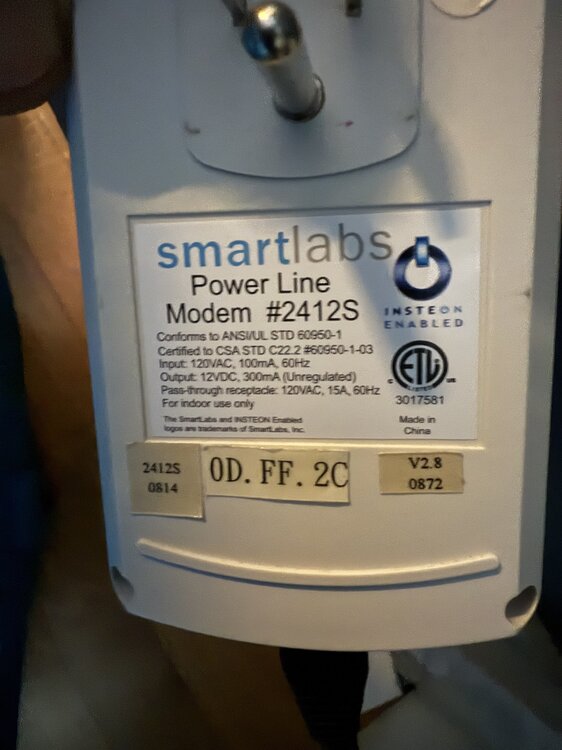
It’s a v2.8 that I have. Pic attached. I see one of my first posts on this forum is circa 2007. So it’s a pretty old PLM!
-
Okay so for now, the new EISY I just bought is a paperweight until the backordered PLM comes out. i will wait on the 2413 to be released then. Thanks.
-
Long time Insteon and ISY user. I finally pulled the trigger and bought the EISY to upgrade from my (totally working) ISY setup. Mostly to get some newer i3 outlets to work better. Currently running the latest firmware 5.3.4 on the ISY and its connected to an (old) Insteon Power Line Modem #2412S. Again, everyting is working for the most part. 50+ insteon devices and programs and portals. I realize now I might have also been required to order the Serial PLM kit with the EISY to work with the 2412S? So, should i order that now? Or should I pull the trigger on getting a new PLM since i am upgrading things in general? Interested in your advice. Thanks.
-
OK, I figured it out. At some point I set a static IP. I changed that to DHCP and reboot it. Everything‘s good thank you.
-
Thanks for the replies. I know this is pretty much a network reconfiguration issue. I Recently Added an Orby mesh network in my home. If I keep the ISY plugged into my modem directly, everything works and I can see the admin console. However, if I plug the ISY Into my primary network that is after the Orbi, I lose the ability to access the admin console or to see the ISY through the portal. I have a recent backup from the admin console that I can restore if and when I can figure out how to access the admin console with the ISY installed thru the mesh.
-
Looking for some help. A couple switches needed replacing and now I’m trying to update my programs in admin. My isy99i seems to be working fine since I can use the portal and the mobile app to control my lights. However, I cannot seem to see or login to the local admin console. I can ping my local IP for the ISY and it replies. If I try accessing the admin console from the Internet, it does not seem to accept my credentials. when I use the local Start Java applet it does not see the ISY. I’ve tried resetting the password, but I still did not see the ISY. Any advice?
-
Finally got around to purchasing some I3 outlets from the insteon shop to replace some old insteon outlets that failed. I added the new outlet to my admin console (ISY 5.3.4) and it seems to only control the top outlet. Is that to be expected or is there a way i can also control the bottom outlet independently too using the admin console?
-
i actually have two of those also. They do work well for me. They are also unavailable to purchase anywhere unfortunately.
-
Definitely the outlet itself as i swapped with a working one to test. I see some moisture in the outlet case. Now, to find a replacement Insteon On/Off outlet somehow....
-
I think the issue is even when nothing is plugged in. Its an off-shoot branch circuit off the detached garage. I suspect something in the garage is creating interference noise possibly.
-
Thanks for the reply Bill. You know, the issue i am having is that the outlet might just be having communication issues. Its located in the backyard pretty far from the house. (Although another outlet is also out there and has no issues). The issue with the outlet is although the ISY sends ON/Off signals, they are not actually received. ISY will show the status changing but it doesnt actually change and if i query the outlet, it reverts shows it in the previous status. If querying works at all as sometimes i get the red exclamation point. In other words, its like its just not receiving ISY commands. Its not a very old Outlet and all other aspects of it seem to work fine. I have full manual control at the outlet. etc. I suppose i can try installing the outlet in an inside box and see if it works more reliably...
-
I see that the OutletLinc dimmer is available. If i only ISY program it to turn things on to 100%, could i use that to control a low voltage transformer? Or is that too risky?
-
I've been enjoying a (mostly) stable house of Insteon for the last few years. Yes i go way back to the early days. I didnt realize Inston might be back?!? Thats great news. No more blood bath bidding on eBay? I am out of the loop and not even sure what Polisy is. I have an ISY 994i 1024 IR currently. How would i add a Z-wave functionality? The issue: I have two Insteon ON/OFF outlets that control landscape lighting transformers. They've been working great for years. I need to replace one of the outlets that died.

