


lhranch
Members
-
Joined
-
Last visited
Everything posted by lhranch
-
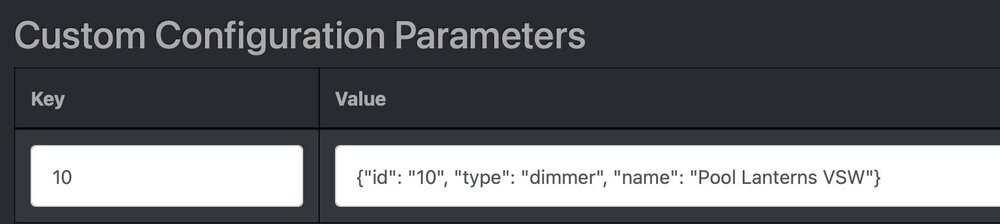
Following the tutorial I found here, I managed to beat my new configuration about the head and shoulders enough to get the Virtual Controller and my generic dimmer to go visible in Admin Console. Success! I had two questions for those with experience in these switches, as virtual dimmers don't seem to present exactly as physical dimmers do. First, the syntax allowed in the program is different for the physical and virtual dimmers. The physical dimmer has controls called Fade Up, Fade Down, and Fade Stop. The virtual one has Brighten, Dim, and nothing comparable to stop. Is this expected? Second (and this seems to be a quirk of MobiLinc Pro only) the brightness reported for this switch is fugazi. On is 40%, whether I turn it on directly or it inherits from the scene when the driving device is 100%. Brighten takes it from 0% straight to 40%, Dim does nothing. Did I define the dimmer incorrectly or incompletely? (EDIT: to be clear, the values shown in Admin Console make perfect sense; it's the values shown in MobiLinc Pro that are wacky.)
-
Hah! UD has already shrugged the ticket, advising me to get in the side door exactly as @DennisC did!
-
Well, that pushed the project ahead. It let me install Virtual, and now Admin Console has new virtual thinginess in the menu. Now I gotta read up on what it expects me to provide for addresses, etc. so I can create one. Thanks a bunch, @DennisC !
-
I dig it. Thanks for all your help, and Merry Christmas!
-
So far, I'd think the biggest avenue of attack would be the missing docker software. Any ideas there before I file a ticket?
-
Http failure response for http://192.168.128.90:3000/auth: 500 Internal Server Error For all combinations, on both http and https. Unless password is blank, then get "unauthorized."
-
pg3x-3.4.9 Name : pg3x Version : 3.4.9 Installed on : Thu Dec 25 17:00:12 2025 MST Origin : misc/pg3x Architecture : FreeBSD:14:amd64 Prefix : /usr/local Categories : misc Licenses : MIT Maintainer : benoit@universal-devices.com WWW : https://github.com/UniversalDevicesInc/pg3 Comment : Polyglot PG3x for UDI eisy Shared Libs required: libc++.so.1 libc.so.7 libcrypto.so.30 libcxxrt.so.1 libgcc_s.so.1 libm.so.5 libssl.so.30 libthr.so.3 Annotations : FreeBSD_version: 1403000 repo_type : binary repository : udi Flat size : 69.9MiB Description : PG3x Plugins manager for Universal Devices eisy/Polisy Release notes for 3.4.9 - 12/18/2025 - Added eisyui-specific navbar - Relaxed plugin rate-limiter to handle plugins with more activity
-
pkg: No package(s) matching PG3x Which is strange, because Admin Console / Launch PG3 shows a login screen. The ranch has an internal private network with local DNS and TLDs, so things can end in .rh (ranch house). Yes. https://insteon.rh:3000 After the usual complaint about the certificate not being valid, which one entirely expects.
-
@hart2hart It rebooted itself (wouldn't have noticed except it kicked my SSH window).
-
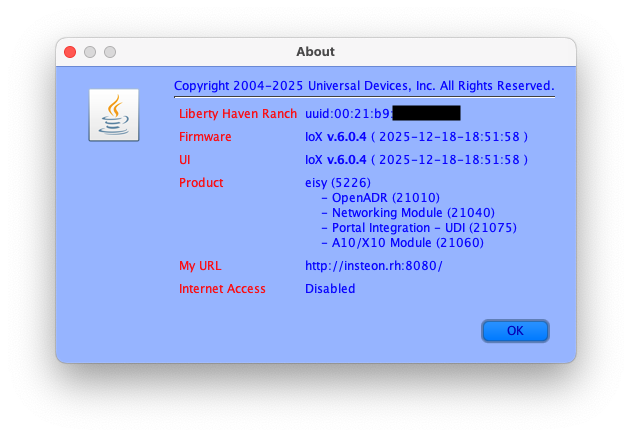
Update finished, ended up at 6.0.4. Updated Java Admin Console to match. Still don't seem to have docker anywhere inside. Do I need to "Install Dev Packages" or is that something entirely different?
-
I don't even seem to have docker installed. The command went nowhere, so I did: [admin@eisy /]$ sudo find / -name docker\* -print /usr/local/lib/qt6/mkspecs/features/data/testserver/docker-compose-common.yml /usr/local/share/gtksourceview-4/language-specs/docker.lang [admin@eisy /]$I'm running 6.0.0. Last time I ran a package upgrade from Admin Console was about a month back, apparently it changed nothing. I'm running another at the moment. There is a button for "Install Dev. Packages." It says I haven't done that, and am I sure I want to. Do I need to? And finally, it looks like I lied earlier (I'll have to go back and re-edit some claims). Although I changed the ID and password used to access the Admin Console, that ID does NOT work for SSH. Only admin works for SSH, and the other ID doesn't even appear in /etc/passwd. But what I said about PG3x refusing all possible combinations at login is still true.
-
By "lockdown program," I mean the program I need to invoke to disable the automatic motion sensor behavior of these lights, and the "reset program" is the one that restores that behavior. As to what I am trying to do. I think that is all laid out in the original post. Again, the desired operation has worked fine for a decade as long as it is invoked from a physical Insteon device, but not if it is invoked from an iPhone or computer app. @hart2hart : Thank you! I will try these next opportunity when I'm back in the saddle. Meanwhile, if you do locate any more specific instructions, please feel free to lay them on me.
-
Humor me -- where are the reset instructions? If it exceeds vanilla UNIX stuff, I'll go the ticket route.
-
In the previous major release, I had set the admin name to a different name and chose a unique password. I used it only in the Admin Console, in both my original ISY and my followon eisy, until I got the notice about the new release 6 upgrade coming, and I had to SSH into the eisy to check it satisfied all the prerequisites; at that time, I discovered my modified credentials worked fine for SSH also. As I reported here, when I performed the v6 upgrade, it reset the admin login to the default admin/admin, and I had to change it to my desired values once more, which again worked fine in both the Admin Console and SSH. (EDIT: This was a misstatement. The admin ID for SSH remains "admin".) Now, having attempted to activate PG3x only for the very first time last night, I find it won't respond to any combination of name and password, and (worrisome) it reports not 401 Unauthorized, but 500 Internal Server Error.
-
It's easy, but not particularly elegant. It requires me to keep THREE icons -- lockdown program, release program, and actual control of the light -- on a phone dashboard with limited real estate... whereas being able to tie the lockdown and release activity to direct light commands (as I have for the past decade) requires only one.
-
Given this correction (all the way from Twenty Minutes into The Future!), I plan to pursue the virtual switch route... as soon as I can figure out why PG3x won't let me login to let me configure it.
-
As they say in Canada, "yeah, no." It doesn't take it. In retrospect, I suspect it might have something to do with the fact that I changed the name of the admin user in Admin Console to something that isn't admin (it offered, and I do have hackers polling my port). Now Admin Console takes that name and password, while SSH still seems to require "admin" and the same password. The cognitive dissonance may be the reason PG3 login is reporting "500 Internal Server Error" on all non-blank logins.
-
I'm assuming our postings crossed in the aether. I can't even log into the darn thing.
-
Ah, if that is the case, it's not worth my while pursuing the virtual devices, as they won't work with my existing program any better than the programmatic control buttons do now. I've added both programs' THEN clauses to my favorites dashboard and I'll leave it at that. A good thing, as I seem entirely unable to activate PG3. It honors neither the default admin/admin as in the basic documentation, or admin/{what I changed it to during setup}, which works fine when using ssh to the eisy. Both these combos result in 500 Internal Server Error from the login page on port 3000, whereas leaving the password blank results in 401 Unauthorized.
-
I'm envisioning this as being a software-based pseudo-device that imitates a switch, but that an app like the admin control or MobiLinc could control and the ISY programming would respond to it as a switch physically being switched. That's precisely what I was hoping to find. I'm unfamiliar with this plugin. Is it the one here? https://github.com/UniversalDevicesInc-PG3/Virtual Do I download everything into the eisy and then "make" the package, or is there a simple installer? And then where do I install the result? (I tend to find things on github distinctly lacking in documentation. They assume you understand a whole bunch of conventions that I don't.)
-
After nearly a decade, I finally had a flash of insight about what is causing a program set of mine to fail. But now that I know, I have no idea what I can do about it. I have a set of backyard lights (one circuit) slaved programmatically to a motion detector. The lights stay 30% dim from sunset to about 11 PM. When motion is detected in the backyard during nighttime hours (even after 11), they come on slowly, stay lit until one minute beyond the last motion detected, then dim slowly to the rest state appropriate to the hour. Anytime after dark, manually controlling these lights stops their automatic behavior, by setting a state variable. If I set them on (for an evening cookout), they stay on. If I set them off (for a meteor shower pool party), they stay off, even if motion is detected. The lights can be returned to automatic program behavior by issuing a fast-off, which resets the state variable. Or that's the goal. The problem is that sometimes this behavior would work, and sometimes it wouldn't. Specifically, the automatic behavior would not shut off despite having manually controlled the lights. Sometimes it would work fine, but sometimes it simply wouldn't. I went nuts diddling my programs, assuming it was some sort of timing race with another program (possibly the motion-detected program), yet could never beat this behavior fully. But a couple nights ago, I finally figured it out. The code I use to reset the state variable looks like this: If 'Pool Lanterns Switch' is switched Fast off Or 'Nook - D Pool Lanterns' is switched Fast off Or 'Portable - Pool Post Lamps' is switched Fast off Then $Manual_Pool_Lamps_sw = 0 ... The code used to set it is similar, except that this triplet is repeated for every action OTHER than fast-off. It finally dawned on me that the failure case always occurred when I used the admin console or my iPhone app (I use MobiLinc Pro) to manually control those lights... whereas it always succeeded if I used any of the physical switches enumerated in the code to control the lights. Even if I told the admin console or MobiLinc Pro to send the command to the hardwired "pool lanterns switch" instead of just the related scene, it still didn't "count" for the purposes of the program as seeing "pool lanterns switch switched." The program environment doesn't seem to allow me to select for such control inputs coming from the admin console or the app. It doesn't seem to allow me any handle by which I could intercept controls going to the scene, or be triggered by those controls going to the scene. It doesn't seem to allow for a scene itself to set a state variable. How do I do what I want to do?
-
Oh! Genius! Thank you!
-
I'm confused by both these responses. My standard method of maintaining the eisy (and the subject of my password complaint) is the Admin Console. There aren't any URLs involved in that process, so I'm not sure how to apply this advice. If I pop the URLs offered above into a browser, I get varied results. Using either https or http to the name of the eisy (with appropriate ports 8080 or 8443), I get a blank page. If I add /desc onto either of those, I get the same config file both ways, so I know the ports are working OK. But neither case requires a password. If I simply browse to the name of the eisy, http or https, no port specified, I get the new login window regardless, which does require a name and password, but I haven't set it up to be useful yet and might not for a while. I'm assuming this is the interface Techman suggests I can bypass or augment. But in that case, I am unsure how to interpret the shorthand instruction, "add the attached URL entry to the admin login."
-
I didn't get any completion popup at all, which was the reason for my post. I rebooted the eisy and cleared cache, and I haven't run into anything yet that isn't working. Thanks for your advice. I'm not happy to have to use the Portal login info (which has a strong PW) instead of the weaker local credentials I used to type in every time I needed to fix something, especially since Java doesn't interface with any of my PW managers OR honor the Keyboard Shortcuts / Text Replacements feature of MacOS. Is there any way (SSH, whatever) to set up an alternate (local) user ID/PW I can use for frequent logins? Does this imply that I will not be able to login to the admin console during an Internet outage because I cannot reach the portal?
-
I started the v6 upgrade (with admin console Upgrade Packages) over two hours ago. I never got any acknowledgement that it completed, but all the checks I know how to perform seem to indicate it may have. Checking https://eisy.local:8443/WEB/sysconfig.txt says: FreeBSD eisy 14.3-RELEASE-p3 FreeBSD 14.3-RELEASE-p3 #4 releng/14.3-n271444-30ad842dd970-dirty: Sat Sep 20 23:18:26 PDT 2025 root@bsdev143.isy.io:/usr/obj/usr/src/amd64.amd64/sys/eisy amd64 *** Package Information *** ************ UDX ************ udx-4.0.4 Name : udx Version : 4.0.4 Installed on : Sat Oct 18 14:06:04 2025 MSTWhen I call up https://eisy.local:8443 in a browser, I get a login that responds to my portal ID, and an invitation to add stuff to a blank page. When I SSH into the unit, it has reset the admin password to the default. The unit still responds properly to manual device and scene commands from my iPhone MobiLinc Pro app (won't try the admin console as it hasn't officially announced completing the update). How do I know if everything is cool despite the lack of completion dialog?

