


johnmsch
Members
-
Joined
-
Last visited
-
Thanks guys, always a goldmine of information here. Ordered the on/off version yesterday.
-
Thanks, that makes perfect sense. Oh wow, I had no idea! When I was ordering the new switch, I just went ahead and ordered two of them, never thinking there could be any issues. Is anyone aware of any actual issues with using a dimmer switch on a bathroom fan?
-
Had to replace another antique switch with a shiny new 2477D V.45 dimmer in the the Master bathroom. A long, long time ago, I wrote programs for each bathroom to turn the fan off after a while. Just went in to the Admin Console to check/adjust the program for the new switch. One thing is bugging me now. Here's a sample from one of the other working programs: Guest Bath Fan AutoOff - [ID 002E][Parent 0001] If 'Guest Bath Light' is switched Off And 'Guest Bath Fan' Status is On Then Wait 30 minutes and 30 seconds Set 'Guest Bath Fan' Off Run Program 'Debug - Guest Bath Fan Auto Off' (If) Else - No Actions - (To add one, press 'Action') Master Bath Fan AutoOff - [ID 0018][Parent 0001] If 'Bathroom Light' is switched Off And 'Bathroom Fan' Status is 100% Then Wait 30 minutes and 30 seconds Set 'Bathroom Fan' Off Run Program 'Debug - Master Bath Fan Auto Off' (If) Else - No Actions - (To add one, press 'Action') I can't get the statement "Fan' Status is 100%" to say " Status is On" as with the other 2 programs. Again, I'm really rusty at programming and surely missing something obvious! Thanks!
-
Thank you sir. Now I think I already know the answer to this question, but might as well ask, as I always learn new stuff here. Is there any utility/trick to scan a ISY Backup file and get the same style Programs text file as we do from the process @Geddy describes above? When I drill down through the contents of the ISY zip file, I get another zip file like UUID......zip, and then get a CONF folder, below that are a bunch of files and folders.
-
Great tip here, wish I had known about this 20+ years ago when I started down the Insteon road! Just did a backup of my ISY. Then followed this process, pasting the output to a new text editor window (UltraEdit) and saved the file with the same name as the backup, with a .txt extension, in the same folder as all by ISY backups. Very cool! Unfortunately, its not going to do me any good right now ☹️ Paging through the text file just now, I found one of my programs somehow lost track of a switch and is now pointing to some <Not Specified> errors: If Time is 4:04:04PM And '<Not Specified>' - Unsupported Ruleset Then Wait 1 hour (Random) Set '<Not Specified>' DON =100%, Else - No Actions - (To add one, press 'Action') This doesn't seem to be affecting anything obvious I'm aware of right now, but its driving me nuts! Anyone know of a way to go back through the last couple year's ISY backups without having to restore each one of them? Thanks!
-
Wow, thanks guys! If these don't work, I can just delete "Office" and create from scratch. Just doubled-checked and there are only two programs that control that switch
-
Excellent! Thank you kind sir
-
The new switch is on the way. When it arrives, what is the best way to replace it in the admin console? The togglelinc will be replacing the "Office" item in the console. Is there some shortcut to having the new switch use that slot?
-
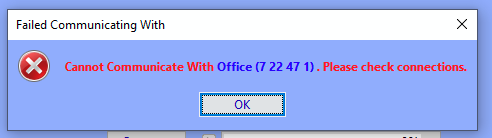
Been a LONG time since I've been in my Admin Console! When I fired it up, I got this error: I then went through the factory reset process and restore. Within about 2 minutes, the off/on flicker returned. Restarted the console and again got the error above again on startup. I guess its safe to assume this old switch is toast. Looks like Insteon has a $59 on/off switch, ordering now. Thanks guys for all the help and stroll down memory lane. Being back in the console reminded me I meant to setup a couple more scenes back in the day... 😁
-
DOH! Now I remember that process and thanks for not telling me to go RTFM. 😁
-
Thanks guys for all the help. Finally got some time to look at this situation again. Tried the restore but still having the issue.. Please refresh my memory as to how I factory reset on this device? One other issue I just noticed in my troubleshooting. This flaky switch is in a room in a corner of my basement. The rest of the basement lights are all controlled by a 8-button dimmer pad and a couple of scenes. I just happened to notice that when I turn off one of the scenes (which controls 8 separate basement lights), when each light in the scene goes off, so does the light in the corner room, for about a second, then immediately goes back on. This happens with the rest of the lights in sequence in the scene. Not the kind of light show I want to see!
-
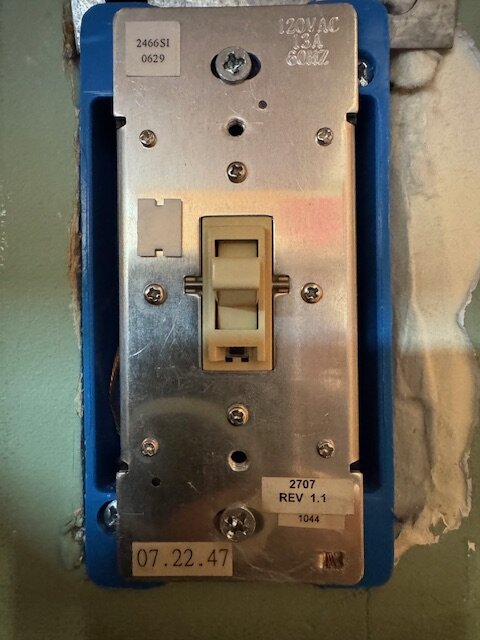
One of my old switches (pic attached) has recently starting randomly switching off and a few seconds later turns back on. It can be anywhere from a a few minutes to 20 to 30 minutes and it happens again. I have about 25 of these and this is the only one with this issue. I'm a LONG time Insteon user and am stumped what the problem could be. Any ideas what could be causing this?
-
Trying to figure out how to automatically turn off my front & garage door lights for Halloween. Those lights, along with many other exterior lights are programmed to turn on at varying times before dusk. Due to some physical issues, I can no longer keep going to the front door for trick-or-treaters at this time. I don't see anything in the documentation about Halloween being some kind of special flag in the ISY programming. The ideal situation would be for those 2 lights not even come on at dusk on Halloween, but then come on at, say, midnight. Any ideas?
-
@oberkc Got everything setup, just one annoying issue remains. On the admin console, I created a new scene. To that, added a few switches and a couple scenes already on the keypad. Then added the new scene to the MobiLinc dashboard. With everything turned on, brought up MobiLinc dashboard and hit the new scene. Everything went off as expected, but the lights on the existing keypad stayed on. This issue sounds familiar but my searches here are not finding anything. Does this sound familiar?
-
Thank you sir! I knew there had to be some way to do this.


