


Me2
Members
-
Joined
-
Last visited
Everything posted by Me2
-
FIXED... Didn't scroll down polyglot config... DUH
-
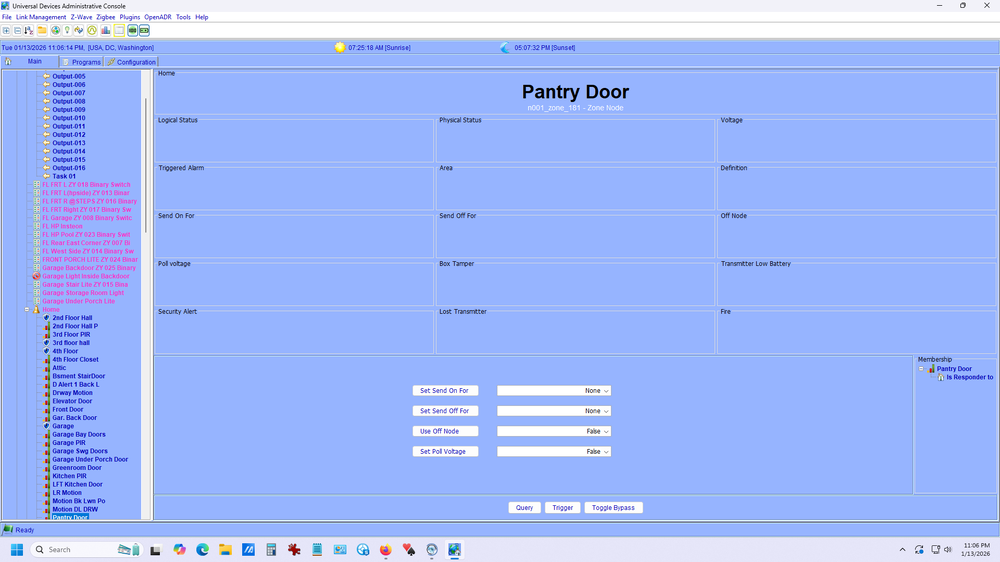
Looking at the Eisy, Main, where the Elks zones are displayed... I have a zone called pantry door. There isn't any status. If I open and close the door nothing changes. So none of my programs using Elk zones are working. If I look at the node(zone) in polygot I don't see any change of status. Only thing that changed is the ELK-M!xep was replaced. The M1XEP (old) had a static address. The new M1xep has a new address. On my old isy-99 I had a ELK tab I would go to to update the ipa of the ELK in the ISY. I am assuming the reason things are screwed up is the IPA. I can't find where to put the new IPA? I know I did it when I first went to the new eisy but can't remember.
-
My elk-m1xep died and was replaced. Can't see elk zones change when I open/close a zone sensor. Can not figure out where to update/change the lan address of the mixep in the eisy. Guessing it's wrong because it was set static on old m1xep.. Everything has been working great for so long it's like trying to start learning all over again. Sucks to be old....
-
I added a z-wave dimmer switch to Eisy. It added 5 items (nodes?). Can someone point me to beginner documentation that explains what they are and how to use them? ZY0002_1 Dimmer Switch (which I renamed "powder Room Light Dimmer") ZY0002 SC Basic Assoc 2 ZY0002 SC Basic Assoc 3 ZY0002 Scene Button 1 ZY0002 Scene Button 2 Thanks
-
Color blind and the print so small, I didn't see. I line that I deleted was the PIR that controls the Powder Room Light (program that was working). I don't care. It's all working now. If it ain't broke, don't fix it... Thank again.
-
THANK YOU! That fixed it!
-
Before you say it, I have deleted and reinstalled the program many time in the last few days before giving up and coming here for help.No change... What bothers me is when I "run then" there is no activity in the "event viewer".
.thumb.png.f8e6e1ad208d1cc88ba8f939cf278323.png) Pantry Light - [ID 0005][Parent 0001] If 'Home / Pantry Door' Physical Status is Open Then Set 'Pantry Light' On Else - No Actions - (To add one, press 'Action')Pantry Light - [ID 0005][Parent 0001] If 'Home / Pantry Door' Physical Status is Open Then Set 'Pantry Light' On Else - No Actions - (To add one, press 'Action')last run time, and last finish time field in status is empty.The light does not turn on. I have 3 devices installed so far. From the admin console the on/off of this device works 100% of the times.INFO BaseNode:set_driver: area_1:Home: set_driver(GV3,0) 'Violated Count' = 0 2024-08-30 15:24:10.531 ELK-4280 udi_interface DEBUG BaseNode:set_driver: area_1:Home: GV4,1 default=None force=False,report=True 2024-08-30 15:24:10.531 ELK-4280 udi_interface DEBUG Zone:_set_physical_status: zone_181:Pantry Door: val=ZonePhysicalStatus.SHORT current=ZonePhysicalStatus.OPEN force=False reportCmd=True 2024-08-30 15:24:10.531 ELK-4280 udi_interface INFO Zone:_set_physical_status: zone_181:Pantry Door: son=1 soff=2 2024-08-30 15:24:10.531 ELK-4280 udi_interface DEBUG BaseNode:set_driver: zone_181:Pantry Door: GV0,ZonePhysicalStatus.SHORT default=None force=False,report=True 2024-08-30 15:24:10.531 ELK-4280 udi_interface.node DEBUG node:setDriver: zone_181:Pantry Door Reporting set GV0 to 3 to Polyglot 2024-08-30 15:24:10.532 ELK-4280 udi_interface.node DEBUG node:reportDriver: Updating value to 3 2024-08-30 15:24:10.532 ELK-4280 udi_interface INFO BaseNode:set_driver: zone_181:Pantry Door: set_driver(GV0,3) 'Physical Status' = 'SHORT'Elapsed 00:00:12.486 : Loading Variables Elapsed 00:00:12.815 : Loading Node Definitions Elapsed 00:00:13.626 : Loading Nodes Elapsed 00:00:13.719 : Creating Widgets Elapsed 00:00:15.760 : Creating Widgets Complete Fri 08/30/2024 03:16:00 PM : Starting Subscription Fri 08/30/2024 03:16:01 PM : Completing initialization Fri 08/30/2024 03:16:01 PM : Refreshing Status Fri 08/30/2024 03:16:01 PM : Refreshing Views Fri 08/30/2024 03:16:46 PM : [D2D EVENT ] Event [n001_zone_181] [ST] [2] uom=25 prec=0 Fri 08/30/2024 03:16:46 PM : [n001_zone_181 ] ST 2 (uom=25 prec=0) Fri 08/30/2024 03:16:46 PM : [D2D EVENT ] Event [n001_area_1] [GV8] [181] uom=25 prec=0 Fri 08/30/2024 03:16:46 PM : [n001_area_1 ] GV8 181 (uom=25 prec=0) Fri 08/30/2024 03:16:46 PM : [D2D EVENT ] Event [n001_zone_181] [DON] [0] uom=0 prec=-1 Fri 08/30/2024 03:16:46 PM : [n001_zone_181 ] DON 0 Fri 08/30/2024 03:16:46 PM : [D2D EVENT ] Event [n001_area_1] [GV3] [1] uom=25 prec=0 Fri 08/30/2024 03:16:46 PM : [n001_area_1 ] GV3 1 (uom=25 prec=0) Fri 08/30/2024 03:16:46 PM : [D2D EVENT ] Event [n001_zone_181] [GV0] [1] uom=25 prec=0 Fri 08/30/2024 03:16:46 PM : [n001_zone_181 ] GV0 1 (uom=25 prec=0) Fri 08/30/2024 03:16:46 PM : [D2D-CMP 0005] STS [n001_zone_181] GV0 op=1 Event(val=1 uom=25 prec=0) is Condition(val=1 uom=25 prec=0) --> true Fri 08/30/2024 03:17:28 PM : [D2D EVENT ] Event [n001_zone_15] [CLITEMP] [80] uom=17 prec=0 Fri 08/30/2024 03:17:28 PM : [n001_zone_15 ] CLITEMP 80 (uom=17 prec=0) Fri 08/30/2024 03:17:39 PM : Create REST U7 [/rest/profiles/ns/1/connection] Fri 08/30/2024 03:17:39 PM : Create REST U7 [/rest/profiles/ns/0/connection] ..................................................................... Status of Program Pantry Light on idle falseI installed another z-wave switch just now: Program......... 3-4 Stair Light - [ID 0002][Parent 0001] If 'Home / Greenroom Door' Logical Status is Violated Then Set '3-4 Stair Light' On Wait 5 minutes Set '3-4 Stair Light' Off Else - No Actions - (To add one, press 'Action') This doesn't work neither. I can turn '3-4 Stair Light' off/on from admin console. If I "run then" it doesn't do anything. I do not set any action in the "event viewer".I have tried both "physical and Logical". Neither work.Running The THEN doesn't turn the light on. And I do not see the "run then" in the "event verier".... If I open the door the status changes yo "open"....New Program - [ID 0005][Parent 0001] If 'Home / Pantry Door' Physical Status is Open Then Set 'Pantry Light' On Else - No Actions - (To add one, press 'Action') On the program that doesn’t work right click and select “Run Then”. Does not turn light on.New Eisy.. I have had it for a while but just trying to use it for Z-wave (moving away from insteon). I have used isy-99 for years. Can't get the simplest of program to run. Program 1: (Doesn't work) If Pantry Door open (Elk Zone) Then Turn Pantry Light On (Z-wave Switch) If I watch Event Viewer I see the Elk Zone change to open when I open the door. I can turn the pantry light on and off with Admin Console. If I open the door and run "if" in the program nothing shows in the event viewer Program 2: (Works) I have another program that works ok. If hall PIR (Elk Zone) violated Then dim Powder Room Light 50% (Z-wave Dimmer) I have tried ever resetting everything I can think of.............
Pantry Light - [ID 0005][Parent 0001] If 'Home / Pantry Door' Physical Status is Open Then Set 'Pantry Light' On Else - No Actions - (To add one, press 'Action')Pantry Light - [ID 0005][Parent 0001] If 'Home / Pantry Door' Physical Status is Open Then Set 'Pantry Light' On Else - No Actions - (To add one, press 'Action')last run time, and last finish time field in status is empty.The light does not turn on. I have 3 devices installed so far. From the admin console the on/off of this device works 100% of the times.INFO BaseNode:set_driver: area_1:Home: set_driver(GV3,0) 'Violated Count' = 0 2024-08-30 15:24:10.531 ELK-4280 udi_interface DEBUG BaseNode:set_driver: area_1:Home: GV4,1 default=None force=False,report=True 2024-08-30 15:24:10.531 ELK-4280 udi_interface DEBUG Zone:_set_physical_status: zone_181:Pantry Door: val=ZonePhysicalStatus.SHORT current=ZonePhysicalStatus.OPEN force=False reportCmd=True 2024-08-30 15:24:10.531 ELK-4280 udi_interface INFO Zone:_set_physical_status: zone_181:Pantry Door: son=1 soff=2 2024-08-30 15:24:10.531 ELK-4280 udi_interface DEBUG BaseNode:set_driver: zone_181:Pantry Door: GV0,ZonePhysicalStatus.SHORT default=None force=False,report=True 2024-08-30 15:24:10.531 ELK-4280 udi_interface.node DEBUG node:setDriver: zone_181:Pantry Door Reporting set GV0 to 3 to Polyglot 2024-08-30 15:24:10.532 ELK-4280 udi_interface.node DEBUG node:reportDriver: Updating value to 3 2024-08-30 15:24:10.532 ELK-4280 udi_interface INFO BaseNode:set_driver: zone_181:Pantry Door: set_driver(GV0,3) 'Physical Status' = 'SHORT'Elapsed 00:00:12.486 : Loading Variables Elapsed 00:00:12.815 : Loading Node Definitions Elapsed 00:00:13.626 : Loading Nodes Elapsed 00:00:13.719 : Creating Widgets Elapsed 00:00:15.760 : Creating Widgets Complete Fri 08/30/2024 03:16:00 PM : Starting Subscription Fri 08/30/2024 03:16:01 PM : Completing initialization Fri 08/30/2024 03:16:01 PM : Refreshing Status Fri 08/30/2024 03:16:01 PM : Refreshing Views Fri 08/30/2024 03:16:46 PM : [D2D EVENT ] Event [n001_zone_181] [ST] [2] uom=25 prec=0 Fri 08/30/2024 03:16:46 PM : [n001_zone_181 ] ST 2 (uom=25 prec=0) Fri 08/30/2024 03:16:46 PM : [D2D EVENT ] Event [n001_area_1] [GV8] [181] uom=25 prec=0 Fri 08/30/2024 03:16:46 PM : [n001_area_1 ] GV8 181 (uom=25 prec=0) Fri 08/30/2024 03:16:46 PM : [D2D EVENT ] Event [n001_zone_181] [DON] [0] uom=0 prec=-1 Fri 08/30/2024 03:16:46 PM : [n001_zone_181 ] DON 0 Fri 08/30/2024 03:16:46 PM : [D2D EVENT ] Event [n001_area_1] [GV3] [1] uom=25 prec=0 Fri 08/30/2024 03:16:46 PM : [n001_area_1 ] GV3 1 (uom=25 prec=0) Fri 08/30/2024 03:16:46 PM : [D2D EVENT ] Event [n001_zone_181] [GV0] [1] uom=25 prec=0 Fri 08/30/2024 03:16:46 PM : [n001_zone_181 ] GV0 1 (uom=25 prec=0) Fri 08/30/2024 03:16:46 PM : [D2D-CMP 0005] STS [n001_zone_181] GV0 op=1 Event(val=1 uom=25 prec=0) is Condition(val=1 uom=25 prec=0) --> true Fri 08/30/2024 03:17:28 PM : [D2D EVENT ] Event [n001_zone_15] [CLITEMP] [80] uom=17 prec=0 Fri 08/30/2024 03:17:28 PM : [n001_zone_15 ] CLITEMP 80 (uom=17 prec=0) Fri 08/30/2024 03:17:39 PM : Create REST U7 [/rest/profiles/ns/1/connection] Fri 08/30/2024 03:17:39 PM : Create REST U7 [/rest/profiles/ns/0/connection] ..................................................................... Status of Program Pantry Light on idle falseI installed another z-wave switch just now: Program......... 3-4 Stair Light - [ID 0002][Parent 0001] If 'Home / Greenroom Door' Logical Status is Violated Then Set '3-4 Stair Light' On Wait 5 minutes Set '3-4 Stair Light' Off Else - No Actions - (To add one, press 'Action') This doesn't work neither. I can turn '3-4 Stair Light' off/on from admin console. If I "run then" it doesn't do anything. I do not set any action in the "event viewer".I have tried both "physical and Logical". Neither work.Running The THEN doesn't turn the light on. And I do not see the "run then" in the "event verier".... If I open the door the status changes yo "open"....New Program - [ID 0005][Parent 0001] If 'Home / Pantry Door' Physical Status is Open Then Set 'Pantry Light' On Else - No Actions - (To add one, press 'Action') On the program that doesn’t work right click and select “Run Then”. Does not turn light on.New Eisy.. I have had it for a while but just trying to use it for Z-wave (moving away from insteon). I have used isy-99 for years. Can't get the simplest of program to run. Program 1: (Doesn't work) If Pantry Door open (Elk Zone) Then Turn Pantry Light On (Z-wave Switch) If I watch Event Viewer I see the Elk Zone change to open when I open the door. I can turn the pantry light on and off with Admin Console. If I open the door and run "if" in the program nothing shows in the event viewer Program 2: (Works) I have another program that works ok. If hall PIR (Elk Zone) violated Then dim Powder Room Light 50% (Z-wave Dimmer) I have tried ever resetting everything I can think of.............


.png.c8a69372eeade7b9d9f7cb74de213de4.png)
.png.c2db4af01c6df60b8b81e37461895e2d.png)

.png.3463488b2ba9ce13891c2b8121e8ab38.png)
Account
Navigation
Search
Configure browser push notifications
Chrome (Android)
- Tap the lock icon next to the address bar.
- Tap Permissions → Notifications.
- Adjust your preference.
Chrome (Desktop)
- Click the padlock icon in the address bar.
- Select Site settings.
- Find Notifications and adjust your preference.
Safari (iOS 16.4+)
- Ensure the site is installed via Add to Home Screen.
- Open Settings App → Notifications.
- Find your app name and adjust your preference.
Safari (macOS)
- Go to Safari → Preferences.
- Click the Websites tab.
- Select Notifications in the sidebar.
- Find this website and adjust your preference.
Edge (Android)
- Tap the lock icon next to the address bar.
- Tap Permissions.
- Find Notifications and adjust your preference.
Edge (Desktop)
- Click the padlock icon in the address bar.
- Click Permissions for this site.
- Find Notifications and adjust your preference.
Firefox (Android)
- Go to Settings → Site permissions.
- Tap Notifications.
- Find this site in the list and adjust your preference.
Firefox (Desktop)
- Open Firefox Settings.
- Search for Notifications.
- Find this site in the list and adjust your preference.