


kurelgyer
Members
-
Joined
-
Last visited
-
Wanted to say a quick thanks to everybody. I haven't had opportunity to try everything yet, I'll post back soon with results when I do.
-
My garage door is controlled with an IO Linc. Most of the time it works, sometimes the garage door starts to move, then reverses, then reverses again. And again. And again x 20. The event viewer shows the command (0.5 second Momentary C ) being sent every second, many times. In Admin Console, right clicking on the relay, advanced PLM Communication the sensor communication to the PLM is set to 0 retries. Should I raise this number? Or is there another path? Thanks!
-
Late reply for anyone else reading this. I believe Switchbot came out with a device that will manually push the button on any garage door remote. This totally circumvents any proprietary requirements. 😄
-
There is the thread to post ZigBee device support requests. I have also conversed with UD directly about adding a product. Michael said they put it on the list. How do we know when a Zigbee device becomes supported? Will it be through an EISY firmware update? Is there a page that lists known supported devices? Thanks
-
-
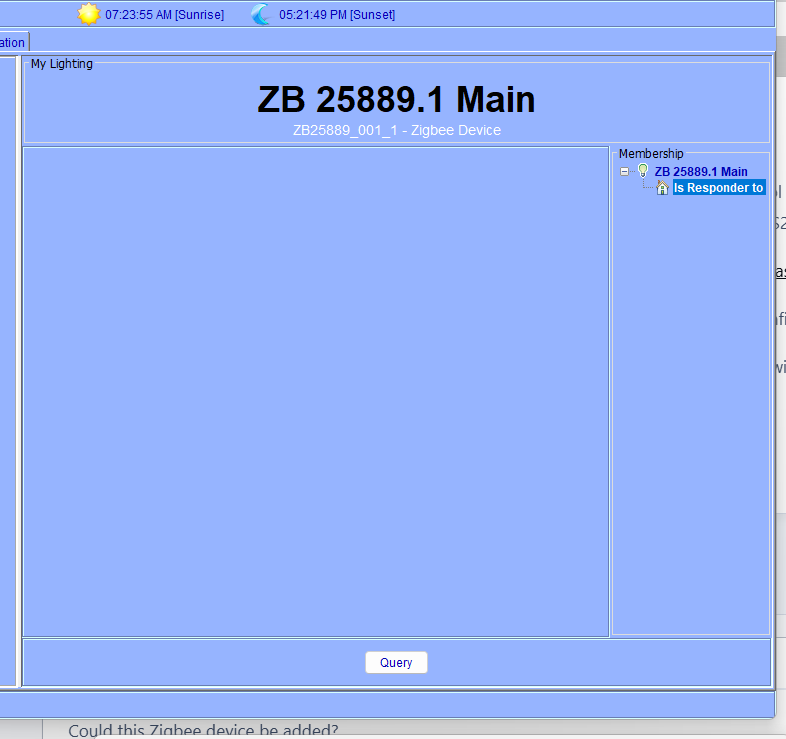
Could this Zigbee device be added? ZigBee Tuya SPI Pixel LED Strip Light Controller Smart Life APP Control RGB IC Dynamic Lighting Static Mode Music Sound ZigBee2mqtt Home Assistant WS2811 SK6812 WS2805 https://www.amazon.com/dp/B0FNR6TB1R?ref=ppx_yo2ov_dt_b_fed_asin_title&th=1 I was able to add it to the EISY, but there are no controls, options, configuration or anything. The comments on Amazon inform that it works with Home Assistant without a Tuya hub. Thanks!
-
I have a Zigbee battery powered button (generic) and a Zigbee outlet (IKEA). What is the proper way to have the button control the outlet? Use a scene or a program? I've tried creating a scene with the two devices in it, but I cannot change the button to a controller for the scene. It only shows as a responder. The button shows up in EISY as 4 On-Off devices, each with a different suffix, ZB xxxxx.1, ZB xxxxx.2, ZB xxxxx.3 and ZB xxxxx.4. Any help understanding this is appreciated.
-
FWIW, I've been around since the debut of the ISY 994. Used HAL 2000 (!) for years before that. And IBM Home Director / X-10 before that! I digress.... I'm not a programmer, developer, or computer engineer - just an enthusiast that tries to dig in as far as I can on the occasion that I have time, or as you say, a "generic user" 😊. Once I'm IN the Admin Console, it's fine. I guess my 50% comment is regarding the IoX finder. I don't spend everyday in the Admin Console, sometimes months pass. More often than it should happen, the IoX opens empty, and I have to go off on a tangent to figure it out. That it's been this way for 10 years is frustrating.
-
Touchy. I didn't hear it yesterday. It was months ago. And it's been talked about for longer than that. Getting in with the Java interface works 50% of the time. To use a program in 2026 I shouldn't have to know how to go into another program, clear it's cache, and know the IP address of a device to get to an admin console. Heck, the only time I access the EISY on my computer is for program creation and editing. Also, I'm a bit trigger-happy testy. I just got off an hour long customer no-service call with Birdfy.
-
I'm here because my IoX Finder also wasn't finding. Clicking Add and entering https://eisy.local:8443/desc got it to work. Am I mistaken, I thought some time ago it was said the Java interface supposed to be going away? Why is it still a thing?
-
I had the updated UD Mobile app at the time of my post and had configured Matter. But when I tried adding a Wi-Fi Matter outlet module it failed.
-
I'm overall pretty confused. My update seems to have gone as expected. After also updating the app I saw the matter option. After enabling it and rebooting Eisy it have option to add matter device via barcode. I have a plug in Wi-Fi outlet. I reset the device, scanned with UD Mobile and got the error 500 several times Didn't work. I see no options in the app or mobile for connecting with thread routers. I thought the app was getting an overhaul. I thought the admin console was getting an overhaul and getting rid of the Java interface. For what is supposed to be a big update, I really don't see any differences or anything new. Is it just me?
-
-
Neither my router or operating system have changed in the last 2 years. I've been able to access Polyglot previously. I can't think of anything that's changed. Unless I'm missing something, I did append the port to :3000 as I shared in my previous posts. I've also typed the address in directly and omitted the "s" and only used http: I just tried manually enter.... New thought: I've been entering addresses into Chrome (and I was clear about that). I just tried entering http://IpAddress:8080/desc into the iox finder and it appears to have worked. If this is where I was supposed to be all along, we were on different pages. I think I'm back in business. Thanks all for your help!
-
To be fair, I think I've as explicitly as possible explained what's happening above. I'll share screenshots.

