


johnjces
Members
-
Joined
-
Last visited
-
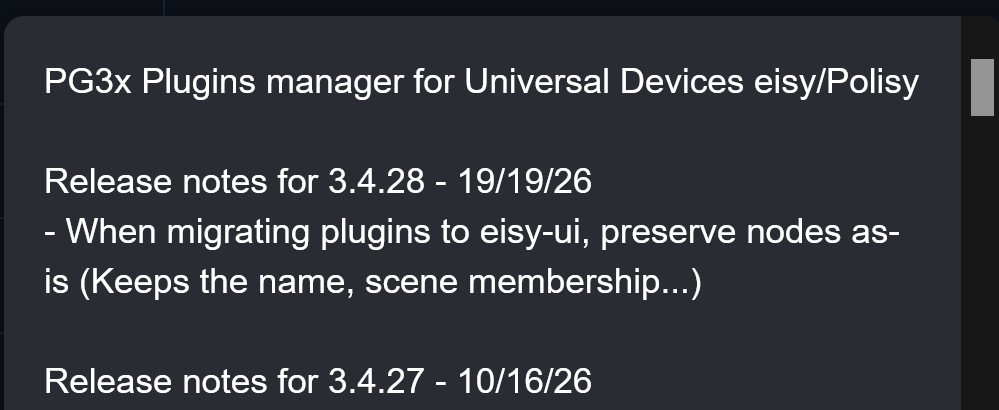
When checking the change log for the most recent updates, (and updates are coming fast and furious it seems and they seem to install WAY faster), this was the date in the change log for PG3X. 19/19/26. LOL
-
WOOPS! I didn't reboot and couldn't get into the NODES section of web UI. Nor could I log into my PG3X stuff. SO... a reboot fixed all. Guess I will make a reboot a mandatory part of my upgrades! And wait a week as usual!!! John
-
I did.. I'm like you and normally wait a week or so but rolled the dice this AM! So far all seems okay, No reboot was required, but is it best practices to still reboot the eisy after an upgrade? John
-
@Javi Thank-you! That is good to know as the UDM is, in my case, my go to for most things that I can do with my eisy since the mobile app is forefront on my phone and always with me. I look forward to the day UDM can be used for updating and upgrades and the little bugs smoothed out. Kudos to you guys! John
-
In checking the UI, I appear to currently have 6.1.2_7 with nothing available beyond that except for PG3x which can go from 3.4.25 to 3.4.26, using the production repository. Isn't 6.1.2_10 more a beta or alpha version right now? Thx! John
-
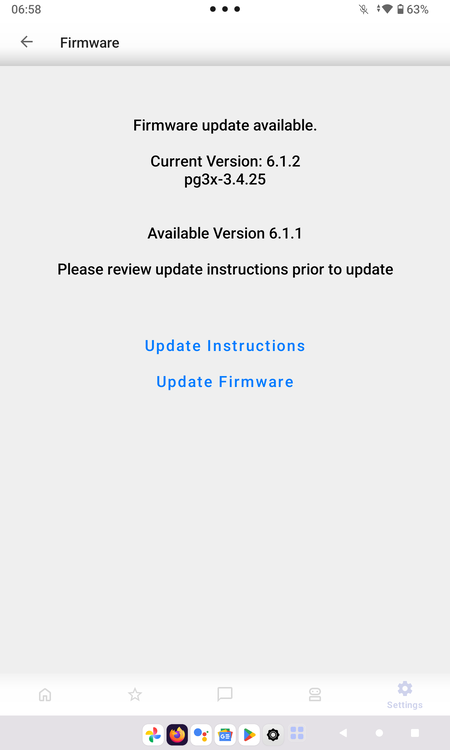
Not sure where to post, UDM forum or here. My UDM had an alert for both my eisy's that came in the early morning on 10/7/26. This was that an upgrade is available, from 6.1.2 to 6.1.1, yes read correctly... seems like a downgrade. I have not seen an announcement for an upgrade and can't seem to find a reference for one in the forums this AM. Have yet to check the eisy UI, but something is askew... maybe?
-
@Guy Lavoie My comment and question had nothing to do with the ability of inability of UDM doing proper updates just that it is not showing proper information. Showing that an update is available and referencing the same version information as an update is a minor bug and hopefully the developers might see my post and think it might be an okay idea to fix that bit of misinformation. Hopefully I'm not the only one seeing this!
-
Thanks Guy. Any thoughts on the UDM not advising of what the updated version will be?
-
For the first time ever, I think, UDM provided a notification that another update is available. In checking UDM, is stated current version 6.1.1, pg3x 3.4.24 with an available version of 6.1.1. Makes no sense as that would tell me there is no upgrade. Apparently this morning there is a new upgrade to 6.1.2.7 without being announced. Just reporting an anomaly somewhere in the system. What does this update/upgrade fix or add? Thanks! John
-
I am embarrassed. Hand is covering my face! Yep, that fixed it! Thanks @IndyMike John
-
I am pulling my hair out. I have checked each and every program I have and I cannot find what is causing my issue! ARGHHH!! Let me begin. I am fully up to date with all my firmware iOX 6.0.5 having updated just a few weeks back. I think there might be another subnumber but haven't checked via web browser for the config file or whatever it is called. I have a Dual Band Switchlink (Insteon) V45 in my garage for the outside lights. I have on old X10 Chime that chimes when at night before the garage door auto closes after dark when we forget to close it. This has worked very well. I have done nothing to these programs in years. I have modifed a few programs for lights on when the garage door opens and they too have worked well. So recently I have an issue when I manually i.e. by hand, turn that Insteon switch on for the outside garage lights, my X10 Chime will chime! I have gone through every program, even those that have nothing to do with outside lighting, disabled anything that had anything to do with X10 Chime and still, only when I manually turn that switch on, that X10 chimes. NOTE: If I turn that switch on by any other means, the X10 does not chime. Such as from UDM, or Agave or from my PC using the java stuff. This makes no sense like the switch itself is sending out the X10 code K16 ON(3). But the switch cannot do that, correct? They were never designed to switch on X10 stuff. Garage Outside Status On Mon 2026/07/27 10:09:19 System Unknown X10 K16 Mon 2026/07/27 10:09:20 System Unknown X10 K16 On (3) Mon 2026/07/27 10:09:20 System Unknown Garage Outside Status Off Mon 2026/07/27 10:09:21 System Unknown X10 K16 Mon 2026/07/27 10:09:22 System Unknown X10 K16 Off (11) Mon 2026/07/27 10:09:23 System Unknown Garage Outside Status On Mon 2026/07/27 10:09:27 System Unknown X10 K16 Mon 2026/07/27 10:09:28 System Unknown X10 K16 On (3) Mon 2026/07/27 10:09:28 System Unknown Do I have a ghost somewhere? I have unplugged the PLM and shut down my eISY, Plugged the PLM back in and restarted eISY I have again searched every program manually, (the search function does not work at all, at least in my eISY) and can find no reference enabled anywhere, and nothing was ever programmed to chime when this light came on or the switch turned on, etc. Where and how do I start looking for this bug and swat it? It is driving me crazy not knowing! Any help would be appreciated!!! THANKS! John
-
@TheRydad Very true and no it didn't revert to the native or default VLAN and now the switch is dead. The point of my post was to find out if the eISY supported VLAN tagging. I don't think that was very clear and then to find out if somehow after the reboot after an update the eISY got tagged in the update or by mistake. But alas it was not my eisy...
-
My managed switches were all set up well but in some linux distros you can create VLAN interface using connection manager. Just wondering if it could be set in the eisy ...but in any event, my managed switch went wonky...failing and it has died. Ports went weird and now VPN is even down! Argh. Oh well! John
-
Many months ago, I set up VLANs for the various things stuck on my LAN separating video and home automation. The full conversation for all devices has not been completed. Yesterday, I did an update all modules as I was behind a bit on PG3. I think there were some minor updates to IoX. Anyway, after a reboot, my eisy could not be found! Logged in via the cloud and found my IP was now in one of my VLANs!! Weird! It was always in the default VLAN prior to this reboot and it has been updated and rebooted several times since the VLANs were created and my switches configured. The eisy is still in the defualt VLAN port. Again, it hasn't changed in several prior reboots but suddenly it deceided it liked the Video VLAN!! Any thoughts on how this occurred and where I add VLAN assignments to the eisy! It's fine where it is for now, but this kind of freaked me out. Thanks! John
-
BLE Matter Commissioning now uses Play Services Commissioning. What does this mean for our provisioning of Matter devices on eISY via UDMobile?


