


auger66
Members
-
Joined
-
Last visited
-
I had the same thing several days ago. Very small Insteon-only system on an ISY. My wireless devices were two open/close sensors and two leak detectors. The two open/close sensors drive two variables that trigger some main functions. No response from wireless devices in the admin panel. No variables changed or programs triggered. I restarted the ISY. No help. Repowered the PLM and the ISY. No help. I begrudgingly did a PLM restore. The ISY prompted a relinking of all wireless devices. I tried to relink one device, but that leak detector started responding before I could finish. The other three wireless devices started responding, too. The system has been working fine ever since (3-4 days.) I suspected the PLM may be going bad. Now, I dunno what to think. Weird
-
To the OP's question, I've wondered that myself. It's unclear to me how this connects. I would like to know in case what I'm using now ever breaks, which is a long-discontinued Autelis Shade Control for Somfy RTS. As far as I can tell, all the Autelis really does is pass network tcp commands to the Somfy URTSI II from eisy network resources. It does have a menu page when you open its local IP address. I don't use it. You can do the same thing with a Somfy myLink RTS Smartphone and Tablet Interface. I found it to have worse range than the URTSI.
-
I had three dimmer switches and one keypad in my bedroom that I turned the backlight off at night. And back on when I got up. I wondered to myself when I programmed that if I was going to wear the EEPROM (not sure that's the correct term) out eventually. After several (less than ten) years, all three dimmers stopped changing the backlight. The dimmer's existing scenes, programs, etc., functioned fine, but I couldn't change backlight, scenes, etc. I have many dimmers. These three are the only ones that exhibited this behavior. I replaced all three. IoX "replace with" didn't work. Eisy couldn't read the old dimmers. I didn't really need to change the dimmer backlight anyway. The keypad is still going strong. More EEPROM, I guess.
-
Probably not the answer you're looking for, but Home Assistant would likely bring everything together. I've never used it, though. I can imagine local integration working. My guess is UniFi would be pretty locked down for remote app access. I have all UniFi similar to what you have and love it.
-
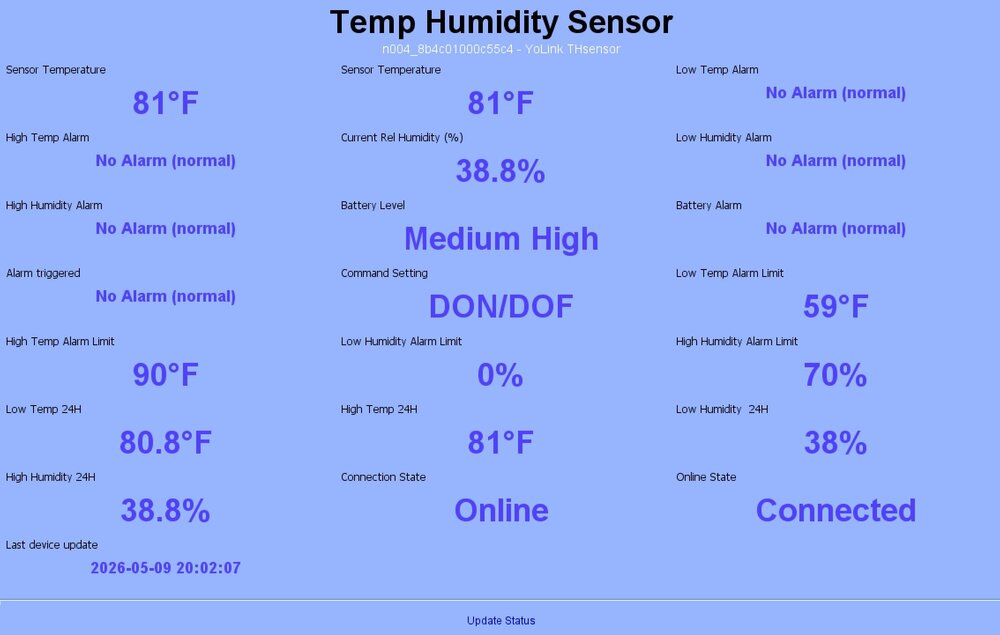
Seems to be ok. The temperature sensor info looks good, including the date/time.
-
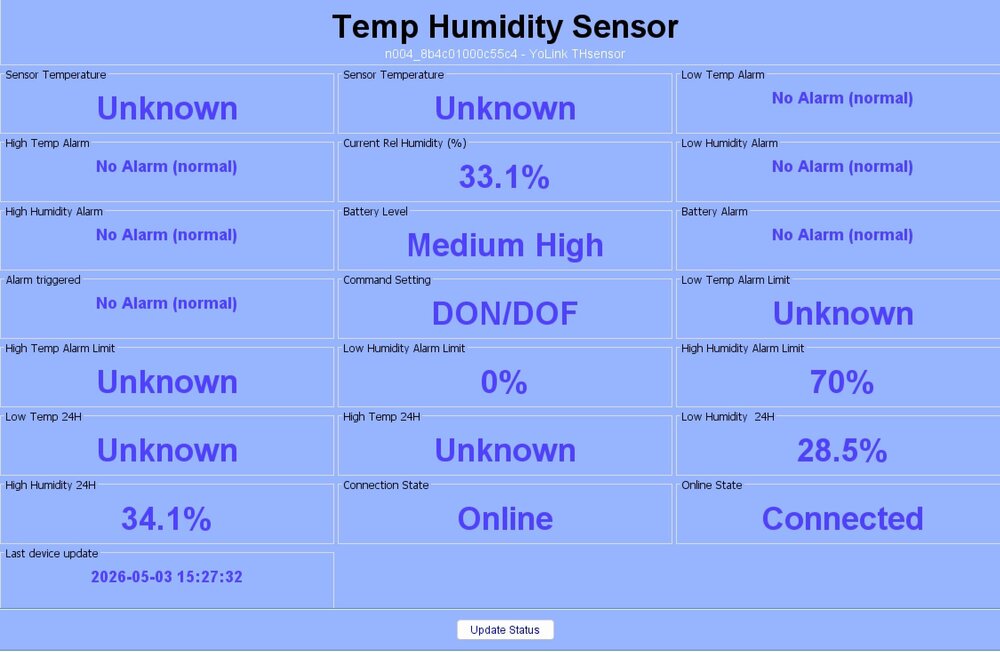
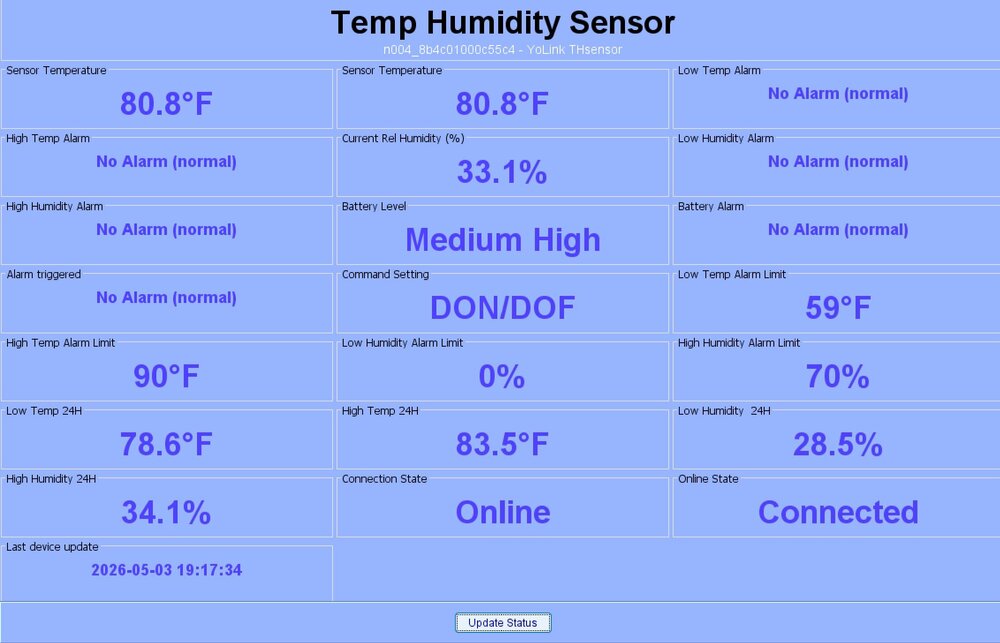
Here are a couple of screen shots of before and after I press the update button on the admin console. Something weird is going on with the last status update time. After pressing the update status button, the time moves a few hours into the future. The status update time before pressing update status is correct.
-
No, everything is fine. I just wanted to give feedback let and others know the update altered my programs. After I "unaltered" them, it's all good. My temperature sensor doesn't update the temperature, among other values, unless I hit update on the admin console, so that's a bit of problem.
-
I never noticed the "legacy" before, but I don't usually go poking around old programs that work. Open/close are not swapped. In this program, Open and Closed were simply removed after the update. So, run then or else did nothing until I added them back. Water valves - [ID 0037][Parent 0006] If - No Conditions - (To add one, press 'Schedule' or 'Condition') Then Set 'Water leaks / Cold Water Valve' Open Wait 5 seconds Set 'Water leaks / Hot Water Valve' Open Else Set 'Water leaks / Cold Water Valve' Closed Wait 5 seconds Set 'Water leaks / Hot Water Valve' Closed I have four of these programs to set the open or close variable for two valves. I can't swear to it, but I think the two open programs changed to Manipulator State is Closed. So, the variable never changed. This is where I changed from legacy manipulator state, also. Cold valve open variable - [ID 003A][Parent 0006] If 'Water leaks / Cold Water Valve' Manipulator State is Open Then $Cold_water_valve = 1 Else - No Actions - (To add one, press 'Action') Like I said, I was poking at four programs, so I can't be sure about that. Regardless, the two variables weren't changing until I fixed them. However, in the first program, I'm sure of the change that broke the program.
-
I didn't know any of them did until last night. However, I discovered today the update removed the open and close command from any valve manipulator program, so none of the programs functioned. I added an open or close command. Works fine now. Then, I went through all water programs. The water valve variable-setting programs changed "Manipulator State" to "Manipulator State (legacy)." I changed them all to "Manipulator State." I also had to correct open vs closed in those programs. I didn't test to see if "legacy" worked. I had to fix the open/close anyway, so I changed both lines in the programs. Works fine now, too.
-
The update installed fine will no errors that I saw. All devices are online in the admin panel. I did have to click update on the temperature sensor to get the current readings. The temperatures would have probably updated on their own if I waited. A schedules child node was added in the admin panel to both water valves but nothing else. Thanks for working on this.
-
I just tried this, and it sort of works. Two devices were added: a ZM 002.1 On-Off Switch and a ZM 002.1 Thermostat. I don't have any sort of Google Hub, which I thought was required to link a Nest thermostat. The "switch" turns the heat pump off or back to its previously set mode. The thermostat seems to work, except for "fan only." Unfortunately, that's one option I need. "Fan only" returns an error code. I can change the temperature. Almost there. Just got back in town after being gone for several months. Upgraded last night to IoX 6.0.3 and PG3x 3.4.6 before adding the Nest to Matter today. Edit: There are several options that return an error code besides "fan only."

-
-
Like the OP said, you could "delete all devices" in the web interface, but Amazon did away with web access a year or two ago. I used it to clean up my device list when adding services created duplicate devices. Then, "discover all." It was a handy function.
-
A few years ago, I needed to replace several old Insteon leak sensors. I almost bought six but ended up transitioning to YoLink. I've been very happy with them, and the YoLink plugin for the eisy. YoLink operates fine separately without the plugin if you're still running an ISY. I got a couple of YoLink valve controllers and a temp sensor later. Everything works great.
-
Maybe because it's not supported? Here's the list from their Polyglot page. Current list of devices supported is as follows: 'Switch', 'THSensor', 'MultiOutlet', 'DoorSensor','Manipulator', 'MotionSensor', 'Outlet', 'GarageDoor', 'LeakSensor', 'Hub', 'SpeakerHub', 'VibrationSensor', 'Finger', 'Lock', 'Dimmer', 'InfraredRemoter', 'PowerFailureAlarm', 'SmartRemoter'


