


MKaye
Members
-
Joined
-
Last visited
-
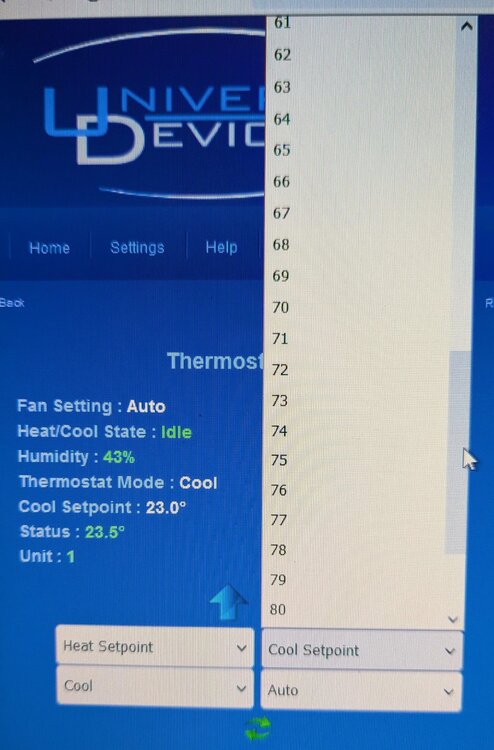
When I use the web portal, I have my settings set to Celcius, but when I try and adjust the cool or heat setpoints, the temperatures are given only in Fahrenheit. Is there some other point to globally set preferences?
-
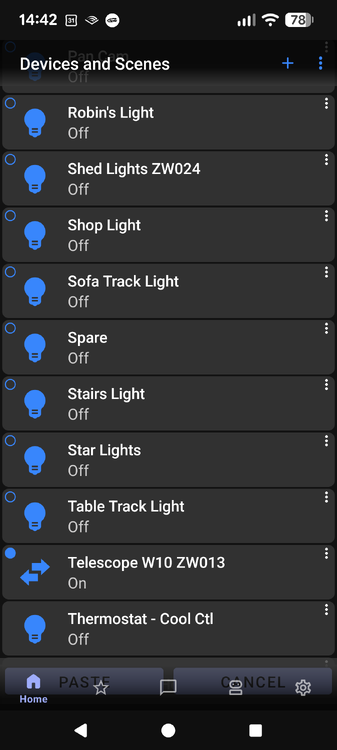
I believe you missed a step. I have to Add to Favourites first. But this is basically the same thing that I showed above. But you are missing my point. What I have been trying to highlight all along is that the Paste and Cancel buttons are hidden behind the lower menu bar. This is my problem, not the ability to complete the task by what ever method. When I am in portrait orientation on my phone, Paste and Cancel cannot be clicked on because they are behind the lower menu bar and barely visible. It took me a long time to even notice that they were even there because they are so faint behind the menu bar.
-
I find the instructions frustrating at times because people say just do this and when I try what they say, that does not happen. Under favourites (star), I have seven folders where I put items I have grouped together like upstairs lights, outside lights, etc. Here is the process I have to use to move an item into a folder: First I press the three dots of the device I wish to have on my favourites page that is on the right of the screen. Then I touch Add to Favourites. Then hit Yes. Now I switch to the Star labeled Favourites. The device is now a square on the Favourites page. I then touch its three dots and click on Move to Favourites Folder. Then I touch the square of the folder I want to move to. At this point, the Paste button is below the bottom menu bar and not accessible. I rotate my phone into Landscape mode and the Paste and Cancel buttons are now above the Menu bar and visible to use. I touch Paste and the phone answers Item Moved and I click OK. Sometimes, I get a spinning wait icon for a while, but rotating the phone back to portrait stops that and the device is in the folder I want it to be in. I am using Android and the version of UD is 1.6.5.
-
I guess I was not clear. I can move the items. That is not the issue. My issue is that the PASTE and CANCEL buttons appear on my screen under the menu bar at the bottom of the screen, the bar with the Home, Star, etc. on it. I cannot physically click on the PASTE button when in portrait mode. I have to rotate the phone to landscape mode in order for the PASTE and CANCEL buttons to not be blocked by the overlaying Home to Settings menu bar.
-
I was trying to move a device from favourites to a folder on my Android phone and I just could not figure it out. Finally I noticed the paste button and it is not any where near as obvious holding the phone as it is in this screen shot. Look where the paste and cancel buttons are. Right behind the bottom menu bar. You cannot click on paste. Finally, I turned on Auto-Rotate and I was able to access the Paste button. But that is a poor way to read the screen as you only get a tiny selection of devices and you have to scroll like crazy to get around. So I would highlight and move around and then rotate and paste and then rotate back. There must be an easier way.
-
Sorry, Houselinc, not homelinc. It was Insteon's PC home software. It almost works.
-
I replaced the capacitors preemptively in my PLM a while ago because that was what blew out in my 2413Us. I am thinking that I may be able to take the serial daughter card out of the 2413S and put it into my spare 2413U and see if that works for me. Since ISY at least knows that the PLM is there, then the serial daughter card is not the problem. It is a terrible shame that we are hostage to the PLM. Sorry, Houselinc, not homelinc. It was Insteon's PC home software. It almost works.
-
Wonderful. PLMs being so easy to come by these days. No, I have not updated anything for a long time. I have tried restoring my devices. I have tried reseting the PLM and every other piece of hardware in the ISY chain.
-
For about a month, ISY994 v5.3.4 has stopped talking to my X10 devices. Today, it has stopped talking to any of our Insteon devices. All of the Z-Wave devices still work. As far as I can tell, ISY is still talking to the PLM, when I ask for its status, it returns a result. All of the Insteon and X-10 devices are still properly controlled by HomeLinc and any keypads around the house. The UD admin console has ! marks for all insteon devices.
-
Yes, this is what I have done. In the admin console, I set the light On Level to be 60% and confirm it by clicking on the On Level box. Then the light turns on to 60 percent. This works until at the switch, I push the light button twice to use full level. After that, when I turn on that light, it goes on at 100%. I was hoping to take advantage of brighter LED bulbs. The room has a fixture that was supposed to only have two 60 watt incandescent bulbs. But if I put in two 100 watt equivalent LED bulbs, I can get a much brighter room when I need it, but still be well under the maximum 120 watt wattage rating for the fixture. For normal use, one click should give me the same as two 60s and it does until I use full brightness. Then the switch works at full brightness from then on.
-
But the colour is not a great one for someone who is colour challenged. Changing the font size unfortunately does not help much.
-
With the 2477d, you can program the light level at the switch. Set the level you want and then push the program button on the bottom of the switch. It will beep and that is the on level. My problem is, it does not stick. It will work and then the next day, it is back to being full on when I press the on switch. What is re-setting the on level program? My On Level is set to 60% in the Admin Console.
-
Someone asked this question, but it was not really answered. The answer told how to change the background, but not the colour. I find the pink that is used for all of the insteon and z-wave devices nearly impossible to read. I have to wonder why this colour was chosen and why it cannot be changed?

