


EBuchanan
Members
-
Joined
-
Last visited
Everything posted by EBuchanan
-
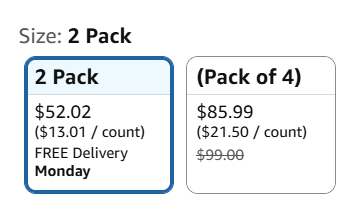
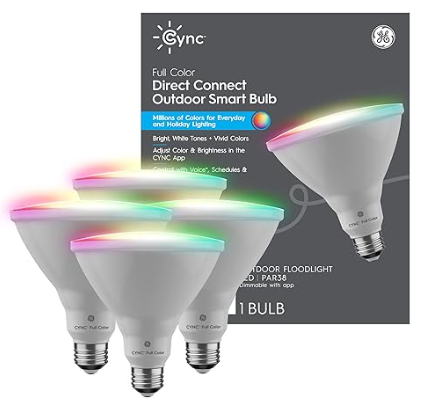
I'm pretty sure it gets BETTER!!! If you follow the Amazon link, it takes you to a 2-pack of Matter enabled bulbs. There is a handy selector to choose a "Pack of 4" instead: HOWEVER, clicking the larger size causes the image to change to a 4-pack in a gray box ... the same gray box that doesn't mention Matter: So, if the pictures are accurate (which I am learning is not always the case), the 2-pack is Matter enabled while the 4-pack is not! 🤦♂️
-
Per @Guy Lavoie 's suggestion, I reached out to GE Support and received the following response in regards to whether or not the GE Cync par38 Outdoor bulbs are Matter enabled: Hey Eric, Thank you for contacting Cync Support. There is a specific Matter enabled version of the Cync par38 Outdoor floodlight available at the moment at Best Buy or Amazon. You'll notice the box is different for the Matter enabled model and will clearly state it is Matter compatible on the package. Here is a link to the Amazon. https://www.amazon.com/GE-Changing-Outdoor-Floodlight-Google/dp/B0G75MH42N/ref=sr_1_4?crid=1Q0KWYRKRCVHP&dib=eyJ2IjoiMSJ9.gcLZ4pZxOjnXJwSVyDmO_5oEuw_VYR0xSXf5C4YIQ_YET_FNF22woExDHmUAODhtwW3vv-Qm_iMO_YZd8d747YAX3bEufPgsEiSfasAVGTA9k8lOVQK0cE42q0RKKWwqvxUggVORf-aqEu30aGYVHpUNgbscwhS-ALpfDkkVVNElTGJ64FNgjmyFUSHb8xVkTiPYKplqanVR358bA9ep9cF-QTXocmNFj5xfJh-4HFdUF9RGnzezTh6ZZHigXYgRDKQCr0_Pc6lEfscPGn4MsCq2MhRc0WCUFg0AdQVyi2I.DQ0IN1Iir_8yLEIMpWazBVRul27d-vTejkS1QahrsfU&dib_tag=se&keywords=Cync%2Bpar38%2Bfloodlight&qid=1771617545&sprefix=cync%2Bpar38%2Bfloodligh%2Caps%2C112&sr=8-4&th=1 Sincerely, Jeffrey C Technician GE Lighting Smart Support Team cyncsmart.com
-
I saw the picture that mentioned Matter and thought those bulbs were safe. Darn your unclarity, GE!!! 🙄 Hopefully it's not out-of-bounds for this forum to just come right out ask: do you have a suggestion for a product/approach to accomplish what I'm trying to do? What I have: an eisy, the ZWave/Zigbee (but apparently not Matter!) dongle, and a 4th generation Alexa Echo Dot. What I'm trying to do: replace my outdoor spotlights with something that has individual programmable color control. I'm not planning to do a show, so they don't have to flash to music or be particularly quick to respond to color change commands. Thank you in advance for any suggestions you have!!!!
-
@Guy Lavoie Thank you for all this valuable information! I'm just starting to look into expanding beyond Insteon, so I'm hoping you are willing to help me with a few very basic beginner questions: Are you directly connecting to the GE Cync bulb using the ZMatter USB module for eisy, or is there another hub in between? My wife wants RGB exterior lights that can be programmed to be different colors on different days. I have an eisy with a ZMatter USB module that I haven't even connected to it yet. I'm looking at these GE Cync bulbs. Do you have any suggestions or warnings you think I should be aware of?
