


Vanhalo
Members
-
Joined
-
Last visited
Everything posted by Vanhalo
-
Does it have a master valve terminal?
-
My location is not suitable for the RainBee8/EzFlora. Works fine if have it right next to the PLM on the same outlet. Apparently where it has to be in my garage is not sending a good broadcast signal. I gave up on it and installed a Rainbird.
-
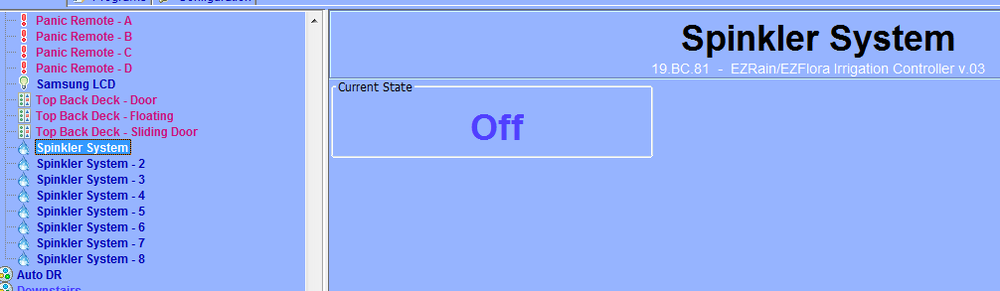
I moved the PLM/ISY to a different room and readded the Rainbee8(EzFlora) I can see it again after re-adding it. Although apparently its called a Spinkler now.
-
Had it working but now my PLM has lost its mind and it cant communicate with it. I am starting to remember how klugey this was.
-
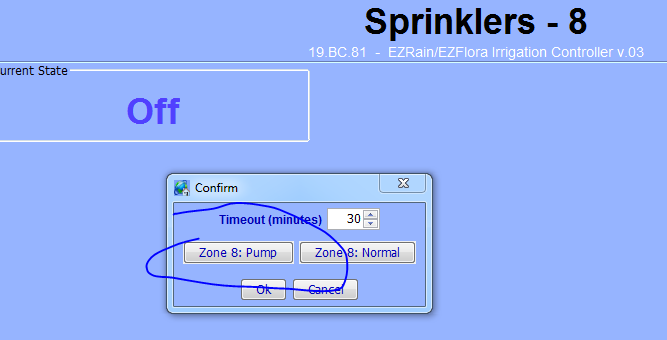
I didnt have to do any of this. I simply had to designate a zone, in my case zone 8 as a pump. in the ISY....dont remember doing it this way last time.
-
I dont remember PLC how to connect to the PLM/PLC 2413S I dont see a COM port assignment in the SHN Utlity.
-
According to Amazon i have a StarTech 3ft 1-Port USB to Serial Cable, Prolific (ICUSB232DB25) somewhere. And i have the serial cable that came with the PLM.Thanks. This is very helpful. Programming EZFLORA / Using EZFLORA with ISY99 or ISY994 EZFLORA can be controlled by an automation controller like the ISY99 or ISY994 series. The controller would dictate schedules to turn the zones off and on, and normally no additional configuration of the EZFLORA is required. In some unique circumstances such as when zone 8 needs to be delegated as a pump control zone, additional programming of EZFLORA is required. In this case one can use an Insteon PLM like 2413U or 2413S and Simplehomenet's Windows configuration utility. If the ISY99/4 is being used, it will be purchased with a 2413S so that same PLM could be 'borrowed' to program EZFLORA. It's a serial connection so if no serial port is present on the Windows PC, a USB to Serial adapter will also be required. Or you can purchase 2413U which is a USB PLM for the programming.SimpleHomeNet Utility SuiteI’m replacing my EzFlora Insteon Sprinkler Control device With a Rainbee8. Been sitting in my office for years brand new. It’s been many years since I have configured a new EzFlora. I think I’m in my 3rd now. If I remember correct there was a utility you had to run to assign the master solenoid. I don’t remember what this utility was called.I noticed that Amazon released support for the Insteon Hub today. Anyone know if they will support the ISY devices in the future?Another difference (that I just discovered) is the T1700 will not accept the wireless receiver/sensor on the RS1 terminal. I am sure the logic is there to allow remote temp control but it is not an available option. The outdoor temp on RS2 is an option but not the indoor temp control. Anyone want to buy a T1700?Thank you! That was very helpful.What isthe advantage of the ISY99i Pro over the Smartlinc Central Controller?


