


JSP0511
Members
-
Joined
-
Last visited
-
Update: solved on my end. The gdodevice parameter had three stray leading spaces in both key and value (visible in the debug log as {' gdodevice': ' 192.168.30.5;...'}), so the plugin ignored it. Retyped without the spaces and Discover created the nodes: Garage Door Opener, Light, Motion, Door. So 4.0.8 does work with a ratgdo32 disco on ESPHome 2026.1.5 via the manual gdodevice setting. Thanks for looking.
-
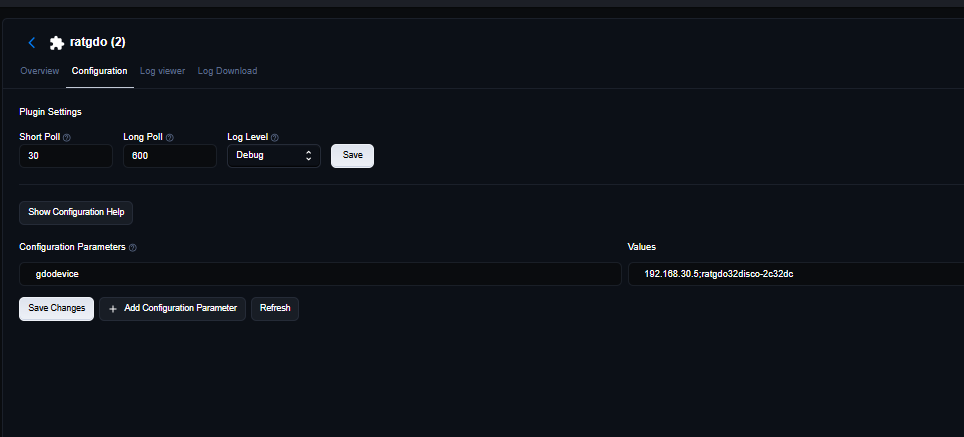
@Goose66 6 Update with a debug-level log. The gdodevice parameter is saved (192.168.30.5;ratgdo32disco-2c32dc, screenshot attached) and the plugin was restarted. I also added a hosts entry so the eisy resolves ratgdo32disco-2c32dc.local. Before that, ping by name said "Name does not resolve", while ping by IP always worked. Discover still receives the full mDNS record (name, address, host, port 6053, ESPHome 2026.1.5), waits about 11 seconds, then logs "No devices returned from discovery." There is no connection attempt or error line in between, and the log never mentions gdodevice. Is the plugin filtering this board out, or is something in eisy-ui 6.1.x stopping the connection? debug.log
-
@Goose66 Tagging you since this is your plugin. More info on the ratgdo32 disco issue above: the board's own event stream works fine. http://192.168.30.5/events returns normal state events for Door, Light, Motion, Obstruction, plus the disco-only entities (vehicle detected/arriving/leaving, distance, voltage). Full output attached. The ping event reports title "ratgdo32disco 2c32dc". The mDNS name is ratgdo32disco-2c32dc. Every working example I've seen in the old v4.0.8 thread is a ratgdov25 board. Does the plugin filter discovered devices by name, such as a ratgdov25 prefix, or only handle certain entity sets? That would explain why it hears the mDNS reply and then returns no devices without ever connecting. events.txt
-
Standard 4.0.8 (licensed) finds nothing on a ratgdo32 disco running ESPHome 2026.1.5 (ratgdo.v32disco_secplus2). eisy, IoX 6.1.2_10, PG3x 3.4.26. Board at 192.168.30.5, same subnet as the eisy; its web page loads fine. On Discover, the debug log shows the mDNS reply (name ratgdo32disco-2c32dc, 192.168.30.5, port 6053), then "No devices returned from discovery." No nodes are created. I also added the custom parameter from the release notes, gdodevice = 192.168.30.5;ratgdo32disco-2c32dc, and restarted the plugin. The log never mentions it. Does 4.0.8 support the v32disco board or ESPHome 2026.x? Log attached. Same symptom as some users in the closed "New Release v4.0.8 - ESPHome version" thread, but the gdodevice parameter doesn't fix it on this board. debug.log
-
i think i'm mostly using mobilinc because i have for 6-7 years now and thats what i'm used to. i too only use it for a few clicks here and there, def not as much as i used to especially with google homes all over the house. it seems like now that i've updated everything and figured out other issues that everything is working as expected. if i run into more problems i'll look to make a switch. it seems like with this type of technology, what didn't work yesterday, may work today but if not maybe tomorrow so always a good idea to revisit solutions i've tried in the past. when the portal was new, i remember having issues getting mobilinc to work, couldn't been an error on my end but was pointed in a direction that got everything to work together and thats where i am at this point lol.
-
the main reason i stayed with mobilinc was because of the phone app. I set it up a year ago and I don't recall there being an app on the universal device side that was as good. what app do you use if you don't mind me asking?
-
ISY has a static IP. From all of the resetting and rebooting, it all seems to be working. I also went and deactivated the ISY Portal module and now all of my spoken words seems to be working where as before, only some of them would work. Not sure how it reactivated itself.
-
Should I/Can I ditch the mobilinc module at this point? It's a year later and I can't honestly remember why I preferred mobilinc over ISY portal but assume I liked the mobilinc app without a similar/better option. Any thoughts or suggestions?
-
Everything appears to be configured correctly, but your ISY does not appear to be online. If it does not come online after 2-3 minutes, you may try the following: In the admin console, client on Help | Manage modules to refresh the portal module on ISY. Reboot your ISY. Reboot your router. In ISY Portal, on the ISY tab, click refresh a few times. Did this and it didn't work. I then deleted and re-added the ISY to the portal again and now get: In order to use your ISY on ISY portal, please make sure to: Wait for the ISY to come online on ISY portal. In the ISY list, you can click refresh to update the online status In the Admin Console, click on Configuration | Portal tab, and approve the access request for this account You are done! No matter how many times i hit refresh, nothing. There is also no request in the portals tab within configuration. Lastly, when I hover over the radio button next to the ISY in portal, it says offline since monday december 16th which I'm assuming was last year, the 16th was on a monday. Also shows last firmware at 4.7.3 at that time. Actual current firmware is 5.3 Is it possible that at some point I disabled ISY portal and polyglot cloud in favor of mobilinc for some reason? EDIT: I see that I installed the mobilinc connect module Monday December 16th! lol I do recall having an issue with mobilinc not working and being told not to use ISY portal but I do not recall deactivating anything. I see the green deactivate button next to all of the modules but i have no indication that any module is indeed deactivated.
-
any thoughts on why polyglot cloud or ISY Portal no longer see the ISY as connected?
-
ok hold the phone now it's working. I am able to set colors, brightness etc from the admin console. I am going to attempt to make a scene and organize the hue devices like I meant to months ago. I still don't know why the ISY internet access can't be enabled....
-
oh damn, you're good. Yes you are correct. I must have set that up before I got the polyisy, correct? it's been a while. If true, there's a good chance i set the polyisy up, got the hue devices to appear in the admin console then walked away without ever setting up proper scenes. I do recall getting the led strips to turn on from the admin console though. I was able to change the color, brightness etc. Months later, it's no longer allowing me to do so. So to recap: network resource setup still works I may have never created a scene which is why I don't see one internet access is disabled as far as I can see in admin console and can't seem to enable it, unsure if related or cause of hue issue
-
I am rebooting now and will give the ISY a few minutes to boot up before plugging polyisy back in. On a side note, through all of this the one program I have enabled is still working. When i press the B button on a 6button insteon switch, it still turns the hue led strips on through the scene I can't locate in admin console but within admin console, when i click "on" on one of the hue devices, it does not turn on.
-
I'm very rusty with this. Where/how can I check the nodeserver? As far as I can tell, every other Scene I've created is showing in the admin console. The one and only scene that included a hue device is not present. EDIT: I have another post explaining that I cannot enable internet on my ISY and thus, the polyglot cloud cannot connect to the ISY. I'm wondering if the problems are related.
-
My firmware is 5.3. I use the newest launcher and when I get into the admin console, UI says 5.3 as well.
