


ccclapp
Members
-
Joined
-
Last visited
-
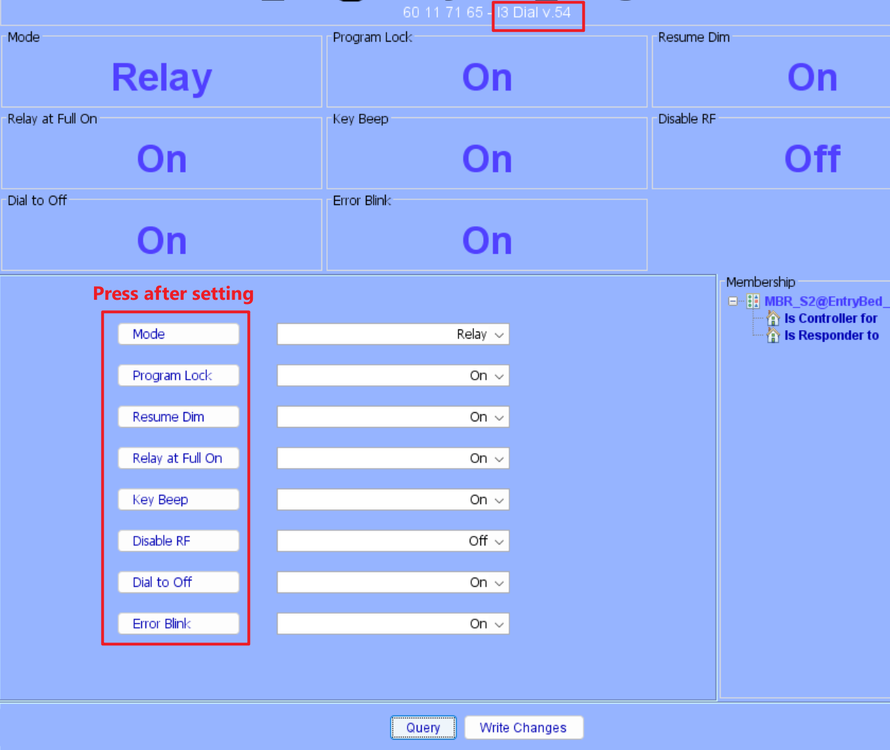
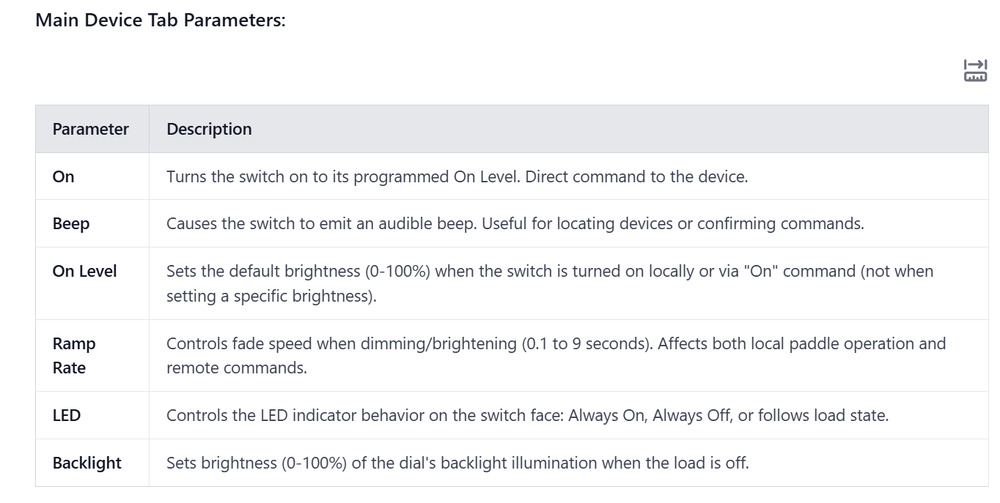
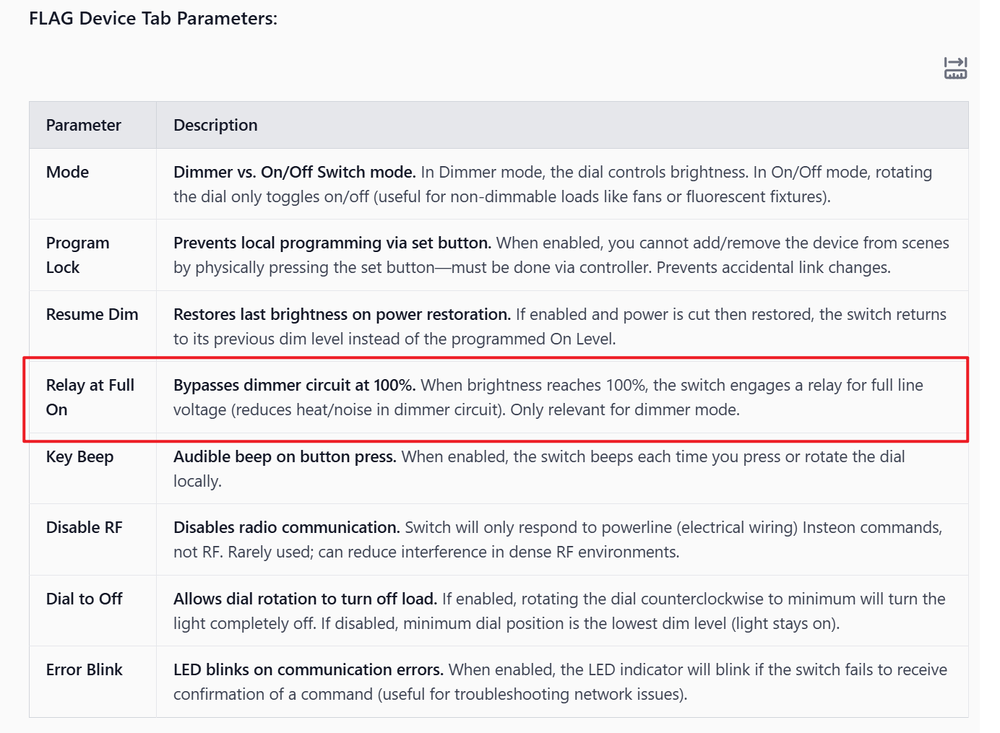
Hi I have done testing on this as suggested by @Geddy and @gdntx ... for the advanced settings shown on the "FLAG" tab of the i3 dial dimmer, one must press/click the label in on the left eg Mode, Program Lock etc. and each must be pressed individually after changing the desired value in the right column. Dont know if it matters but I then also pressed write changes after all settings were set. I then did a reboot of eisy and then after doing Query on the device, all values stick and correctly show. Also, it has been hard to find info on what each value does/means. With some AI research I find the following... It was especially hard to find info on the Relay at Full On setting...interesting Hope others find this useful. Thanks for the help.
-
Fair point. since I am doing configurations for a whole house now it's very helpful to see the actual specifications so I will put in a ticket on this just for final clarification. Thanks
-
Hi geddy or others I'm just trying to clarify the question above of of whether whether the insteon device properties actual settings will be visible in the eisy admin panel because if not I don't know how anyone is able to do meaningfully use insteon devices. is anyone able to clarify this? Thanks very much
-
Ok, this is crazy! If I understand correctly we have no way of seeing what settings we have applied to the devices. If so, this might be enough to abandon ISY/EISY. How can this be, that is a base level requirement (to know what settings you have on your devices.
-
Hi thanks for your help. I will look at this more carefully when I return to that location next week. I appreciate it thanks
-
...Update,,, Interestingly, using the UD App on my phone, I have changed Mode from Dimmer to Relay. However does not work on the Admin Console. I am connected locally with both.
-
HI I just setup a new EISY Home in a new location. I updated to firmware and UI version IoX v.6.0.3. After adding multiple i3 Dials, when I try to make any changes, eg, ramp rate , on level, or mode from dimmer to relay, nothing gets updated on the device. I have tries multiple times and rebooted EISY. Each time I click Write Changes button and/or right click to Write Updates to Device. WHen I do this, event viewer shows no communication. When I querry device, the settings revert back to default. How do I resolve this? Have others had issues with the i3 devices? Do I need to revert to manual device programming or use the Insteon controller outside of ISY? Note, before adding to EISY, I factory reset the devices via air gap etc. Any wisdom on this? Thanks
-
Hi I am testing zooz Zen72 smart dimmer. This is designed to control scenes/devices via 2, 3, 4, 5, up/down presses. I have set zwave parameter #13 to 1 per... https://www.support.getzooz.com/kb/article/538-zen72-dimmer-switch-700-advanced-settings/#:~:text=Parameter 13%3A Enable or disable,for quick double tap triggers. However in eisy I do not see these are triggers in programs, not as possible controllers in scenes. eisy simply brings in the dimmer as a single device/node/entity Does isy not support this functionality? Thanks
-
Thanks. This is working for some programs but not for others. There is no apparent reason, all are simple working programs.
-
Ok, this is strange, some programs do copy via r-click->copy. But some dont???
-
Hi Sorry for my basic question but I have searched wiki and forum and can not remember how to copy/duplicate a program. I just want to duplicate an existing program so I can make some edits for testing. I see right-click -> copy but no paste and nothing happens when I just do copy. I am on latest firmware on an eisy after migrating from 994 Thanks
-
HI Thanks Darn,I was hoping to avoid this, as many scenes x many brightness levels = too many I regularly dim/brighten a given scene from a KP button and its not really time or event specific to automate. Thanks for the clarification
-
Hi Quick question: Are scenes dimmable or can you specify the brightness level of scenes on the Amazon or Google assistant integrations Thanks
-
I just connected my 1st zigbee test device. Its a "Third Reality" "Smart Plug GEN2" www.3reality.com, bought on aamazon for about $10 (4pack for $38) https://www.amazon.com/gp/product/B0BPY5D1KC/ref=ppx_yo_dt_b_asin_title_o04_s04?ie=UTF8&psc=1 THIRDREALITY ZigBee Smart Plug 4 Pack with Real-time Energy Monitoring,15A Outlet, Zigbee Repeater,ETL Certified,ZigBee Hub Required,Work with Home Assistant,Compatible Echo Devices and SmartThings It was very quickly found/added to eisy. It has a single device field listed and functioning as an on/off switch. It is supposed to report poser/energy use, but does not on eisy. I have not tried it elsewhere. Thanks
-
Hi , apologize in advance if this is an obvious question I should know the answer to... but I don't I just received my eisy and the z matter stick (I was previously on an ISY). I had assumed they're already was zigbee broad support as I thought that's what that stick was for. am I mistaken and only just now we starting to get zigby support? a simple clarification would be helpful Thanks


