


pkauf
Members
-
Joined
-
Last visited
-
Well, it's been over 20 minutes and no phantom presses. Did a couple tests on the remote fob, and nothing yet. Pretty sure you're good. Thanks again!
-
OK, it's very close to the original model number that started this, I think mine just has 4 buttons instead of the 2. I truly appreciate how quick you checked this out and provided code. Awesome support!
-
So far, so good. Just uploaded it, and ran it, no phantoms yet. Let me wait about an hour to ensure we are good. I also have another 4 button remote - "Flexfob" - Model YS3604-UC. Is that one covered by your code also?
-
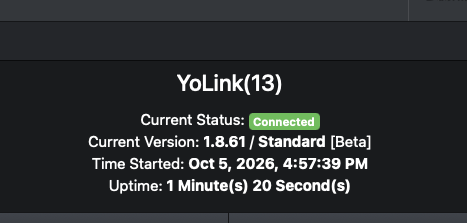
Installed. I'll do some tests see if I get a reoccur.
-
Perfect. I was just about to post that I am 99% sure I just got a phantom press - I was chasing down two issues, one with the Rachio and the other with the Yolink button - so when I saw the Rachio issue, I thought it was making me think this was an issue - but I figured out a programmatic way of getting around the Rachio problem, and then the button just pressed like 20 minutes after the last time I was using it. So this makes me feel alot better. Will be happy to test. I haven't installed a "non production" store plugin before. Is it pretty obvious where to get this? And I found the non production drop down, ready where you are. Thanks.
-
Did a little more debugging and I think I see a possible issue. My program that tries to shut off the running of the sprinkler based upon a button press checks to see if the zone (or controller) is watering. If I watch the node in AC, the "watering" status does not change to On after the rachio kicks on. So my program won't try to shut it off. But, if I manually do a query in AC, then click the off, it shuts off. So it appears that the rachio plugin isn't updating the status on the Controller or the Zone unless it's forced in the AC. I even tried adding a query in my start program (after a wait of 1 second) and that still didn't update the Watering status. Oddly though, when I get the program to stop it (after the manual query) or by manually stopping it in the Rachio app, the status does update. Hope this helps - or tell me what I'm doing wrong. Thanks! - Also, just a side note, I tested this without hitting both controllers to rule out an issue with that, this is just starting/stopping a single zone on one of the controllers.
-
I have a program hooked up to a Yolink 4 button remote. The DON kicks off the program to start/stop rachio for one of my greenhouse zones. Look at the log. There is a rachio timeout on the second press to shut it off. When this happens, I can hear the sprinkler shut off, then go back on. The "failed connecting" says retrying 2 more times . . . I don't see why the failure of sending a OFF command is causing the Rachio to turn back on. What am I doing wrong? Please note, I do have 2 controllers in my setup, and this is starting the first controller to open a zone that the second controller feeds with a zone and pump . . . 2026-10-05 14:28:35 - DBG1|ISY [T:40518562650128] [D2D-EVENT ] [n012_service ][CTL] AWAKE 0 (UDShell.h@155:_debug()) 2026-10-05 14:28:38 - DBG1|ISY [T:40518562666512] [A n013_01001157c3key0] POST - DON 0 (UDShell.h@155:_debug()) 2026-10-05 14:28:38 - DBG1|ISY [T:40518562650128] [D2D-EVENT ] [n013_01001157c3key0][CTL] DON 0 (UDShell.h@155:_debug()) 2026-10-05 14:28:38 - DBG1|ISY [T:40518562666512] [B n013_01001157c3key0] POST - TIME 1791228518 (UDShell.h@155:_debug()) 2026-10-05 14:28:38 - DBG1|ISY [T:40518562650128] [D2D-EVENT ] [n013_01001157c3key0][STS] TIME 1791228518 (uom=151 prec=0) (UDShell.h@155:_debug()) 2026-10-05 14:28:41 - DBG1|ISY [T:40518562664464] [A n011_controller] POST - DON 0 (UDShell.h@155:_debug()) 2026-10-05 14:28:41 - DBG1|ISY [T:40518562650128] [D2D-EVENT ] [n011_controller ][CTL] DON 0 (UDShell.h@155:_debug()) 2026-10-05 14:28:47 - DBG1|ISY [T:40518562654224] [A n013_01001157c3key0] POST - DON 0 (UDShell.h@155:_debug()) 2026-10-05 14:28:47 - DBG1|ISY [T:40518562650128] [D2D-EVENT ] [n013_01001157c3key0][CTL] DON 0 (UDShell.h@155:_debug()) 2026-10-05 14:28:47 - Error|Sockets [T:40518562650128] [NS-14-Rachio] failed connecting (timeout = 200, rc = -1, ssl_ret = 2) 354 ... retrying 2 more times (UDXSockets.cpp@259:connect()) 2026-10-05 14:28:47 - DBG1|ISY [T:40518562654224] [B n013_01001157c3key0] POST - TIME 1791228527 (UDShell.h@155:_debug()) 2026-10-05 14:28:47 - DBG1|ISY [T:40518562650128] [D2D-EVENT ] [n013_01001157c3key0][STS] TIME 1791228527 (uom=151 prec=0) (UDShell.h@155:_debug()) 2026-10-05 14:29:01 - DBG1|ISY [T:40518562666512] [B n003_zone01] POST - GV1 2220 (UDShell.h@155:_debug()) 2026-10-05 14:29:01 - DBG1|ISY [T:40518562650128] [D2D-EVENT ] [n003_zone01 ][STS] GV1 2220 (uom=58 prec=0) (UDShell.h@155:_debug()) 2026-10-05 14:29:01 - DBG1|ISY [T:40518562666512] [B n003_zone02] POST - GV1 9650 (UDShell.h@155:_debug()) 2026-10-05 14:29:01 - DBG1|ISY [T:40518562650128] [D2D-EVENT ] [n003_zone02 ][STS] GV1 9650 (uom=58 prec=0) (UDShell.h@155:_debug()) 2026-10-05 14:29:01 - DBG1|ISY [T:40518562666512] [B n003_zone05] POST - GV1 735 (UDShell.h@155:_debug()) 2026-10-05 14:29:01 - DBG1|ISY [T:40518562650128] [D2D-EVENT ] [n003_zone05 ][STS] GV1 735 (uom=58 prec=0) (UDShell.h@155:_debug()) 2026-10-05 14:29:01 - DBG1|ISY [T:40518562666512] [B n003_zone06] POST - GV1 760 (UDShell.h@155:_debug()) 2026-10-05 14:29:01 - DBG1|ISY [T:40518562650128] [D2D-EVENT ] [n003_zone06 ][STS] GV1 760 (uom=58 prec=0) (UDShell.h@155:_debug()) 2026-10-05 14:29:02 - DBG1|ISY [T:40518562666512] [B n006_winds] POST - GV1 137 (UDShell.h@155:_debug()) 2026-10-05 14:29:02 - DBG1|ISY [T:40518562650128] [D2D-EVENT ] [n006_winds ][STS] GV1 137 (uom=14 prec=0) (UDShell.h@155:_debug()) 2026-10-05 14:29:02 - DBG1|ISY [T:40518562666512] [B n006_winds] POST - GV2 6 (UDShell.h@155:_debug()) 2026-10-05 14:29:02 - DBG1|ISY [T:40518562650128] [D2D-EVENT ] [n006_winds ][STS] GV2 6 (uom=25 prec=0) (UDShell.h@155:_debug()) 2026-10-05 14:29:03 - DBG1|ISY [T:40518562666512] [B n006_controller] POST - GV2 142901 (UDShell.h@155:_debug()) 2026-10-05 14:29:03 - DBG1|ISY [T:40518562650128] [D2D-EVENT ] [n006_controller ][STS] GV2 142901 (uom=56 prec=0) (UDShell.h@155:_debug()) 2026-10-05 14:29:11 - DBG1|ISY [T:40518562664464] [B n010_t531644969270] POST - CLIHUM 53 (UDShell.h@155:_debug()) 2026-10-05 14:29:11 - DBG1|ISY [T:40518562650128] [D2D-EVENT ] [n010_t531644969270][STS] CLIHUM 53 (uom=22 prec=0) (UDShell.h@155:_debug()) 2026-10-05 14:29:11 - DBG1|ISY [T:40518562664464] [B n010_rs_familyroomt] POST - CLIHUM 53 (UDShell.h@155:_debug()) 2026-10-05 14:29:11 - DBG1|ISY [T:40518562650128] [D2D-EVENT ] [n010_rs_familyroomt][STS] CLIHUM 53 (uom=22 prec=0) (UDShell.h@155:_debug()) 2026-10-05 14:29:11 - DBG1|ISY [T:40518562654224] [A n011_controller] POST - DOF 0 (UDShell.h@155:_debug()) 2026-10-05 14:29:11 - DBG1|ISY [T:40518562650128] [D2D-EVENT ] [n011_controller ][CTL] DOF 0 (UDShell.h@155:_debug()) 2026-10-05 14:29:14 - DBG1|ISY [T:40518562666512] [B n008_270019] POST - CLITEMP 8028 (UDShell.h@155:_debug()) 2026-10-05 14:29:14 - DBG1|ISY [T:40518562650128] [D2D-EVENT ] [n008_270019 ][STS] CLITEMP 8028 (uom=17 prec=2) (UDShell.h@155:_debug()) 2026-10-05 14:29:14 - DBG1|ISY [T:40518562666512] [B n008_270019] POST - GV0 8816 (UDShell.h@155:_debug()) 2026-10-05 14:29:14 - DBG1|ISY [T:40518562650128] [D2D-EVENT ] [n008_270019 ][STS] GV0 8816 (uom=17 prec=2) (UDShell.h@155:_debug()) 2026-10-05 14:29:14 - DBG1|ISY [T:40518562666512] [B n008_270019] POST - HEATIX 851 (UDShell.h@155:_debug()) 2026-10-05 14:29:14 - DBG1|ISY [T:40518562650128] [D2D-EVENT ] [n008_270019 ][STS] HEATIX 851 (uom=17 prec=1) (UDShell.h@155:_debug()) 2026-10-05 14:29:14 - DBG1|ISY [T:40518562666512] [B n008_270019] POST - WINDCH 8028 (UDShell.h@155:_debug()) 2026-10-05 14:29:14 - DBG1|ISY [T:40518562650128] [D2D-EVENT ] [n008_270019 ][STS] WINDCH 8028 (uom=17 prec=2) (UDShell.h@155:_debug()) 2026-10-05 14:29:14 - DBG1|ISY [T:40518562666512] [B n008_270019] POST - CLIHUM 8229 (UDShell.h@155:_debug()) 2026-10-05 14:29:14 - DBG1|ISY [T:40518562650128] [D2D-EVENT ] [n008_270019 ][STS] CLIHUM 8229 (uom=22 prec=2) (UDShell.h@155:_debug()) 2026-10-05 14:29:14 - DBG1|ISY [T:40518562666512] [B n008_270019] POST - BATLVL 2762 (UDShell.h@155:_debug()) 2026-10-05 14:29:14 - DBG1|ISY [T:40518562650128] [D2D-EVENT ] [n008_270019 ][STS] BATLVL 2762 (uom=72 prec=3) (UDShell.h@155:_debug())
-
I am having a similar issue with my "YoLink Smart Wall Light Switch, Single Pole, 10A, YS5708" - there are two child buttons on this that I am using to control sprinklers. I am triggering short press = DOF, and I have two programs. If the Rachio is running and button is pressed, it shuts them off. If it's not running, and button is pressed, it runs them for X minutes. Issue is its ghosting random presses afterwards and either stopping or restarting them over and over. Any help would be appreciated- I am on the 1.8.60 release. But I noticed this was for a different device - not sure if your fix covers mine. To be clear, these button presses have timestamps when no one was near the switch. Thanks - let me know if there is anything additional you need from me. Here is what that node looks like: Also, here are a couple of the ghost presses: FYI, looking further into my logs, I don't think now I'm getting the phantom press. I think I'm having an issue with the Rachio connection timing out causing an issue. Looking into it more. Sorry for the firedrill.


-
Same issue here. All my scenes stopped working when I upgraded to Alexa+ - fortunately for Grok, I saw I was able to revert to old Alexa, and everything works again. Is there an ETA for the upgrade to the UD Skill to work with Alexa +?
-
Cool, if you can't, let me know and I'll just get the power device. it's only like 20.00 . . .
-
And, if for some reason this isn't working, I could always get the following - do you support it? https://www.amazon.com/YoLink-Long-Range-Wireless-Monitoring-Required/dp/B09NR1YXHH/ref=sr_1_1?crid=21V2VVEZE3Z9U&dib=eyJ2IjoiMSJ9.s-GdXmoujhVVpoLTqRIotFp8xtys6Kqx2J7VRf9aOySyZ6KGPIljLywfZnclIjogcwmuFFyBfFlEYAopg1U5SQvNj9hDXr2En-ZAODv3331EebOiIrD5710yU0ljPgobVKSL8ztpCdkkiWozcpaT8LDSZKron8CNTiVNJRHTX-DaQMum4LBpgDAvUi9UaPeP_L8XYg9o94KrQVr2nE8qkAPrTsEPzCiiCWmvfvG2vmU.3VW2sRzGzzWWhk41UcgCDI3xn7BENfUw5fwQmE7ncjQ&dib_tag=se&keywords=yolink%2Bpower%2Bfailure%2Bsensor&qid=1755635901&sprefix=yolink%2Bpower%2B%2Caps%2C113&sr=8-1&th=1
-
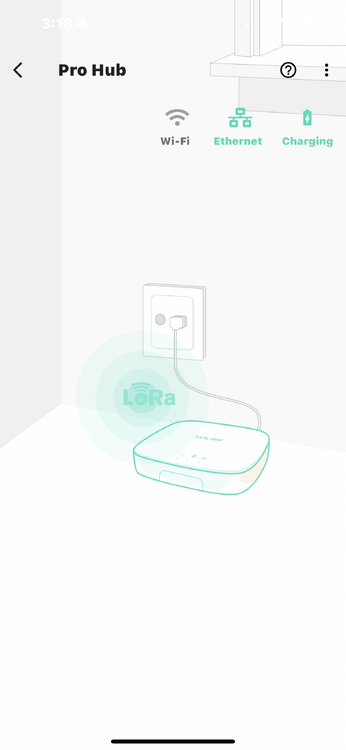
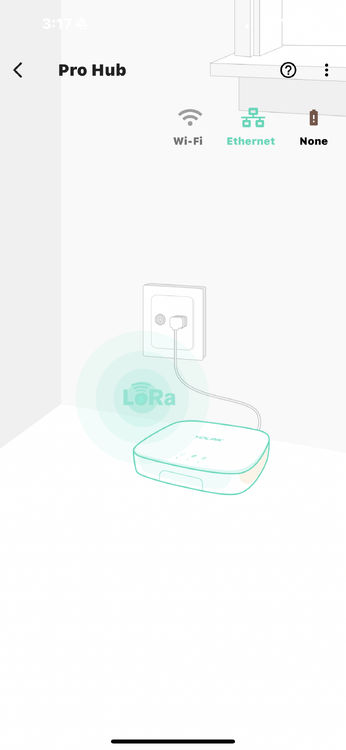
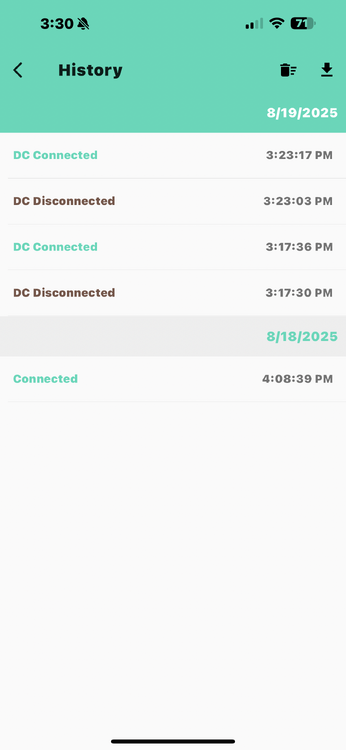
I don't see any messages in the logs from the X3 Hub, only the speaker hub, but I may be misreading it. Let me know if this helps. It does show up in the device log, but maybe it isn't putting it out via the api . . . YoLink_8-19-2025_32932_PM.zip
-
Cool, thanks for confirming, just didn't want to send the wrong info. @paulbates - thanks, sorry, should have trusted you! 😀
-
@paulbates - are you sure this is what he wants? @Panda88 indicated he ignores the hubs that are not the speaker hub, so why would there be an messages generated from the plugin? I assumed he was looking for messages coming out from the hub itself. Just want to make sure I grab what is needed. Thanks!
-
Cool, I'll kill the power and grab the log. Kinda new to Yolink - where can I get that log-in the app somewhere?


