


sjenkins
Members
-
Joined
-
Last visited
Everything posted by sjenkins
-
@hart2hart, I get that setting the variable by program is a PITA if you are not changing it from your initial setting. I'm putting up a new beta v1.3.24 "as we speak" which addresses it, you get the credit as your previous comment triggered me on this one. Basically, why wouldn't we optionally allow the user in the JSON or YAML configuration versions to override the initial defaults? appreciate the dialogue, it makes this thing better as we go.
-
Appreciate the thoughts @Guy Lavoie The Off button (documented in original post & README), you are right is of questionable usefulness. It will turn the status from On to Off if the toggle is not in one of the two TIMER statuses. The reason for not using a specialized Start button is scenes don't play well will that. DON, DOF, DFON, DFOF, and sometimes OL, are really your only command options. From what I have seen so far you are mainly a program guy, but @Diesel is mainly a scene guy. So in the design of these devices I have tried to bridge the gap, make it useful for both, as well as keep fairly standard to how the Insteon devices operate. I did think about another toggle to start off, but could not really think of a use case which I couldn't achieve with a wait statement or a thoughtful set of triggering. I would like to keep this clean & not add complexity if it doesn't fill a defined gap. Hope that helps.
-
@Guy Lavoie, You’ve got it. So my next question is, I documented that in the readme (above, first post), would you have gotten that from my text? I basically did it as a list of if’s when you switch it, or change status. As opposed to your story method.
-
ok @Guy Lavoie, @hart2hart, fixed the simple issue. Please keep trying to break this. I also, to @hart2hart, thought that it might be useful to be able to define in the json or yaml starting numbers. I have not pushed the commit, but will test a bit and roll that as a minor change to the beta. The docs are also being written as I go here. Please take a look and give some feedback with the hat of a new user.
-
Sorry, I’ll fix the simple version tonight. My bad. the colon is being stripped by the polyglot device name function. its newish & must not like colons, I hadn’t back factored to the earlier devices. I’ll check with udi and see what they think on this.
-
Thanks, I’ll add that tonight. as well need to add more to my testing routine 🫢🙈
-
Thanks , good to hear all is well, looks like the install.log is happy as well. I might have over engineered the solution and just needed to peg the version so it doesnt try to compile a new one.
-
@GTench, Putting this here, so that if others are interested they can check their install.log (if you don't know what I mean and don't have any issues, don't worry about it) I did notice something in your install.log where the aiohttp was failing to pip install. Seems it's a thing in freebsd in certain cases, but as its part of the "optional" bits of aiohttp, it seems to not affecting the running plugin. I do not know why it's good on mine and not on others. Anyway, based on my research, I made some changes to my requirements.txt and added a precompiled version in vendor-wheels directory. Would you mind installing from the non-production store into a separate plugin slot. You don't need to add any configuration. Let it go for about 5 minutes and pull the logs from the plugin log tab. The install.log will have what I want. Hoping this solves that issues & doesn't create any others. You can delete the plugin after that. Thanks!
-
Well I don’t disagree, sometimes a scene just seems to work. Also the nice thing in a scene you can often set it to try more than once right in the command setting.
-
@Guy Lavoie, I completely get it, it’s my wife that doesn’t ;). (Actually she is very gracious). I do similar things in my progs with the “bump” times. So take a look at my description of the onDelay, it can simplify the moving from one scene to another. Different paradigm but we can get to the result and simplify too. So in my example I go from a high level at my bar to the normal level after a period of time. Well if you wanted to “bump” the time you can either change the delay value and bump the timer or have a second timer. This would give you your initial and bump times. I guess my point is this is not just for non-programmers, I wrote it (like you did for timers) to clean up the non-value added countdown programs & leverage scenes. I am interested if there are features that would enable what you are doing more. good discussion, thanks.
-
Hey @hart2hart, You can create this node in any of the three config methods (I did update the config text manual) but right now I don’t have it where you set the delay there (I could add to my todo to have an initial value field; if that would be value add). You can pull the device up in the AC or eisy-ui and manually enter it. Or you can make a small program which runs on startup to load the device delay. You also can change the delay time when you like; the delay would be effective on the next On switch. so json: 82 {"type": "offdelay", "name": "office lt offDelay"} would work. you are correct on your thoughts on scene usage, in the scene add the switch as a controller, the fan as a responder, the off delay as a controller. when the switch turns on, the fan comes on, onDelay receives DON and after delay seconds, sends DOF to the scene and shuts it off. Depending on the device or devices in the scene you may want to modify the command offDelay sends to each device in the scene. hope this helps. read the README in the GitHub (link in config file which you see on the config tab in the plugin. Ask any follow-up questions here, anytime.
-
@Guy Lavoie, you made me smile ; good to have a kindred spirit out there. ( was once a controls engineer, from Canada, born in Montreal) So these ones have the added advantage of being able to be part of a scene. So your above program could be replaced by a scene. ========= Toilette Fan Scene Toilet Fan (responder) Toilet Fan offDelay(control) {switch and/or motion device which starts the fan} (control) with Toilet Fan offDelay DUR set (either manually or with a program) to how many seconds to keep on (600 if you want to be conservative for a 10min clearing of the air) =========== OR: you can use it in a program like your example above but after you switch on the offDelay the prog is: if: Toilet Fan offDelay is switched OFF then is: Set or Switch Toilet Fan OFF ============== would need a simple program to fire the offDelay: if: {switch and/or motion device which starts the fan} switch ON then: Toilet Fan offDelay switch ON ============= As I mention in the docs, I did not include a variable which tracks the countdown. Much more overhead than the Threading Timer structure. These three should cover 90% of use cases. Open to talk about those 10% though. Using these devices I have started replacing the variables and programs which simulate timers across my house. I am about half way in and have wiped out dozens of them. Helps with readability & maintainability.
-
Pre-amble: When I started with my shiny new 994 over 10 years ago I was struck with something missing. The environment was familiar, with a state machine controlling I/O. As a young engineer almost 40 years ago I did my share of PLC programming. Scenes were new, but made sense. But the timers were missing. From relay logic days or PLC ladder logic, I was missing my on / off timer relays. I use timers all over the place on my (994, Polisy, Eisy) and always considered them a bit of a PITA to set-up and maintain. Turn-on a light group which I want to turn off in 10min takes a scene, static variable, set the init so you have persistence, then usually have a program for LightON, LightCountdown, LightOFF, depending on the trigger conditions. So, sorry for the pre-amble but that is why these three new devices exist. Virtual offDelay, onDelay, Toggle Please try them out, see if the behaviour is how you would like ; try to break them! EDIT: lots of profile changes here, so may require a reboot if your labels are not coming up right, especially with new AC and EISY-UI. From the github README: Link added here (note, the README is not the plugin CONFIG file which contains config pointers) let me know of any doc improvements. I tried to up the game a bit on them. offDelay switch Usage: Replaces programs simulating timers used to switch scene off after delay time. For example you turn on a light scene which you want to turn off after x-seconds. The scene is switched on by a switch/program & fires offDelay, after x-seconds the scene is turned off. if Switched: On (DON) when ST Off/On, ST status set to TIMER, CMD (DON), after DUR (DOF). On (DON) during ST TIMER, reset the time, CMD (DOF) sent AFTER DUR seconds. Off during TIMER, ST status changes to Off, CMD DOF sent immediately. Fast On / Off mirror On / Off Set: delay (DUR) to delay seconds for switch, after CMD DON wait to send DOF. range 0 - 99999 seconds which gives you more than 24 hrs. if 0, mostly acts like a regular switch. Status: Off(0), On(1), TIMER(2) When plugin is stopped, if ST is TIMER, ST will be set to On for persistence. Using Thread timers to fire switch, so for now I am not showing a status of how long left in the timer. Trying to keep a low overhead. onDelay switch Usage: Replaces programs simulating timers and scene trigger for transition from one scene to another. For example you turn on a high level light scene which you want to transition to a normal level later. Use two scenes, one High, one Normal/Low, switch on High for x-seconds, after delay then transition to Normal/Low. High scene: onDelay is Responder, set delay (DUR) to x-seconds Normal/Low scene: on Delay is Controller in Normal scene, sending appropriate commands to each device. If switched: On (DON) when ST Off/On, ST status set to TIMER, CMD (DON) after DUR delay. On (DON) during ST TIMER, reset the time, no CMD sent until DUR complete. Off (DOF) during TIMER, ignore until TIMER done. Off (DOF) when ST Off/On, ST status set to Off, send DOF immediately. Fast On (DFON) behaviour is equivalent to on (DON). Fast Off (DFOF) anytime to set ST status to off, CMD (DFOF) sent immediately; this method to cancel is used to allow use and control in a scene. Set: delay (DUR) to seconds switch will, after receiving DON, wait to CMD DON. range 0 - 99999 seconds which gives you more than 24 hrs. if 0, mostly acts like a regular switch. Status: Off(0), On(1), TIMER(2) When plugin is stopped, if ST is TIMER, ST set to On for persistence. Using Thread timers to fire switch, so for now I am not showing a status of how long left in the timer. Trying to keep a low overhead. toggle oscillator Usage: Replaces anywhere you want a scene to oscillate On/OFF. It does not need to be balanced, so allows you to be Off for long periods and On for a short one. Can of course be used to trigger programs on a regular interval as well. An obvious example is blinking Christmas lights. Another would be for attention getting or security flashing. Firing a program at regular intervals can be pretty useful. If switched: On (DON) when ST Off/On, ST status set to onTimer, CMD (DON) immediately. On (DON) when ST onTimer/offTimer, timer reset, CMD (DON) immediately. Off (DOF) when ST onTimer/offTimer, no effect. Off (DOF) when ST Off/On, ST status set to Off, CMD (DOF) immediately. Fast On (DFON) same as On (DON). Fast Off (DFOF) all ST, ST set to Off, CMD (DFOF), cancel further oscillations; this method to cancel is used to allow use and control in a scene. Set: onDur (DUR) to seconds switch will, after sending DON, wait to CMD DOF. offDur (GV0) to seconds switch will, after sending DOF, wait to send DON. range 1 - 99999 seconds which gives you more than 24 hrs for each On / Off if either timer <= 0, it will be reset to 1 Status: Off(0), On(1), onTimer(2), offTimer(3) When plugin is stopped, if ST is onTimer, ST set to On for persistence. When plugin is stopped, if ST is offTimer, ST set to Off for persistence. Using Thread timers to fire switch, so for now I am not showing a status of how long left in the timers. Trying to keep a low overhead.
-
Good news! Interesting that they are starting up at such a different speed. I learned something on this one. The timer should be significant anyway, well out on the normal curve, as its just to flag if something isn't right. ok, please stress test the plugin. I don't currently have anything else in the development pipeline. (although my logging could have been better in this case). If anyone has features they would like, toss them out for discussion.
-
The logs look quite clean & without error except for a timeout in start-up gathering parameters, but they are ok too. It looks like the startup is taking longer on your machine than the timeout allows, which is why the messages. I think you are on a Polisy, correct? That may be why its a it slower. I have raised it & pushed to production. Please re-install the production version in the same slot as your current & let me know how it goes. thanks again for your patience....
-
@GTench, can you go to the log tab in the plugin then hit the download log package a minute or two after a restart. Gives me more than the system log. Thanks.
-
Can you restart and send me logs please.
-
@hart2hart, thanks, this is a frustrating one as the plugin is telling the poly to update the profile when the version does not match. Worse its a bit of a random walk why it sometimes works & updates and other times requires a rerun of the plugin or worse an ISY reboot. I find myself hitting the update-profile button every time change it and I stop or start the plugin in the hopes it will take. I'd love to solve this one. Please play with all the new bits of this plugin ; try to break it ; let me know if you find something you don't like.
-
@hart2hart, Thanks for the feedback. Obviously not normal, That’s been solid for a number of versions. In order can you restart the node, try it. If no joy restart ISY & try. Send me logs if still zero ; means it failed in discovery; like to see where. Possible, but usually blank, if you have updated to 6.0 I have seen it take time on the remote versus local login until the profile updates. thanks.
-
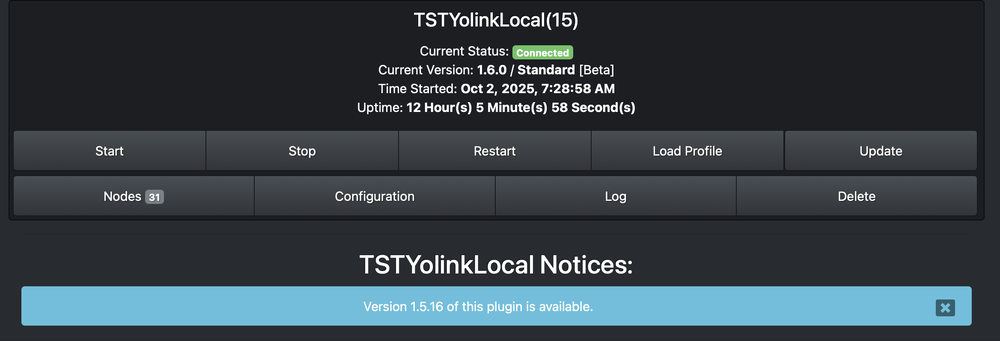
Sorry I wasn't clear. I don't think I am running 1.6.0 I think the timing was such: 1. I had 1.5.15 and the update came down for 1.6.0 2. crashed, did not work 3. later it came asking to update 1.5.16, did the install and all is good, initally said it was 1.5.16 but then the pg3 display says its 1.6.0 (I don't think it is) 4. it is now claiming to want to install 1.5.16 again I did nose around in the files but I don't know where you specify version. install.log
-
In the no news is good news category, I am moving v1.13.1 to production: Per the beta topic: This should bring to an end this writing cycle, for those of you tiring of the updates. Should move to a period of stability with just debug unless someone comes up with a brainwave of a new feature. I am much happier with the stability and maintainability of the plugin now. This minor update focused on the start-up which was very repetitive and hard on the gateways with too many polls for data. I also really did not understand much of the polyglot ecosystem when I started this plugin ; feeling better about that now, especially how persistence and parameters work. 1.13.1 DONE refactor controller discovery, put, get, goodip functions DONE refactor controller startup, config, params, naming, logging DONE refactor cmdSetPos
-
Ya it wants me to update again to 1.5.16 but showing 1.6.0 ; working fine now so ignoring.
-
Quite a few updates which for those of those following the betas will know. Below is the log which lays it out step by step; many of the rewrites are for future maintainability and stability. The logging should be cleaner and easier to follow as well. Some user facing features though: Controller: ST status follows the running of the node. Connected means running properly ; Disconnected for stopped or failed. ST control still is a heartbeat which can be checked in a program. Number of nodes is just a sanity check if all the nodes you put in your configuration add up. Switch: Added toggle Generic / dimmer Added onlevel & onleveltype, which mean we can mimic physical switches better On level is the return to level after the switch is off. Fast on will always go to 100 On level type is Static or Dynamic. The first mimics Insteon, set it and it will not change, the second will change with the on level. Temp user facing should be working better with variable writes Garage lots of reliability improvements 3.1.22 DONE generic/dimmer static/dynamic behaviour 3.1.21 DONE generic/dimmer to model dimmer ST & OL DONE name & address check using poly interface DONE consistent use of poly versus polyglot DONE fix nagging error check in main() DONE controller discover refactor DONE add notice for ISY authorized error (was only in logs) 3.1.20 DONE fix controller ST "status" on at start, off at stop / delete, "control" still heartbeat DONE garage send CMDs, motor, motion, obstruction ; get naming consistent DONE standardize startup sequence DONE rewrite checkParams, Discovery DONE add NumberOfNodes DONE switch/generic/dimmer/temp(R/C): nodes use polyglot persistence, delete old db files DONE swtich cmd TOGGLE add DONE consolidate temp, tempC, tempRC into one module DONE temp variable writing now with shortPoll (only upon change, considers precision) DONE refactor function naming DONE refactor garage, fix persistence, sse client DONE backfeed garage improvements to switch(done), generic(done), temperature() 3.1.15 DONE generic, dimmer, change ST to OL, memory of level for DON, DFON/DFOF, command
-
With reboot, both plugins said v1.5.16 was ready (1.6.0 had installed for both). Updated and started, all was well. Version on both plugins now say 1.6.0 again ; store is 1.5.16 Thanks
-
Just did the install of 1.6.0 & its crashing log files attached. In addition once you start the node, both local and regular, it seems you cannot hit the stop button and get it to stop. Tells you its not running. Is this a result of the initializing status. Means I had to delete the node to get it to stop. update: not just the local hub plugin ; the regular plugin is crashing and restarting as well. TSTYolinkLocal_10-1-2025_92945_PM.zip


