


UD2)17rrh
Members
-
Joined
-
Last visited
Everything posted by UD2)17rrh
-
@Geddy @oberkc @dbwarner5 These are all really good ideas. Thank you. I've adjusted the original program and it is working well. But I'll try the variable approach as I have a few ideas to expand upon what I am doing now.
-
"The first thing you do is disable the program so that it does not self-initiate". I didn't think of this as a possibility, thinking a disabled program just wouldn't run at all, but this is a nice feature. Everything seems to be working as planned now. Thanks again @Geddy and @oberkc.
-
Thanks @oberkc and @Geddy for the help.
-
OK. Making progress. So I did see where I needed to change the Command line in the app from Enabled to Run Then. Now when I trigger the entry manually it turns the lights on! Progress. So how do I make the lights only respond to the geofence command after dark but not come on irrespective of a geofence command at sunset? And is my 10 min wait in the right spot? Just want the lights on until we get in the house.
-
I have it that the Geofence Entry is calling for the program to run as an Enter Command.
-
Thank you for taking the time to reply. iOS: 26.2 UD Mobile App: Allow Location Access = Always "Trigger Enter Command": Enter command is successfully sent in the log but the program does not run. I just noted though, that when I submit the "Trigger Enter Command" in UD Mobile the program in my Admin Console immediately changes to "Disable". Here is my program: Geofence Entry Lights - [ID 0007][Parent 0006][Not Enabled] If From Sunset To Sunrise (next day) Then Set 'Gate Lights' On Set 'Garage Door Lights' On Wait 10 minutes Else Set 'Gate Lights' Off Set 'Garage Door Lights' Off Thanks for any further help you can offer. Ps I now deleted the phones in Occupancy 2.0.
-
Hi, Both my wife and I have the UD Mobile app installed with our geofences set up. Both are enabled in the app. I see the phones in the admin console in my Home Geofence node tree. I have the program set up to turn lights on. On isy.com, the phones are also in the Occupancy 2.0 section. It looks like the app correctly records the time I enter the geofence but the Enter program does not trigger. The program is enabled. Any obvious reason the program is not being triggered? Could it be that with one phone at home, the crossing of the second phone into the Geofence won't trigger the linked program. I did notice on the app that under "Devices and Scenes" > "Home Geofence" (with both my wife and I at home) my phone says "false" and hers "true". Is this anything? Many thanks for your help.
-
Update. Changed the spoken word from two words to one and it works fine.
-
Thanks again for your help. The scene is in Alexa. The spoken word still did not work but I made a routine, and it worked as you suggested. I just wish I knew why the spoken word is not working. I understand there were some changes that might have affected older Alexa's earlier this year. Our older devices all seemed to have poorer response to our voices around the middle of the year and practically overnight.
-
Thanks for all the replies. I have tried the above ideas, tired renaming the scene too, re-ran discovery a few times and it just won't respond. However, I have three scenes and the two most recently added do not work. The oldest (+2 years) does. I think I'll just have to go old school and turn them off by hand.
-
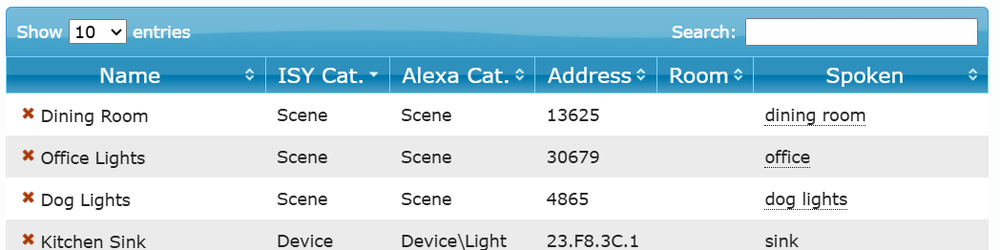
Thanks so much. Very helpful. So I have the scene set up in the portal and the spoken word identified. Now what I get from Alexa is "dining room is not responding. Please check its network connection". Nothing happens with the lights upon the spoken word. Frustrating as all the other spoken word command's function well.
-
Thanks for the reply. At the moment, I only have the scene active in my IoX admin console. In my Alexa app, I’ve had the UD “ISY Optimized for Smart Home V3” skill enabled for years, I've also run the device discovery command. Not sure if that helped. Voice control of the scene worked fine when it included just one switch. However, after adding a second switch, it's that second switch that does not respond, while the first continues to work as expected. Since there’s usually a considerable gap between when I use the admin console or add new switches, I don’t always remember the optimal setup process.
-
Thank you for the reply. This keypad is at least that old, likely a few years more, so this well might be the situation as everything else with the keypad works well. I'll tag this keypad for an upgrade.
-
I have two Insteon on/off lights in the same room. Using the admin console, I created a scene with both lights in it. In the notes section for the scene, I designated a spoken word. Only one of the Insteon lights responds to an off or on command, spoken via Alexa (using with the set spoken word of course). I do need both to respond. Anything obvious I am missing? Do I need to refresh the Alexa app? Thanks.
-
I have an Insteon 6 button keypad. The main on/off switch is controlling a kitchen light. Elsewhere in the kitchen are other lights all on their own Insteon On/Off switches. I programed a scene for button B on the key pad to turn off all kitchen lights. All the single Insteon on/off switches respond perfectly every time but the keypad's own on/off switch never responds. All switches, including the keypad on/off switch are set up as responders to keypad button B. Why doesn't the keypad on/off switch respond? Thanks for any help.
-
Thank-you @dbwarner5 and @firstone for your help. So I am afraid to say (aka embarrassed) that this was operator error on my part. I pressed the Hue Hub button and immediately restarted the plug-in. Within a few seconds everything populated. Thank-so much for your help. I also see all my Hue bulbs in my admin console, and I am happy to start programming.
-
Thanks @dbwarner5 for your help. Currently running PG3x v 3.2.27. IoX running 5.8.4. It has been for a while. I previously did delete the plug in and reinstall. I did not get the request though to press the button on my hub. I also tried starting and stopping the plug in. No success at this time. Here is a portion of the error log...thanks again. 2025-01-18 22:16:33.799 MainThread udi_interface.interface WARNING interface:start: No node server version specified. Using deprecated server.json version 2025-01-18 22:16:33.800 Interface udi_interface.interface INFO interface:_startMqtt: Using SSL cert: 0021b9026579_3.cert key: 0021b9026579_3.key ca: /usr/local/etc/ssl/certs/ud.ca.cert 2025-01-18 22:16:33.800 MainThread udi_interface.interface WARNING interface:db_getNodeDrivers: huebridge not found in database. 2025-01-18 22:16:33.800 MainThread udi_interface.interface INFO interface:addNode: Adding node Hue(huebridge) [None] 2025-01-18 22:16:33.800 MainThread udi_interface INFO hue:__init__: Started Hue Protocol 2025-01-18 22:16:33.801 Interface udi_interface.interface INFO interface:_startMqtt: MQTT keepalive is 300 seconds. 2025-01-18 22:16:33.850 MQTT udi_interface.interface INFO interface:_connect: MQTT Connected with Reason code: Success 2025-01-18 22:16:33.850 MQTT udi_interface.interface INFO interface:_connect: MQTT Subscribing to topic: udi/pg3/ns/clients/00:21:b9:02:65:79_3 - MID: 2 Result: 0 2025-01-18 22:16:33.892 MQTT udi_interface.interface INFO interface:_subscribe: MQTT Subscribed Successfully for Message ID: 2. Reason codes: ['Granted QoS 0'] 2025-01-18 22:16:33.975 Thread-2 (parameter_handler) udi_interface INFO hue:connect: Saved bridges information is not found 2025-01-18 22:16:33.975 Thread-2 (parameter_handler) udi_interface INFO hue:connect: No bridge configuration found, trying discovery... 2025-01-18 22:16:33.976 Thread-2 (parameter_handler) udi_interface INFO phue:connect: Attempting to connect to the bridge... 2025-01-18 22:16:33.976 Thread-2 (parameter_handler) udi_interface INFO phue:connect: Error opening config file, will attempt bridge registration 2025-01-18 22:16:34.008 Thread-2 (parameter_handler) udi_interface INFO phue:get_ip_address: Connecting to discovery.meethue.com/ 2025-01-18 22:16:34.055 Thread-2 (parameter_handler) udi_interface ERROR hue:connect: IP Address OK. Node Server not registered.
-
The state did not change to 0 when I unplugged my Hue hub.
-
Thanks. Here is the log: 2025-01-18 12:30:54.604 MQTT udi_interface.interface DEBUG interface:_message: QUEUING incoming message shortPoll 2025-01-18 12:30:54.606 Command udi_interface.interface DEBUG interface:_parseInput: DEQUEING shortPoll 2025-01-18 12:30:54.606 Command udi_interface.interface DEBUG interface:_handleInput: PROCESS shortPoll message {} from Polyglot 2025-01-18 12:31:09.615 MQTT udi_interface.interface DEBUG interface:_message: QUEUING incoming message shortPoll 2025-01-18 12:31:09.616 Command udi_interface.interface DEBUG interface:_parseInput: DEQUEING shortPoll 2025-01-18 12:31:09.616 Command udi_interface.interface DEBUG interface:_handleInput: PROCESS shortPoll message {} from Polyglot 2025-01-18 12:31:24.622 MQTT udi_interface.interface DEBUG interface:_message: QUEUING incoming message shortPoll 2025-01-18 12:31:24.622 Command udi_interface.interface DEBUG interface:_parseInput: DEQUEING shortPoll 2025-01-18 12:31:24.622 Command udi_interface.interface DEBUG interface:_handleInput: PROCESS shortPoll message {} from Polyglot 2025-01-18 12:31:39.631 MQTT udi_interface.interface DEBUG interface:_message: QUEUING incoming message shortPoll 2025-01-18 12:31:39.631 Command udi_interface.interface DEBUG interface:_parseInput: DEQUEING shortPoll 2025-01-18 12:31:39.632 Command udi_interface.interface DEBUG interface:_handleInput: PROCESS shortPoll message {} from Polyglot 2025-01-18 12:31:41.796 MQTT udi_interface.interface DEBUG interface:_message: QUEUING incoming message longPoll 2025-01-18 12:31:41.796 Command udi_interface.interface DEBUG interface:_parseInput: DEQUEING longPoll 2025-01-18 12:31:41.796 Command udi_interface.interface DEBUG interface:_handleInput: PROCESS longPoll message {} from Polyglot 2025-01-18 12:31:54.641 MQTT udi_interface.interface DEBUG interface:_message: QUEUING incoming message shortPoll 2025-01-18 12:31:54.641 Command udi_interface.interface DEBUG interface:_parseInput: DEQUEING shortPoll 2025-01-18 12:31:54.642 Command udi_interface.interface DEBUG interface:_handleInput: PROCESS shortPoll message {} from Polyglot 2025-01-18 12:32:09.647 MQTT udi_interface.interface DEBUG interface:_message: QUEUING incoming message shortPoll 2025-01-18 12:32:09.647 Command udi_interface.interface DEBUG interface:_parseInput: DEQUEING shortPoll 2025-01-18 12:32:09.647 Command udi_interface.interface DEBUG interface:_handleInput: PROCESS shortPoll message {} from Polyglot 2025-01-18 12:32:24.653 MQTT udi_interface.interface DEBUG interface:_message: QUEUING incoming message shortPoll 2025-01-18 12:32:24.653 Command udi_interface.interface DEBUG interface:_parseInput: DEQUEING shortPoll 2025-01-18 12:32:24.653 Command udi_interface.interface DEBUG interface:_handleInput: PROCESS shortPoll message {} from Polyglot 2025-01-18 12:32:39.657 MQTT udi_interface.interface DEBUG interface:_message: QUEUING incoming message shortPoll 2025-01-18 12:32:39.657 Command udi_interface.interface DEBUG interface:_parseInput: DEQUEING shortPoll 2025-01-18 12:32:39.658 Command udi_interface.interface DEBUG interface:_handleInput: PROCESS shortPoll message {} from Polyglot 2025-01-18 12:32:41.800 MQTT udi_interface.interface DEBUG interface:_message: QUEUING incoming message longPoll 2025-01-18 12:32:41.801 Command udi_interface.interface DEBUG interface:_parseInput: DEQUEING longPoll 2025-01-18 12:32:41.801 Command udi_interface.interface DEBUG interface:_handleInput: PROCESS longPoll message {} from Polyglot
-
@dbwarner5 yes, my Hue iOS app sees all my Hue bulbs and accessories. @oberkc Yes, Hue installed and not the emulator. Thanks for helping.
-
Thanks for the reply @dbwarner5. So I see the Hub just as the screenshot above shows (yes, State (ST) is a value of 1). But no Hue bulbs. I removed the plug-in and reinstalled it. As above, everything looks good (ST = 1) but still no bulbs.
-
Hi. Bringing back an issue I had some time ago but did not resolve. EISY and Polygot 3 show that the Hue install was successful. That is, I see a green "connected" status in Polygot. However I do not see any Hue devices added when I review my admin console. I tried a reboot of the system along with several attempts with "re-discover bulbs". Any thoughts? Anything obvious I am missing? Many thanks.
-
Thanks for the replies. The current fan light/fan control (all in one) is not Insteon. I might need to investigate the optional wall mount.
-
I have a room where the combined fan/light control switch is the other side of the room from the door. I'd prefer to also control the fan and its light at the point of where I enter the room. I have an Insteon based system. Without cutting into joists and drywall and running a wire from a new additional switch at the door to the existing, is there a better way to do this? I suppose the easiest could be a remote control at the point of entry to the room? But I'd like a switch if possible. Thoughts welcome! Thanks.
-
Thank-you and bookmarked the how-to guide. Thanks for sending.

