


MMAltair
Members
-
Joined
-
Last visited
-
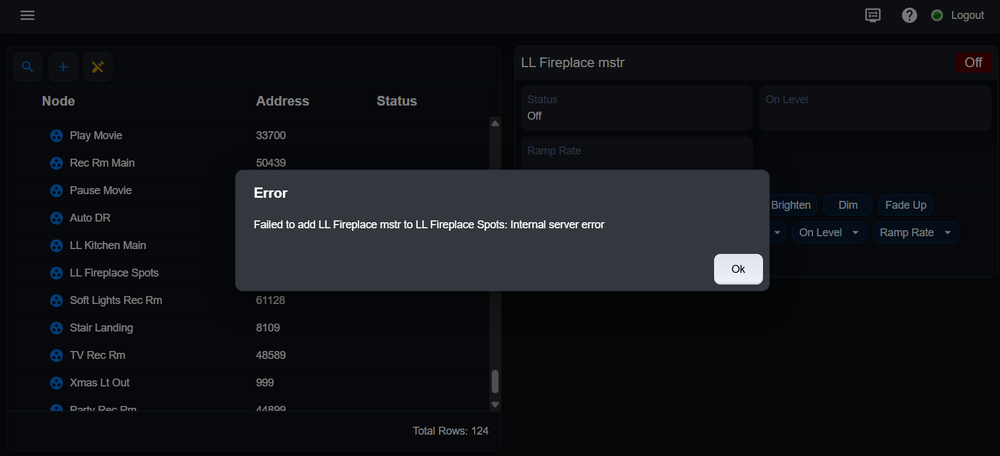
I'm running into the same problem and haven't figured out a solution. Due to other problems I removed 2 Insteon devices from my network, reset them to factory defaults, and then re-added both devices to IoX. This worked without any problems. I then added 1 of the devices to a scene without a problem (the 2 devices are used to control the same light so basically creating a scene where either switch can control the light). When I try to add the 2nd device to the same scene I get the error "could not read config file [./FILES/CONF/4D9BF0.REC]". I tried deleting the device, resetting it, and re-adding it the network which works fine, but when I try to add it to the scene I get the same failure. Not sure what to try next. Update: I tried adding the 2nd device using EISY UI and still get an error although it isn't as descriptive. Here's the screen shot -
-
I'm seeing the same problem with the Java console although I haven't tried the EISY UI console to see if it works. In the Java console all of my existing scenes no longer show the scene control buttons to control the scene. The scene controls do work in UD Mobile. In addition while trying to add a new device (4D.9B.F0) to an existing scene I keep getting an error saying "could not read config file [./files/conf/4D9BF0.REC]". This is preventing me from updating the scene. These problems may be unrelated but possibly not. I'm on IoX v.6.1.2
-
This is a great idea. The only issue I can see is that it won't survive a Restore from backup but this is minor. I think I'll implement some programs that do this on a daily basis rather than every time a variable is updated. Mike
-
Is there a way have persistent storage for variables across IoX reboots or upgrades? I have some items that I track long term that get lost whenever IoX is upgraded or rebooted. For example I count each time the sump pump is turned on as way to gauge its life span. I also track power on hours on my HRV (Ventilator) as way to judge it's overall life as well as to know when I need to do maintenance on the ventilator. I can think of other possible uses of persistent storage as well. Does anyone know of a way to accomplish this? Thanks Mike
-
A final follow up to my Insteon network corruption problem and related recovery. As I mentioned previously I replaced my PLM and then deleted, reset, and re-added all of my Insteon devices to my network and still had the red ! mark in front of some devices even though they seemed to work just fine. I ignored this since I was busy doing other things and the network was working fine. About a week ago I took the bold step to upgrade EISY and IoX to the latest firmware (first 6.1.1 and now 6.1.2) which went smoothly. Amazingly the firmware upgrade seems to have fixed the Insteon network problem. I no longer have any ! marks on any of my Insteon devices and the network is working without errors. Thanks to all those that responded during my investigation. Mike
-
Thanks for detailing your Insteon difficulties. I'm in a similar situation where my network has been stable for many years and now continues to have problems. I did find one Switchlink device on my network that failed completely (swollen capacitor) but replacing it didn't solve my other problems. After removing, resetting, and re-adding every Insteon device to my network things are working reliably again but not without the dreaded ! Mark on a number of devices that I can't get to go away. My assumption is this means there are still communication errors with these specific switches but that is only a guess. Is there another reason EISY would flag an Insteon device with the red ! mark? Other than ! mark on specific switches (about 10 out of 45 devices) everything seems to work properly and can be controlled reliably by EISY. The thing that mystifies me is why there would be communication failures when all of my devices are now dual band? When I used to have a mix of single band and dual band devices I would have occasional problems which I believed were caused by power line communication issues on the single band devices. These issues went away after I replaced all of the single band devices. I suppose it's still possible there is an Insteon device on the network that is failing and corrupting communications to other devices on the network. One thing I should mention is I haven't seriously dug into the communication error log. I have many plugins in my system including an Elk plugin that generates an enormous amount of log entries in addition to the Insteon communication entries. The only way I can simplify the log data is to take many of my plugins offline while trying to debug things. That may be the obvious next step to get a better feel for why specific switches are getting flagged by EISY.
-
I like the idea of implementing a backup function in UD Mobile. My phone has plenty of storage for the backup files and it gets backed up automatically. I know the UDI team is busy deprecating the Java console but if this is primarily a UD Mobile effort perhaps there is an opportunity.
-
Thanks for the ideas. I ended up replacing the modem and manually restoring the Insteon network by deleting, resetting, and re-adding each device. Things are mostly working now with the exception of a couple of devices that still get some communication errors. I will investigate that issue later. On the programs topic I have hundreds of programs with many of them tightly integrated with UD Mobile. It would be an enormous task to try and recreate the programs along with their associated variables. I plan to be much more diligent about keeping EISY backed up on a regular basis. It would be nice if there were a way to automate regular backups of IoX, perhaps within the local EISY file system. Thanks again Mike
-
Thanks for the ideas. I'm pretty sure the Insteon network is the only issue in my system so perhaps the PLM Restore I tried messed up the PLM tables. I'm reluctant to try an old backup since I will lose programming and it will likely still leave my Insteon network in broken state due to the Insteon device links changes I've made trying to debug the current problem. My next step is to delete a deice, do a factory rest on it, and re-add it to IoX. Hopefully this will solve the problem of IoX thinking there is a problem with the re-added devices.
-
It's certainly possible that an Insteon device was affected by the power outage. The devices I've deleted and re-added seem to work just fine with the exception of still having an ! mark in front of the names in IoX. In the logs I've looked at there aren't any retries going on indicating there aren't communication issues. I'm going to try an experiment where I delete a device, factory reset it, and re-add it to see if that clears up the problem of the system think something is wrong with the device. Thanks for the feedback.
-
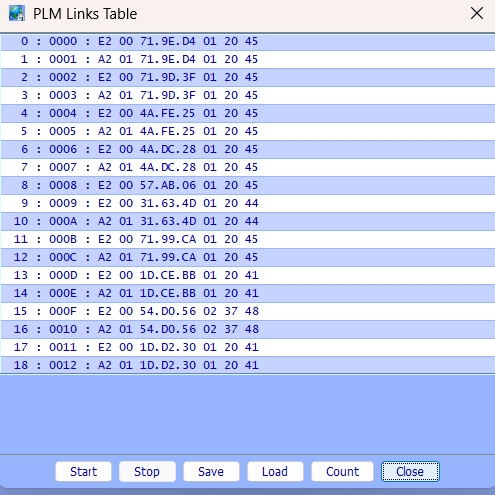
I deleted the device using the "Delete" menu option by right clicking on the Device name in My Lighting. I then added the device back using the drop down menu "Link Management" and then selecting "New Insteon/A10/X10 Device". The device has an ! mark in front of it. I didn't do a factory reset on the device before I re-added it. I have not added the device back to the scene that it was originally part of. Should I be removing devices from the scenes first before deleting and re-adding them to IoX? One interesting observation I see is anytime I make a change to a device IoX is out writing to many devices that have nothing to do with the device I'm currently working on. I would expect this behavior if the device I'm working on were part of a scene that another device is in but this is not the case. Seems odd. Another thing I just figured out is the PLM link table only has entries for the devices I have deleted and re-added to IoX (10). It has no entries for all of the other devices in my system (~ 30 devices). I suspect that when I tried to do a restore on the PLM somehow the PLM link table was erased. I haven't been very diligent about creating back ups for IoX. The last backup I have is from when I updated the system to 6.0.4 back on 3/7/2026. I've made quite a few programming changes since then and would hate to lose all of that work by restoring an old backup to try and fix the Insteon issue. Here's the PLM Links table -
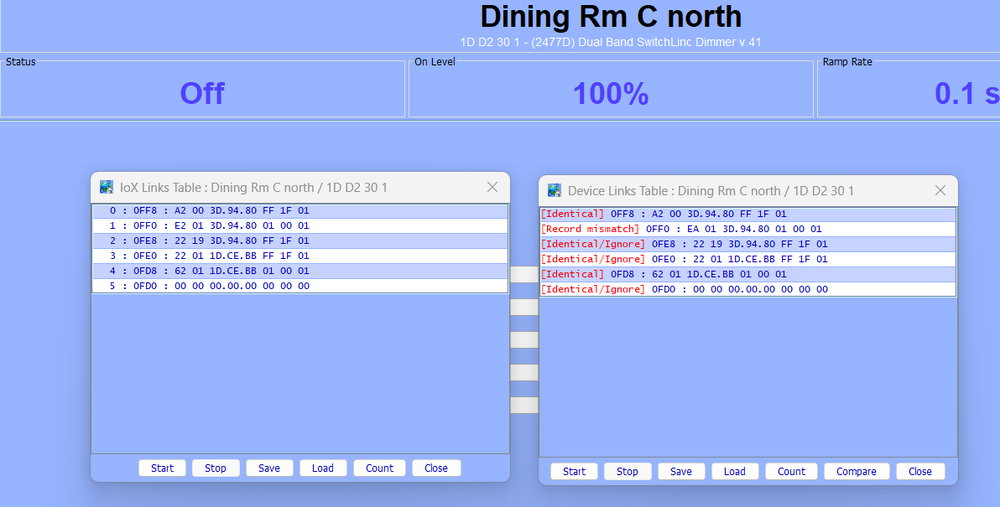
 I'm back trying to make progress on this. I have not replaced the PLM and instead am trying to understand the source of the problem. As an experiment I deleted 2 devices that are in a scene and re-added the devices to the system. In this experiment the devices work fine after re-adding them but I still get an ! mark in front of each device in the My Lighting list. I then did a compare between the Device tables and the IoX tables and it shows a mismatch on one table entry. Do you have any idea why there would be a mismatch on the one entry after deleting and re-adding the device? I have included the screen shot below. Thanks
 Thanks. This log was a test log where I only tried on/off commands to one device that has an ! mark which doesn't work along with on/off commands to a couple of devices that have ! marks and were deleted/re-added and they do work. I have to disable a bunch of my polyglot plugins during the test since they fill the device communication log with unrelated entries. Additional background: After the power failure none of my insteon devices worked so I tried unplugging the PLM, plugging it back in, and then restarting EISY to no avail. I then repeated this procedure but this time I unplugged power from EISY after restarting the PLM and then things seemed to work. However, a few days later it was apparent that only some devices were working. As a debug step I did try and do a restore on the PLM with no change in behavior. One thing I should mention is around the time I noticed things weren't working I tried launching the Admin console using the wrong version of start.jnlp which worked (and shouldn't have). Shortly after this i realized my mistake and re-launched with the correct version of start.jnlp which also worked. I don't know if this error contributed to the problem or not. As I stated before, I believe I need to rebuild my Insteon network with my new PLM and delete/re-add each Insteon device so the devices are aware of the new PLM. I plan to try and do a Restore on the new PLM to see if this improves things. It will take me a few days to do this work. MikeJust getting back to this. Thanks for the ideas. I did check the Device Communications event log and do see some Nacks when I send commands to devices that have not been deleted and re-added to the system. I still suspect this is related to the power outage we had a few weeks ago. Since nothing else has changed in the house I think the PLM was likely damaged (It's old) by the power outage. My next step is to replace the PLM with a new one I bought a few moths ago, as a spare, and see if this resolves the issue. Below is a snippet of the event log - Mon 08/03/2026 12:06:53 PM : [INST-TX-I1 ] 02 62 1A 38 33 0F 11 FF Mon 08/03/2026 12:06:53 PM : [INST-ACK ] 02 62 1A.38.33 0F 11 FF 06 LTONRR (FF) Mon 08/03/2026 12:06:53 PM : [INST-SRX ] 02 50 1A.38.33 3D.94.80 2F 11 FF LTONRR (FF) Mon 08/03/2026 12:06:53 PM : [Std-Direct Ack] 1A.38.33-->ISY/PLM Group=0, Max Hops=3, Hops Left=3 Mon 08/03/2026 12:06:53 PM : [D2D EVENT ] Event [1A 38 33 1] [ST] [255] uom=100 prec=0 Mon 08/03/2026 12:06:53 PM : [1A 38 33 1 ] ST 255 (uom=100 prec=0) Mon 08/03/2026 12:06:57 PM : [INST-TX-I1 ] 02 62 1A 38 33 0F 13 00 Mon 08/03/2026 12:06:57 PM : [INST-ACK ] 02 62 1A.38.33 0F 13 00 06 LTOFFRR(00) Mon 08/03/2026 12:06:57 PM : [INST-SRX ] 02 50 1A.38.33 3D.94.80 2F 13 00 LTOFFRR(00) Mon 08/03/2026 12:06:57 PM : [Std-Direct Ack] 1A.38.33-->ISY/PLM Group=0, Max Hops=3, Hops Left=3 Mon 08/03/2026 12:06:58 PM : [D2D EVENT ] Event [1A 38 33 1] [ST] [0] uom=100 prec=0 Mon 08/03/2026 12:06:58 PM : [1A 38 33 1 ] ST 0 (uom=100 prec=0) Mon 08/03/2026 12:07:11 PM : [VAR 2 42 ] 4 Mon 08/03/2026 12:07:12 PM : [D2D EVENT ] Event [n006_1921681219] [GV0] [38] uom=56 prec=0 Mon 08/03/2026 12:07:12 PM : [n006_1921681219 ][STS] GV0 38 (uom=56 prec=0) Mon 08/03/2026 12:07:13 PM : [D2D EVENT ] Event [n006_192168165] [GV0] [8] uom=56 prec=0 Mon 08/03/2026 12:07:13 PM : [n006_192168165 ][STS] GV0 8 (uom=56 prec=0) Mon 08/03/2026 12:07:15 PM : [INST-TX-I1 ] 02 62 71 9D 3F 0F 11 FF Mon 08/03/2026 12:07:15 PM : [INST-ACK ] 02 62 71.9D.3F 0F 11 FF 06 LTONRR (FF) Mon 08/03/2026 12:07:16 PM : [INST-SRX ] 02 50 71.9D.3F 3D.94.80 2F 11 FF LTONRR (FF) Mon 08/03/2026 12:07:16 PM : [Std-Direct Ack] 71.9D.3F-->ISY/PLM Group=0, Max Hops=3, Hops Left=3 Mon 08/03/2026 12:07:16 PM : [D2D EVENT ] Event [71 9D 3F 1] [ST] [255] uom=100 prec=0 Mon 08/03/2026 12:07:16 PM : [71 9D 3F 1 ] ST 255 (uom=100 prec=0) Mon 08/03/2026 12:07:26 PM : [INST-TX-I1 ] 02 62 71 9D 3F 0F 13 00 Mon 08/03/2026 12:07:26 PM : [INST-ACK ] 02 62 71.9D.3F 0F 13 00 06 LTOFFRR(00) Mon 08/03/2026 12:07:26 PM : [INST-SRX ] 02 50 71.9D.3F 3D.94.80 2B 13 00 LTOFFRR(00) Mon 08/03/2026 12:07:26 PM : [Std-Direct Ack] 71.9D.3F-->ISY/PLM Group=0, Max Hops=3, Hops Left=2 Mon 08/03/2026 12:07:26 PM : [D2D EVENT ] Event [71 9D 3F 1] [ST] [0] uom=100 prec=0 Mon 08/03/2026 12:07:26 PM : [71 9D 3F 1 ] ST 0 (uom=100 prec=0) Mon 08/03/2026 12:07:28 PM : [VAR 2 43 ] 3 Mon 08/03/2026 12:07:34 PM : [VAR 2 41 ] 3 Mon 08/03/2026 12:07:39 PM : [INST-TX-I1 ] 02 62 71 0E A6 0F 11 FF Mon 08/03/2026 12:07:39 PM : [INST-ACK ] 02 62 71.0E.A6 0F 11 FF 06 LTONRR (FF) Mon 08/03/2026 12:07:42 PM : [VAR 2 42 ] 3 Mon 08/03/2026 12:07:43 PM : [INST-TX-I1 ] 02 62 71 0E A6 0F 13 00 Mon 08/03/2026 12:07:43 PM : [INST-ACK ] 02 62 71.0E.A6 0F 13 00 06 LTOFFRR(00) Mon 08/03/2026 12:07:51 PM : [INST-TX-I1 ] 02 62 4D 9B F0 0F 11 00 Mon 08/03/2026 12:07:51 PM : [INST-ACK ] 02 62 4D.9B.F0 0F 11 00 06 LTONRR (00) Mon 08/03/2026 12:07:51 PM : [INST-SRX ] 02 50 4D.9B.F0 3D.94.80 AF 11 FF LTONRR (FF) Mon 08/03/2026 12:07:51 PM : [Std-Direct Nack] 4D.9B.F0-->ISY/PLM Group=0, Max Hops=3, Hops Left=3 Mon 08/03/2026 12:07:57 PM : [INST-TX-I1 ] 02 62 4D 9B F0 0F 13 00 Mon 08/03/2026 12:07:57 PM : [INST-ACK ] 02 62 4D.9B.F0 0F 13 00 06 LTOFFRR(00) Mon 08/03/2026 12:07:57 PM : [INST-SRX ] 02 50 4D.9B.F0 3D.94.80 AF 13 FF LTOFFRR(FF) Mon 08/03/2026 12:07:57 PM : [Std-Direct Nack] 4D.9B.F0-->ISY/PLM Group=0, Max Hops=3, Hops Left=3 Mon 08/03/2026 12:07:59 PM : [D2D EVENT ] Event [ZY004_199] [ST] [100] uom=51 prec=0 Mon 08/03/2026 12:07:59 PM : [ZY004_199 ] ST 100 (uom=51 prec=0) Mon 08/03/2026 12:07:59 PM : [D2D EVENT ] Event [ZY004_199] [DON] [100] uom=78 prec=0 Mon 08/03/2026 12:07:59 PM : [ZY004_199 ] DON 100 (uom=78 prec=0) Mon 08/03/2026 12:07:59 PM : [D2D EVENT ] Event [ZY004_199] [ST] [0] uom=51 prec=0 Mon 08/03/2026 12:07:59 PM : [ZY004_199 ] ST 0 (uom=51 prec=0) Mon 08/03/2026 12:07:59 PM : [D2D EVENT ] Event [ZY004_199] [DOF] [0] uom=78 prec=0 Mon 08/03/2026 12:07:59 PM : [ZY004_199 ] DOF 0 (uom=78 prec=0) Thanks Mike


