


MarkJames
Members
-
Joined
-
Last visited
Everything posted by MarkJames
-
That's along the lines of what I was describing earlier. Map each of those buttons to a program which dynamically builds the PIN. So the keypress would add a number according to its keypress value which would be added to the dynamically built pin multiplying its previous value by 10 each time before adding the new keypress. At whatever length is needed for the PIN it would either kick you out with an error message or run the program. This would work for running programs, setting device status, etc but it would not work (AFAIK) to allow you through to an entire page of password protected features. eg - my house has six Elk areas - All the arm/disarm programs are on one page so it would be great to just password protect that page (folder) in UDM. The same can be said for having multiple Schlage/Yale/etc locks on one page that could be locked/unlocked from one place or any other sensitive data. I agree that the implementation you describe is do-able and not particularly complicated but it seems like something that is so totally reuse-able and practical for such a wide variety of purposes that it makes sense for it to be a built-in function. It's just 2 more properties for a folder. Whether it's password protected and if so what the password is. When a user hits the button for a folder it could check if the folder is password protected and if so pop a dialog asking for the password.
-
Thank you! I used to use HSTouch with HomeSeer many moons ago. A numeric keypad password page was a built in function in that ecosystem. Very handy.\ If you're up to adding yet another suggestion it would be great to have a palette that you could define so that you didn't have to write down the hex codes for the colors you use and enter them all the time
-
That doesn't really address my issue. I want to require a user to enter a password before they can run a program within UD mobile. For example let's say I have a program called 'disarm house'. I create a command type icon within UD mobile that has as it's command 'run disarm house <then>'. That's a great idea when the only one with access to the tablet is me. But I can't very well leave it like that where if someone breaks into the house they could just walk up to the tablet and disarm the alarm. So what I need to do is if a person wants to access the disarm house icon they are required to enter a pin or password first. I can think of a way of doing it by creating a keypad of numbers that execute programs building a pin within ISY step by step until the pin is confirmed or a wrong number is entered but it's a clunky way of doing it, Is there a more graceful way?
-
I tried searching this but it gets so many extraneous hits that I gave up and started a new topic so forgive me if this is a rehash. I've got a page in my ud mobile app where I can arm/disarm my Elk system. I've never cared about that because I've always run it solely on my phone so authentication is pretty much a given. But now I've set up an android tablet as a home controller. It's mounted on the wall in my kitchen and obviously it's not a good idea for the disarm function to be just plain accessible to anyone. Is there a straightforward way to require a password to get to the security system disarm folder? On another note... would it be possible to get an 'armed stay' and 'armed away' icon added to the built in icons? Thanks in advance
-
fd That would be very nice. Looking forward to it.
-
I had a couple of PLMs that would throw ALL ON commands once in a while and light up the whole place. Pretty jarring when it happens at night lol. IOLincs would all go ON with this too. I had/have an ElkM1 system so I just wired the GDO opener switch like you said to an output relay on the Elk. The Elk is far more robust than the Insteon system so it will absolutely not 'accidentally' open the door. I just had the ISY run the automation task associated with it and have that trigger the relay. That kept it completely separate from any stray signals. It was probably overkill but I already had the output board as I use that for my fireplace - and for the same reasons too.
-
Well that was easy...... all connected and working. Turns out all I had to do was install homekit hub then enter the pairing code for my ecobee into the config. Nice. Now if only my Chamberlain GDO would allow access outside of their stupid MyQ app - grrrrr Thanks!
-
Thanks - I'll go look. I've been working so far just from the install instructions in the details area of the homekit pg plugin
-
I see that Ecobee has shut down the integration we were using and now it has to be accessed indirectly. When I try to pair my ecobee so that I can use the homekit hub I'm stuck because I'm android. Is there a workaround for this?
-
How is it that you run a program from eisy-ui?
-
So within the eisy-ui there is the option to show properties of a zone. There is also a widget to toggle bypass of a zone. I can't seem to find a property that shows if a zone is, in fact, bypassed. I can hit the toggle bypass command but I have no way of knowing if anything has happened without going into Elk-RP. Am I missing something?
-
interesting.. I've since upgraded to 6.05 and it has more functionality that 6.04 did so I'm still on the fence. 6.04 didn't even show scenes so this is a major upgrade. I'll look at the programs and variables aspect as the UI develops. It certainly shows promise
-
As it turns out the eisy-ui interface isn't gonna work for my purposes anyways. I have a windows surface tablet I wanted to repurpose as a wall mounted controller but I don't see a way to run programs or change variables from this interface. I guess I'll just pick up a used android tablet and use that instead.
-
Ahh - thank you. I have no z-wave so not an issue for me. I'm purely insteon. There was no z-wave when I started lol - just Insteon and X-10
-
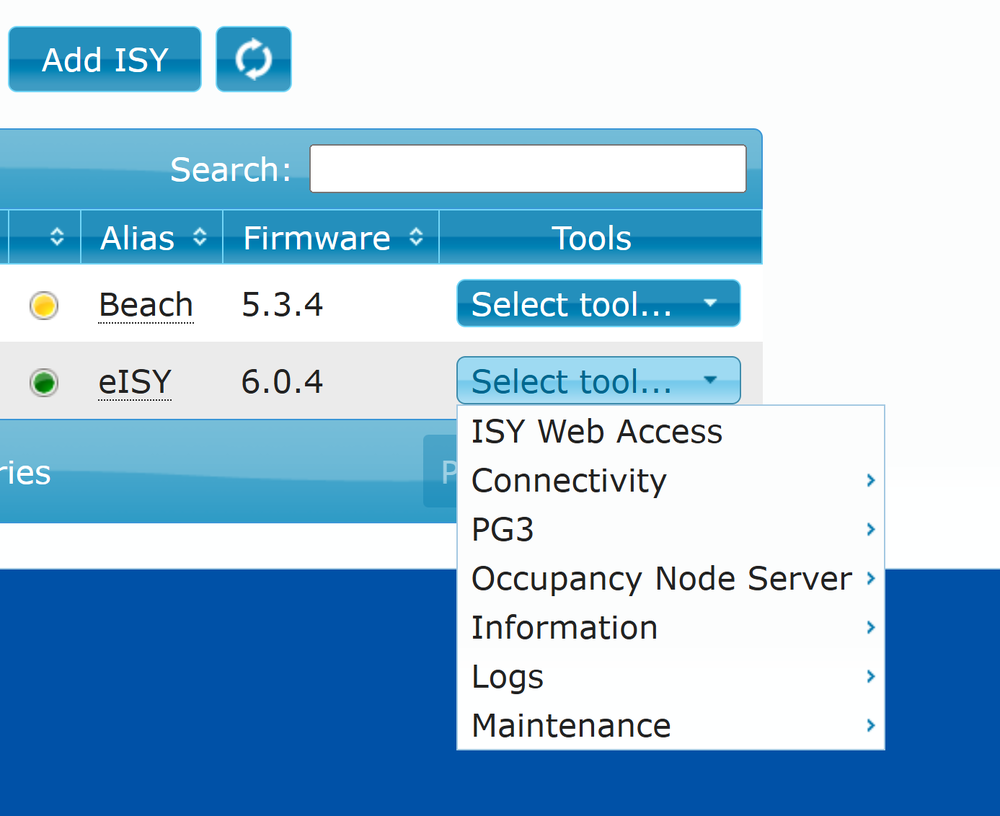
Mine doesn't look like that
-
I may not have explained myself well. I have a portal account. Have had since the portal was created. I've been on ISY since inception. From within my home I can browse to http://eisy.local and that brings up the eisy-UI dashboard from which I can add and edit tiles, pages and so forth. I can't seem to access that same dashboard from a computer outside of my local LAN. I assume there are one or more port forwards that I can set up on my router so that I can get to it but I can't seem to work it out. ISY Web Access from the portal takes me to the older, blue ISY web access page. URL to ISY under information takes me to a page that doesn't load URL to Admin Console takes me to a page full of XML results
-
Is there a port forward I can set up so that I can access eisy.local from a remote location? I've tried forwarding to my eISY ip on both 8080 and 8443 but neither one brings up the eisy UI from remote. I'd like to work on my tiles and pages while I'm away from home but can't seem to find it. I've also tried using both the admin console URL from my portal and the ISY URL from my portal but again - no eISY.local UI Thanks
-
Correction... It turns out that when I took the update some of my disabled programs were re-enabled. That's what caused the cycling
-
So I added a node to the interface. Just the header and an on/off switch. All of a sudden the node associated started turning on and off and on and off repeatedly. I went in to admin console and could see it toggling on/off etc but there was no program running that could account for it. I couldn't stop it - had to reboot
-
Thanks.
-
I just performed the upgrade to the new UI. Quite slick - I like it. I'm trying to add a node that is a scene, though, and they don't show up in my nodes. Is there a setting somewhere to make those show? Turning on/off a device without affecting the scene throws my switches out of sync. Thanks
-
Thanks Paul, I'll take a look at that. I think I had something like that installed years ago to use it as an android appdev device for my son. I'd forgotten about it. Now that you mention that there's probably an android VM that would run on W10 too..... Appreciated.
-
I have an MS Surface 10 that is currently not being used. I was thinking of wall mounting it and turning it into an HA controller but unfortunately there doesn't see to be a UD Mobile app for the Windows platform. Is there another frontend that someone can point me at that has a high WAF?
-
Thanks. Turned out to be a combo of adding port number and it not being https on my internal network Much appreciated Thanks - I'll try that next time. I didn't realize it used different credentials depending on where the login was coming from. Appreciated1
-
Not my first rodeo... not even close. 20 years or so at this now. So I cleared my Java cache, deleted all applets. Re downloaded admin.jnlp. I run the console and it doesn't find my local eISY. So I manually enter the url - https://192.168.0.172/desc ..... not found So I go to my portal and see my eISY is online with internal IP 192.168.0.172 - grrrr - seems like it should work. OK let's try another way - I copy the url from the portal page and add it in the console. Now it finds my eISY but won't accept my credentials. I've encountered this before - when I try to log in via the cloud my credentials don't work but when log in via a port forward or local network they do. So now I can't log in to my eISY neither within my local network (as it's not found) nor via the cloud (it won't take my credentials). Any idea what's up?


