


Peter Henneberry
Members
-
Joined
-
Last visited
-
I removed, and reinstalled the plugin again. Repaired the two thermostats this morning, and so far both are reporting correctly when the HVAC fan is on.
-
Fan state has stopped working (sometimes). I have two Ecobee thermostats, and have ISY tell me when the fan state changes to ON so it will run a then statement in my program based on the time of day. Both work at times, but usually only one is working with the fan state. The other I can see from the ISY Admin Console that it shows the fan state is on, but the program rarely is triggered. I've restarted the three polyglot plugins, and sometimes it starts again, but most of the time it doesn't. Using Ecobee ver 4.1.10 standard MQTT ver 0.50.8 free HomeKitHub ver 2.0.17 Professional Polisy ISY 6.1.1 (performed the same way on 6.05) Any others experiencing the same issue, and what did you do to correct it?
-
When I go to SSH and issue: sudo pkg upgrade udx isy eisyui pg3x I supply my admin credentials, and then SSH shows "No repositories are enabled" Figured it out, I had to issue: sudo repo.util prod to first activate the repository. Upgrade went fine after that, and all is working including integration to Home Assistant. Appreciate the support from this forum.
-
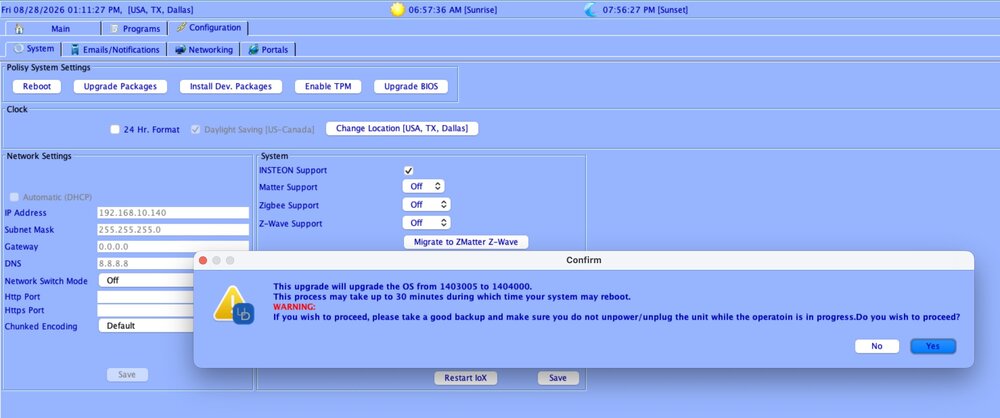
Upgrade failed, and I'm still on 6.0.5 From the AC, I clicked to "upgrade packages" then went to SSH to look at the logs, as it was over an hour and nothing seemed to be happening. I am running I0X 6.0.5_10, and the /var/log/messages shows that only one file updated: polisy pkg[17912]: udx upgraded: 4.5.0_7 -> 5.0.0 I rebooted my Polisy, waited until everything finished discovering (20 min), and then clicked to Upgrade Packages again, this time IoX presented a different message: (see attached file) I accepted by clicking Yes, and after 90 minutes, still no activity in the /var/log/messages file. I rebooted a second time, and click again to upgrade, no difference, nothing is upgrading according to the /var/log/messages file Thoughts?
-
Here is the response from Netro (dated July 12, 2026) We would like to explain that we released the new Public API V2.0 in October 2025. To better protect users’ sensitive information, such as device serial numbers, only users who were already using API V1.0 before the transition are allowed to continue using V1.0. All other users are required to use API V2.0. After checking the issue you described, it appears that the current plugin (version 0.1.18) is still using the older API V1.0, which is why the connection is not working properly. The plugin will need to be updated to support API V2.0 for new users. We also noticed that the current plugin may have some compatibility issues with the new API.
-
After adding the serialid (which is my Netro Spark serial number that I see on the Netro app, settings, under controller), I click save and than restart. Message pops up that says SerialID <serial#> generated ERROR, check device is Online and that tokens are available. I checked that I typed the serial correctly (cleared and retyped), also removed Netro plugin, rebooted Polyglot, and reinstalled plugin. I checked that the Netro controller is online. I have sufficient tokens as there has been no excessive polling to use them. I also waited 2 days after it was configured, still see the error message. What has others done to configure this plugin?

-
io_guy, when's the next version coming out where I may manually request a pin. The ns stopped working two days ago, I stopped, started still with no success. I then removed it, along with the app on the Ecobee site. Then I readded the ecobee ns, and no pin, instead a lot of error messages dealing with permissions. It appears the previous ns didn't successfully remove.


