


EJones01
Members
-
Joined
-
Last visited
-
That was it. Updated fine. Thank you!
-
Do you know if this will be enabled/allowed from the Jave console in the future. I'm not that familiar with ssh control of Policy. I get this error when trying that upgrade command. No repositories are enabled. (My OS is 14.3)
-
I tried updating packages but get nothing past 6.0.3 ?
-
This new Z-Wave Presence switch is what I've been looking for for ages. Its works so well and is easy to configure. UD picks it up well and programs using it are lightening fast, better than Insteon sensors even. Going to put these in every dark room in the house! Red Series – Inovelli
-
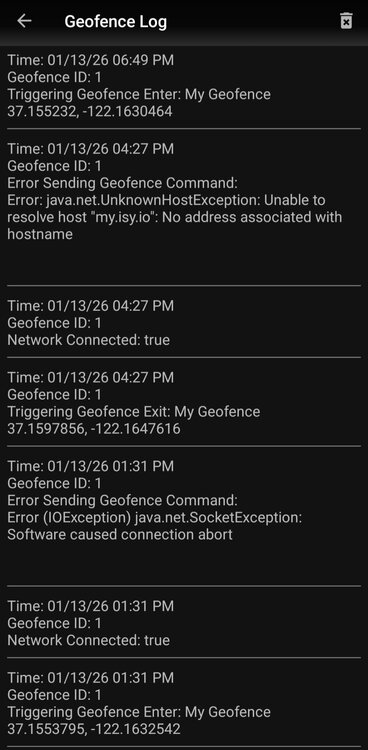
@Javi Hi again. I'm still getting GEO fence errors that cause it not to trigger 50% of the time, see image. Also, but probably unrelated the past couple of weeks the GEO is being triggered at random times during the day....and night. This is new, and I know it may be the OS but wanted to report in case others start seeing this. Android latest.
-
The release announcement says Polisy and the install notes say polisy too so I'm presuming it should work. Will update later today....
-
I got it to work locally. really excited now as the Sofabaton can now control anything. Here's a command to turn a light on in Sofabatons setup.

-
This also helped
-
Thanks a million for the links! Its a bit over my head....but I just turned a light off from a web browser ! I had to enter my credentials.......can someone show me where to embed them in a link like this? https://my.isy.io/f161bb3d23afbcddf12bb8832ef5a1b86f46d22fc2913089834c8933443/rest/nodes/1A E8 60 1/cmd/DOF
-
I'm looking at how to control programs from the Sofabaton remote. it can send http post commands. Can I do this, is there any documentation on how to in UD? Thanks
-
Looks like a phone reboot was all that was needed. Weirdly UD mobile now shows the correct last time I went through the fence...4 hours ago. Thanks
-
I have never seen those manual controls on Android. The logs do not show any location changes...but Android settings do show that its asking for them. I wonder if there's been a change in message format or something that the App is not able to read now.
-
The GPS has worked flawlessly for months. 3 days ago it stopped. I see in my Android settings that the app is still requesting the location but its not triggering the GEO fence anymore. The UD Mobile logs do not show updated locations anymore so I'm presuming there's a disconnect between the ask for location from the App and then not getting it. App still has full permissions. Was there an update?
-
Updated Policy with no issues just now. Rebooted by itself and all online.
-
Oh my, I remember doing this when I created these years ago. Thats for the brain jerk! Whilst I can see the extra flexibility this feature may offer, for me it's a needles extra step for my many scenes with multiple switches controlling them. Anyway, thank you! All good now.


