


bmercier
Employees
-
Joined
-
Last visited
Everything posted by bmercier
-
@glarsen, @sjenkins Please PM me with the result of: /rest/profiles?include=editors,nodedefs,linkdefs /rest/nodes
-
Will be fixed in the next release, thanks
-
There has been a few reports of errors like "Error loading node <node address>: Profiles loaded but nodedefs missing" Does anyone have tiles configured with insteon successfully? If so, did you have to install isy-5.9.1_21.pkg ? Anyone with isy-5.9.1_21.pkg that still can't get insteon to work? If so, please restart the isy service. To troubleshoot this further, take a non-working node and use this url: https://eisy.local:8443/rest/nodes/<node address>/profiles The error normally means that there are no nodedefs at this url.
-
When eisy-ui is installed, IoX does not connect to portal. eisy-ui does. So if you have no portal connection, make sure eisy-ui service is running. If it is, restart it and watch the logs.
-
Please install this IoX build: isy-5.9.1_21.pkg sudo pkg add -f isy-5.9.1_21.pkg sudo service isy restart The latest IoX published release might be missing required fixes.
-
This is due to the self-signed cert. You shoulf be able to: Click "Advanced" in the Edge error page. Choose "Continue to eisy.home.local (unsafe)".
-
This is indeed material-ui icons. eisy-ui provides the same icons, but looking into in, I figured that the google/fonts and MUI icons page just have a better search using synonyms. As an example, find any icon on google/fonts, and you will be able to find it on eisy-ui using the icon name. Anyway, I found out where to get the synonyms and will implement that. Thanks for pointing that out! The 2nd icon is used to resize the tile vertically based on content. It's just easier to use this than dragging the corder. The 3rd icon is used to move the tile to another favorites page. This can be useful if you configured a complex tile and just want to move it. Will add the tooltip, thanks.
-
Ok thank you. FYI I release 0.4.1 which should be more robust. It's no longer using npx, it's now using the prisma bin from the pkg. It will no longer be dependant on connectivity, it does not need to have a HOME var set, etc...
-
The sharepoint link won't work with curl. This downloads the sharepoint download preview page. Please use use your browser to download the file on the desktop. Then use scp to send it to your eisy. Alternatively, after downloading it to your PC, you can look at the browser console and capture the url used for the actual download. That can then be used with curl.
-
Thanks for your invaluable feedback. Thanks will fix that. > 2. I wish the node list was fully collapsed when I opened it instead of having to scroll through and close everything just to check if all of my nodes were there. Searching is probably best for something like that. But then if everything is collapsed, the serarch would uncollapse it to show results. > 3. While we're talking about the node list... As I was going through and collapsing them, they would all spring right back open at once after being collapsed for a few seconds. It didn't happen every time and I can't seem to reproduce it intentionally. This probably happens with the node list is refreshed in the background. The data is cached, but at some point it becomes stale and gets refreshed. I'll see what I can do about this. > 6. Showing nodes in their folders is on the roadmap, right? Yes > 7. The "Home" link and the fold out menu link for "Favorites" both taking you to the same page is a little cumbersome. Eventually the Home will be configurable. For now, it's the Favorites. > 8. Trying to set up a tile on a new dashboard and.... only option is Default Tile? Then why is it an option? This depends on the nodes capabilities. eisy-ui looks at the command and properties and other things on the node to figure out what are the types of imports possible. But there seems to be an issue in your case- See 10. > 10. Loading with an error that prevents it from being usable? I think we have different definitions of success /s Good point about the success message. Can you please upgrade packages? eisy-ui requires the latest IoX, and by the looks of it, it is not. > 11. Tried to edit that widget to see if it's a property that I can change, and I was surprised to see that the widget is allegedly including all buttons. By default, the widget includes all buttons. You should be able to edit the widget and pick the buttons you want. But because of the problem in 10, you can't. The "profile" is not loaded. > 12. I tried adding the rest of the nodes for that keypad and editing the commands and properties, but there were none available. Same problem as 10. Fixed, thanks. Needed one more coffee.
-
eisy-ui 0.4.1 changes Updated the DB creation process to use the prisma bin instead of npx Portal proxy connection keep-alive set to 30 seconds. To install eisy-ui 0.4.1 Download this package to your eisy: eisyui-0.4.1.pkg Install: sudo pkg install -f eisyui-0.4.1.pkg Start the service: sudo service eisyui restart
-
It would be good to figure out what happened. You saw the database file in the db directory? Did it have zero bytes? Do you recall doing anything in particular that might have impacted the install?
-
I reproduced it by deleting the database. Not sure why, but it looks like the package install failed to install the database somehow. And if there's no database, nothing will work. To fix this run: cd /var/eisyui sudo ./scripts/prisma_deploy.sh sudo service eisyui restart
-
Please run a package upgrade. The latest IoX is required. Let me know if that fixes everything, or not.
-
> pkg: archive_read_open_filename(/usr/home/admin/eisyui-0.4.0.pkg): Unrecognized archive format If feels like there has been a problem getting the pkg to your eisy. How did you download + transferred it to your eisy? Using scp?
-
Please install using sudo. Forgot to mention that.
-
For alpha testers, please provide feedback on this post:
-
For eisy-ui alpha testers, please post your feedback here. Ref:
-
Hello, Here's the first alpha release of eisy-ui. If you are familiar with SSH, you can proceed with a manual install of eisy-ui for testing purposes. For now, I'm expecting just a few installs by technical folks. If you are not familiar with ssh, please wait for the beta release. If you have installed this alpha release, please give this post a "Thanks" and feel free to provide feedback. Prerequisite Please run an Upgrade packages from the admin console. eisy-ui relies on new APIs available only on the latest IoX. The latest PG3x 3.3.19 is also required. To install eisy-ui Go to the latest post in this thread to find the latest alpha release Install: sudo sudo kg install -f <package name> Start the service: sudo service eisyui restart Using eisy-ui Launch your browser to: https://eisy.local Login with your portal user and password eisy-ui features Favorites page This allows you to create a dashboard like page to interact with your nodes. Organize them the way you like it. Just display the properties and controls that are relevant to you. Use widgets to create an intuitive interface to manage your lights, color bulbs and thermostats. Group relevant nodes within the same tile. PG3x integration You can access PG3x from within eisy-ui. For the most part, it's just the same PG3x served within iframes, except that there is now a single sign-on. In PG3x you used to have to login with your IoX user and password, and there was a separate portal login that was required. That portal login could be reset using System | Switch Portal Profile. This is no longer the case. With eisy-ui, you login once to eisy-ui with your portal user profile and can access PG3x. That's it. Portal connection IoX used to make the outbound connection to portal. This is no longer the case. When eisy-ui is installed, eisy-ui connects to portal instead of IoX. This change is transparent. This however lays the groundwork for multi-connections to portal which will allow parallel requests from portal to eisy, and thus enhance speed. Rest API The IoX rest API can now be accessed on ports 80 and 443. However, this works with your portal credentials instead of IoX user and password. The rest API can also be accessed using a JWT, but that's beyond the scope of this post. Logging eisy-ui's log is on the file system as you would expect, but it is also sent to our cloud log server. Eventually there will be a setting to allow/disallow this. But for now, this can't be disabled. This allows us to troubleshoot problems that may arise more easily. Backward compatibility Please note that IoX can still be accessed directly on port 8443 and 8080, using IoX user and password. PG3x can also be accessed directly on port 3000, using IoX user and password, just like before. However, it is not recommended to switch between using PG3x from eisy-ui vs directly on port 3000. If you do so, you may have to use System | Switch portal profile when using PG3x on port 3000. The only permanent change when eisy-ui is installed is that IoX no longer connects to portal. So if your eisy is offline, make sure the eisyui service is running. FAQ Can I see the eisy-ui log? At this time there's no UI to see the logs like PG3x does. To see the logs in real-time: tail -f /var/eisyui/logs/ui-current.log What devices are supported? https://eisy.local/nodes, which is the main page to see your nodes is very similar to what you are used to in the Admin Console, and this supports any nodes. The Favorites page likewise supports any nodes. There are specialized widgets that allow to make a better UI like switches, sliders, etc. You can create a nice UI for thermostats and color bulbs in particular. There is however no specific widgets for locks. Only the "Generic command" can be used for those. There is also no supports for scenes or programs yet. I have a 994/Polisy, can I install eisy-ui? Unfortunately no. eisy-ui can only run on eisy. What's next? In addition to a nicer UI, the goal of eisy-ui is to replace the Admin Console. One of the biggest upcoming feature will be the ability create and manage programs. We will also make enhancements based on the feedback from this alpha release. Eventually, the Favorites page tiles will support scenes, programs and variables directly. This will allow such things as displaying the status of a node, but control through a scene or program. Here's a few screen shots
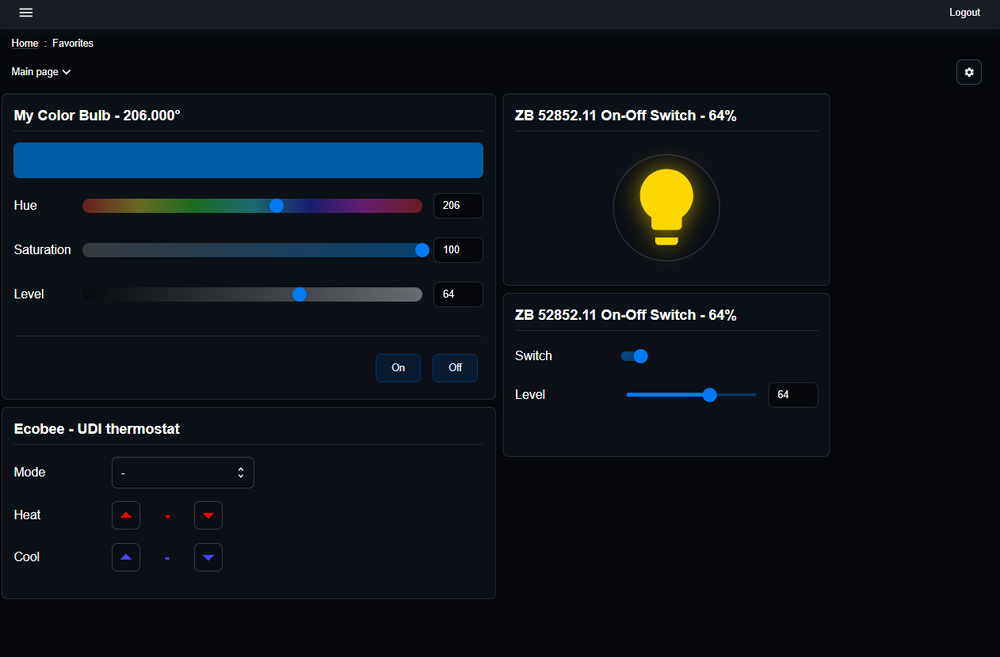

-
This error message means that it is receiving too many requests from a user interface - either UD Mobile or a web browser. This is tripping the rate limiter. Check the browser log for unusual activity. Check the PG3 log as well. Something might be stuck in a loop somehow. A reboot might be required.
-
Today, the main difference between Polisy and eisy are the hardware capabilities. On the software side, both are similar. However, one big difference is that some of the upcoming features will only be available on eisy: The matter-server, which allows to expose IoX devices to matter & homekit. The new eisy-ui service The new eisy-ui service will provide a unified access to IoX, PG3, and some of the portal features as well. It will also serve the new web UI which will allow you to have a web-based customizable dashboard-like UI. Eventually it will completely replace the java based admin console. Polisy will still benefits from updates to IoX and PG3, but new features like the matter-servert and eisy-ui service will only be available on eisy as it needs that extra power thar eisy provides.
-
Hello everyone, We will have a short portal maintenace next Tuesday March 18th. Between 4am and 5am PST, your unit will briefly disconnect and reconnect to portal. The purpose of this maintenance is to update certificates. Benoit
-
After the latest mac update, users must now enable local network access for chrome and Admin Console. The permission dialog is only shown once, so if you deny/ignore it, you will need to manually enable on MAC > System Settings -> Privacy & Security -> Local Network

-
Just an FYI if you are using a Mac: After the latest mac update, users must now enable local network access for chrome and Admin Console. The permission dialog is only shown once, so if you denies/ignores it, you will need to manually enable on MAC > System Settings -> Privacy & Security -> Local Network
-
If you use a 994, the only option is 1 year.


