


Illusion
Members
-
Joined
-
Last visited
Everything posted by Illusion
-
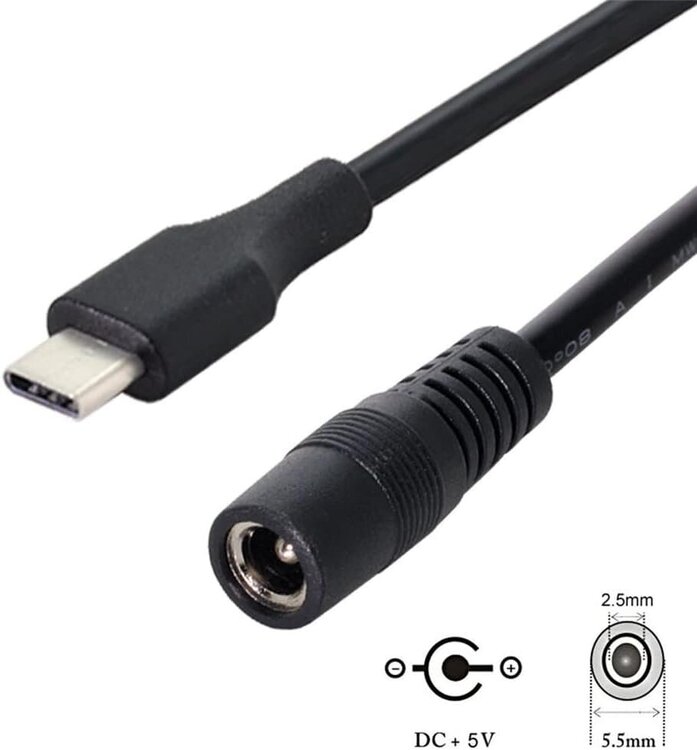
Okay, my solution is in place and seems to be working flawlessly. All I did in the end was buy an adapter cable, pictured below, and connect that to my APC DC UPS barrel connector. This USB C connector is then connected to the power input port on the eisy, not the full function port. I did buy a USB C meter with PD triggering and did lots of testing before connecting my new eisy R2 to the power. It seems to me that the warning about using any other power supply with the eisy R2 is a bit backward. It is the included power supply that should never be connected to anything else. It spits out 12V all the time and ignores all PD protocols. It will have a good chance to wreck anything else you plug it into. But this version of eisy does seem like it could take a PD compliant power supply through either USB C port, but I am not going to be the one to mess with that as my solution works for application very well. Thank you all for your advice and direction.
-
I personally would recommend against removing them from IoX. At least at first. Personally, I would stop all IoX programs. I have a program to do that, but if you do not unplugging the PLM would work quick as well. Then turn your switches on and off and stuff. If problem is gone, it is an IoX program. If problem is not gone, do not remove them from IoX. T (Too much unnecessary work and you loose lots of fun troubleshooting options). Next I would compare device links. Alt click on one of the switches in Admin Console>Diagnostics>Show Device Links Table. Window pops up and IoX queries the link table stored in switch. When done, click on compare. If everything is not identical, that is probably your issue. Restore devices in the alt click menu of the device. If all that does not work, then I would factory reset the devices and see if the problem still persist. If it happens after factory reset you have bigger issues. And yes, you can absolutely program Insteon switches locally. I had an entire Insteon system that was completely locally programmed at the devices pre-ISY. It was horrible.
-
Further research seems to support that the 12V input port is a hybrid port. While it does not support data xfer, it appears to support the PD protocol. My research says that PD negotiation with this port is optional. It can accept 12-18V without negotiation which is what the included adapter is. The full function port appears to require negotiation as it is expecting 0V before PD negotiation and may be damaged by connecting a dumb 12V supply that is always on. It seems that they did this specifically so that you could power this small computer from a battery or power bank that has no PD ability, as long as it was 12V. Also the range of 12-18V seems to be because lots (maybe even most) USB C power supplies do not support the 12V profile. The 12V profile that was part of PD 1.0 was not included as a mandatory voltage in USB PD 2.0 & 3.0, so now most power supplies jump from 9V directly to 15V skipping 12V altogether. But this learning I have done makes me wonder if the warning label UD put on the device is a leftover from eisy that just came over to eisy R2? It sure does seem like you could power this device from a USB C Power Delivery compliant supply that supports 15V which would be any that advertise as 27W or greater capacity.
-
This is actually really great info. Yeah the power supply could really mess up another USB C device, but looking at the exact computer on Amazon: https://a.co/d/h0XQsML It looks like the OTHER USB C port is fully PD compliant and can be used as a power input! So for sure I feel like I could use a PD compliant UPS like https://myliontech.com/en/product/mylion-muc66-mini-ups-type-c-pd-65w-in-out-lithium-battery-pack-backup-uninterruptible-power-supply-for-wifi-router/ and plug it into the second USB C port. This is really a great link too. Thanks Brian. Based on this I am first going to try an adapter cable going from barrel to USB C. I am also going to buy a USB C meter/tester and play with that before connecting to my eisy.
-
Well, ideally for me would be if I could continue to use my APC DC backup. It outputs a regulated 12V up to 3.5 amps on a standard DC barrel connector. This plugged directly into the Polisy. It should be able to power the eisy for like 12 hours or more. So do you think a simple adapter like: https://a.co/d/3PLKt9u Would work? I know 12v is 12v, but my big concern is polarity and the USB C pin out. I would assume this is very common and manufacturers (including Universal Devices) would use the same pins for power, but I also would not have assumed that UD would have a USB C port that does not negotiate using the PD USB standard or at least have a way of protecting the eisy from damage. USB C power supplies are so common I was surprised to see a damage warning on the device with the public having access to such a variety of power supplies that terminate to USB C. So I am just a little scared. Regarding device sync. Yeah, I have a delayed activation relay connected to an I/O linc. 2 minutes after power is restored and stable the I/O linc closes, the ISY sees this and notifies me and does a query all.
-
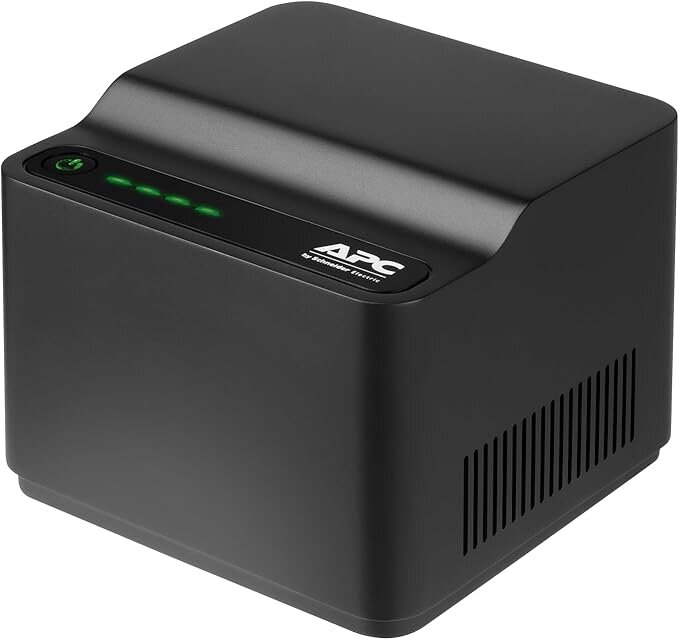
Just set up my new eisy R2. I am coming from Polisy so the power supply form factor is different. The eisy uses a USB C 12V port. But the top of my new eisy R2 had a sticker that said to only use the factory supplied power supply as it will be damaged by anything else. What is special/unique about the eisy USB C power input? I thought USB C was generally supposed to be kinda universal and sorta protected? What is special/unique about the UD supplied power supply? The reason I ask is because I have some extensive programing that relies on countdown timers. (long ones) I am coming from the ISY 26 to the 99i to the 994 to the Polisy. With each iteration I have had to implement a new UPS solution to keep my ISY live across blackouts. Each time I have looked at alternate ways of achieving my objectives that are met by my long timers and never been happy with them. I have built further systems and protocols that rely on my ISY always being on. Before I begin looking for how I am going to accomplish a UPS for the eisy R2 I wanted to make sure I would not damage my eisy. I know I could just get a normal UPS and plug the UD 12v power supply into it, but I have always preferred a direct DC UPS. The Polisy ran on a APC UPS Back-UPS Connect CP12142LI : The advantage to this is the device is further separated from the power line, there is no transfer time, and most importantly, without inverting DC battery energy to 120V 60hz AC only to convert it back to DC I realize vastly longer run times for the same size back up battery. Actually, the DC UPSs usually end up being less than half the size of a normal standby UPS. I feel pretty confident that I can find a suitable USB C 12V device that will function as a UPS, but the sticker makes me worried about damaging my eisy.
-
I have a Denon AVR-X2200W. I installed AVRemote and added the Denon in the "Custom Typed Configuration Parameters" section. I put the static ip address of the AVR in as the host name. In the Admin Console it shows "Denon AVR Online" as 'True'. The volume, power, and mute statuses seem to be right and updating. But the input always sits at 'tv_sat' and the unit does not respond to input changes in the Admin Console. I have tried changing 'Connect on demand' from the default 'false' to 'true' with no noticeable change. What does this parameter do? If the volume, power and mute status is correct, I am at a loss as to how to get the input to show the correct status and unfortunately that is the main data point I wanted to use. Any suggestions would be appreciated.
-
Polisy. IoX version 6.0.0
-
1.4.3
-
If my UD Mobile app is using a remote connection, the home screen at the top will say "Disconnected, will reattempt connection" It will show an attempt counter eventually just landing at the disconnected message. But it appears to be connected. If I go into controller settings is reports as 'Online' with Synchronize working fine. Devices show correct status once I focus on them, but do not auto update which is the behavior I have come to expect when on a remote connection vs the auto status updates I see when local. It does not matter what device I use, and it does not matter wether that remote connection is cellular or wifi. Running v1.4.3
-
It took me 4 tries to reinstall and get it working again. But then no configuration work or anything. Poof all working again! Thanks for this thread!!
-
Upgrade of OS to 14.1 and IoX to 5.9.1 has corrected the issue. I guess we never get to know what was going on. I am going on the theory that it was something in IoX 5.8.4 as my update to that firmware coincides pretty closely with the start of the issue. Why no one else had the issue, and why we could not figure out what mechanism was the cause will remain a mystery.
-
Upgrade to wired Polisy went well. Only notes are I did not get the 4 beeps at the end. Did get beeps throughout. Took about 20m PG3x and system no longer show up at https://polisy.local:8443/WEB/sysconfig.txt) and https://polisy.local:3000 I have to use the IP address.
-
I am going to move away from system startup time research. I am going with @bpwwer view that this is an admin console bug. Reboot/restarts later in the afternoon were still 41s off, but the AM/PM differential went away. Based on the fact that the time displayed in the admin console, that ssh shows Polisy knows the correct time, and that the email I get from ISY on reboot is timestamped correctly in the message body by the ISY, I do not want to spend any more time on this. I did 6 hours of tests on this issue yesterday. I am not opposed to coming back to this, but I would like to focus my efforts on the fact that IoX does not restart if I am not connected to the UD Portal. I think the answer lies in that. Either that or figuring out what is different about stopping internet access for the IoX vs other forms of internet interruption. I think that could give us a great data point. Data point #4: and Variations on those tests #3: @Geddy Regarding your idea of changing networking cable and topology, I thought that would be a good thing to take as far as I could while testing the startup time anomaly extensively. So I strung ethernet cable together to run my Polisy on my neighbor's network. So different WAN, different LAN, different cable, different router. Same results. IoX restarts unless I break the connection to the UD Portal.
-
Okay, here is what I currently have investigating the time/NTP issue. @Guy Lavoie Thank you for that suggestion. Can confirm that Polisy has correct time as verified through your ssh suggestion. The time is not always so far off. I restored internet at 11.50.30am and system shows: I restored at 12.02.30p and system shows: I restored internet at 12.09.03p and system shows: I am not sure this strangeness has anything to do with my issue at all, but is fascinating. I was wrong about this only happening with the internet drop and restore. There is the same time discrepancy if I reboot the Polisy or 'Restart IoX' from the configuration pane. The same discrepancy shows up if I do a remove/restore power to the Polisy. I had missed this by not paying attention to the AM/PM or because all those test were done in the AM and being off by a few seconds during a reboot is impossible to detect because of system startup. It is off by a few seconds and always seems to show only AM. I will do more testing in the afternoon.


-
@BigMojo Oh wow! I had not even caught the AM/PM differential. Interesting
-
@Geddy Just tested with different network cable connected to a switch connected to a mesh node in another part of the house. Same results. @gregkinney 1. Network cable replaced. 2. Tested on completely different power supply. A battery, so no wall outlet or circuit breaker involved at all in this test. Full isolation from home power. Same results. New Data point! I was doing all these test by just pulling the ethernet cable out and plugging it back in since I had taken the effort to get to the back of my Polisy to change/reroute the network cable. Most of my tests are done by shutting off the WAN in the router just because it is the easiest. But what I realized on one of the restarts, the restart time did not seem right. Because it is a physical removal and restoration, I can know the exact second that the internet was restored. Internet was restored at 12.06.15p. IoX System status shows a startup time of 12.05.34!!! IoX is showing a startup time 41s BEFORE the ethernet cable was plugged in! I do not know if it is relevant, but I know computers like correct time. If I select the restart IoX button, or I hard reboot the Polisy, the startup time is correct. (The system time in the Admin Console is correct in all cases)

-
My Notification plugin will always notify all my devices that have UD Mobile with a message "Notification Node Server Standard Edition Startup." any time the Notification plugin starts up. I do not seem to be able to stop this. Other messages like "PG3 is starting" respond to the "Plugin Notifications (PG3)" group, and messages like "(Polisy) is now offline" respond to the System Notifications group.. But I do not seem to be able to stop the notification from this plug in. It goes to every device that has UD Mobile. Is there something I am missing?
-
That is a good one! I started to test this as a factor but stopped when I realized that the test where I unplug the ethernet cable preserves WAN IP address. I suspect that a reboot of the router does as well since the modem retains power. But turning off my internet over and over throughout the day creates other problems that I have to limit. So much so that I really wish the 'block internet access' switch would work to cause the issue. But your suggestions does make me think that there is something there. So my Polisy has a reserved IP address. The Polisy is not set to a static IP internally, but the router always gives it the same LAN IP address. But if I 'block internet access' for just this device, the LAN IP address remains constant. But this should also be true if I remove power to the ONT. The LAN never goes down in that case. I am still unable to reconcile the difference between Data points we have so far: #4 and #5 I feel like there is a piece of information here that if I could isolate it might inform people smarter than me.
-
There is new OS for the Polisy coming out soon. UD and I plan to install that and continue testing, but Michel has low confidence that it will correct this particular issue. We were focused on hardware right up to the point that I can make it stop by severing the connection to the UD Portal. That is where we kinda hit a wall. Unfortunately, I do not have other hardware that I could switch to, and that would be a major endeavor. Our current plan is to install the new OS soon and if the issued continues do some network traffic monitoring. But I started this forum post because people much smarter than me do not think that is going to fix anything.
-
I have lots of Insteon, a little bit of Z-wave. I have the Zmatter board. Power supply is an APC DC UPS (CP12142LI) https://www.apc.com/us/en/product/CP12142LI/network-ups-12vdc-lithium-battery19500mah-bms-4led/ I have considered altering the power supply for testing, but I cannot bring myself to make the effort because IoX does not reboot unless the portal is connected and I loose and restore internet. I cannot see how a different power supply would alter that variable. TCP/IP is used extensively in my plugins and networking module.
-
Ooh, that is a good one! I like it. But alas, no change. IoX still reboots. I turned off "System Notifications", "UD Communications", and "Plugin Notifications" for all groups/devices. I also stopped the Notification Plugin for this test. Yes. I kinda have to. I did not use to, because my Polisy and my IoX programs are built to never restart unless I actively and manually do it. I have over 300 nodes, so it is a long time to 'Query All' if I am working on something that requires a reboot or restart. My Polisy is on a DC UPS, so does not loose power unless power is off for a long time. But now that my ISY restarts an average of once a week or so, I have to have 'Query at Restart' enabled or my ISY does not know the status of any of my devices. My whole wake up programs fall apart in this case. Disaster! I really feel like we can move away from the program angle. Disabling ALL programs does not stop the behavior. I admit to being a somewhat poor program writer, but I have been pretty great about never creating any kind of looping program. Surely UD would have seen that in the logs as you suspect. I like your thinking that the connection to a wifi device on the local network is involved, but the only thing I have like that is my Tempest weather station and associated plugin. But I feel like that is excluded by the stopping PG3x test. Further, my ISY does not get the weather info from the internet, it gets it locally from the LAN. And even if it did, I feel like the severing of the connection to the portal causing a change in behavior would exclude that since it has nothing to do with the portal.
-
Thanks Geddy! In my version of Mac, I think it is Option + Command + R to 'Reload Page From Origin' but that worked. Thank you. On Sequoia Command + Shift + R is 'Show Reader' Command + R is indeed 'Reload Page'
-
@RRalstonLogs have been captured and sent to UD. If your theory were correct, what is the relevant difference between having my IoX connected to the portal vs not connected to the UD Portal? Would not the electrical status change be the same either way, so we should see the same results in those two scenarios?
-
@Guy Lavoie Interesting. I had not, but now I have. Will answer here and update the original post to include data point. Disabling all programs does not stop IoX from restarting on loss and restoration of internet.


