


awysocki
Members
-
Joined
-
Last visited
-
I am trying to connect a single S505 Tapo switch to eISY and not having any luck. It sees the switch but fails on the 15 second timeout when completing. Not sure if its me or the software. If there is a log I can watch or review to give me clues??? I was hoping 6.1.1. (which I have installed) would work better with Matter, but looks like they spent more of their time working on WEB Based Admin Console. All good stuff. Just doesn't help my Tapo S505 switch
-
I've tried adding Tapo s505 switches and not having much luck. Tapo can see it, Amazon can see it, Google home can see it, but when I try UDMobile it times out the first time. Second time it sees it, when I click Done, it says this can take a few minutes, but then time out and fails. I've tried sharing via Tapo app and Amazon app, but give the same result. I'm encouraged to see you have added the plugs, its not easy to use switches so I might get a Tapo P125M to see if I have better luck. I was excited with 6.1.1 thinking more fixes were added but still no luck on my end. For the record, I go into Tapo GEAR for device -> MATTER SETUP CODE copy the code THEN go into UD Mobile, Matter -> + Add type that code in, SUBMIT and wait Click the IM READY button -> connecting to Device shows my device then click DONE. Please wait while Matter ..... Then ERROR: Could not discover device time out. No matching matter commissioning server found within 15s OK
-
I'm having the same issue with a Tapo TP-Link matter on/off switch. I added it to google, then added it to eISY by share code. It worked for a few weeks then stopped working. I deleted it everywhere and reset the switch. Added it back to google and tried to add it to eISY via share code and it just hangs and doesn't connect anymore. iox finder says I'm at 6.0.4 Don't know what else to try. I was able to share coded and add it to Alexa, Both Alexa and Google can control the on/off switch, but I can't get it to add to eISY.\ Same boat, just different switch.
-
I will second this request. My use is I have a hot water recirculation pump, it would be nice to have a button by the sinks that need it to run to bring hot water up. Today I use "Alexa turn on hot water". But guest don't always understand that, so having a button to press makes it even simpler. I haven't found any other buttons. I have 2 of these, they somewhat connect but the button pressed events don't show up.
-
I called into support. they asked for access into my eISY and then things started working. Don't know what they did, but I'm good.
-
NEVERMIND, I was trying this on the other side of the house. I just factory reset the switch, added it to google home, got the share pin code, and added it to UD Mobile using the code was standing 5 fee away and after about 45 seconds it added it. I think I shot myself in the foot trying it from the office. I though it was all done via wifi where I think it uses Bluetooth for some of it. I have my switch added
-
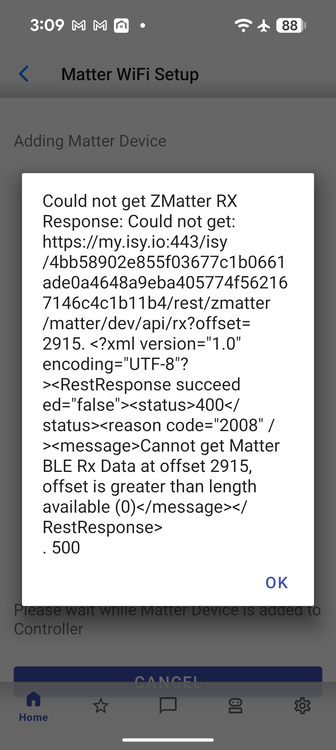
I'm not having much luck, I think I have tried both ways 1) sharing the device by getting the pin code from Google Home, and 2) trying from a factory reset, then adding it in. All using UD Mobile app. I just get errors like Scan already started 500 (OK) or this error. I posted as the image.
-
Uninstall and reinstall does the same thing. AI says the cloud has a corrupted device listing. Causing the problem, I just didn't know how to clear the cloud
-
This morning trying to play around with Matter devices and seeing if I could get a device connected. Now when I run the UD MOBILE app. it loads up, I see my devices, then about 2 seconds later I'm looking back at the phone launch screen. What I have tried Uninstalled the UD MOBILE app and reinstalled it. Go thru all the steps and 2 seconds after the display of my devices, it crashes Did a complete interview of my Z-Wave devices from start.jnlp Rebooted my eISY - Pulled the plug Ran Upgrade Packages and did the reboot when it said to. I'm at a loss what else. AI says to do some weird stuff like deleting my profile and adding it back in. Setting up a second device via ip address, but the prompts AI says I should get don't match the UD prompts I see. Everything works from the Java admin screen, just not the UD MOBILE app I'm at 6.04 on eISY 1.5.2 on UD Mobile
-
Thanks this is clearer to me now. I was trying to do it from the Java Admin page, not the phone app. Sound like this will work when I get my app working again. Seems when I upgraded everything to 6.0.4 UD Mobile crashes. Don't answer here. I'll open a different post. Thanks
-
Can you or is this explained somewhere? How you would set this up. I just installed a TAPO MATTER switch, Connected it to google home I can connect it to Alexa/Amazon if that is easier. but I don't see how I connect that pipe to UD. From google home I see all the other HA systems but UD wasn't listed. So just trying to understand how to connect Tapo matter switch to UD Thanks
-
I don't think its my Java cache because my.isy.io also says its down. since the reboot. Right now, Java start.jnlp can't connect, My UD Mobile can not see it. https://my.isy.io says its off line. I've rebooted the eISY a few times now, wait 20 minutes and still its off line. So trying to dig deeper to look at the unix logs to see what isn't running or what is crashing?
-
I noticed that eISY was updated for a new interface. So I java admin into my machine and clicked on update/upgrade Left the system overnight to do it thing. I know sometimes it can take a few minutes. The next day there was a message on the java admin page that a reboot was needed. To go to system and click on reboot. I did and now its dead. Nothing loads up and I can't get any of my ISY screens to show up. The only good news is that the system does connect to the network and I can ssh in. But I'm lost as to where to look or what to check as to why the system isn't loading. Any logs I should start in on? Thanks
-
I'm Following along on this page => https://developer.isy.io/docs/getstarted/dev_env going to use VS Code on my windows machine. I'm going to be remote because I can't put a monitor and keyboard on my device -- its in a closet. When I get to step #2 its not finding the IDE script. I've update the eISY to 14.3 and installed the dev packages from the admin screen but when I connect its not finding this script. Thanks Andy
-
Had to pick up some on/off switches for work. We were using KASA so I picked up some new ones (Kasa KP125M ) They now support MATTER. From my quick read of the forums, ZMATTER is for the support of Zigbee devices that support matter, I'm guessing over the zigbee network. Will my EISY support MATTER over ethernet/WiFi? Will it support the Kasa devices that support matter? Just learning so trying to understand this all.

