


awysocki
Members
-
Joined
-
Last visited
Everything posted by awysocki
-
I had no plans on switching either, but when you can get a dual pack of switches from Tapo for $23.99 where 1 zwave on/off switch from zoos is $43.95 it starts to add up. Using the matterjs-server running as a container I have not seen any fallen off switches yet. Its been a few weeks, and yes I had to tweak my parms for mDNS, once I did that all my switches (battery powered - IKEA) that stopped working now work day after day. I was just hoping to have the same ability using the eISY Matter Stack and not have to run my own. Sonoff, Tapo and IKEA all seem pretty solid so far for me, Though hit me up in a month, I may have different feelings then ;-) I'm not going to rip out all my Z-wave items but if one dies I will consider a Matter device in its place.
-
I don't see any way to ADD new devices using eisy-ui Under nodes the (+) just adds folders. No love no drama
-
I have been playing with matterjs-server on a linux box. 80% of the devices I connect to it actually connect and I can turn them on and off or get status. but on eISY, I can not get any matter devices to configure. I have tried Tapo, IKEA, and Sonoff devices and can't get any of them to link up. Using Google home or Amazon Alexa I connect the device and have full control. I go into the setting of the device and create a share code (just the numbers). If I connect it to matterjs-server it connects usually within 30 seconds. Doing the same process with eisy. The flow is different. 1) go into Google home, find my device, go to setting and select USE PARING CODE, not QR code. 2) I have 15 minutes to complete these steps from this point. 3) I open UD MOBILE and click the + sign -> ADD MATER DEVICE 4) Select the option of ADD MATTER DEVICE WITH SETUP CODE 5) Scroll to the bottom and input my setup code, no spaces, not dashes click SUBMIT 6) it then opens GOOGLE HOME set up. (this I find odd) Google home pages says it found device and then goes back to UD MOBILE pages 7) ERROR: Could not discover device: Timeout: no matching Matter commissioning service found within 15s Why does UD Mobile open up google home search during provisioning? Anybody actually using Matter devices on eISY home?
-
Network Resources Not sure where to find it on eisy-ui? CONFIGURATION -> NETWORKING -> NETWORK RESOURCES I use it for NFTY.sh messages to my phone, Notifications are ok, but I use NTFY for lots of my programs other than eisy. Using java admin console it was easy to add them in, but don't know where they are on eisy-ui Thanks
-
I don't understand the goal of this? PG3 was a way to add features to eisy. I don't fully understand other than calling it something different PLUGINS vs PG3 what its buying us. I guess I just need more explanation what this means. When you say "for a while..." hasn't this always been the case even with PG2. That's a long while. So you are saying the plugins now run in the eisy-ui app/container/service...? Where before they ran in the PG3 app/container/service... which connected to eisy-ui? So you are removing a layer of code? We don't call them PG3 nodes anymore, we call them plugins? Just looking for a better road map of what is the goal and what should I be aware of. Thanks Andy
-
I change the node server name in the PG3 program. Gave it a new version number and did a restart of the program on the PG3 admin page. Then looked in NODES from the menu and it wouldn't update the node names. Yet in the Java Admin Console it did update there.
-
Testing as a developer. I changed the name of my PG3 Node server I was developing. For the life of me I could not get eisy-ui to see the new name. java version saw the new name when I quit and restarted it, but eisy-ui I could not till I rebooted the eisy box.
-
What is the proper way to get EISY-UI to reload its NODES. On UD Mobile you click on Synchronize, What is the equivalent on eISY-UI? Ctrl+Shift+R doesn't do it
-
I just published a temp fix for MATTER, I created a PG3 program that will talk to a MATTERJS-SERVER sitting on your network. If you have a machine running that you can install a container file for the matterjs-server, then you can use the PMATTER PG3 to talk to it. You'll find the PG3 in the NON-Production store and the project is at https://github.com/awysocki/PMatter/
-
Long story short... I have a single Tapo Matter switch I needed to toggle. I've tried to get it to work on eISY and their matter stack, but could not get the share code to take it. After reading the forums others have similar issues. Its funny when I reset the switch, Google, Amazon try to grab ownership of the switch while I'm configuring it in the Tapo app. But UD Mobile would not make it stick, it would see the switch, yet time out when you click the complete button after around 15 seconds. So I have a few hours open and AI coder at the ready. This setup requires another machine running on your network. I could have used my NAS or my Linux box, I went with my Linux Rocky 9 box, I installed the MATTERJS-SERVER container using podman. It works like a champ. Its was pretty easy and if you go to the project in the /support directory there is a readme explaining how. https://github.com/awysocki/PMatter/ Then install PMATTER from the PG3 store - currently in the non-production store, I will move it over once I get some Ikea devices to test with and make sure they are working. But for now in beta. All the devices the PMatter PG3 programs understands will be listed un PMATTER CONTROLLER in ISY Most of my testing has just been to turn on and off lights. Not much else. Enjoy
-
I am trying to connect a single S505 Tapo switch to eISY and not having any luck. It sees the switch but fails on the 15 second timeout when completing. Not sure if its me or the software. If there is a log I can watch or review to give me clues??? I was hoping 6.1.1. (which I have installed) would work better with Matter, but looks like they spent more of their time working on WEB Based Admin Console. All good stuff. Just doesn't help my Tapo S505 switch
-
I've tried adding Tapo s505 switches and not having much luck. Tapo can see it, Amazon can see it, Google home can see it, but when I try UDMobile it times out the first time. Second time it sees it, when I click Done, it says this can take a few minutes, but then time out and fails. I've tried sharing via Tapo app and Amazon app, but give the same result. I'm encouraged to see you have added the plugs, its not easy to use switches so I might get a Tapo P125M to see if I have better luck. I was excited with 6.1.1 thinking more fixes were added but still no luck on my end. For the record, I go into Tapo GEAR for device -> MATTER SETUP CODE copy the code THEN go into UD Mobile, Matter -> + Add type that code in, SUBMIT and wait Click the IM READY button -> connecting to Device shows my device then click DONE. Please wait while Matter ..... Then ERROR: Could not discover device time out. No matching matter commissioning server found within 15s OK
-
I'm having the same issue with a Tapo TP-Link matter on/off switch. I added it to google, then added it to eISY by share code. It worked for a few weeks then stopped working. I deleted it everywhere and reset the switch. Added it back to google and tried to add it to eISY via share code and it just hangs and doesn't connect anymore. iox finder says I'm at 6.0.4 Don't know what else to try. I was able to share coded and add it to Alexa, Both Alexa and Google can control the on/off switch, but I can't get it to add to eISY.\ Same boat, just different switch.
-
I will second this request. My use is I have a hot water recirculation pump, it would be nice to have a button by the sinks that need it to run to bring hot water up. Today I use "Alexa turn on hot water". But guest don't always understand that, so having a button to press makes it even simpler. I haven't found any other buttons. I have 2 of these, they somewhat connect but the button pressed events don't show up.
-
I called into support. they asked for access into my eISY and then things started working. Don't know what they did, but I'm good.
-
NEVERMIND, I was trying this on the other side of the house. I just factory reset the switch, added it to google home, got the share pin code, and added it to UD Mobile using the code was standing 5 fee away and after about 45 seconds it added it. I think I shot myself in the foot trying it from the office. I though it was all done via wifi where I think it uses Bluetooth for some of it. I have my switch added
-
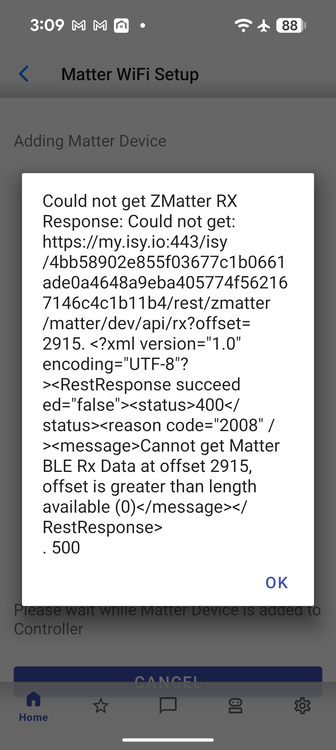
I'm not having much luck, I think I have tried both ways 1) sharing the device by getting the pin code from Google Home, and 2) trying from a factory reset, then adding it in. All using UD Mobile app. I just get errors like Scan already started 500 (OK) or this error. I posted as the image.
-
Uninstall and reinstall does the same thing. AI says the cloud has a corrupted device listing. Causing the problem, I just didn't know how to clear the cloud
-
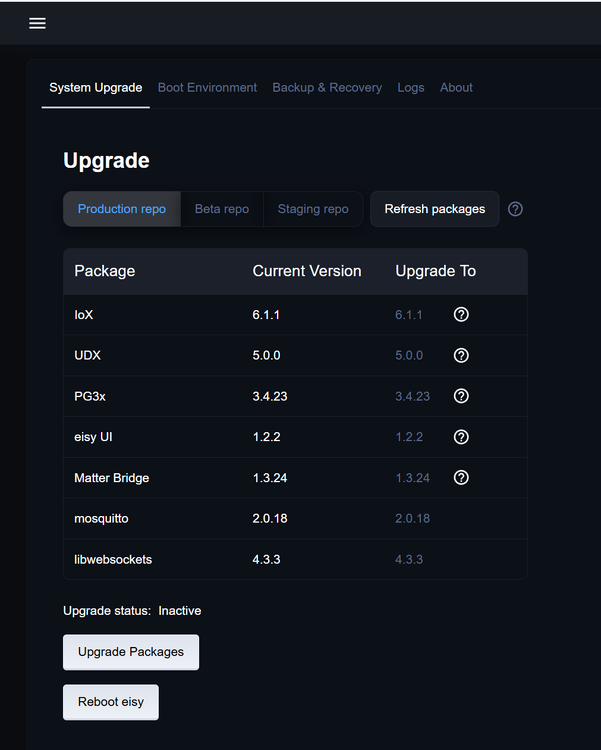
This morning trying to play around with Matter devices and seeing if I could get a device connected. Now when I run the UD MOBILE app. it loads up, I see my devices, then about 2 seconds later I'm looking back at the phone launch screen. What I have tried Uninstalled the UD MOBILE app and reinstalled it. Go thru all the steps and 2 seconds after the display of my devices, it crashes Did a complete interview of my Z-Wave devices from start.jnlp Rebooted my eISY - Pulled the plug Ran Upgrade Packages and did the reboot when it said to. I'm at a loss what else. AI says to do some weird stuff like deleting my profile and adding it back in. Setting up a second device via ip address, but the prompts AI says I should get don't match the UD prompts I see. Everything works from the Java admin screen, just not the UD MOBILE app I'm at 6.04 on eISY 1.5.2 on UD Mobile
-
Thanks this is clearer to me now. I was trying to do it from the Java Admin page, not the phone app. Sound like this will work when I get my app working again. Seems when I upgraded everything to 6.0.4 UD Mobile crashes. Don't answer here. I'll open a different post. Thanks
-
Can you or is this explained somewhere? How you would set this up. I just installed a TAPO MATTER switch, Connected it to google home I can connect it to Alexa/Amazon if that is easier. but I don't see how I connect that pipe to UD. From google home I see all the other HA systems but UD wasn't listed. So just trying to understand how to connect Tapo matter switch to UD Thanks
-
I don't think its my Java cache because my.isy.io also says its down. since the reboot. Right now, Java start.jnlp can't connect, My UD Mobile can not see it. https://my.isy.io says its off line. I've rebooted the eISY a few times now, wait 20 minutes and still its off line. So trying to dig deeper to look at the unix logs to see what isn't running or what is crashing?
-
I noticed that eISY was updated for a new interface. So I java admin into my machine and clicked on update/upgrade Left the system overnight to do it thing. I know sometimes it can take a few minutes. The next day there was a message on the java admin page that a reboot was needed. To go to system and click on reboot. I did and now its dead. Nothing loads up and I can't get any of my ISY screens to show up. The only good news is that the system does connect to the network and I can ssh in. But I'm lost as to where to look or what to check as to why the system isn't loading. Any logs I should start in on? Thanks
-
I'm Following along on this page => https://developer.isy.io/docs/getstarted/dev_env going to use VS Code on my windows machine. I'm going to be remote because I can't put a monitor and keyboard on my device -- its in a closet. When I get to step #2 its not finding the IDE script. I've update the eISY to 14.3 and installed the dev packages from the admin screen but when I connect its not finding this script. Thanks Andy
-
Had to pick up some on/off switches for work. We were using KASA so I picked up some new ones (Kasa KP125M ) They now support MATTER. From my quick read of the forums, ZMATTER is for the support of Zigbee devices that support matter, I'm guessing over the zigbee network. Will my EISY support MATTER over ethernet/WiFi? Will it support the Kasa devices that support matter? Just learning so trying to understand this all.


