


pjjameso
Members
-
Joined
-
Last visited
Everything posted by pjjameso
-
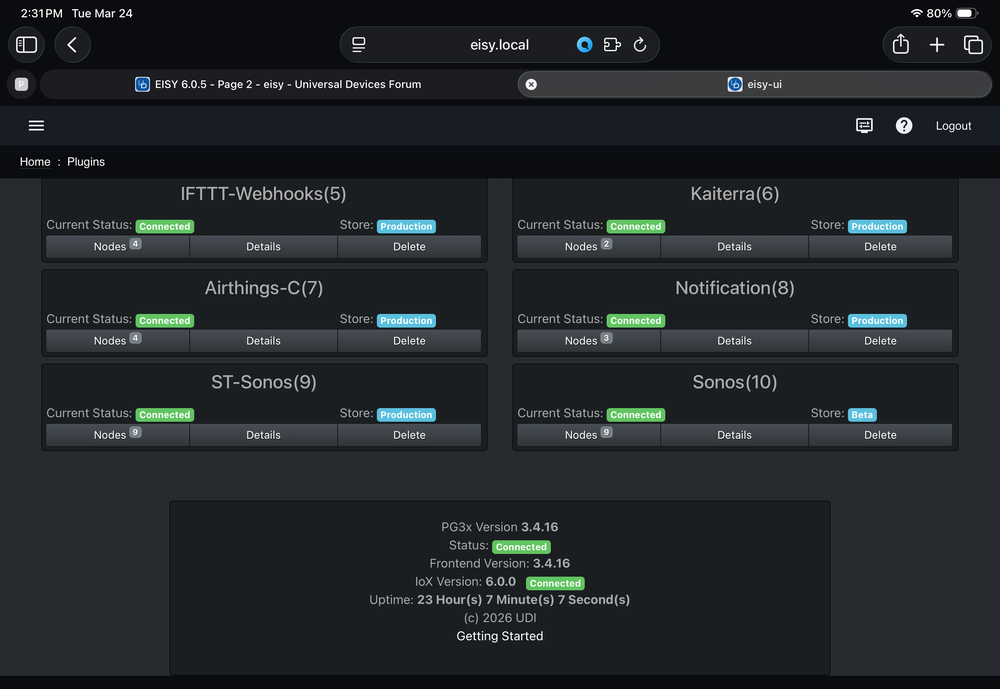
Tried all suggestions, here is a screenshot from eisy.local.
-
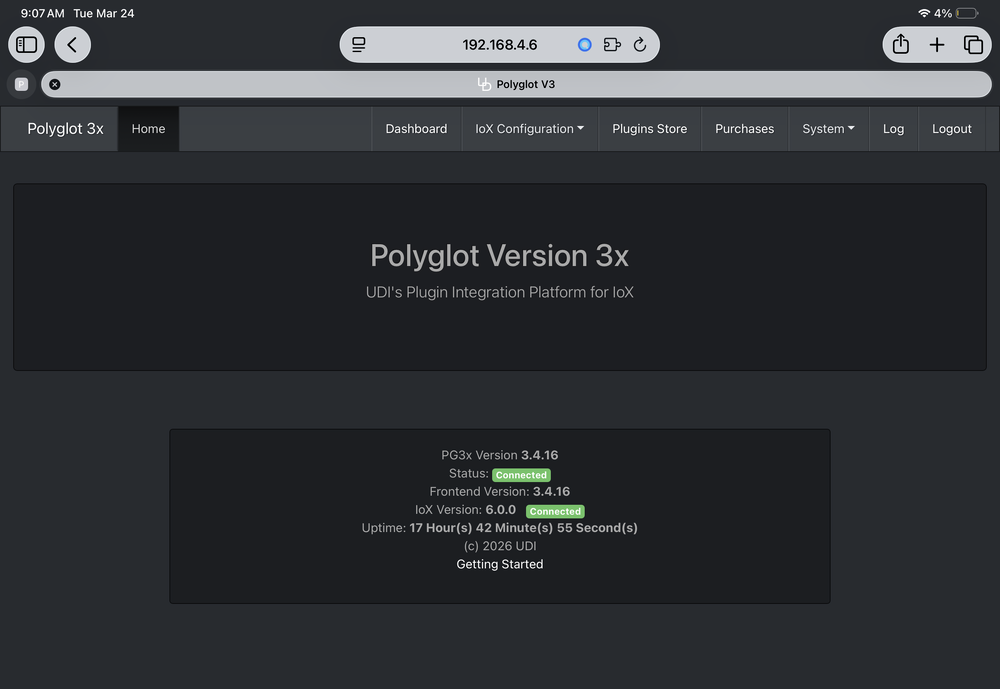
Thanks, upon further inspection pg3x is showing iox as 6.0 vs 6.05
-
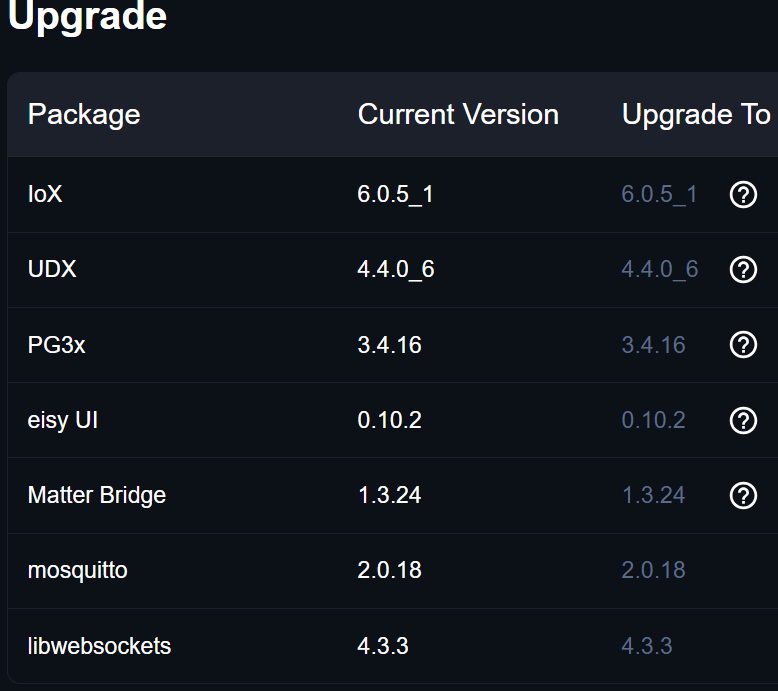
So it seems everything went okay except PG3 still say 6.0. Have rebooted, closed the browser and relaunched using eisy.local. Still same result. Thoughts?
-
Thanks Bob, Just returned from my overseas trip will make the updates to the configuration
-
Bob, As expected the join command is not working... On another note, I missed something as each time I restart the sonos plugin if finds all the speakers. Was there something I needed to add to stop the auto discovery? Im heading out of town for a couple of weeks so wont be able to reply to you after tonight. Appreciate the effort, I will ping you when I return if you are still interested in pursuing a solution
-
You are AMAZING Bob! Thank you for the effort. Will test ASAP...
-
Bob, is there a way to place an option box in polyglot to not create specific nodes? Thinking I would just delete all the nodes except for the two I want have joined. I have manually deleted them but as you noted they keep reappearing.
-
Thank you Bob for your thoughtful response. Fully appreciate how difficult it would be to update code without a device to test. Im thinking the easiest way to progress, if you are willing, is to modify the ST-Sonos plug-in as it has all the features of the Sonos plug-in but with the join command included. The issue with ST-Sonos is that the numeration of the individual Sonos units keeps changing. So when I create a program and the if statement is executed the then statement may join with another Sonos unit vs the one originally saved in the program. I have even tried to delete all the sonos units except for the two I want to join based upon the program but all the units keep reappearing. Buttkicker - [ID 0032][Parent 0001][Not Enabled] If 'Emporia / Bmt UPS' Killowatts >= 0.4000 kW Then Set 'ST-Sonos / Buttkicker' Join Basement Else - No Actions - (To add one, press 'Action') Let me know if you want to step back from this request or take a look and see if its a quick fix or much more involved.
-
The issue I had was that the mute and volume commands would no longer work using the Harmony skill. Tried all sort of workarounds including buying the sofabaton x2. Everything back to normal now since I reverted to the old alexa.... go figure
-
@bpaauwe @bpwwer Bob, Would you be willing/able to add a join function to the Sonos Polyglot plug in? I realize you forked this over from the ST-Sonos plugin which incorporated the join function. Issue with the ST version as you recall was that the way the individual units were queried messed up the order and as such units would join other units randomly. Happy to pay for your time on this request Thanks in advance
-
Wow, I have had nothing but issues after getting automatically signed up for alexa+. Actually bought a Sofabaton X2 thinking that the Harmony Elite was the issue with the new Alexa+. Was ready to post a new help request when i saw above that you could uninstall alexa+, did so and now everything is working correctly again. Thank you to the forum!
-
From Grok it appears the appletv is very aggressive with cec. Just received the blocker and it works perfectly. Now I have consistent automation using the harmony elite remote.
-
Genius! Thanks so much just ordered a blocker. Will revert if it solves the issue.
-
Already off in appletv, lg overrides and turns on and off. Truly a pita…
-
You can but the LG turns it back on. Seems to be a known issue if you use eArc.
-
Thanks! Missed to right click to bring up the notes!
-
The lg has simplink (CEC) which turns off/on the appleTV box. This makes it a pain in the *** when creating activities in the harmony elite. I currently have a work around by waiting 7 seconds after tv shutdown to turn it back on. Was wondering if a better solution would be to install the harmony NS and write a program that tests for the power state of the appletv and if off turn on. Will I be able to accomplish this with the NS? BTW you cannot disable simplink and have it stick if you are using earc.
-
Added the spoken word to new scenes in the portal. The NS sees all the original devices/scenes but none of new devices with their spoken words. Yes, restarted the admin console several times.
-
@Jimbo.Automates Decided to add a couple of commands to Harmony Elite remote however I cannot get the new spoken words in the portal to be seen by the NS. Been awhile since I have configured what am I missing in the process? Have deleted and reinstalled to no avail. Harmony shows the VUE and there aren't any errors in the log.
-
Noticed a few topics on the forum relating to font size not sticking on multiple logins. Has anyone found a work around so I dont have to keep selecting a larger font and then restarting the console?
-
Think it may be working now for god only knows why. Just using two programs, a timer and a test. Copied below for info. Thanks for the help Airthings Timer - [ID 003E][Parent 0030][Run At Startup] If - No Conditions - (To add one, press 'Schedule' or 'Condition') Then Repeat Every 1 hour Run Program 'Airthings AQ Test' (If) Else - No Actions - (To add one, press 'Action') Airthings AQ Test - [ID 003F][Parent 0030] If 'Airthings Controller / Main Level' CO₂ Level <= 775.0 PPM And 'Airthings Controller / Main Level' VOC <= 225.0 Then Set 'ERV' On Wait 15 minutes Set 'ERV' Off Else Set 'ERV' On
-
I cant get these programs to work at all. It seems like the timer program will not execute the aq test if statement as the variable show last updated friday night. Weird as i have changed the timer to every 2 minutes for the test. Thinking there might be a bug in the 4.91 where commands following a repeat are not executed. Of course it could be Im just missing something obvious. Thanks for the help

-
Thanks, tried that and even recreated original program and couldn’t get it to work.
-
I just moved from Polisy to Eisy and one of my programs stopped working. Had to break it into 3 programs to get it back up and running which seems very inefficient. Looking for some help on improving the routine. Basic idea is when air quality is good just run the ERV for 15 min each hour. If the quality if above the thresholds run the ERV continuously until they return to normal and then resume the 15 min routine each hour. Here is what I currently am using. Airthings Timer - [ID 003E][Parent 0030][Run At Startup] If - No Conditions - (To add one, press 'Schedule' or 'Condition') Then Repeat Every 1 hour Run Program 'Airthings AQ Test' (If) Else - No Actions - (To add one, press 'Action') Airthings AQ Test - [ID 003F][Parent 0030] If 'Airthings Controller / Main Level' CO₂ Level <= 775.0 PPM And 'Airthings Controller / Main Level' VOC <= 225.0 Then $sAirThings = 1 Else $sAirThings = 0 Airthings AQ Normal - [ID 006D][Parent 0030] If $sAirThings is 1 Then Set 'ERV' On Wait 15 minutes Set 'ERV' Off Else Set 'ERV' On
-
Any suggestions on how to improve process would be appreciated. Not an expert at programing by any means, more like try, fail, try again, rinse and repeat!


