


KHouse
Members
-
Joined
-
Last visited
Everything posted by KHouse
-
Thank you both so much. I was racking my brain trying to think through the logic and figure out what I was missing. Didn't realize it returns to "normal" before the time is up and that is the root cause of the problem. Thank you again for the explanation and examples!
-
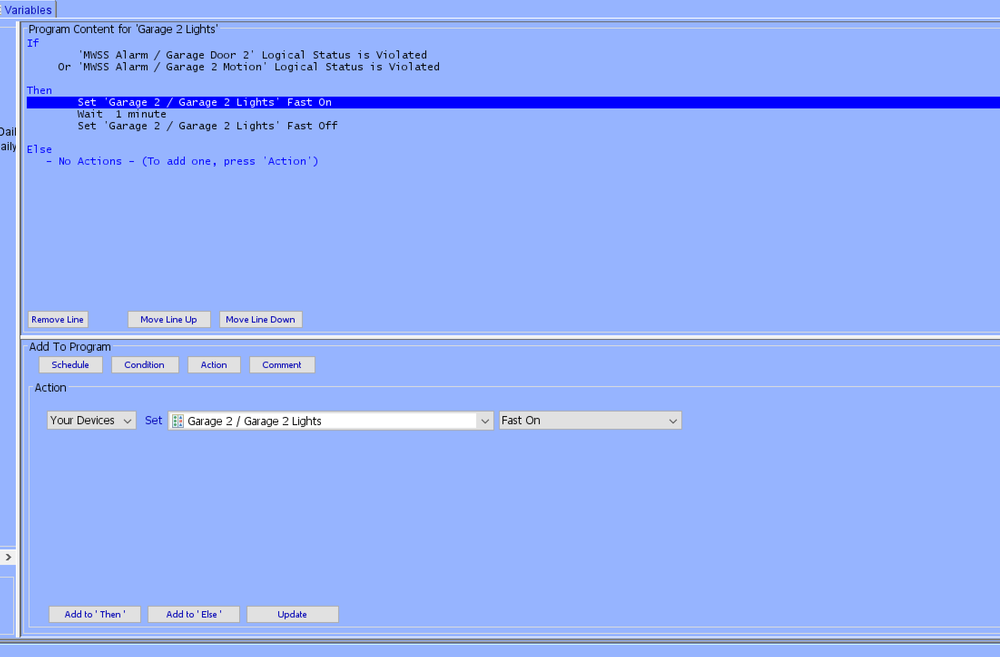
Attached is a screenshot for what I would assume to be a very basic program that is not working for me. Appreciate any help anyone can give on what I am doing wrong here. If garage door sensor or motion sensor is activated, turn garage lights ON. Wait X number of minutes, then turn garage lights OFF. The door sensor and motion sensor are ELK, tied to the alarm, while the light switch is INSTEON. The lights do turn on when triggered...but they do not turn off. I must be missing something basic or not understanding how this work. Appreciate any help!
-
Yes! I learned this from the first facility. The manufacturers sure do like to update their lights and so a fixture bought a year from now is unlikely to be the exact same they sold a year ago. And as much as the industry LED's last a million hours, the drivers sure don't.
-
We based the lighting off of my other facility. This garage is a little bit wider, but we duplicated the same amount of lights per bay essentially. I wrote 12, but it's actually 18 fixtures. The electrician recommended less fixtures (with more output), but I wanted that quantity of fixtures to ensure we had good coverage everywhere so that there were no shadows. I also like the 4,000k color while the electrician and everyone recommended 5,000k. I just prefer the more natural look vs. the "sterile" look of pure white LEDs.
-
Thanks for all of the detail info/explanation! I'll work on a solution here with the electrician now that I'm a little more educated on it.
-
Sorry, forgot to mention, this is for a commercial facility and the lighting is 277v.
-
I believe I'm using the dimmer 2334-232. I have another one handy and the box shows 600W. So that has got to be the problem. The lights are "Astrelights LED Linear Strip Lights". SKU ALI-00-41VT-003. Shows many different wattages on the box, so not sure if it's adjustable on the fixture itself or they just sell them in those fixed wattages. I do know the color temp is adjustable on them so maybe the wattage (brightness is too). It's a large garage (3 bay + extra 20' wide by 54' deep. So there are 12 of these fixtures.
-
My apologies...watts not volts. (The lights are 227v though btw). It seems as though the 6-button switched is "maxed out". Thanks! Thanks for the help folks, much appreciated.
-
I've got a new build where I'm trying to install an Insteon 6-button keypad to control the garage lights. The garage is rather large so there are (12) four foot LED light fixtures in the ceiling, and the light switch gets pretty hot when the lights are on. The electrician said the lights are drawing exactly 600 volts, and so recommends a 1,000 volt light switch, however, wanting to use Insteon to control this I'm wondering if there is an alternative or if someone has a recommended work-around / solution? Appreciate any help.
-
Submitting the ticket + remote-in from Michel solved the problem! For other's future reference, I'm not sure what the issue was as all of the work they did to solve the problem went over my head, but the problem is now solved. Thanks again for all of the help @Javi and @DennisC.
-
Ticket submitted. Thanks!
-
Sorry for the basic questions. Where would I open the ticket at, and where would I find the node server log? Thanks again!
-
I just tried rebooting the controller, still no fix. I've upgraded the UD Mobile App to current version, restarted the plugin in PG3x, rebooted the eISY, restarted the Elk M1, synchornized in the app, tried to restart the plugin from the app (that does nothing), tried to start the plugin in PG3x under configurations, checked the box to allow the plugin access to the eISY, tried to press start in the app...nothing has worked. I still have the same issue where it shows the plugin is disconnected. When I try to start the plugin, I get the error message that it's already running (see attached). When I try to press restart on the plugin in UD Mobile, I get the below error message.


-
Yes, thank you. I did check that box, which resolved the orange error, however, I when I try to set the alarm in UD Mobile, I still get error "Node Status UOM". In PG3x, it shows that the plugin is disconnected. I try to press start, and it says it's already running. I try to press restart, and that doesn't change anything / do anything.
-
Unfortunately I'm getting an error when tryint to restart the plugin there. The configurations tab says it's disconnected, however, when I press start, it says it's already running. When I press re-start, I get the error with the red/orange pictured below. EDIT: I found the little checkbox for allow ISY access, so that part is resolved. However, I still get the same error about it being disconnected and when I try to start or restart it doesn't do anything. It says it's already running.


-
Would you be able to help explain how to do that? In admin console I dont see anywhere to restart the plugin. In the app, I go to ADMIN -> Plugins -> ELK (it says STOPPED on this screen) -> when open the node server information is highlighted in red. Says status is STOPPED. If I hit the start command at the bottom it says ERROR - ALREADY RUNNING. I've tried pressing re-start there but that didn't help anything. Thanks!
-
When I open the admin console, it shows ELK as a plugin. I just completed a synchronization, and now when trying to set the alarm to armed I get the error "Node Status UOM". I tried restarting the app and restarting the Elk M1. Same error. Thanks again.
-
A little bit of an update/issue. Ever since the app software update, I now have this error when trying to set the alarm to armed/ON. I did not have this error before, and the alarm still works fine through eKeypad app. Any ideas how to resolve the error? Thanks again!

-
Just to update for now. I'll keep an eye on this over the next week or two, and then update the thread if this was a resolution or if there is still a problem. Thanks again.
-
Sorry about that. That was from the eISY. Just looked there out of habit. My fault! Current firmware for UD Mobile is: 5.6. Updating to 5.8.3 now. *After the update, it showed it updated to 5.8.4. Thanks.
-
Currently running 43.71.8v9E. Thanks.
-
Does anyone know why UD Mobile might not be updating in real time? And it seems it's more delayed on some devices and not others, but sometimes it is all devices. Essentially it's tough to trust the status UD Mobile is showing me because sometimes (and often) it's wrong. (Note: I used MobiLinc prior, and never had issues, so I don't believe it's my network or setup, but I could be wrong). I'm running eISY (previously ISY994i), and mostly all Insteon devices for lights and things, with Elk M1 + honeywell devices for alarm. The two biggest culprits are my garage doors and my alarm. On the garage doors, I have it with what I would call the typical programming that was copied from this forum many many years ago. The garage doors are toggled by a relay (Insteon garage door kid that is wired into the garage door openers), and a magnet (reversed so it shows correct if magnet is "open" vs. "closed"). On MobiiLinc I remember it had a little garage door icon that showed open or closed based on the status (magnet). With the UD Mobile setup (which I like UD Mobile btw), there's a button on my favorites for the relays (press this to open or close the doors), and there's a button for the magnet status. If I toggle the relay (open the door), the relay lights up yellow as if it's ON. This eventually clears itself but is sort of annoying that it always shows yellow like it's on. But really should be a momentary on/off. (I have the color changed to yellow when devices are on). Then the door is open, so the magnet is separated and that device should show yellow (as if open), but it doesn't. If I query it, it then does show yellow / open. If I close the door, again it stays yellow until I query it when it shows closed / off. Even closing and re-opening the app doesn't update the status. Is there a way to get the magnet devices to update instantly in the UD Mobile app so that I know for sure if the garage doors are open or closed? Regarding the alarm...that's an ELK M1 system running Honeywell devices. It just doesn't work sometimes. I can turn the alarm ON from the UD Mobile app and half the time it doesn't do anything, although half the time it does turn the alarm on. Very annoying. And the status doesn't update in real time either. I don't know if it's ON or OFF by looking in the app. I then have to revert to eKPro which I've had for over a decade and still always works fine. I'd prefer to do everything in one app of course, so just very frustrating that half the time the alarm doesn't work and/or isn't updated in real time in UD Mobile. Anyone know if these two issues might be related or what a fix might be? As for the many lights I have in the house, 95-98% of the time those all do show the status correctly/update in real time when I toggle the buttons to turn the lights on or off in the app. Thanks for any help!
-
Thank you both, and thank you for the offer @Goose66. To clarify, yes, I'm looking to have 3 thermostats in the out building connect to the eISY, so looking at the best way to do this. I also need 3 door sensors in the out building connected to the eISY, or security system. In my home I run an Elk M1 with Honeywell wireless devices. In this new build I will be using Insteon in the office (lights and some motion sensors), however, will also have a security system (brand/model TBD as of yet). I can choose anything to work with the eISY to get what I need in the out buildng and for security. Would you have any other recommendations that might work better knowing it's not tied to Insteon (but tied in one way or another to the eISY)? Thanks again.
-
I have a new building going up that will have an office (1 thermostat for HVAC + 2 gas garage heaters), and another building going up about 1,000' away from the office. This building will have 3 HVAC's (3 thermostats). The office will be outfitted with the eISY and Insteon. The HVAC guys want to install Venstar T4900 thermostats. I've got Insteon throughout my home, however, use my Honeywell thermostats through their native app and not through my eISY. What would be the proper procedure to connect the office/building thermostats to an eISY in this new construction? I will have empty conduit ran for low voltage from the office to this far away building. Not sure how to get wifi out there / reputable signal that far, and not sure how to "hard wire" the thermostats to the eISY. Appreciate any help anyone can give. (On a similair note, also now trying to figure out how to use Insteon door sensors on the doors in this far away building. Again, can hard wire the distance, or if using some insteon devices along the way can repeat the signal, though I'm not sure how far that signal travels through powerline).
-
Using the eISY. No z-wave in my setup. Just a lot of Insteon, Elk for security, and Alexa stuff. Buying game tickets is of course the preferred solution to my problem. I do have season tickets, but cannot go to all of the games so we watch from home also. Thank you. I'll take a look.


