


aca2b2
Members
-
Joined
-
Last visited
-
@apostolakisl Weird situation while using the pentair node server. I have created favorites on that allow me to turn on my pool lights and waterfalls within the UD Mobile app. I can turn those items on without an issue using the app, but their status does not update. i.e. If I turn on the lights the lights will turn on physically, but the app shows them as still off. Same thing will happen with my waterfalls. BUT...If I log into the Pentair app, not UD Mobile, and then check UD Mobile the status of these items automatically updates. It appears something is timing out with this nodeserver.
-
Ok. So I switched my intellicenter to recognize my globrite as an intellibright. This fixes the issue and the color mapping is the same.
-
Got it. I'm guessing here...but is this the heartbeat signal sent to the central station?
-
Can anyone help me understand the "Unknown message AT: 100" error. It pops up everytime I open the Elk node server. Thanks, Andrew
-
Hi there, I'm having a little issue with getting my globright color LEDs to work. I have the ability to turn them on and off from the nodeserver, but I don't have the ability to change the color like I do from the Intellicenter. Is there anything I can do to change colors using the nodeserver.
-
Got it...Thanks for the quick response.
-
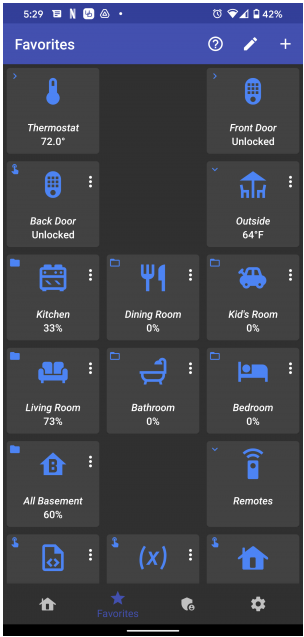
How do you arrange icons on the favorite screen to get a gap in between icons? Like the example below. I have tried moving them with the edit button, but the always go right next to each other. I can't get a gap to exist?
-
Thanks to firstone for solving my issue. In the event anyone else did what I did. Don't use mini-IR blasters to send signals to the Flirc. In my case the mini's did not put out a strong enough ir signal. Ultimately, I had to do some re-organization and put the eISY & Flirc right next to the Harmony hub. This pretty much solved the issues.
-
After a couple years of hesitation I finally migrated my ISY to the eISY. At this time I am using the 1 free month of several node servers like eISYIR to make sure everything works. Unfortunately, I have struggled with the eISYIR node server. The receiver just doesn't want to recognize remote IR signals. Here is my setup: -EISY r1 -Harmony Elite Remote -Harmony Hub w/ mini blasters -Flirc USB dongle As of lately I am not able to get the system to recognize any of the IR signals after the nodes are created (yes, they get created, then nothing). I have tried changing the Release Threshold with no luck. I have even read that line noise may be an issue, so I plugged my EISY into a power conditioner. My next option is to buy another Flirc, but I doubt this is the issue as setting the unit up on my computer works flawlessly. adding @firstone with the hopes he can help with my setup. Any other suggestions?
-
@Jimbo.Automates Just curious...What is a huge cost? Is it something manageable if there were people willing to find a way to generate the $$$?
-
@glarsen File received and working. Thanks!! @DennisC I have purchased the EISY but have yet to install it. There are several things in my current ecosystem that will need to changed when I update, which is why I have postponed it for so long. I am a big fan of Mobilinc, which is also no longer supported, but is still working and being used by my entire family. I just need to set some time aside to get everything changed. @Geddy Thanks for connecting @glarsen . I really appreciate it.
-
Unfortunately this is not a fix. I am using PG2 on an ISY994 and cannot access the PG3 nodeserver.
-
Hoping someone can help me out here. The other night I was doing some troubleshooting on my ISY994. I ended up deleting a few nodeservers on my local polyglot server. One being the TimeData server created by Gordon Larsen - ve7gel - https://github.com/ve7gel/Timedata. This link no longer exist, but I would like to get a copy of the nodeserver back on my system. Does anyone have a backup they can send me? Thanks, Andrew aca2b2
-
It worked now. Not sure what changed.
-
I have tried to renew my subscription but both the CC and Paypal options do nothing. Anyone else having this issue?

