


PhanTomiZ
Members
-
Joined
-
Last visited
-
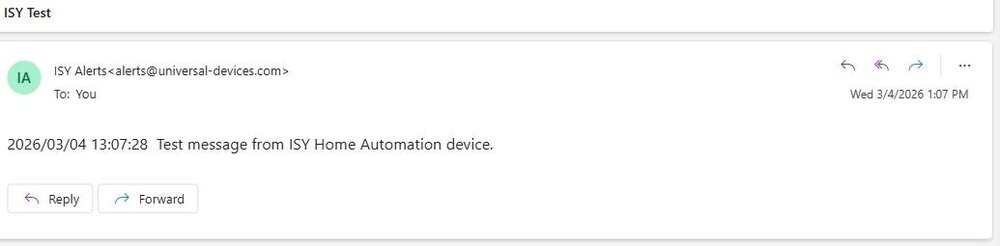
Just made a quick change from SMTP @gmail toe "Use Default" and ran a test and it's back to working again. This is hit and miss. Uploading Attachment...
-
Thanks for the pic. Makes sense, but I haven't updated BI in about 6 months or so. Don't have this option. I will update BI. My BI is still working correctly though with my old setting. So how does this setting affect my Gmail account and the ISY for the "TLS negotiation failed? Sounds like a google password/authentication problem? Sorry, but I feel I'm starting to fall down the rabbit hole... PhanTomiZ
-
Not using oauth in BI. My Cyberpower UPS also works fine and I receive notifications from it. Sorry for the stupid question, but where does Oauth get configured? Gmail? I've been using the app passwords for many years now. I'm sure those settings work and I'm very familiar with getting that setup. I've done everything in the wiki for setting up gmail years ago. I've even gone in and created new app passwords. Configuring gmail Account(NOTE: As of May 2022 Google has removed the ability for logging in with simply a Username/Pass (used to be considered "Less Secure Apps" process of logging in). Google accounts are now required to have Advanced Security enabled (Two-Factor Authorization type of access). Please refer to Google Account Help for specific directions on how to generate an App Specific password that will then be used in configuring ISY Email Setup. Login to your gmail account Go to Settings | Forwarding and POP/IMAP. Under POP Download, make sure POP is enabled. Go to Settings | Filters and Blocked Addresses and make you are not blocking yourself Configuring (unique) App Password(Required as of May 2022) See App Passwordfor more info. Steps (as of April 2024) Go to Accountfrom the Google list of apps Click on Security & sign-in in the list on the left Click on 2-Step Verification found under "How you sign in to Google" (You might need to enter your password to proceed) App Passwords is at the bottom of the page. (See below if you do not have the section for App Passwords) Click on > Type the name for the "App" (i.e. "ISY Notification") Click on Create Copy (or make note of) the generated password to be used later Click DONE to store the newly created app specific password to your account This created a unique 16 character password, save it (copy to clipboard) and use it when setting up Gmail below instead of the primary account password. If you do not see App Passwords this means you have never setup an app password. Use the "Search Google Account" box at the top of the page (when you are on the "Security & sign-in" page). Or you can try using this direct link - https://myaccount.google.com/apppasswords (you might need to sign into Google or re-enter your password before continuing) NOTE: 2-Step Verification MUST be active on your account before you can setup "App Passwords" Configuring for Use with gmailMake sure you have configured your gmail Account (see above) Go to Admin Console | Configuration tab | Emails/Notifications Under SMTP Settings ensure Use Default is Not checked For SMTP Server enter smtp.gmail.com For SMTP Port enter 587 For User ID enter the username associated with your gmail account (e.g. abc@gmail.com) For Password enter the password associated with your Account For From you can leave it blank. If your service allows it, you can add a display name ensuring the format follows First-Name Last-Name:Email-Address" Make sure TLS is checked For timeout, 5000 (or more) Click on the Save button Test (Often times the "TEST" email is considered SPAM by many free email servers. So if it does not show up right away please check your SPAM folder. Normal alerts should receive to in-box normally, but you may need to add the address to trusted senders or setup a filter to never filter ISY notifications.) Attention: The "FROM" field contains an important ":" (colon) between the "First-Name Last-Name" and "Email-Address" portion. That is VERY important to include if you want a display name to appear in the sent message. If you do not include the colon and have something other than just the email address it WILL FAIL.Not sure how Google changed the rules for logging in with TLS??? What is 1.Switch to Modern Auth: Update your app or ..... What I do know is my Blue Iris, which has the same email servers setting as my ISY, keeps chugging along. I get notifications with snapshots and all. Out of the blue, my ISY stopped sending notifications and when I test the same settings as Blue Iris, I get the TLS negotiation failed.Same here with TLS error. Thought it was me until I saw this post. Started about 2026 Feb 24 or so. I was having many problems with my ISY 994izw with v.4.9.0 rebooting every 5 minutes or so. Replaced the micro sdcard and restored (original transcend card 10 years old). Somewhat fixed it. Noticed all would work as long as I didn't open the admin console's programs tab. Then, magically for the past few days it's all back to normal except for the tls error. Not getting any notifications. Really sux. Using smtp.gmail.com doesn't work at all! If I "Use Default", sometimes it works and sometimes it doesn't. So frustrated with the ISY and notifications that I purchased the Eisy r2 and I'm waiting to do the full install. Hope this tls error doesn't get migrated to my new setup. PhanTomiZHi again, I too, am a loyal ISY user! Unfortunately, I returned everything on Friday. Wanted to get this migrated during the Xmas break, but much too much research to find out the migration process. I have many intertwined Insteon and Z-Wave programs that it will take me more than a week to accomplish, let alone figure out. I think the biggest factor is that my current ISY Insteon/Z-Wave is working and has been for a long time. Second factor is the WAF!!!! Can't inconvenience them for too long as they've been used to an automated house. Just going back and looking at my programs and variables is a task. I'm in awe, that I was even able to come up with some of them. Just trying to follow some of them is a frustrating and tedious. I think I've come to realize that it was fun 10 years now . What will happen when the ISY completely fails? I'll be selling all my devices and going back to the dark ages Thanks to all for the encouragement and the responses. PhanTomiZWhat got me started on it was seeing <Not Specified> in my programs and wondering what the heck I deleted that caused this program to have a UFO in it! I have enough text files saved up, so when this happens, I know at least what the line was pointing to. A little tedious, but sure does answer some questions as to what I've done in the past. BTW, Opened a ticket and Michel responded in record speed (ongoing). I know why this is the best piece of hardware I've ever purchased! The team @UD for sure! Will keep this thread updated...Answers in green. Thanks for the super fast response.Thanks for your prompt reply! Outch!!!! Do you know if there are any guides, pointers, procedures or posts? My ISY has been chugging along for almost 10 years! My programs are intertwined with Insteon and Z-wave. This might be, for me, a multi year rebuild. Not sure my wife would be so patient, as she's gotten used to the automation as have I. Do you know if there are many others in the same situation of having to rebuild? Thanks again PhaTomiZHi, Have the hardware sitting on the desk waiting to get installed. Migrating and reading as much as I can. Wiki says: If you are migrating your Z-Wave network You must be using a 500 Series Board in the ISY-994 Doesn't say if you have a 300 series board. What are the instructions for my setup? Thanks PhanTomiZOpen it up and change the battery. While you're at it, check contacts to make sure they are not corroded. When you buy this stuff, you just don't really know how long it has been sitting. Good idea to check the build date too.Query the low battery node.Can you scan your order invoice and post it here. Of course redact your personal info. Just would like a current, updated list of all the components. I've been living with my intermittent PLM for about 4 months, since the last power outage. Thanks in advance PhanTomiZJust a little info about the 2342-222. I have three of them. What works for me is to recharge after 500 button presses or 120 Days. PhanTomiZ Mini RemoteLinc #1 Charge Battery NOW If $sMini_RemoteLinc_1_._Button_Press >= 500 Or $sMini_RemoteLinc_Recharge_Daily_Counter >= 120 Then Send Notification to 'Default' content 'Default Subject' Else - No Actions - (To add one, press 'Action') Feb 3/21 - Changed Recharge Daily Counter from 100 to 120 Days or 3 months July 15/19 - Now using 24 hour timer. Most accurate. Looses 1 sec a day. Set for 90 Days. July 8/19 - Charged on this Day - Changed from >=200,000 Min to 129,600 Min. (3 Months) Sept 14/18 - Changed to >=200,000 Minutes; Made it to 577 button pushed when it died and 208,000 Minutes Charge every 5 Months or 220,000 Minutes


