


sjenkins
Members
-
Joined
-
Last visited
Everything posted by sjenkins
-
Sorry, @Guy Lavoie , What you are showing is what I was attempting to describe on my phone. I have multiple lines as I usually have local,beta, and production in three slots with different versions. Not sure what to say, the store and the GitHub look good & I am able to run 0.0.27 on beta. I will push the beta to store again. Anyone else having the issue?
-
production is at v0.0.26 non-production(beta) is at v0.0.27 @Guy Lavoie there should be a button beside that slot 8 indicator to reinstall there. I just checked the repos & all look good.
-
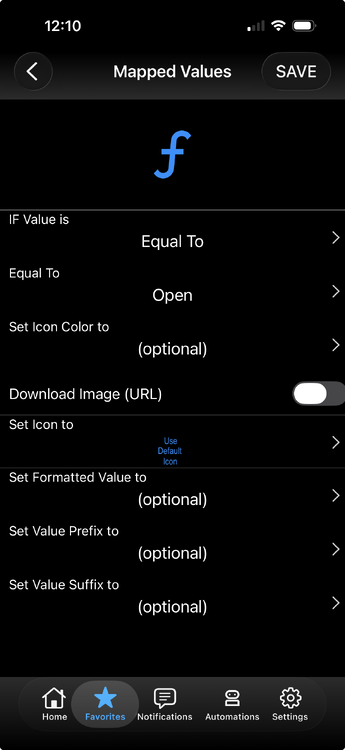
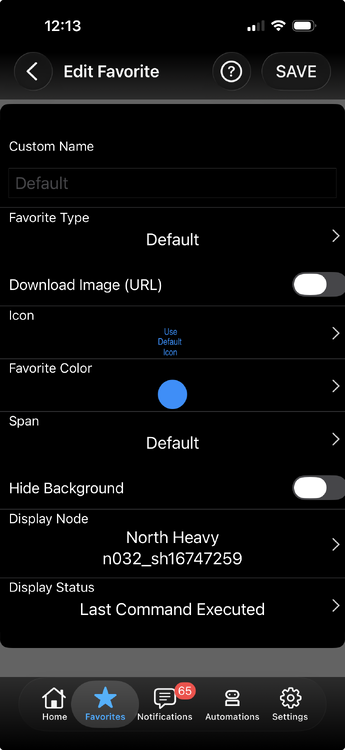
@Techman , It can be done: You just need to make sure the object you are doing this with {default, command, etc} is chosen as a shade (not a scene).
-
Purely a unique identifier given by the Tahoma app. Can be used to make sure you have the right device if a node name is changed independently of the unit. Its carryover from my HunterDouglas plugin where it was the only true way to know you were talking to the right shade. Clean look?!? Are you truly an Eisy user? ;)
-
Follow up: (too late to edit for some reason) If we added the beta type sales option to the old production store then we could make changes in only one of the two places. Adding two sales options to a plugin, if they do sync
-
-
@bmercier , Thought this would be useful to the wider audience. For the transition period how is the production store and the new plugin(beta) store sync'd (or not). I see the new one is populated with what was in the production store. As I have added to the new one I see it doesn't push back to the old production store. Does anything from now on in the old store get sync'd to the new store? Does this mean for the next while that we have old and new, we developers need to update both stores? Not a problem for any of the above I am just trying to figure out the rules of the sandbox between them.
-
I have had at least once where it blasted right by the percent I had tried to move to. Wondering if the stop signal didn't get through. Let me know if anyone else sees this the odd time, I could send it twice. I must say I am enjoying this feature (use it to bring down the second shade and block morning sun)
-
This one is a feature request by @Guy Lavoie to be able to move by percent for RTS shades. Make sure you do a full open / close and time how long it takes then put that in the span for each shade. Right now the default is 8s but my Phantom outdoor blinds are a full 27s. I also know on my Hunter Blinds I have one blind which is a laggard to the others all the time. After that you can move by percent in the up or down direction. Remember the Pending / Completed is much slower as that is a handshake with the Tahoma, not measuring when the stop signal is given. Anyway, have fun and give some feedback! ## 0.0.27 - RTS Move By Percent: new MOVEPCT command (percent 1–99, direction Up/Open or Down/Close) sends open or close, waits (percent × total span) / 100 seconds, then sends stop; SETSPAN sets per-shade Total Span Move Time (GV1, default 8 s, persisted); Last Command Executed adds Move By Percent; RTS-only — io/Zigbee shades keep SETPOS PS - This plugin modifies the profile, so if you are using Eisy-ui it can be harder to get it to read the profile update (the button to load profile doesn't seem to be making it happen; on the old Admin you just restart it. I am still figuring out the best way besides deleting the browser cache and restarting the service. Any ideas @bmercier or @Javi ?
-
I’ve moved to it exclusively and so far it’s doing it all for me. Small bits to be solved like moving a node to a folder or scene can’t always be done by drag-n-drop. Too far, and it won’t scroll. But I write and publish a few plugins, so am in and out of everything daily. Looking forward to the new plugin method inside easy-ui. I like what I see. Thanks UD!
-
Added a status for RTS shades which gives last command executed. Was a feature request of @Techman ; as well he found a bug in discovery, much appreciated for both! Next will be working on another feature request by @Guy Lavoie also for the RTS blinds to give allow setting of partial moves by percentage. Boy this would all be much easier if we bought blinds with full control, eh? ## 0.0.26 - Skip OGP protocol gateway during discovery: TaHoma reports ogp:Bridge (Open Generic Protocol gateway) as a device; it is infrastructure, not a shade. Previously it appeared as an extra node with no useful commands. Run Discover after updating to remove an existing OGP node automatically. ## 0.0.25 - Shade Last Command Executed (GV8): new status alongside Last Command (GV7); reports Open, Close, Stop, or My Position when sent; starts as None on node startup; GV7 still tracks Pending / Completed / Failed from the gateway
-
@Guy Lavoie , ok, can do a default time as well (just timed my outdoor Phantom blinds and they take almost 26s to raise). Looks like the old plugin used configuration variables. In the new EISY api the retention across boots and installs is not an issue. the problem with doing it in a config is you don't know the node number until the first boot anyway and this node number can change with a rediscover. I think I would implement with a settable value which is stored as a persistent value. Sound Kosher?
-
@Guy Lavoie , (and anyone else who has 2c to give), The way I see it this is just an RTS shade function (shouldn't be needed in the new positional based ones). The user enters a time to fully raise/lower, Total Span Move Time We add a command with parameters Move by % This command is Activate with parameters of Move %(1-99), Direction (up,down) The program sends a up/down command, then Stop after x seconds. x being: Move % x Total Span Move Time Thinking now of status. As the shade can be moved manually I don't think keeping a % position has any value. I think the Sade Last Command would be something like Move% Does the above meet your vision?
-
@Guy Lavoie , I did , then I forgot, good reminder. I'll put it in my todo list, yours is a bit more complicated. Last bit has been busy with life, when I had plugin time I did a bunch of spring cleaning and got some of the older plugins common on the backend. Was slowing me down when everytime I switched work to a plugin the workflow was so different.
-
Just put up to beta v0.0.25 with a feature request from @Techman Added a field called Last Command Executed which upon startup is populated with None then moves to {Open, Close, Stop, or My Position} based on the command given. Note that if the RTS shade is moved manually with the remote or even from the Tahoma app, there is no feedback here, this is purely as a memory for your programs ; careful as you use it. Feedback welcome as we tweak this plugin. ## 0.0.25 - Shade Last Command Executed (GV8): new status alongside Last Command (GV7); reports Open, Close, Stop, or My Position when sent; starts as None on node startup; GV7 still tracks Pending / Completed / Failed from the gateway
-
Fixed where there is a delay at normal startup for the waiting on user connection message to clear. As well have fixed the upload to the data folder for your devfile. This and other communications and moving to the modern UD standards on things. Tests out on my system, give it a try: ## 0.50.11 - Fix config overwrite on update: stop re-injecting example devlist/devfile and MQTT defaults on every parameter load; clear customParams in server.json so plugin updates do not reset saved Polyglot configuration - Clear waiting notice when discovery or MQTT connection fails ## 0.50.10 - Fix stop() crash on early shutdown: remove legacy mqttc teardown path that raised AttributeError when discovery failed before the MQTT bridge was created (common during eisy-ui config) ## 0.50.9 - Clear MQTT waiting notice promptly after broker connects: drain Paho callbacks at startup and at DISCOVER so "Waiting on user MQTT connection" does not linger for a full poll cycle when the broker is already up - Fix devfile path resolution: bare filename (e.g. virtualconfig.yaml) resolves to data/<name>; empty devfile no longer silently loads mqtt-devices.yaml — use an explicit devfile or devlist - Fix startup log (was incorrectly labeled "Virtual Devices") - PG3 store manifest server.json) with executable udi-mqtt-pg3x.py — use Update from the store - Rename entry script from mqtt-poly.py to udi-mqtt-pg3x.py - Standard bootstrap (error handling; version in VERSION / profile/version.txt / server.json) - Developer toolchain: uv, pytest profile sync test, Makefile, CONTRIBUTING (runtime install unchanged: install.sh + requirements.txt)
-
Back office, configuration uploading & examples changes. 3.2.0 \ DONE PG3 store manifest (server.json) with executable udi-virtual-pg3x.py — use Update from the store \ DONE rename entry script from udi-Virtual-pg3.py to udi-virtual-pg3x.py \ DONE load devFile YAML from data/ when given a bare filename (matches MQTT devfile behavior) \ DONE standard bootstrap; VersionHistory.md renamed to CHANGELOG.md \ DONE developer toolchain: uv, pytest profile sync test, Makefile, CONTRIBUTING (runtime install unchanged: install.sh + requirements.txt) 3.1.29 \ DONE upgrade dependencies to address Dependabot security alerts (aiohttp, requests, urllib3, ujson, black, and others) \ DONE setuptools remains pinned <81 for pyisy/pkg_resources compatibility (udi_interface Node import)
-
Back office and dependabot. See below for the hopefully boring details. Let me know if otherwise. ## 1.14.0 - DONE PG3 store manifest server.json) with executable udi-hunterdouglas-pg3x.py - DONE rename entry script from hunterdouglas-poly.py to udi-hunterdouglas-pg3x.py (use Update from the store; delete/reinstall if the node server fails to start) - DONE standard bootstrap (error handling, version in VERSION / profile/version.txt / server.json) - DONE rename versionHistory.md to CHANGELOG.md (template standard) - DONE default branch and documentation links aligned with udi-hunterdouglas-pg3x naming - DONE developer toolchain: uv, pytest profile sync test, Makefile (runtime install unchanged: install.sh + requirements.txt) - DONE includes aiohttp 3.14.3 security updates from 1.13.6
-
Able to vette that camera status {person, face, line, motion, audio} are firing programs. Control events are there, still verifying that they fire programs too ; next will need to check out if scenes are getting fired based on events. So you know alarms modes and custom written alarms (like in the alarm manager) are not part of the public api as Unifi calls it. If/when added I can add to this. I have decided to avoid logging in with a user name or local alarm mode with this plugin. Anyway, let me know if it's working for you , it's working for me. Now my deck lights don't turn off If someone is out there (using the unifi camera as motion detector).
-
Well I want to thank the ud team, I have been using the program editing for a few days now I do like it. One question is when a program gets messed up due to a plugin uninstall or reinstall, the admin would paint it yellow. It there an equivalent in the new UI ? I think they are ALWAYS looking for specific feedback. Just saying it sucks is usually not a path to continuous improvement.
-
This is meant as a plugin to integrate the newish Unifi Protect api to your Eisy. The api is a bit limited but is growing as time goes on. By sticking to the api we stay out of needing local logins or the issue of global/local alarms (search the unifi forums if you're interested). You can see in the log I changed the name to stay out of the way of the legacy UniFi Protect project. Mostly the focus here is to get camera and sensor events to the Eisy so you can use them in your programs. Cameras: People, Animal, Faces(generic), Vehicle(generic), Line Cross, Motion, All the specific audio. Sensors: Motion, Door, Temp, Humidity, Tamper, etc. Doorbells: (I don't have one yet as they are not in stock but the api has them there) The indicators have been set up in Status and Control so you can use them in your programs. As always give me feedback and/or requests, but I am going to limit this to the api in its current form and grow with it. So no local login or other work arounds. ## 1.5.2 - Complete NLS command names for all nodedefs (fixes missing Control triggers on AI+Audio cameras) - Add CONNECTED/DISCONNECTED control commands for online/offline transitions - Add profile test ensuring every send command has an ISY program label - Rename project to Unifi Protect api udi-unifiprotectapi-pg3x) ## 1.5.1 - Fix line crossing ignored on public API cameras (``hasLineCrossing`` omitted from featureFlags) - Log line crossing events at INFO for easier EISY troubleshooting ## 1.5.0 - Capability-based camera nodedefs: detect, AI (face/LPR/line), AI+audio, doorbell - Expand camera events: line crossing, audio detections (smoke, CO, siren, etc.), doorbell ring - Capability-based sensor nodedefs: contact, motion, leak, glass, environmental — no unused drivers at 0 - Add temperature_units config (C or F; default F) for UP Sense environmental sensors - Detection and sensor state changes emit ISY control commands reportCmd) for program triggers - Document Public API scope, read-only design, and Global Alarm Manager alignment in README ## 1.3.2 - Fix sensor live updates dropped after partial WebSocket messages recalculated capabilities - Only refresh sensor capability map when config fields change; infer modelKey from device id - Apply driver updates only for fields present in each WebSocket payload ## 1.3.1 - Fix sensor Connected flapping on WebSocket partial updates (merge cached state) - Fix environmental UOMs: °C=4, lux=36 (was inches/wind direction) ## 1.3.0 - Add USL / UP Sense sensor nodes via GET /integration/v1/sensors - Per-sensor drivers: motion, contact, leak, tamper, alarm, glass break, temp, humidity, light - Capability-aware driver mapping from Protect featureFlags ## 1.2.0 - Migrate to UniFi Protect Public Integration API (v1) with API-key-only auth - Camera discovery via GET /integration/v1/cameras - Live updates via subscribe/events and subscribe/devices WebSockets - Remove legacy private bootstrap API and username/password configuration - Drop doorbell ringtone/volume commands until official API support is added ## 1.1.0 - Real-time WebSocket motion and smart detection drivers - Doorbell ringtone, volume, and repeat control - Standard PG3x bootstrap, server.json, and version sync tooling
-
Well I know who to talk about if I need to know anything about this device!
-
Sorry for a bit of churn but have been working on getting my plugins more common and up to newer UD standards. As I inherited some older pg2 plugins there are a few things. In that process I have uncovered a bug or two. User facing I have fixed the .zip upload to .yaml config file ; this gets stored in the data directory and should survive most UD upgrades coming. Works well on my machine, let me know. Will push to production after a bit. 3.2.0 \ DONE PG3 store manifest (server.json) with executable udi-virtual-pg3x.py — use Update from the store \ DONE rename entry script from udi-Virtual-pg3.py to udi-virtual-pg3x.py \ DONE load devFile YAML from data/ when given a bare filename (matches MQTT devfile behavior) \ DONE standard bootstrap; VersionHistory.md renamed to CHANGELOG.md \ DONE developer toolchain: uv, pytest profile sync test, Makefile, CONTRIBUTING (runtime install unchanged: install.sh + requirements.txt) 3.1.29 \ DONE upgrade dependencies to address Dependabot security alerts (aiohttp, requests, urllib3, ujson, black, and others) \ DONE setuptools remains pinned <81 for pyisy/pkg_resources compatibility (udi_interface Node import) 3.1.28 \ DONE fix Controller/Temp ready_event poll gating (.is_set) \ DONE temp reset_stats clears prevVal; CtoF/FtoC mutual exclusion \ DONE VirtualTempC commands match nodedef; QUERY in nodedefs \ DONE onDelay TIMER report; generic SETST naming; NLS ctl QUERY typo
-
Fixed where there is a delay at normal startup for the waiting on user connection message to clear. As well have fixed the upload to the data folder for your devfile. This and other communications and moving to the modern UD standards on things. Tests out on my system, give it a try: ## 0.50.10 - Fix stop() crash on early shutdown: remove legacy mqttc teardown path that raised AttributeError when discovery failed before the MQTT bridge was created (common during eisy-ui config) ## 0.50.9 - Clear MQTT waiting notice promptly after broker connects: drain Paho callbacks at startup and at DISCOVER so "Waiting on user MQTT connection" does not linger for a full poll cycle when the broker is already up - Fix devfile path resolution: bare filename (e.g. virtualconfig.yaml) resolves to data/<name>; empty devfile no longer silently loads mqtt-devices.yaml — use an explicit devfile or devlist - Fix startup log (was incorrectly labeled "Virtual Devices") - PG3 store manifest server.json) with executable udi-mqtt-pg3x.py — use Update from the store - Rename entry script from mqtt-poly.py to udi-mqtt-pg3x.py - Standard bootstrap (error handling; version in VERSION / profile/version.txt / server.json) - Developer toolchain: uv, pytest profile sync test, Makefile, CONTRIBUTING (runtime install unchanged: install.sh + requirements.txt)
-
Pushing to production the bugfix @mike2545 found for us. ## 0.50.8 - Enable Paho MQTT automatic reconnect with exponential backoff (2–30s) - Start with connect_async() and keep retrying when the broker is offline at startup - Show a persistent notice while waiting for or recovering the user MQTT connection - Reject publishes while disconnected instead of silently dropping commands - Resubscribe to status topics only after a successful connect callback - Defer MQTT connect/disconnect handling to the Polyglot thread to avoid races - Subscribe only newly discovered topics during DISCOVER; skip node queries on reconnect - Add on_connect_fail logging for TCP connection failures before CONNACK


