Skip to content
View in the app

A better way to browse. Learn more.

Universal Devices Forum

A full-screen app on your home screen with push notifications, badges and more.

To install this app on iOS and iPadOS
  1. Tap the Share icon in Safari
  2. Scroll the menu and tap Add to Home Screen.
  3. Tap Add in the top-right corner.
To install this app on Android
  1. Tap the 3-dot menu (⋮) in the top-right corner of the browser.
  2. Tap Add to Home screen or Install app.
  3. Confirm by tapping Install.

croberto

Members
  • Joined

  • Last visited

  1. Thank you all for your help and wisdom, much appreciated.
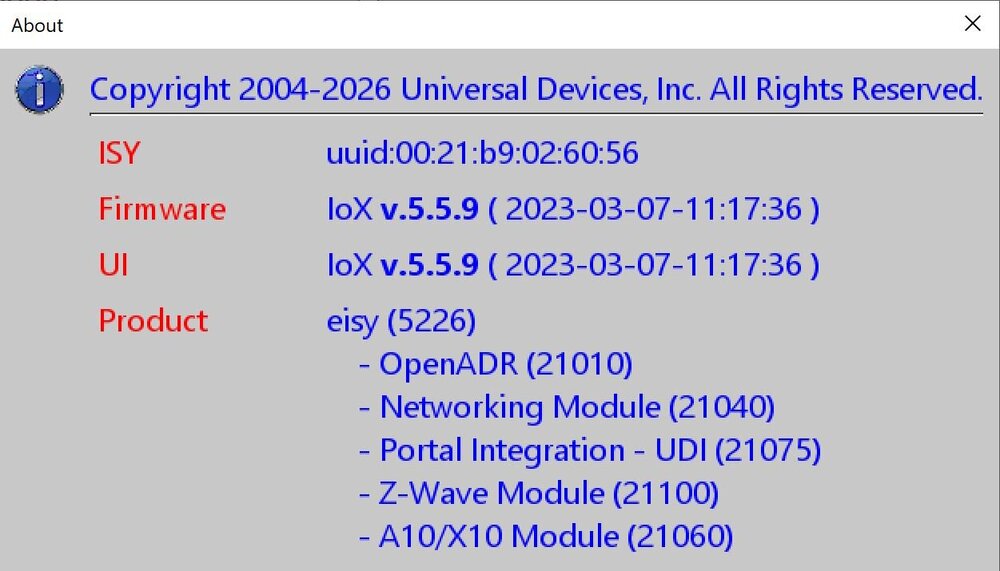
  2. I have an eisy stuck on firmware 5.5.9 from 2023-03-07 and can not upgrade it. I have tried upgrade packages from the config page but after it says it will take 30 mins and clicking ok, the admin console closes down and nothing happens. there is not manual update option on the help menu as there use to be, so I am at a loss on how to update my eisy. Thank you for any help you can provide.
  3. Is there a way that the ISY99 can see the status of a 2473S outlet when it the button is pressed on the font of the outlet. because now the outlet will turn on and off when pressed locally but the ISY does not see the status change. Thanks, Chris

Account

Navigation

Search

Search

Configure browser push notifications

Chrome (Android)
  1. Tap the lock icon next to the address bar.
  2. Tap Permissions → Notifications.
  3. Adjust your preference.
Chrome (Desktop)
  1. Click the padlock icon in the address bar.
  2. Select Site settings.
  3. Find Notifications and adjust your preference.