


jrcasselman
Members
-
Joined
-
Last visited
Everything posted by jrcasselman
-
thank you! Just opened ticket with UDI team.
-
finally getting logs - see attached. Here is what Preplexity is coming back with: This log shows a mostly healthy PG3x startup and polling cycle, with one clear issue: repeated httpx connection error: Error: read ETIMEDOUT events around 07:12, 07:20, 07:36, 07:44, and 07:57, which suggests intermittent communication timeouts rather than a full outage. What looks normalPG3x starts cleanly, loads the SQLite database, finds the IoX controller, and reports the store is up to date. The node server AmbientConsole is repeatedly verified as installed correctly on IoX, and the /rest/profiles/ns/*/connection requests are returning 200 responses. Portal token refreshes are succeeding, and the UI reconnects after auth refreshes. What stands outThe repeated httpx connection error: Error: read ETIMEDOUT entries indicate a timeout when PG3x tries to talk to something over HTTP. There is also a udx401: Access denied (401) during several POST /auth attempts at 12:31, which points to failed portal authentication before later successful re-authentication. At 12:33:13 and 12:33:37, PG3x restarts twice in quick succession, which may have been intentional or could indicate a crash/restart cycle. pg3_6-19-2026_21732_PM.zip system_6-19-2026_21738_PM.zip
-
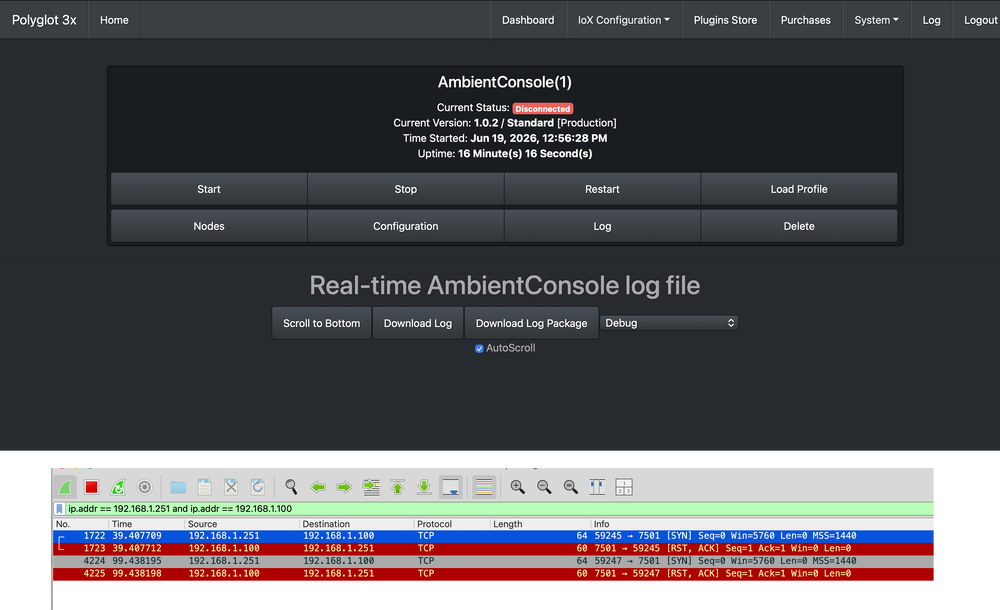
I’ve gone through a full remove-and-reinstall cycle and wanted to summarize what I’ve done and what I’m seeing now. FYI: Just cleared all the logs from EISY (error and normal log). restarted then plugin from Polyglot V3. Also went to it’s debug log page and said it was running. Then waited to see packet sent from Ambient console to the eisy IP and the reply (image). Once saw packet, - Looked at Polyglot 3x - log / debug (nothing) - Looked at eisy event log, nothing of value - Looked at eisy error log - see attached, though doesn’t look like anything. System / versions PG3x: 3.4.19 IoX / eisy: 6.0.5 PG3x status: Connected IoX status: Connected What I removed and reinstalledDeleted the AmbientConsole plugin from PG3x. Confirmed the eisy plugin slot list was empty afterward. Reinstalled AmbientConsole from PG3x purchases. Selected slot 1 during reinstall. Verified that PG3x put AmbientConsole back into slot 1 on eisy. Current AmbientConsole configurationIn PG3x, under the AmbientConsole plugin configuration: shortPoll = 60 longPoll = 600 Port = 7501 Station Name = blank These are the default values, and I have left them unchanged. Ambient Weather console configurationAmbient console is configured on the same LAN as eisy. Ambient console IP: 192.168.1.251 eisy IP: 192.168.1.100 Console is pointed to the eisy IP Custom server/path configured for the AmbientConsole setup I also tested a second port after the first one failed, but behavior was unchanged What I’m seeing in WiresharkI mirrored the traffic and filtered only the Ambient console and eisy conversation. What I see: Console initiates TCP to eisy on the configured port. eisy responds immediately with RST, ACK. I saw this behavior on both port 7501 and port 7502. I do not see the session proceeding to the point where actual weather payload data is accepted. What I’m seeing in logsAmbientConsole debug log shows no obvious errors. eisy logs show normal IoX/system traffic and plugin framework activity, but nothing that looks like a successful Ambient weather ingest. I do not see an error in the AmbientConsole log that explains the TCP reset. What this suggestsAt this point the LAN path is clearly working because the console reaches eisy and eisy responds. The issue appears to be on the eisy/plugin side where the TCP session is being refused before the weather data is accepted. ISY Error Log.v6.0.5__Fri 2026.06.19 12.58.31 PM.txt
-
Hello all, Environment: EISY (5226) Firmware: v6.0.5 OpenADR Network Module Portal Integration A10/x10 Polyglot 3x - Purchased both AmbientWeather and AmbientConsole (neither will connect) - switched to AmbientConsole so everything was connected on L2 network and I could be 100% sure what is happening - below is details: Under "Dashboard" i'm getting "Current Status" Disconnected Otherwise: PG3x Version 3.4.19 Status: Connected Frontend Version: 3.4.19 IoX Version: 6.0.5 Connected Uptime: 14 Hour(s) 50 Minute(s) 1 Second(s) (c) 2026 UDI Note: Had Preplexity helping me debug - it and I are at our end on what to try next. I've also uninstalled AmbientConsole setup summaryI’m trying to get an Ambient Weather console feeding local data into eisy through the AmbientConsole node server in PG3x. Already documented: PG3x version: 3.4.19. IoX/eisy version: 6.0.5. PG3x status: Connected. IoX status: Connected. Polyglot 3x configurationAmbientConsole node server installed and running in PG3x. Profile shows Ambient Console. User ID field displays the eisy MAC address, which appears normal for this plugin/setup. I tested the listener port on eisy/plugin side with 7501, then changed to 7502. PG3x remains connected to IoX throughout. Ambient Weather console configurationConsole IP: 192.168.1.251. eisy IP: 192.168.1.100. Console and eisy are on the same LAN. Console is configured for Customized upload. Console is pointed at the eisy IP and the configured listener port. Ambient protocol settings were used as expected for the local console feed. Packet capture resultsI mirrored traffic and filtered for only the Ambient console and eisy conversation. What I seeThe console opens a TCP connection to eisy on the configured port. Example on port 7501: Console 192.168.1.251 sends SYN to eisy 192.168.1.100:7501. eisy responds with RST, ACK. Same behavior occurred after switching to port 7502: Console attempts TCP connection to 192.168.1.100:7502. eisy again responds with RST, ACK. InterpretationThe LAN path is working; the packets are reaching eisy. The connection is being actively rejected by eisy. This looks like the service on the eisy side is not accepting the socket, not a console-side Wi-Fi/IP issue. Since both ports behave the same way, this does not appear to be a simple bad-port-selection problem. What I’m looking for help withAt this point I’m trying to determine whether: the AmbientConsole node server is not actually binding/listening correctly, there is a plugin configuration issue, a port conflict or service conflict exists on eisy, or the node server needs to be reinstalled/reset. If you want, I can also turn this into a more concise forum post with bullet points and the packet capture included as a short evidence section.
