


waffles
Members
-
Joined
-
Last visited
-
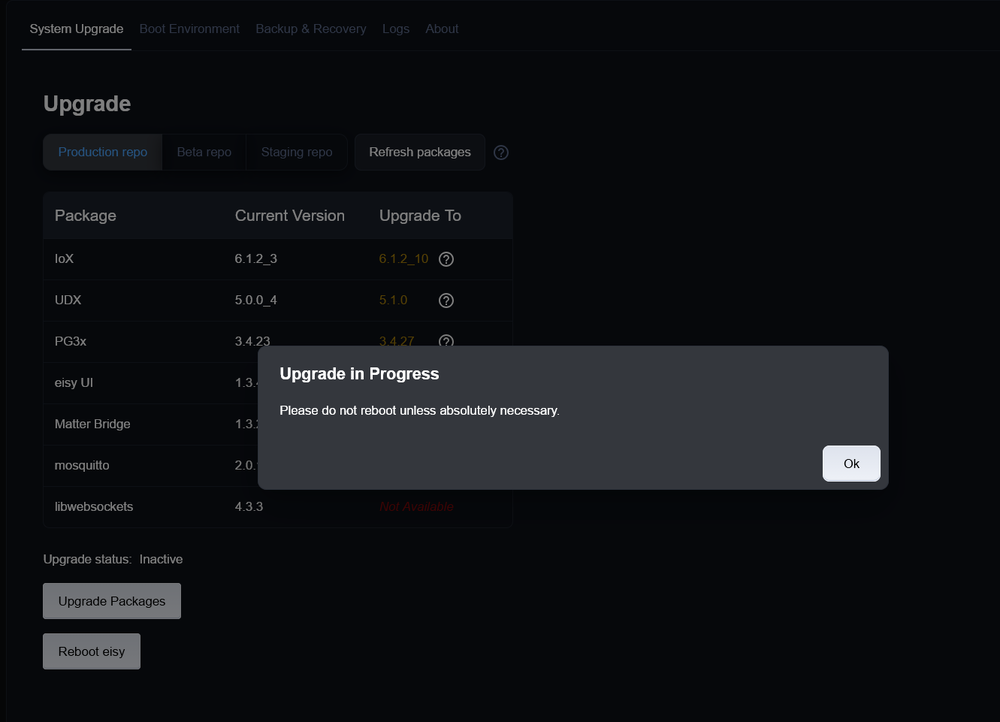
Some weeks back and with help e.g. from this thread I was able to upgrade my Polisy. I have not run into any issues since. Now I see that there are new versions available. What is the process for updating to those? I have tried via the web interface a few times, including waiting for some 10 minutes in between and reboots. It still shows the old versions. Do I have to use SSH again? If so, what are the steps/commands. Any help would be greatly appreciated?
-
I found this thread when I was troubleshooting my formerly working Alexa/ISY implementation. My Alexa AV implementation (pause/play) had stopped working a little while age (while e.g. lights continued to be working fine. I had tried all sort of things, e.g rebooting ISY, disabling/re-enabling skills to no avail. Turns out that Alexa+ has broken those AV commands for me. Reverting back to Alexa 'classic' has brought those back to life. So for the time being. I will continue with Alexa 'classic', but if anyone has any suggestions/ideas on how to make those AV commands also work with Alexa+ I would like to hear about it.
-
Mine is back up as of a few minutes ago.
-
Just came back online. So all good again.
-
I saw the post after I found my portal access/Alexa to be not working: However, from what I understand it should be working again. AC is accessible just fine via LAN. Is there anything I would need to do to bring it online again?
-
I seem to have run into the same issue with my Polisy. Sounds like the best way forward is to open a ticket, which I will do.
-
Thanks @Michel Kohanim for your reply. Sounds like you use it as a regular PC that also happens to run IoX on it. Am I overstating this? This gives me a good idea. Thanks.
-
I found this in the sticky: "Why should I buy one? Only you can answer this question. If you have a polisy, I'd say don't unless you simply want a new toy, have money burning a hole in your pocket, or simply to support UDI." This statement was made already some time ago. So I was wondering if this still holds true today. I have a relatively small system with less than 100 Insteon devices and limited amount of simple programs. Would I gain anything performance- or otherwise if I switched to a polisy?
-
Got it. Thanks!
-
This had been my MO for years as well, but it this time I apparently needed to do it the other way around. I had also tried several power cycles beforehand to no avail....
-
I have been trying to update v3.2.4, but thus far without success. I thought when I update my Polisy via the Upgrade Package command in the AC that Polyglot would also be updated along the way. This does not seem to be the case. What do I need to do here?


-
When did you upgrade yours? From what I understand (and I could be wrong - still awaiting confirmation) Polisy got temporarily pulled from the list of eligible products. EDIT: Finally I just got mine to upgrade also. I had not made the connection yet to clean the Java cache before making any upgrade attempts. Thanks for pointing me into the right direction!
-
How did you do this? I only keep getting 5 beeps and no update on mine. EDIT: Finally I just got mine to upgrade also. I had not made the connection yet to clean the Java cache before making any upgrade attempts.
-
I received the release announcement email last night so I just tried upgrading my polisy via the AC, but it did not work (got 5(?) beeps, but AC stayed 'alive', no logout, and still on same f/w as before: 5.6.4). When I browsed through the support thread here I found @Michel Kohanim post buried, indicating that the upgrade has been disabled. Not sure what 13.2 refers to though, so I wonder if my issue is related here or not. Any guidance would be appreciated. Thanks!
-
I worked through the instructions here:https://wiki.universal-devices.com/index.php?title=ISY-994i_Series_INSTEON:Networking#Web_Server_Module ....specifically the part about: Append to an Existing File I now can access it via Chrome (my go-to browser FF does not like that it is not a secure connection)


