


phenneberry
Members
-
Joined
-
Last visited
Everything posted by phenneberry
-
Very much appreciated hart2hart. Let me investigate to see what it would take to switch the system to a DSC classic. I will first reach out once again to EyezOn and see am I missing anything with their configuration, and if not, look at options.
-
Just saw your message about Uno direct replacement for the DSC panel. I hadn't looked into it, primarily I thought I would have to change the motion sensor and both keypads as they are proprietary to the DSC Neo. I had already spent $200 when I moved in to have the DSC Neo operational as one of the keypads had a bad wire, and the tech charged $100 for the service call and $100 for the wire installation (120 feet from panel to the furthest door) where the panel is, then I purchased the EnvisaLink 4Max and UNO4 which was almost $200 so spending $400 on a system didn't make me want to invest more. I just wanted the EnvisaLink-DSC module in Polyglot 3 to report arm/disarm and the ability to set or disarm the system. Simple. But I'm starting to think that is not possible with this DSC Neo system.
-
Using the DSC Neo, with the EnvisionLink requires the UNO4 expansion card to allow communication to EyezOn. EyezOn can only arm & disarm the system with the DSC Neo and show whether the system is armed or not. Currently no other feature is available. This is what I was hoping with the the EnvisaLink-DSC in Polyglot 3, allowing me to arm /disarm, and to see the status. Zones status is not available with the current configuration, and the system simply shows ready to arm or not ready to arm, but doesn't tell why in EyezOn. I could purchase an additional UNO8 expansion to add 8 zones, and then move the zones from the DSC Neo to the expansion card to allow EyezOn to 'see' the zones, but the added price isn't work it. All I want is to have the EnvisaLink-DSC module in Polyglot 3 communicate correctly to show arm/disarm and be able to arm/disarm when the status is 'ready' but I continue to see in the Polyglot logs that it cannot communicate with the EnvisaLink card.
-
True, but I can see the partition, and the alarm is set at the partition level and not the zone level. When I do add a zone, or all 8, isy shows them as closed (which is good as they don't update with the DSC Neo system).
-
Great questions. There is very limited control with the EnvisaLink 4 Max with the DSC Neo. It basically can only arm and disarm the system. No zone monitoring, so that is why I switched the zones to zero, hoping that would fix the communication issue. The expansion board, UN04 allows DSC Neo to send an alarmed condition back to EyezOn. So, yes, I do have zones, in fact I use 6 of them as the remaining 2 zones on the basic DSC Neo are needed for the UN04 but again without purchasing additional UN04 or UN08 boards to wire the zones directly to the UNO boards, then the zones cannot be monitored via the EnvisaLink. I'm hoping something will change in the future, as I had a Honeywell alarm that I used EnvisaLink and enjoyed the zone monitoring, and additional features. Just not the situation with the DSC Neo due to a change with the Neo's proprietary communication.
-
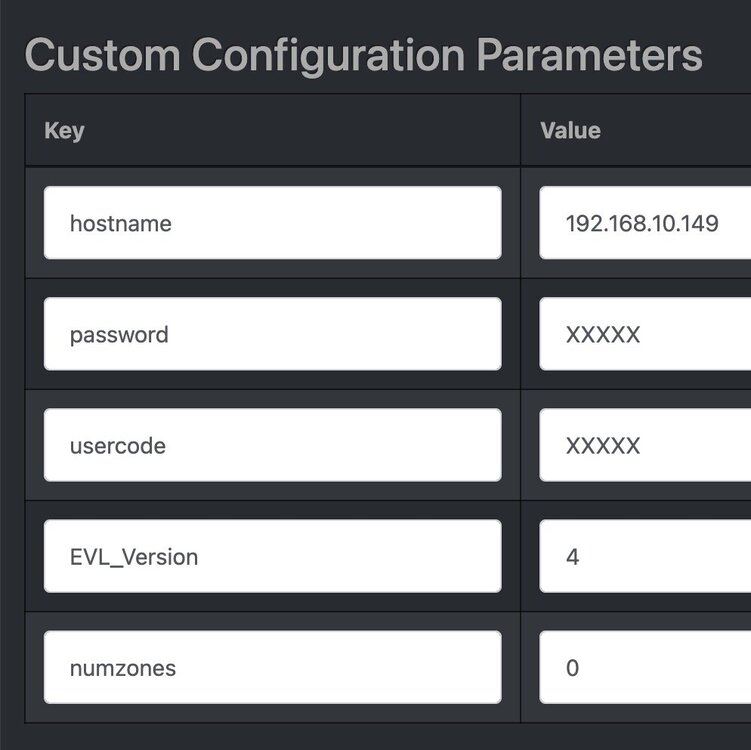
Yes, the XXXXX are there just to hide the actual passwords
-
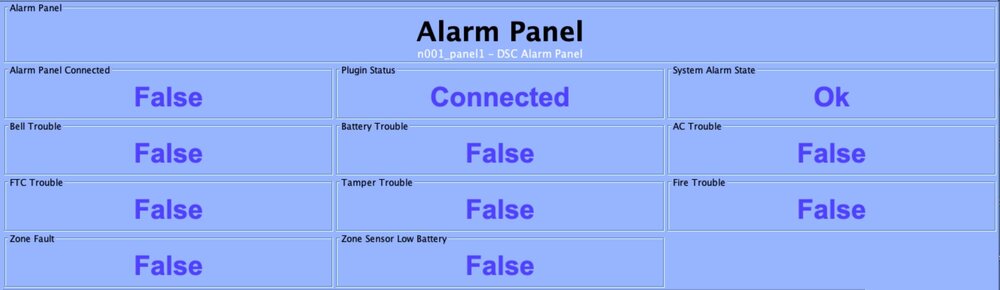
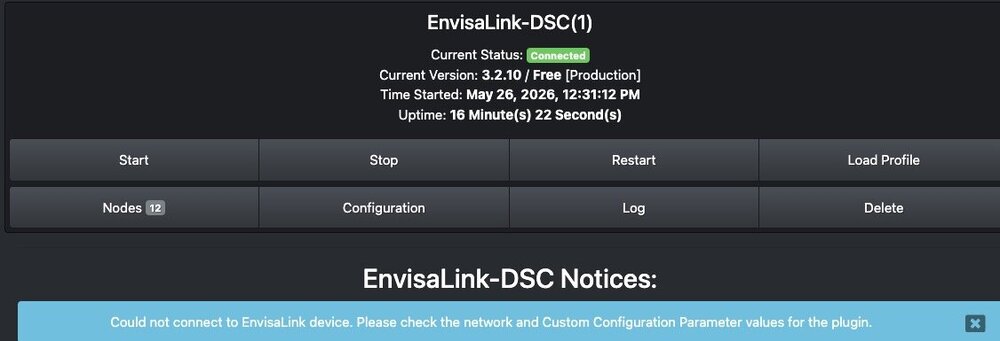
Used the EnvisaLInk 3 with my Honeywell system and the EnvisaLink-HW flawless for over 2 years. Moved last month, alarm is now DSC Neo, so purchased the EnvisaLInk 4MAX with the UNO4 Zone Expander (needed for EyezOn to communicate with the DSC Neo). Now when I installed the EnvisaLink-DSC on my PG3x (version 3.4.18), it shows the plugin cannot connect to the EnvisaLInk device and to check the network and Custom Configuration. My network doesn't appear to be the issue, as I can open the EnvisaLink web page (192.168.10.149), so I'm assuming I must have missed something with the configration. I tried leaving the zones at the default of 8, but according to EyezOn, it won't report zones on the DSC Neo so I then tried with 0 as the setting, still no success.
-
I upgrade to PG3x 3.2.2 and Ecobee problem went away. Much appreciated.
-
Using 3.1.23 PG3. Power in house failed yesterday and when Polyglot came back up, 6 nodeservers were all fine, but the Ecobee complained, and wouldn't start. I attempted to restart, tried restarting Polisy - both to no avail. Removed Ecobee. Then installed. Shows status as Disconnected. When I slick start which should give me the PIN, the node starts, waits 2-3 seconds and then stops 2023-08-26 20:57:25,113 MainThread udi_interface INFO polylogger:set_basic_config: set_basic_config: enable=True level=30 2023-08-26 20:57:27,554 MainThread udi_interface INFO __init__:<module>: UDI Python Interface for Polyglot version 3 3.1.0 Starting... 2023-08-26 20:57:27,624 MainThread udi_interface ERROR udi_interface:write: Traceback (most recent call last): 2023-08-26 20:57:27,625 MainThread udi_interface ERROR udi_interface:write: File "/var/polyglot/pg3/ns/000db9593250_1/./ecobee-poly.py", line 7, in <module> 2023-08-26 20:57:27,626 MainThread udi_interface ERROR udi_interface:write: from nodes import VERSION,Controller 2023-08-26 20:57:27,627 MainThread udi_interface ERROR udi_interface:write: File "/var/polyglot/pg3/ns/000db9593250_1/nodes/__init__.py", line 5, in <module> 2023-08-26 20:57:27,627 MainThread udi_interface ERROR udi_interface:write: from .Thermostat import Thermostat 2023-08-26 20:57:27,628 MainThread udi_interface ERROR udi_interface:write: File "/var/polyglot/pg3/ns/000db9593250_1/nodes/Thermostat.py", line 1 2023-08-26 20:57:27,628 MainThread udi_interface ERROR udi_interface:write: ormat(name)) 2023-08-26 20:57:27,629 MainThread udi_interface ERROR udi_interface:write: ^ 2023-08-26 20:57:27,629 MainThread udi_interface ERROR udi_interface:write: SyntaxError 2023-08-26 20:57:27,630 MainThread udi_interface ERROR udi_interface:write: : 2023-08-26 20:57:27,630 MainThread udi_interface ERROR udi_interface:write: unmatched ')' Thoughts?
-
I purchased two, Insteon Garage Door sensors #74551. They work perfectly, allowing me to open /close either door remotely, and I've linked them to a keypad, so that inside the house, I can see the door status, as well as push the keypad button to activate the door. The one downside, whenever ISY is rebooted, it triggers both doors to open, and stay open. Anyone have a workaround for this?
-
Much appreciated Michel for the info. One additional question on this, is there any plan for integration between ISY and GE Nucleus, so that I can use ISY to report and manage rather than two separate devices. Thanks again, Peter
-
I just contacted the Arizona Power Service (APS) to obtain the PAM code, and they had no idea what an ISY, Zigbee Brueltech monitoring or PAM code is. Has anyone else been successful in configuring the ISY here in Northern Arizona with APS? Or is there something that I should be communicating with APS, as they acknowledge it is a smart meter (elster meter)? Thanks for any assistance, Peter
-
I upgraded to 3.1.10, and attempted to add my six 2444a28 Remote 2 controllers, but every attempt fails, with the following message: Node not added - failed reading links (Insteon address) [-200000/-8] I don't have any links as I was going to add it to the ISY, and than add scenes to each button, as all my lights are SwitchLink 2476D, and in order to add the SwitchLink Dimmers directly they need to be 2477. Suggestions?
-
I upgraded from 3.1.2 to 3.1.3, when I click on Administrative page, I receive Java error: Applet com.universaldevices.client.ui.UDClientApplet notinited, resulting in the admin page failing to load. I tried the basic Java that ISY recommends on a 'clean' machine - JRE 6U5, as well as the current version - both product the same error. How do I roll back to 3.1.2 when I cannot log into the admin console?
-
Both Insteon controlled thermostats continue to loose connection. I disable them, and then re-enable them. That works until I restart the ISY admin, or until I perform a query of devices.


