


HL3
Members
-
Joined
-
Last visited
-
Thanks all for the speedy help!
-
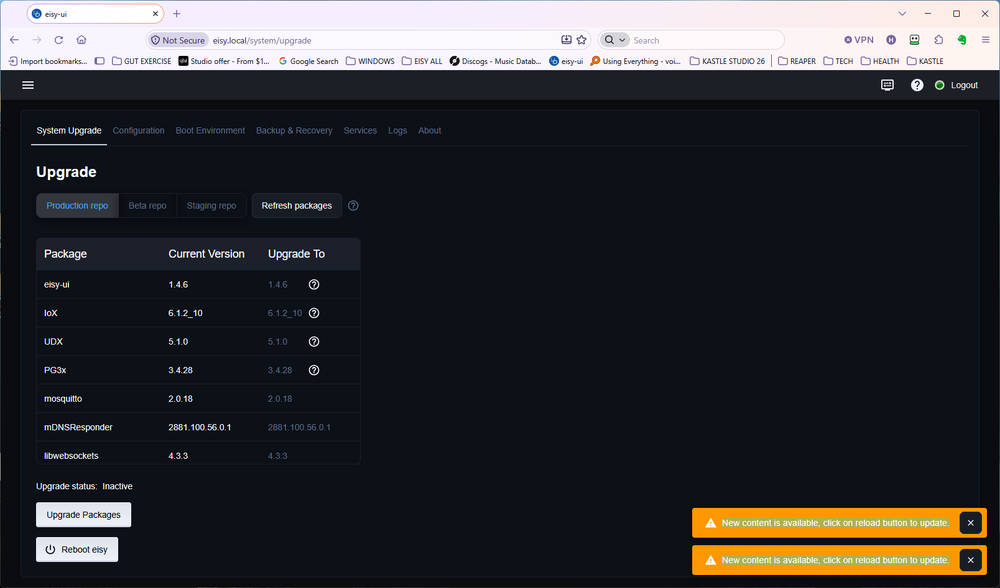
After having updated IoX to 6.1.2 eisy-ui is throwing a message saying "New content is available. click on reload button to update" Assuming that's referring to the browser reload, regardless of Update Status: Inactive it's recurrent. No new devices have been added. Thoughts? eisy-ui 1.4.6 IoX 6.1.2_10 UDX 5.1.0 PG3x 3.4.28 mosquitto 2.0.18 mDNSResponder 2881.100.56.0.1 libwebsockets 4.3.3
-
I will follow your advice & post. Thanks for your help!
-
Latest firmware all around. No local IP. 8080 for eisy. Interesting that sync resovles the issue
-
None of mine have a toggle command. I have for example: -Groups for lighting run by 6 & 8 button wall keypads 2334-2 and wireless remotes 2342-232 for example. -IOLinc 2450 to open Garage door. When these are triggered the only occasional issues are via MOBILE then rectified by Synchronization. This is a repeatable condition. When using hardwire or wireless insteon devices performance is perfect. When using Mobile SOMETIMES, performance is either deminshed or non-working. Synchronization rectifies these issues immediately. It has had this behavior since deploying the eisy years ago. I waited chalking it up to product evolution.
-
Thanks Sometimes it does not issue a command to a device until Sync
-
When simply opening MOBILE running a Favorite may not work until SYNCHRONIZE is run. I've tried LEGACY SYNCHRONIZATION to no real avail. Thoughts?
-
You all rock! Amazingly speedy cogent advice! I successfully implemented it already. Thanks so much! Thanks but I don't see how this works. I tried to Favorite a Program but it doesn't run it.
-
I control the Garage door open/close 2 ways. Manually triggering by way of a 2450 relay from UD Mobile. Also, a Program that opens the door, waits a few minutes then closes it. Also by UD Mobile. No problem. However for the latter, to do so a device was necessary for the "If" statement of the program. I couldn't find a way from UD Mobile to trigger the Program without it. I don't want a physical switch that might be mistakenly pressed leading to problems. I used a 2635-222 On/Off Module to trigger from Mobile. It works, but it's a clumsy costly approach. I'd like to merely invoke the Program from a Mobile tile. Thoughts? Thanks
-
Here we go. I have been using a 2476D in a bathroom and have two different brightness settings depending on the time of day. 100% 6am-10pm same day and 12% 10pm-6am next day. The switch is for the circuit mentioned & I have two different Programs running two different Scenes to achieve the daily settings. Much of the time this has been successful. However... The short story is at times the 2476D sets the brightness to its internal On setting & not the programmed levels. I have arrived at this by tests and MUCH troubleshooting. Sometimes upon first ON tap of the switch, brightness goes to the internal settings. After second tap, only then it responds to the programmed level. This has been exacerbated by upgrading to an eisy. I bet what I'm trying to achieve is a stretch. Asking the switch to essentially be its own controller. Funny it works a majority of the time. Your thoughts are welcome!


-
Thanks all. Much appreciated!
-
My 2450 IO Link Status is not changing with Momentary A use in eisy Administrative Console. It's set for a 1 second hold to trigger the garage door. The relay works as expected but the status of the relay remains "ON" until manually sending an "OFF" command. I'm expecting the status to follow the function of the relay and show "ON" while on and revert to "OFF" when off. As a work around, I've made a Program that sets it to "OFF" after 5 seconds. Is there a more elegant way? Thanks Howard


