


nowandthen
Members
-
Joined
-
Last visited
-
I saw a comment in another closed thread in one of the replies about possibly adding a collapse (all?) button. I would love to have this button. When in the Nodes or IoX (very similar) views, it would be nice to click one button and collapse the tree. Thanks for consideration.
-
Sadly, I am still trying to get my ratgdo's to display and work correctly after migrating from PG3 legacy (garage door and gate in my case). I spent a few hours this morning fussing with them, but had to work on other things. Just saying, it's not always a straight forward migration, so plan to spend some time fussing to get things to work again. :( At the moment I deleted them, then managed to get them back in PG3 Legacy where they work but do not display correctly in UD Mobile. Maybe I have to delete anything and everything to do with them, then try to load directly into Eisy Plugins. Posting in case anyone else has experienced similar, and can offer advice. Otherwise, maybe tomorrow.
-
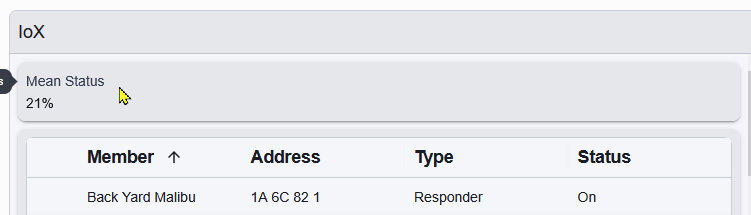
Why? It's not something I look at and say "Oh! Something is not right." For me, wasted screen space. There are so many devices in my system I can't possible discern any value from this. What am I missing?
-
How many "other users"? I for one, like color. "Other users" must like 1955. I like 1966 (and beyond), The Wonderful Wold of Color. KISS. Easy to see, easy to comprehend. No column sorting, it's just there. Please reconsider keeping color for on/off and % on. Anyone else?
-
Thanks mmb Reboot from system menu worked. I see notification in UD Mob1le that PG3 server started. I now see a menu item pg3x (legacy) whereas before it was just PG3. PG3 devices loaded. I now see my ratgdo devices in the nodes tree. I should know to reboot by now.
-
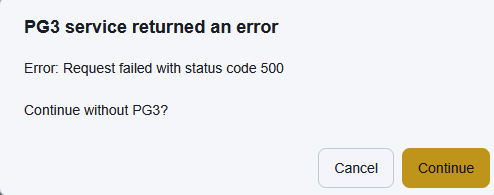
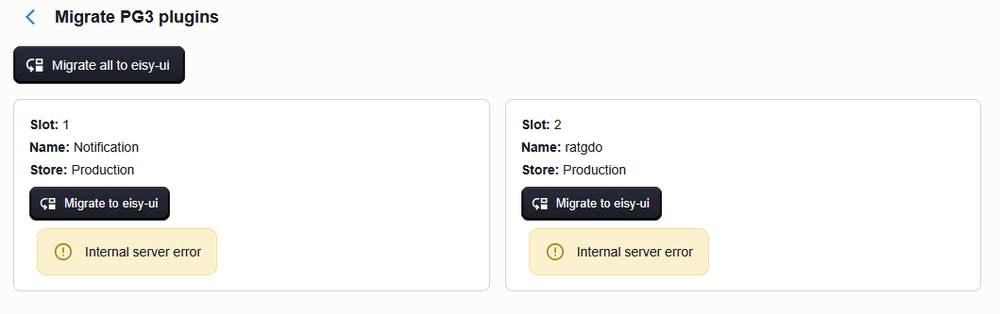
Same. When I start eisy UI in my browser I see this: Like Phil G. Attempting to migrate PG3 devices/programs gives this: Thus I do not see these in the tree. How do I fix this? TIA
-
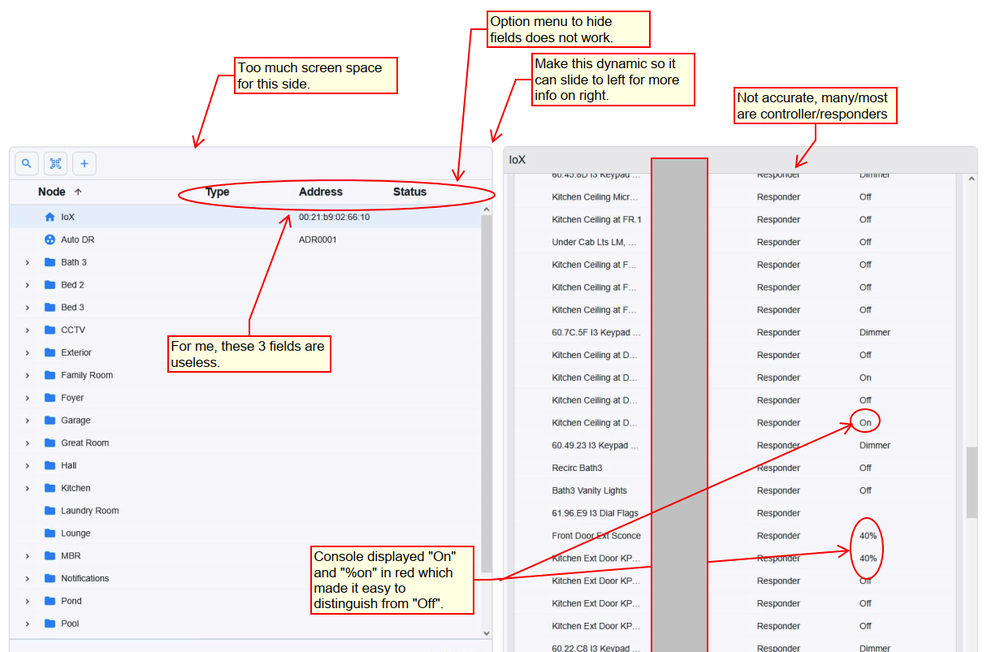
See image for initial feedback. Most important, at least for me, is coloring "on" and %On" in red like the old console did. This makes it really easy to see what's on and what's off. Currently, screen is divided in 2 halves, and it can't adjusted. Many columns on left have no useful information (for me). There is a menu to not show them but it doesn't respond. Items on right half all show at responders, but almost all are controller/responders. Digging deeper reveals this but if you are going to show what they are, then show correct setting. Good first cut, hopefully, the UI will get better with user feedback.
-
My experience, and maybe this will help others... I was on 6.0.4 I clicked on "upgrade packages" as instructed by Javi. It appeared to be done after the upgrade message went away, (maybe 20-30 minutes). I closed the console then clicked on IoX launcher, Was presented with the usual URL in the launcher window. I clicked on the URL, nothing happened, (anxiety level rising). So I tried a link listed above http://eisy.local. Nothing! Anxiety level rising. I use Firefox, but was not working "Unable To Connect" anxiety level rising. Someone had success with Hoover/ Shark/Dyson errr Google Chrome, I gathered my courage and tried it, still no luck. Anxiety level rising. I typed in the local address of my eisy 192.168.xx.xx, the screen alternately showed a login screen and flashed white over and over agin. Unusable. Anxiety level rising. Maybe because IoX launcher was still open? I ended up unplugging my eisy and plugging it back in. After a short while I was able to log into the eisy using the local ip address 192.168.xx.xx. I did not try IoX launcher. So... Upgrade was not straight forward as hoped, but as usual, I got through it. Hopefully you can too. BTW: I thought I read interface looks the same as the console. which I am not seeing, but that's okay. I will adapt. Good riddance Java! Looking forward to smoother upgrades. To the UDI team; I would not be an Insteon if not for this device, wait, maybe that should be "the the Insteon team". ???? Thank you EiSY team!
-
I've been hunting on this forum for about 30 minutes as to how to upgrade my Eisy. I see the post that Java will no longer be supported. Good riddance! But the link takes me to an article that is a "mile long" and I can't find the tree for the forrest. I'm probably blind but I don't see any instructions or a "button" in my console to upgrade. Message to UDI: Make this stupid simple, so stupid people like me can click a button and upgrade. You guys know this system inside and out, but many of us just want a simple link to upgrade. Shouldn't this be in the console, and if it is, maybe make it more obvious? Didn't there used to be a notification of an upgrade? As much as I hate Microsoft upgrading my system without my consent, it is simple and it just works. Please, can someone point me to a procedure that is not a mile long on how to upgrade my eisy? I am truly sorry about the complaining. Feel free to call me blind, stupid, cranky, or anything else.
-
Every time I log into the eISY, a "New Insteon Devices" window pops up reporting an "added" device. It is always the same device. This window seems to be somewhat new. Not a big deal because when I close the window and log in again/later the device(s) are no longer reported as added... However, one device will not go away, it's an i3 Dial v.54 if that matters. I have 3 other i3 Dials, that were added, and many other devices, that report as added but then don't report again. But this one device keeps popping up. Any ideas how to make it stop reporting this device as added? BTW, not a fan of this pop up report.
-
I didn't try Guy's solution, I first tried Techman's and that worked so I stopped there. Thanks to both of you!
-
I read this https://forum.universal-devices.com/topic/45353-using-admin-console-cant-connectlib_errors-403/ it seems we have reached the time where no local login is available to users. I get wanting to simplify. But logging in is a pain. I have to use my portal login which is a much longer user name and has a randomly generated password, which means I have to log into my password manager to get the password. It's a much longer process to get in. With local, I have a simpler username and a simpler user password. Any way to retain a local login? Thanks.
-
Are you aware that the PowerWall 3 battery technology cannot keep track of 100% and 0%, so periodically, they will dump the batteries to the grid until they are depleted to 0% in order to find that data point, then next day, sunshine permitting, will start charging back up.The Powerwall 2's do not have this "problem". Perhaps that is what was happening. The apps grab data from Tesla, so they can only report what Tesla posts. If indeed the Powerwalls are doing their "calibration", then powering off will only postpone the dump. It will happen again very soon.
-
Thanks to those that offered possible solutions. I really appreciate it. I just got dumb lucky in finding something that fixed the problem.
-
Solved. Even a blind squirrel... blah blah blah. Reading this thread, again, it made me think about looking at my other UD logins. While only one of the four worked when logging in through the console, and the console entries were blank, I realized that one was for my.isy.io. I logged into that and stumbled around the PG3 area, not sure what button woke up PG3 but I started getting notifications via UD mobile that PG3X was starting up and the ratgdo's where coming online. I can now log into PG3 via the option in IoX Finder. I'd love to know why this path fixed the problem with PG3. Strange side effect: in UD mobile the gate and garage doors used to report Open, Closing, and Closed. Now they report 1 (meaning open from looking at the door), 4 opening, 1 open, and 3 closing. Not intuitive at all. :(


