


johnnyt
Members
-
Joined
-
Last visited
Everything posted by johnnyt
-
zwave restore bug was fixed in an unadvertised update (6.0.4) a few days ago. After the upgrade I was able to replace my dongle following the steps outlined in my original post without needing steps 7 and 8.
-
Got some hands-on UD support yesterday and there's a problem with zwave restore in latest IoX version - perhaps a bug in a recent update to the zwave libraries. Surprised no one else reported it but then again restoring a backup usually only happens after some sort of failure that requires it. I guess this is why it's important to test your backup/restore process every now and again before you really need it. Hopefully this gets fixed soon because if my (and/or others') current zMatter dongle fails we'll be dead in the water.
-
I was an early adopter of eISY (also of Polisy). I remember being advised to replace the power supply for the Polisy and I did that. Is it really an issue with the eISY too? With respect to both the power supply and USB port, I have to wonder why one dongle would fine but not another. Would different dongles bought at different times have different power consumption? One thing I thought of doing was swapping out the complete set (eISY and dongle) but that's a big pain / last resort as I believe different eISY h/w comes with different portal and plug-in licenses. I would need to get all that stuff transferred over and (I think) do a fair amount of configuring, although I've never done it so I'm not sure.
-
I opened a ticket about a week ago and included several logs from my initial attempts. The lack of a reply lead me to post here. I just added explanation I posted here around my second session of trying to replace it. Hopefully I do hear from someone.
-
So I started the process over making sure antennas were connected inside and in the right place (Red = Zigbee // Yellow = Z-Wave.) I also made sure Zwave was ON in the config tab and even tested both dongles after doing a factory reset using my spare eISY and a spare Zwave device. The test included verifying that things worked consistently including at a fair distance on the other side of the house two floors away while both my test and prod eISYs were running right next to each other. One of my dongles, although recognized enough for the Zwave menu to appear in the AC, stopped communicating during my testing and I could not get it to work so it's been relegated to my e-waste box. Using the now proven fully working 2nd spare dongle, I went through the restore process in my original post (after doing factory reset while it was on my test eISY) and the same exact problem occurred. The new, restored (spare) dongle refused to connect with any of my prod devices. It reports them all as 'not awake' and there's no status being reported to the Admin Console. This after a "Restart IoX" then, when that didn't work, a reboot, Also this is with "Query at Restart" enabled in config tab, and I followed it with a manual Query All a good 5 mins after system stopped being busy due to restart. (I also had disabled 95% of my programs to minimize resource contention.) I can see from the event viewer and by using Xray function that the restore worked and the dongle has all my prod devices in its memory. I really don't know what to think. Did I miss anything? How likely is it that my spare dongle is defective even though it's working fine using my spare eISY?
-
I checked them and they're correctly connected, i.e. Red = Zigbee // Yellow = Z-Wave.
-
you can still login the old way by adding "https://<your.eISY.IP.address>:8443/desc" to the launcher list and electing it instead of the entry without the 8433 port number.
-
Has anyone had problems replacing their zMatter dongle? My current zMatter stops working after a few weeks and I power cycle eISY to get it working again. It's happened about 3 times now so I decided to replace it. I've tried with two spares I have that were working last time I checked them and in both cases they were not able to communicate with any of my devices. I either get a message that device is "not awake" (most of them) or err=1 (a few). Most of my devices are AC powered and therefore always awake. Not a single one works. Here's the process I followed: 1. backup zwave 2. backup IoX 3. power off eISY 4. swap out zMatter dongle 5. power on eISY 6. restore zwave 7. restart IoX 8. power cycle eISY (after restarting IoX didn't result in things working) I tried this with 2 different spare zMatter dongles. I also tried doing a factory reset on the 'new' dongle before step 6 (restore zwave). This deleted all zwave devices in IoX so I did a restore IoX then restore zwave again. Same outcome. I do see in Event Viewer that the zwave restore was successful. I also tried letting things settle after startup with new dongle and after the restore to make sure it wasn't just a question of time or resource contention. I can put the old one back in and everything works fine. I worry I'm living on borrowed time with the old one and would like to be able to replace it. Am I missing a step? Is the restore zwave function broken? Any help would be appreciated.
-
This plug-in worked for me intermittently after I upgraded for eisy-ui 0.7.2 about a month ago but it's broken for a little while now such that neither a plug-in restart or an eISY restart fixes it. <snip> UPDATE: Today's problem was a unusual issue related to something else. Ignore this (I don't see how to delete it)
-
@bmercier I've submitted a ticket, as requested. I'm glad to hear the call to the mothership is encrypted even if the rest of the local traffic is not. On that note, why can't we use https with rest locally?
-
So I can't do eisy.local. It doesn't resolve because I have eISY on a separate IoT subnet (VLAN), which protects devices on my main subnet from all my Internet of (Insecure) Things devices. I tried http with IP address and, while it didn't chew through RAM and responded quite quickly, it still gave me 404 error Problem with using http (I thought) is that I'm sending my portal userid and password in the clear and I don't really want to do that.
-
using https://192.168.100.249/
-
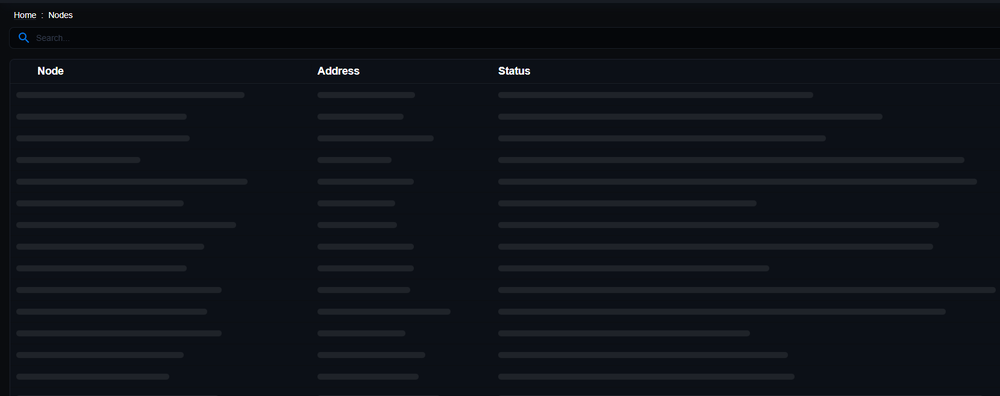
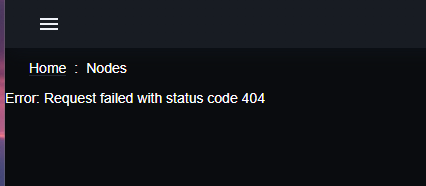
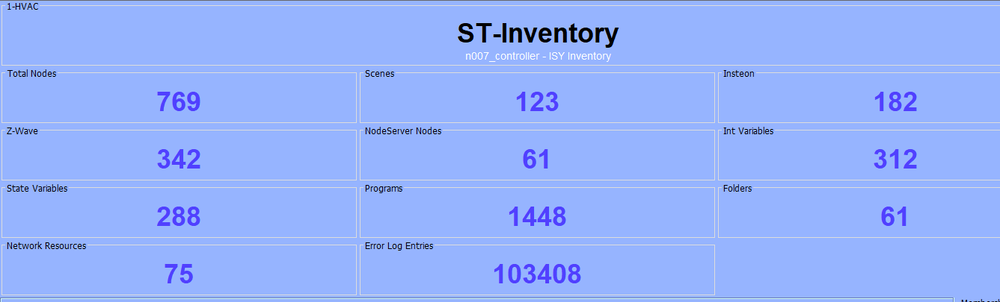
Am on 0.7.2 (had this problem on previous versions too) When I open home page (or select "Nodes"), Chrome works for a while and either gives me error 404 or crashes. I can see my RAM going up to 95% (mostly Chrome climbing above 6 GB ) in Task Manager before the crash. Firefox doesn't doesn't chew up RAM as bad (maybe 2GB) but it keeps loading and loading and loading for minutes then returns 404 With the Programs tab, it shows them almost immediately but keeps loading and Chrome soaks up all the RAM again. Firefox also shows programs but keeps loading until 404 without soaking RAM the way Chrome does. I do have lots of nodes and programs but I don't see this kind of RAM consumption with Java AC. It peaks at ~1.5 GB
-
I upgraded my eisy recently and noticed this morning that PG3 system log entries are timestamped 2 hours behind. The OS time is correct (checking through SSH), as is the Admin Console time. Am running IoX 6.0.0 and PG3x 3.3.23.
-
Has anyone found solution to this? After upgrading yesterday and now at 0.7.1 of eisy-ui, I also am getting the 404 error message when I try to add a tile. Have done 2 reboots and 3 Re-install All Plug-ins. No joy.
-
I was monitoring udx log during a Restart IoX and noticed that a restart of IoX does a restart of PG3 (twice, actually, in the test I monitored). See below. What's weird is that the uptime number for PG3 didn't/doesn't reflect this apparent PG3 restarts. It continues to show uptime since last system reboot (see my original post). Thu Jul 31 08:25:58 EDT 2025|/usr/local/etc/udx.d/static/udx_startup.sh: stopping isy service ... Thu Jul 31 08:26:05 EDT 2025|/usr/local/etc/udx.d/static/udx_startup.sh: starting isy service ... Thu Jul 31 08:26:05 EDT 2025|/usr/local/etc/udx.d/static/udx_startup.sh: starting pg3x service ... Thu Jul 31 08:26:05 EDT 2025|/usr/local/etc/udx.d/static/udx_startup.sh: starting ud_pkg_stat service ... Thu Jul 31 08:26:05 EDT 2025|/usr/local/etc/udx.d/static/udx_startup.sh: successfully started udx 3.9.0_9 Thu Jul 31 08:26:05 EDT 2025|/usr/local/etc/udx.d/static/udx_startup.sh: isy id = 349 Thu Jul 31 08:26:05 EDT 2025|/usr/local/etc/udx.d/static/udx_startup.sh: polyglot id = 349 Thu Jul 31 08:26:05 EDT 2025|/usr/local/etc/udx.d/static/udx_startup.sh: /etc/rc.conf has matter support Thu Jul 31 08:26:05 EDT 2025|/usr/local/etc/udx.d/static/ud_pkg_stat: wifi.ops is not being called as a comamnd Thu Jul 31 08:26:08 EDT 2025|/usr/local/etc/udx.d/static/udx_startup.sh: restarting pg3x because it didn't start 0 ... Thu Jul 31 08:26:11 EDT 2025|/usr/local/etc/udx.d/static/udx_startup.sh: pg3x started successfully ... I guess this means there's nothing you can do about the Airthings plug-in restarting when IoX restarts? So what about storing the short poll timing somewhere and recalling it at startup so the plug-in never exceeds the API limit? Similar to the INIT function in IoX. Thanks for considering it.
-
Would like to add my vote to this. With increasing occurrences of wildfires blowing smoke all over North America it would be good to know as PM2.5 and PM10 go up and down.
-
Thanks for your reply. Does the plug-in actually need to restart just because one restarted IoX? Can't IoX just read/pull the values still there in the plug-in table (if it hadn't been restarted) to set the initial values in the IoX nodes? I was assuming a pull was possible because I see a "Query" and "Query All" buttons in AC as well as the option do it in programs for the Airthings nodes. If not / alternatively, can either a 'pull' function be added so a push is not needed (much cleaner), or something be added to stop/start the plug-in from a program in IoX? With the latter, one could write a program to stop the plug-in before doing an IoX restart (at least when it's a planned one), and another program that starts the plug-in 10 mins after IoX restarts. Or stop the plug-in when API Limit is exceeded, wait some period of time, then restart it. You're right that one should not have to Restart IoX regularly. Unfortunately, I have a number of issues that UDI either can't reproduce (so can't fix) or won't fix for a while because they have other higher priorities and very limited capacity. One of the unresolved problems is IoX spontaneously restarting, which can happen at highly inopportune time. These happen after IoX has been running for a while so I'm managing the issue by automating restarts to happen in middle of the night when no one notices. Right now weekly restarts at 2AM has avoided random restarts. It also means cleaner shutdowns instead of the hard crash of a random one. I might stretch that to 2 weeks but it's unfortunately become a necessary evil to avoid inopportune restarts, at least until either I and/or UDI can find/fix the root cause. I'm not hopeful that will happen soon, if at all.
-
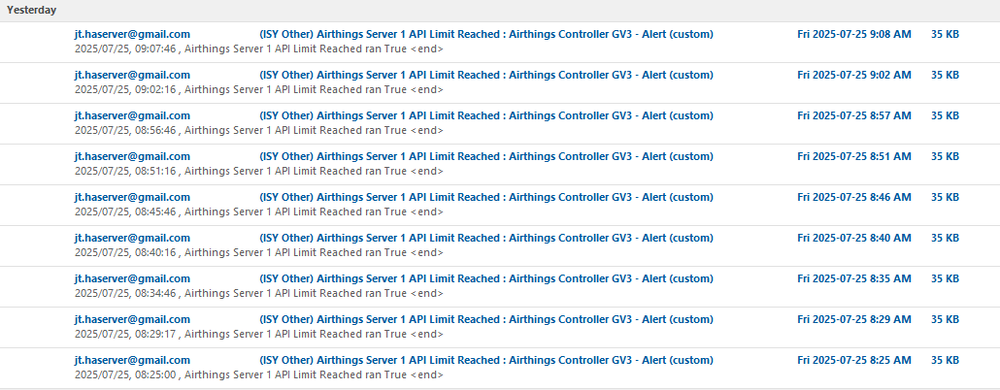
Just to provide a visual, I have a program that notifies me by email when Airthings API Limit has been exceeded. Here's an example of what I get in my inbox when I restart IoX:
-
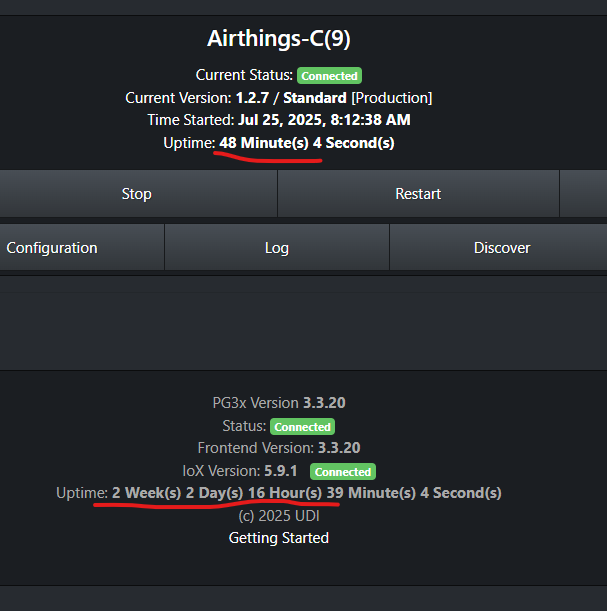
Hi @Jimbo.Automates, Whenever I restart IoX both my active Airthings-C plug-ins restart. For one of them it causes the plug-in to exceed the API limit for multiple update cycles that can last up to 45 mins when I look back to previous restarts. The plug-in that violates the API contract supports 9 devices with short poll of 330 (5 1/2 mins), which is sufficient in terms of not exceeding API limit (anything over 270 is enough) unless a plug-in restart occurs. The other active plug-in doesn't hit the API limit but it only has 4 devices and a 200 sec short poll. Unfortunately, for several reasons I need to restart IoX with some regularity, meaning a regular violation of the API contract with Airthings. Ideally could you put in a delay of short poll duration at plug-in restart to ensure there is no API limit violation? Desirable would also be no automatic restart when one is just calling for an IoX restart. That seems like a bug to me but I see other plug-ins restart too so maybe there's a reason for it that I'm not seeing? I guess it's not a big deal if one doesn't have an API call limitation but is more problematic when there is one. I will PM you my log (set to Info) for today. There was an automated restart just before 2AM and a manual one around 8:12 AM. Let me know if you need a lower level of debug logs. It's easy to change and replicate the issue. Here's a screenshot showing how PG3 has been running for a couple of weeks now while the plug-in has only been running for less than an hour (when I took the screenshot). Note that this has been happening for a while. i just haven't taken the time to report it until now. Thanks
-
Thanks @larryllix. You raise a good point of discussion about doing this. I did post not long ago looking for recent feedback/experience on having 2 insteon and 2 zwave networks co-existing together. While there hasn't been any confirmation there that it works (or doesn't) as of the time I write this, it did get a comment from a long time user that supported my own understanding that it should work. I also recall a long time ago (pre zwave 994i days) asking if having 2 insteon networks works, and the answers I got from several people, including UD Support, were basically "yes but you have to know what you're doing". You'll see in that other thread I do ask if someone can confirm whether both insteon networks are helping each other by passing all messages on, what I assume you mean by "echoing", which is how I think it would work. No one has answered that yet so if you know from experience whether/how it works, can you elaborate on that in the other thread? Thanks again
-
I'm considering splitting up my eISY workload into 2 separate (smaller) IoX instances - one that will continue to run on the same eISY, and one that will run on a currently unused Polisy. I'm hoping to get some help understanding what might be missing in the migration steps I list below, as well as if something simply won't work the way I'm expecting it to work (most notably on the Insteon side). For those curious about my motivations, I've attached more info with context and some of the reasons for wanting to do this (which is not the focus for this thread) Before getting into the migration steps, here are a few important notes about the plan: - A key element of my plan is to use a remote eISY (connected through a VPN but completely disconnected from my Insteon and Zwave devices) to pare down my 'prod' IoX into its two distinct (smaller) "images" that I would then restore onto my existing main eISY and a 'blank' Polisy respectively as an initial load that would take me 90% of the way there. - On the zwave side, I know I would need to exclude/include any/all zwave devices (and fix a bunch of programs) that I now want to control using the IoX instance on the blank Polisy, a.k.a IoP (with a separate Zwave dongle). That's fine as there are only a handful of them. The Polisy will be controlling mostly Insteon stuff. - What isn't clear to me is whether I can avoid having to unlink/relink all the Insteon devices and recreate all the scenes that I now want to control using IoP. One veteran opinion I got was that I may not have to but it hasn't been proven so to be safe I should plan to start over. If I did have to unlink/relink everything, the cost would be high and it would pour a lot of cold water on this idea pretty quickly. My own assumption - and it's a critical one - is that, because Insteon linking uses the hardware's address directly (xx.xx.xx), unlike zwave which creates an arbitrary logical address (e.g. ZY001), I would just be able to do a "Restore PLM" on IoP (with new/blank PLM) and everything will simply work on IoP as they did on the eISY's IoX instance. Stated more explicitly, a Restore PLM on IoP would simply go to every device it knows about using the xx.xx.xx address it has for it and tell those devices that it is now the PLM in charge. Any Insteon devices that I would have deleted when creating the IoP "image" (half a dozen or so) will simply not be queried/updated by IoP since it doesn't have those devices in the PLM table it maintains. The latter devices would therefore still continue to respond to the main eISY/PLM combo. If this assumption is wrong I'd like to know why it doesn't work this way. What am I not understanding about how insteon and "Restore PLM" works? Assuming that my assumption is correct, below are the steps I put together for splitting an IoX instance into two. Note that the image creation prep work (Phase 1) has been tested/refined using my remote eISY. Everything worked as described below and the fixing/cleanup involved was very manageable. Also, all my devices and programs have been organized by folders according to their intended destination, i.e. "eISY" vs "Polisy", to make the deletion process really easy. Phase 1 - Prep work using a remote eISY with its own PLM/zwave Create Polisy 2.0 starter image 1. load current prod eISY backup onto remote eISY 2. restore zwave & disable automatic writing for Insteon 3. delete eISY related programs folder 4. delete eISY related devices folder (mostly zwave with a few Insteon) 5. Zwave | Synchronize | New & Deleted 6. Remove Failed Nodes for all the deleted devices now appearing in root folder 7. take zwave and IoX backup for use in phase 2 Create eISY 2.0 starter image (with only a handful of Insteon devices) 8. load current prod eISY backup onto remote eISY 9. restore zwave & disable automatic writing for Insteon 10. delete Polisy related programs folder 11. delete Polisy related devices folder (mostly Insteon with a few zwave) 12. Zwave | Synchronize | New & Deleted 13. Remove Failed Nodes for all the deleted devices now appearing in root folder 14. take zwave and IoX backup for use in phase 2 Phase 2 - Deployment (starting with Polisy) 15. shutdown prod eISY and unplug its PLM 16. power ON Polisy (with its own PLM/zwave) 17. load Polisy 2.0 starter image 18. restore zwave & disable automatic writing for Insteon 19. exclude zwave devices that are needed on Polisy (and still exist in the image) 20. factory reset zwave dongle (to start clean) 22. re-include zwave devices that are needed on Polisy 23. fix programs 24. Restore PLM 25. shutdown Polisy while eISY is being updated 26. plug in PLM and power ON prod eISY 27. load eISY 2.0 starter image 28. restore zwave backup 29. restore PLM 30. Zwave | Network | Heal Network Anyone ever do something like this? Any thoughts/comments on whether this should work? Any missing or out-of-order steps? whysplit.txt
-
Updated my Polisy today, which was at latest I could get before this update, i.e. 13.2 and 5.8.4, and it worked fine. I was an early buyer of the Polisy but I went through the pain of getting updated BIOS, etc. some time ago. I made some popcorn and watched it happening in real time by opening a Putty session and typing in: sudo tail -f /var/udx/logs/log It did appear to skip some things (like OS upgrade) the first time around to do some other things first then go back to do the things it skipped, with long pauses along the way so that's why I guess it takes a while. Guessing 15 mins in my case. I saw a lot of messages about things not needed or up to date, so that helped timewise in this case.
-
Thanks for that bit of info. Can anyone confirm my understand that all insteon signals from both insteon networks will be repeated for all to hear? Also, do zwave repeaters (built solely for that) repeat signals from both zwave networks or just the ones they see when initially powered on? Finally, anyone actually have experience with this?
-
Yes, it works. Thank you!


