


oskrypuch
Members
-
Joined
-
Last visited
-
Well, do drop by and post, when/if you get around to it. Orest
-
@bob123 wrote: "Hopefully will get some time this weekend to attempt the migration from polisy to eisy and just moving the zooz dongle is all I need to do." Bob, How did it go? I am in the same situation, and with an older Polisy that will not go beyond 5.4.4 without a system OS reflash, and a 700 series USB ZWave stick, it is the latter that is the big hold-up, as you know there is no backup option. Reportedly ( @Guy Lavoie ) unplugging, and plugging it into a (new) replacement Eisy may work. I also have some polyglot 3.0 stuff that will have to get moved. I had another Polisy (cottage) that was a simpler setup, and no Z-Wave, which I did reflash, and it bricked at first. Was eventually able to get it going again with multiple reboots and some SSH twiddling - so a little gun-shy. It sits at 5.8.0. I am concerned that after December I will lose access to my systems through the java applets. A bit frustrating as everything is working perfectly, and happy with the app. Unhappy with potentially having to spend a bunch of money (for an Eisy) and a bunch of time, and will essentially end up with the same functionality. Orest
-
Is this an iThingie problem only? That is, is there an issue with the android UD app? Orest
-
Ok, good to hear, and I now have the data dump so can review in future. Thanks for checking it out. Looks like I am back in business! Orest
-
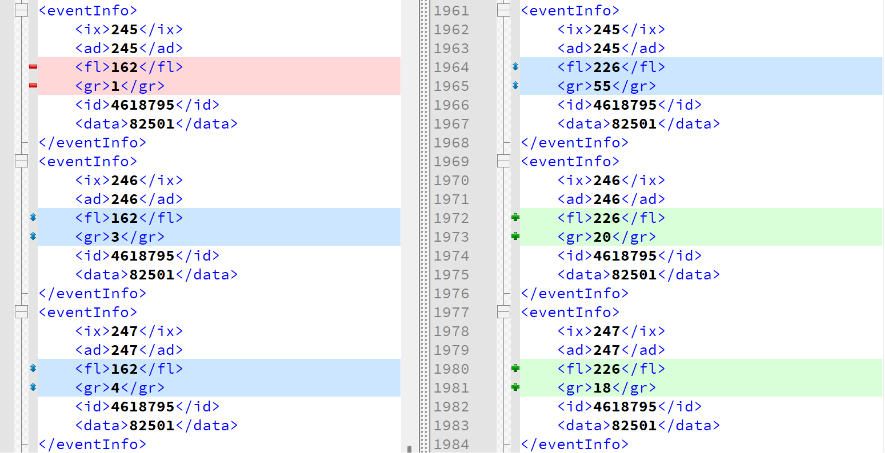
Well, I have the UI's XML dump from the 22nd, 23rd and 25th. The latter two, the 23rd & 25th are identical, the initial one on the 22nd differs slightly, as I was commenting. I've attached the two that differ. Orest PLM Links Table.v5.4.4__Mon 2026.06.22 11.57.31 AM.xml PLM Links Table.v5.4.4__Tue 2026.06.23 01.40.12 PM.xml
-
@IndyMike Well, it has been a day or two, and all is running normally. But, I did notice a difference in the PLM table. Same number of items, and the "id" three bytes, and the "data" two bytes are constant, but in a half dozen (of the 293 lines), the FL & GR values, which is the first two bytes, did change. I am thinking that this is normal? Orest
-
Python is easy to pickup, quite powerful, and available on most every platform. Less popular these days, but still very handy with a rich library of code. Orest
-
That is some impressive sleuthing. The log files are all txt, so easy to manipulate. Did you write some code in C or python or something? I have the original Insteon design white paper (somewhere), and was going to dig into it years ago, but got distracted by something else. Orest
-
Guy beat me to it (looking), but just wondering, have you tied the 1/2 sec (vice 1 sec) delay to errors in data Tx? Orest
-
The few PLM entries I added did not change, or vanish, overnight, and function on these devices is preserved, so ... Completed a full PLM restore (293 lines now), and now doing a full device restore. Looking good, so far. Orest
-
And, I'll keep the device event viewer/log rolling for now. Orest
-
Well then, thanks to @kclenden too! And, thanks to @Guy Lavoie and @paulbates who helped get the ball rolling. The time frame of that errant code insertion, does match up with the observed faulting issue, so good circumstantial evidence. I'm going to sit with just the few devices I have restored for now, and confirm that they stay fully working -- a day should do it. There are only 32 PLM table entries right now, so easy to download/compare. If no further resets/issues, will do a full PLM restore, and as you suggest, follow that up with a DEVICE RESTORE on each device, for good measure! Thanks again. And, will report back. Orest
-
@IndyMike I am so grateful for your time and expertise on this! I think we are well on the way to solving this issue. Having the PLM (errantly) reset from time to time, would explain everything we are seeing. Do you feel there is a good chance that this comm overload triggered the errant reception and reset? The every thirty seconds thermostat polling was not intentional. There was a (recent) bit of code I added, and it looks like it got into a loop from time to time, I've squashed that, and checking the device comm log, the severe polling of the stats is stopped. I also do monitor stats that are calling for heat and cool to "count" the time of operation, but this is not new, and this executes once a minute, only if a stat is calling. For good measure I've disabled this for now. If I reenable it, will move it out to five minute intervals, that is accurate enough. Runaway code is obviously a bad thing in general, to say nothing of triggering an ALL-ON issue! As a test, I have DEVICE RESTORED some usually affected devices, and saved out the PLM TABLE for comparison/reference. And now I know precisely what command to look for in the log, if I see that fault again. If that sorts it out, I'm just a PLM restore to be back to normal! Will report back, and happy to hear any other suggestions you may have. Orest
-
... and that single DEVICE RESTORE, restored the function of that one device. So, I am thinking, that the 70 or so entries of the PLM table (copy uploaded), really just represents the PLM entries from the few devices I had just DEVICE RESTOREd. Given the number of devices I have, I might expect to properly see many hundreds of PLM entries. But, what is causing the mass clearing of the PLM table!? Is a failing Polisy, the problem? Orest P.S. And, there are NO [ 02 6F ] entries in the log.
-
@Guy Lavoie Correct, to be absolutely clear, all scheduled commands from the Polisy to devices are working ok. -- AND, the fault trigger just occurred, all devices can no longer transmit, including the ones that I just recently DEVICE RESTORED. AND, looked at the PLM table, it was BLANK! Hit START a number of times, no change. I then DEVICE RESTOREd one device, some PLM links now show up in the PLM table, eleven of them. Well if one device gives eleven links, clearly the PLM table is way under populated, even when I thought it was "full". DEVICE RESTORE a second device, now there are 29 entries in the PLM. Something is clearly "rotten" in the PLM table (or access to the PLM table by the Polisy) when the fault occurs, and that is shutting down devices communicating!! @IndyMike Attached is the original 70 entry PLM table, which is likely "light", and the event log that covers today, including the period when the fault occurred, which appears to be an emptying of the PLM table! PLM Links Table.v5.4.4__Sat 2026.06.20 11.50.29 AM.xmlISY-Events-Log.v5.4.4__Sat 2026.06.20 02.05.23 PM.txt

