


bdw72
Members
-
Joined
-
Last visited
Everything posted by bdw72
-
It's truly a new card, and I will try to copy the old one to the new one. Thank you!
-
Oddly, I can telnet to it, it connects but will not let me login when i put the new card in it. With the old card it works fine. IOX finder show all the expected information.
-
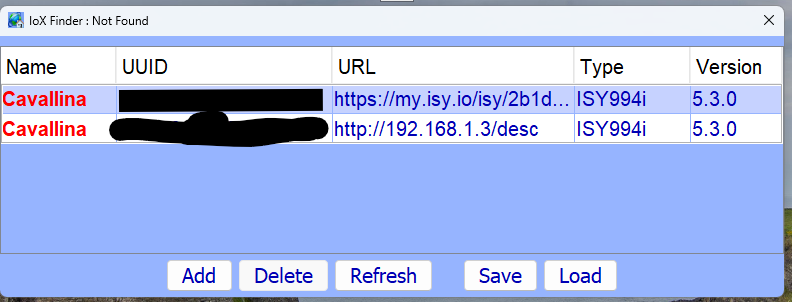
I have tried that multiple times and it did not work, but is now working by adding the IP. The problem is I cannot connect to the isy to install a new SD card. I can ping it, just cannot connect to it after i put in the new card.
-
I have no problem pinging my isy and there are no error lights, it just does not see it in IOX finder and cannot connect locally to the console. even the UD Mobile app works and controls things, just a couple things are flaky. I tried to ssh to it but that did not work.
-
Had power issues from a storm and ISY was throwing errors, but still worked and I could get to it from the portal. Now I and trying to put a new SD card in it and load up 5.3.0, then do a restore, but no luck finding it via the finder. I totally removed java, rebooted, re-installed java, cleared the cache, rebooted and the ISY is still not found. Any ideas?
-
Turns out it was a DNS issue, once i changed the DNS setting on the ISY to a different address, it started working again.
-
My portal subscription does not expire until 2022. I changed my network ip scheme by adding a Meraki firewall and a new wireless router, same setup i had before at a different house, and it worked fine there. I am accessing MobiLink Pro to control my lights remotely. The portal is the only thing not working after changing everything.
-
I changed my network around at home and now the ISY portal says offline. I can get to my isy externally and locally but for some reason the ISY portal is offline. Any ideas?
-
@Michel Kohanim Ticket Submitted, thank you!
-
I setup the email notification and text notification and hit the "TEST" button and i get the test delivered to my mail and a text to my phone. I setup a program with if this then notify email and notifiy text. Then i save it right click on the program and run then and no text or email. I am using the default SMTP setting, FYI. Please help.
-
So the light came on even after removing it from the ISY and doing a factory reset. Bad device. I appreciate the help in troubleshooting this issue. That's what make this the best forum out there!
-
-
It did it again after the factory reset. my device id 4C A0 73 ISY-Events-Log.v5.0.15A__Fri 2020.07.24 02.10.45 PM.txt
-
@MrBill You are correct in your summation. There are no programs associated with the device, and the device links were identical. I just now did a factory reset and restore. We shall see if that fixes it. This device is plugged into an outdoor plug and controls some LED lights. This issue just started happening recently and there were no issues previously. i will get the other information asked for, here in a bit. Thank you all for you insight and trying to help me fix this issue.
-
Ok, so when the unit is off and i unplug it and wait for 5 secs and plug it back in, it stays off, and it comes back on when i do the other test. The new load is my Direct Tv power supply, so i really can't unplug it.
-
I have not tried it yet, on a long conference call.
-
That is correct it is an Insteon 2634.
-
I have some lights plugged into my outdoor insteon plug and throughout the day the lights will just turn on without being asked to or turned via the software. How can i fix this or chase down what is causing it? I did plug in something new and i did put a noise filter on it.
-
Open worked great for my garage door opener which has an io linc. Close did nothing, but when i said "Open" again, it closed.
-
Have you looked at this? https://innovativehomesys.com/products/insteon-water-shutoff-valve-package-deal?variant=944466575
-
That it, no other triggers, we only use those lights a few times a year so, Alexa controls the scene that's it. Load Sensing is not an option. I will factory reset it.
-
This is an outdoor plug (2634-222) No programs for it. It's in a scene and may be controlled by Alexa. This controls about 20 LED light cord on my deck. The times they turn on is completely random.
-
Can someone please review the attached event log and help me figure out what is turn on the device 4C.A0.73? This outdoor plugin is turning without anyone telling it to do so. Thanks, Brian ISY-Events-Log.v5.0.14__Mon 2019.06.17 08.30.24 AM.txt
-
Recently we had storms roll through and probably some power issues (I was at work). Now i have several switches that are flashing in one way or another. One has the LED's on the side flashing, others are flashing RED and some are flashing GREEN. All switches are functioning normally and I tried to restore them and that did not work. How can i get these switches to stop flashing? Thanks, Brian
-
Try here first: https://wiki.universal-devices.com/index.php?title=ISY-99i/ISY-26_INSTEON:Garage_Door_Kit
