


DIYguy
Members
-
Joined
-
Last visited
Everything posted by DIYguy
-
Had several Insteon devices with links that stopped responding. Started with rebooting PLM, rebooting EISY. Tried testing what ever I could think of to refresh the devices than finally did "Restore modem (PLM)". After that every single linked Insteon device stopped working. Long list of door contacts/light, motion/lights three-way linked switches, etc. Nothing worked. I could control the devices directly through Admin Console but nothing else works. I just now tried re-linking the mini remote to the lamps and got that to work again but every other links is gone. Did running Restore PLM wipe the links or is there possibly something else going on? It's a very ling list of linked devices and not thrilled at the idea of having to redo every link. Would running a restore from backup help?
-
@IndyMike I want to thank you for your help. After the delete and re-add modules were communicating properly with EISY and didn't have to replace any modules. Was able to successfully re-link with other controllers and add back to programs. Alexa is even cooperating. In a related topic, mentioned at start of post that numerous electronics went bad at the same time. May have been a surge after a local power outage and surge when power came back but don't know for sure, may have been coincidence. One of the devices was my Honeywell Tuxedo Touch keypad. Have that one in the hallway next to the bedroom. Finally got that back online but lost all programming and firmware out of date. Been working on that one along with the Insteon. Good news, Tuxedo has latest firmware and all programing is reentered.
-
Deleted the model in EISY. Did the factory reset. Turned circuit off at load center, had wife on phone, held the set button while telling wife to turn power back on and continued to hold set button LONG time, no beep. Unplugged PLM for 20 seconds, plugged back in. Did a reboot of the EISY from the Configuration screen. Tried to add Insteon device in link management using auto and it didn't find the device. Tried again manually adding address while linking and it worked. Device is back and responding. ISY-Events-Log.v6.0.4__Tue 2026.05.26 10.57.56 AM.txt
-
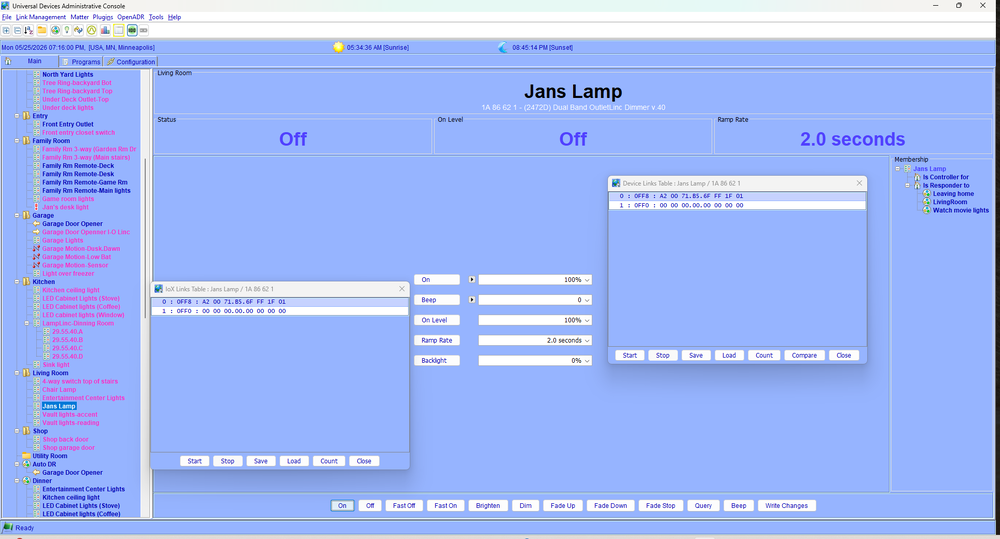
I think we've achieved the point of delete and attempt to add back. I did get a couple devices to respond to EISY commands but there are several remaining such as Jan's lamp (lamp on end table where she reads) that just do not respond. Shows status but no response. See attached screen shot.
-
In Link Management-Advanced Options I changed from Automatic to Device Reported. Tried to turn on device, adjust on to 100% and write file. Did another Restore Device and then save the Event Log. Latest attached. ISY-Events-Log.v6.0.4__Mon 2026.05.25 06.29.38 PM.txt
-
@IndyMike Had to look up how to do a level 3 Event log. Think I got it. One of the devices that I can't get to communicate is the Jans Lamp I tried including before. Did another restore for that module (node) and ran the Event Viewer log. What the log has to say is above my normal grade. ISY-Events-Log.v6.0.4__Mon 2026.05.25 05.53.14 PM.txt
-
I had my first phase coupler back in the days of X10, later replaced that one with the Insteon phase coupler. Still have one or two Insteon Access Points plugged in. Yup, that old. Also had a bunch of Insteon FilterLinc's and X10 FilterLinc Pros. Use to have extensive saltwater reef systems with lots of large pumps and halide lighting so lots of filters. Still have some of the X10 Pro filters still in use but several of the Insteon FilterLinc's died. (2) 2477D Dual Band SwitchLinc Dimmer v.41 (2) 2472D Dual Band OutletLinc Dimmer v.40 (1) 2456D3 LampLinc v.33 Event file after trying to restore the 2472D Jans Lamp 1A 86 62 1 again, still not responding. Did get a switch and outlet to respond to EISY that previously wasn't responding. Still having issues with the mini remote for the living room that controls the switches and outlets that are having issues. Progress ISY-Events-Log.v6.0.4__Sun 2026.05.24 06.56.04 PM.txt
-
@oberkc Network Gateway, EISY, Insteon Hub, security system, NAS, Internet gateway, etc are on battery backup and surge protection. All nodes not working are in wall switches and outlets. Dedicated outlet installed next to EISY has been in place for years. Have somewhere around 30+ nodes communicating but six device nodes that are not. Restore Device performed multiple times on each failed device, tried factory reset and add back, still didn't work All this is after the PLM failed and was replaced. I've restored the PLM MULTIPLE times. Most nodes work, some don't. Only thing I haven't tried is to completely delete the modules and try and add back and see if EISY will communicate again. If so, will need to go and redo all the programs and links that include those devices. If not, If this doesn't work, looks like between $400 and $500 in new modules and a bunch of labor replacing and reprograming.
-
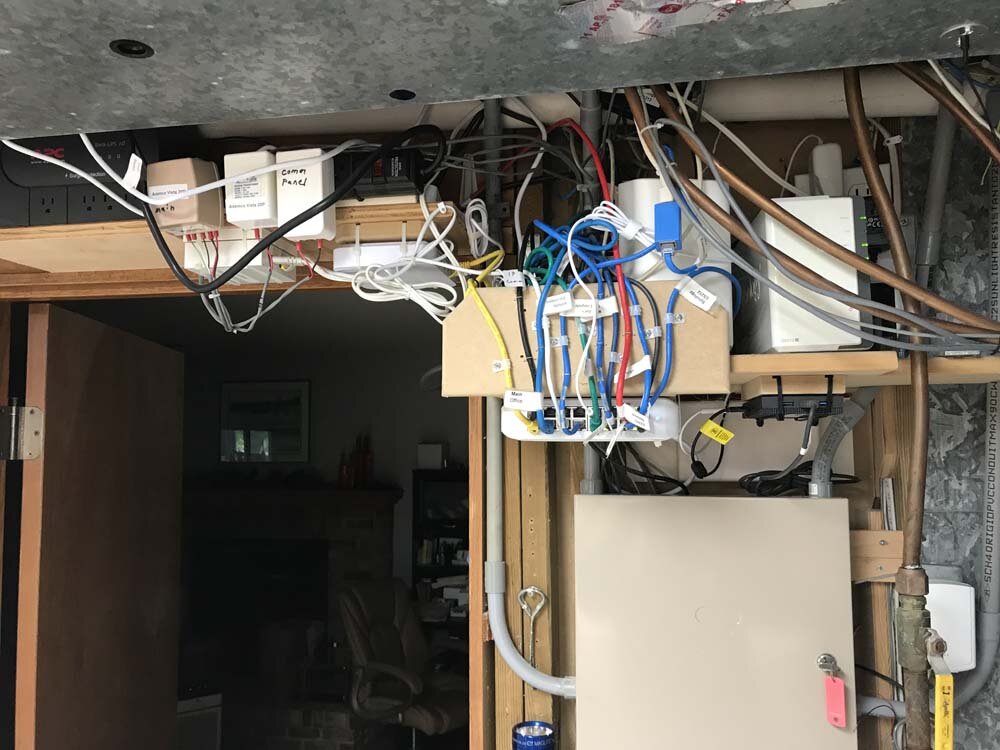
Tried the airgap factory reset on one of the wall switches with the least number of programs attached. Tried the EISY relink, and the EISY add device. Tried to delete that one switch but stopped when it gave a message about removing long list of devices. Figured that might be that that light is included in several programs with other devices. Wasn't sure if it just removed that light from those programs but the way the warning read look like multiple devices would also be deleted so did not delete. Still no communication, rebooted EISY, did another restore PLM with the mini remote in linking mode. Still have six devices with exclamation points and no communication plus the mini remote. Have an Insteon signal bridge hard wired at load center. Everything except the PLM is plugged into battery backup /surge protector. Moving stuff around is not an option. Photo attached.
-
Tried the "Restore Device" when right click on the offline devices. Does the System Busy for couple minutes while attempting to update and when done, no change. Devices that aren't responding are all hard wire, either wall switches or outlets. Also tried Query Insteon engine. When done get the Failed Communication With error and "Cannot Communicate With (xxxxx) Please check connections"
-
Every year Portalshark dings my bank account for MobiLinc Connect subscription. I thought that was just part of the portal service subscription but it looks like UD has it's own ap that seems to work. Since migrating to EISY I discovered MobiLinc Pro doesn't work Wondering If I have to delete that ap, reinstall and start over? Also installed MobiLinc X and tried to login in with my MobiLinc account and that doesn't work. Digging a bit deeper it looks like MobiLinc X is a completely different ap and cost $120 per year! Nope. My bank account was just dinged $50 last month for MobiLinc Pro. Anyone with more Insite?
-
Update: Finally received the new PLM module. Went through the install steps, rebooted the EISY from inside configuration and then did the restore PLM. Now that system can see the PLM again, I have at least six Insteon modules that are now exclamation marks and cannot communicate. These are probably the most used modules. These all worked before the PLM failure. Not sure if I delete the modules and try to add it back again will restore communication and if so, what that does to my programs.
-
Migrated all my network equipment, cameras, access points and even the phone system to Ubiquity UniFi. Migrated 994i to EISY R2 about six months ago. Anyone know if any of my existing systems will link with EISY? Have the UniFi phone that shows my Protect cameras, Echo Show shows my Ring cameras but have multiple systems that don't talk with each other
-
Tried again. Unplugged PLM for about an hour, took Golden for a walk. Did the hold black button in while plugging in and it just went solid red and long beep while holding in, went straight to green when released the button. Checked and still get "Not Connected". Did an eisy reboot from the Configuration tab. Checked again, Not Connected and can't do a PLM restore. Ordered my last PLM through Amazon which showed last PLM was February of 2021. Also, Serial does look to be discontinued so that makes the discission for me, ordered the USB PLM plus a male/male USP cable. Slow ship, full week for Prime delivery.
-
Update: After the reset attempt appeared to fail, I checked the log file. Looks like about 10K log entries which completely stop as of May 01, 11:23 AM. After that date, lines of 0 and null.
-
Did the reset with the PLM, Unplugged, held for about 30 seconds or so, held the black button while plugging back in. LED went red and about 3 seconds later went green. Unplugged the eisy, same hold unplugged for maybe 30 seconds then plugged back in. Exited out of Administrative Console and reopened, check PLM status and still not connected. Dead PLM? If so, should I reorder another serial or order the USP module this time?
-
Along with furnace dyeing, water softener dyeing same day, Tuxedo Keypad dyeing same time, my eisy isn't working. After dealing with all the other issues now getting a moment to address the eisy. Upgraded my ISY-994i to the eisy six months ago and used my existing serial PLM and used the serial adapter cable. System has been working fine. Noticed none of my landscape lighting has been working which was the trigger to check out the eisy. Using the LAN admin Console I cannot communicate with any of my Insteon modules so did the diagnostic PLM Info/Status and get the "Not Connected" error. The 2413S PLM has a solid green light, I've unplugged and plugged in several times. Unplugged the eisy several times still no communication. If I need to replace the PLM is there any benefit to go with USB module or the Serial since I already have the serial cable? Not sure is it's just a coincidence but had a power failure at my house and power out about four hours before power was restored. Next morning water softener is locked in permanent recharge cycle at 4:30 am and running for hours. House is 65 degrees. Didn't notice the Tuxedo Keypad being dead until later. Same with the eisy. Could just be weird timing and coincidence.
-
I went through all those steps but nowhere in those instructions does it say anything about adding port 8443 to the address as Guy suggested. This worked and solved the login issue which then allowed me to migrate my data.
-
Tried going into the Administrative Console and in the Programs section for variables clicked on "add" for State and Integer to add a couple variables each. Had to unplug the eisy as reboot wasn't. After the reboot the eisy-ui shows the variables but I don't actually have any data applied. My programs now show the "If" and "Then" conditions set up in Ad Console. Have to admit, creating programs in Ad Console where much easier using the available conditions, I don't see anything like that in eisy-ui. Also have no clue how to utilize the variable in eisy-ui compared to Ad Console. Looks like another rabbit hole to go down to learn how to make those work.
-
Just installed the new eisy home r2 with a few issues but working through them. I have managed to import all my information from my 994i Administrative Console into the new eisy, now trying to work through the issues of the eisy-ui web interface. All my modules and programs show up in the Administrative Console same as before and pass function test turning light on and off. When I checked the automation section of the eisy-ui page it will list my programs but clicking on integer variable or state variable returns an Internal Server Error. I cannot "add" any variables, just get the error. Also, now that the eisy-ui is installed but not working, none of my programs are working. How do I get past the internal server error?
-
Never mind, found out how to delete the extra eisy.
-
Another question.... In my portal app I tried to manually add the eisy using the MAC address and must have typoed as it did add the eisy but one letter wrong. Would not let me correct the address so repeated with correct address and this was successful. Now I show and extra eisy offline that I can't delete. How do I remove the incorrect/inactive eisy?
-
Hey Guy, opened IoX Launcher, created new, had to manually add the address and added the 8443. Launched the LAN connection and it recognized the admin/admin for login. I used this previously when using IoX Launcer, located ISY's but it did not include the 8443. Now, how do I get it to remember the new address with the 8443 included. I did a restore and imported my 994i information, had to reboot and it loses the added line with port #.
-
Just received the new eisy home r2 and cannot log in to the Administrative Console through lan. I've tried admin/admin and get the failed authenticating IoX error. Sub message says use the portal user id/password. Tried that and still get the failed message. The UD mobile ap will not allow migrating my backup from my 994i through the ap, says have to use the console. Also mobil ap is still tied to my 994i which is offline as I can only use one pl module at a time. I'm running all Ubiquity UniFi equipment for my network and I can see the eisy module, MAC address, IP address and info. I used the IP address which opens the eisy-up location but nothing except plugins information. I can access my portal account and see my old isy and new eisy but can't do much, still no usable access. Another mystery, when I accessed the eisy it opened up a page for portal authorizations. This page showed my contact information plus another account tied to my portal account for Garland Spretz as approved authorization with email. Two users for my account. I did revoke access, and this person was removed. Sort of scary that there was a 2nd authorized user for my eisy account. Any suggestions to be able to log into my new eisy console. I have already deleted Java cache, rebooted multiple times, etc.
-
Thank you! Did not know about this. Already downloaded the installation manual and digging in.


