


walkman9999
Members
-
Joined
-
Last visited
Everything posted by walkman9999
-
I have started using smart start via the UD iPhone app which lets you scan the QR code, and I choose s2 when I am offered the choice. I have not been able to determine if it joins the device as a p2p link or mesh. I have read Michel comments that there is no official support, I am just trying to understand if there is comm/protocol support for LR since I have a use case that may require it. thanks for feedback and info.
-
Receipt states: ZMatter USB: Z-Wave+, Zigbee, and Matter Module for eisy (Z-Wave+ Certified - Long Range)i
-
Apologies if this is covered, my search was inconclusive. My controller appears LR-aware internally and I am able to add using DSK value, but I don’t see any user-facing way to enable or verify LR. Is LR currently supported on eisy, and if not, is it planned? I have a single device that would benefit. TY
-
Referring to this thread, I was under the impression that TriggerLinks had heartbeat sent once/24h or so. Further reading seems to indicate that the heartbeat behavior is dependent on the version and I have a mix of the v.43 and .42. All sensors expose a "Heartbeat" component but I will report back on behavior. It looks like the original thread (linked above by Guy Lavoie) also relies on a heartbeat, so unless I can leverage that function I don't know how to approach the battery warnings. Some sensors are on rarely used doors so it is a concern. Appreciate the insight so far, any other info welcomed. TY
-
Is this what you're referring to? If so, this variable is always 1 (set to 1, init is 1). I think it is used to make the program "active". The problem I had with my first iteration was that there was nothing to trigger it. If this isn't what you're referring to, let me know. I'm trying to work thru the possible logic problems.
-
Well, that wasn't working. I enlisted ChatGPT for an answer and we wrote the following program pairs for Insteon heartbeat-enabled devices: 1) A program to monitor the heartbeat (using control rather than status - this was important) and if heartbeat is received, restart the timer program 2) The timer program that fires the notify if the timer ever expires. Logic seems sound, we'll see how it works in production. _BackDoor-HB - [ID 0064][Parent 0048] If $HB_BackDoor_Armed is 1 Then Wait 25 hours Send Notification to 'Prowl-Normal' content 'Battery-BackDoor' Repeat Every 24 hours Send Notification to 'Prowl-Normal' content 'Battery-BackDoor' Else - No Actions - (To add one, press 'Action') _______________________________________ _BackDoor-Notify - [ID 0064][Parent 0048] If $HB_BackDoor_Armed is 1 Then Wait 25 hours Send Notification to 'Prowl-Normal' content 'Battery-BackDoor' Repeat Every 24 hours Send Notification to 'Prowl-Normal' content 'Battery-BackDoor' Else - No Actions - (To add one, press 'Action')
-
Still just a framework, I will build this out with some detail but this is my current approach based on u/paulbates. I think the idea below is to not inform if things are OK, but set variable (which informs downstream) if the heartbeat condition is not met. Not exactly sure how to test unobtrusively, so any feedback is welcomed. BackDoor - [ID 005C][Parent 0062] If 'Main House / Sensors / BackDoor / Back Door-Heartbeat' Status is Off Or 'Main House / Sensors / BackDoor / Back Door-Heartbeat' Status is On Then Wait 25 hours Else $Battery_LOW = 1
-
I do not have much experience with programming on EISY but below is a framework, I know it is incomplete and any pointers are appreciated. Seems like for battery powered device such as TriggerLink, there would have to be some type of additional IF? BackDoor - [ID 005C][Parent 0001] If 'Main House / Sensors / BackDoor' Responding is False Then $Battery_LOW = 1 Else - No Actions - (To add one, press 'Action')
-
I feel like I've seen a thread that references a solution to this, but search fails me. I don't see a battery status exposed for the triggerlink nodes, but my goal is to receive a notification when it is time to change the battery. Any ideas or links are welcomed. EISY and TriggerLink 2421 .42 TY
-
I did not reboot between attempts, I will try that. The extra instances just appeared - seems like I'm getting bad interview data maybe. The results of interviews is not predictable. I do not use security, it is not enabled in EISY or on the devices. I do have the issue described in the link you provided. I just assumed it is a "dot zero" type of bug that will be patched. It doesn't seem to affect operations in a direct way. Thanks you for the helpful info. There is a certain "wife window" that I can work on home automation. She is supportive but I sense that that window is closed until the weekend. I will pick it up then.
-
I don't suspect comms as the problem - the rest of the ZWAVE network works well, and include and remove commands seem "snappy". I understand we're reaching the end of the troubleshooting road, I appreciate the suggestions.
-
I removed with: EISY-> ZWAVE-> remove a ZWAVE device menu The process work well. I've heard folks refer to "exclude", but I assume that remove is the ESIY equivalent. The reason I use the "Update with interview option" is because the device is "connected", but the subcomponents were not discovered correctly.
-
I am using the EISY with UDI ZWAVE module that plugs into the device's USB port, model 21100. I performed factory reset on the AEOTEC device each time I exclude. LEDs indicate that the reset was successful. I have repeated the remove/include process multiple times. Both inclusion and removal are quick. Removal works as expected with all components removed from EISY tree. Inclusion triggers the interview and the result is some subset of the total components of the device showing up, sometimes just the alarm and wake-up, other times (as pictured) with everything except the "Alarm Controller" which is the main component that the subs get nested under when present. Is there a separate option for "exclude" (rather than remove)? Any other tips? Happy to keep experimenting, but I've tried any combination of EISY ZWave menu items I can think of. thank you for your input and info
-
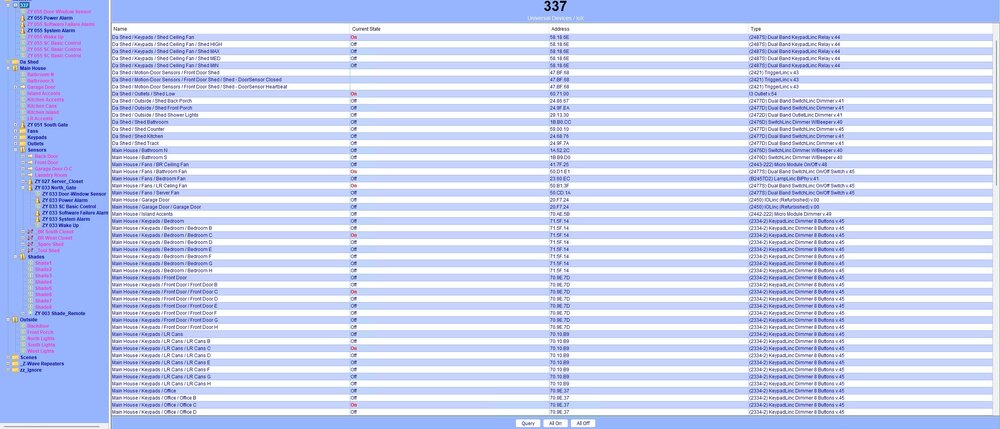
I'm not 100% sure of the terminology, but 337 is the container for the entire network. It is where devices go when I "remove from folder". Edit: screenshot attached
-
Thanks for quick reply. In this case, I've repeated the procedure 17 times (last device was 033, this one is now 055). I can't really expect any additional iterations to work. Comms don't seem to be a problem, I'm in proximity to the dongle and the add and remove commands seem to be responsive. I've performed factory reset on the sensor multiple times and according to the LED blink sequence, it has been successful. Any idea if factory reset on Z-Wave dongle (ZWAVE->Advanced->Factory reset Dongle) is a good move. Will it remove any devices I have in the network? I also tried the log events during add/remove sequences (ZWAVE->Capture log), but the log was empty of events. Just showing the TAIL commands but zero bytes of logging data. Other than the rubbing belly trick (which I will now try and report back), any other suggestions?
-
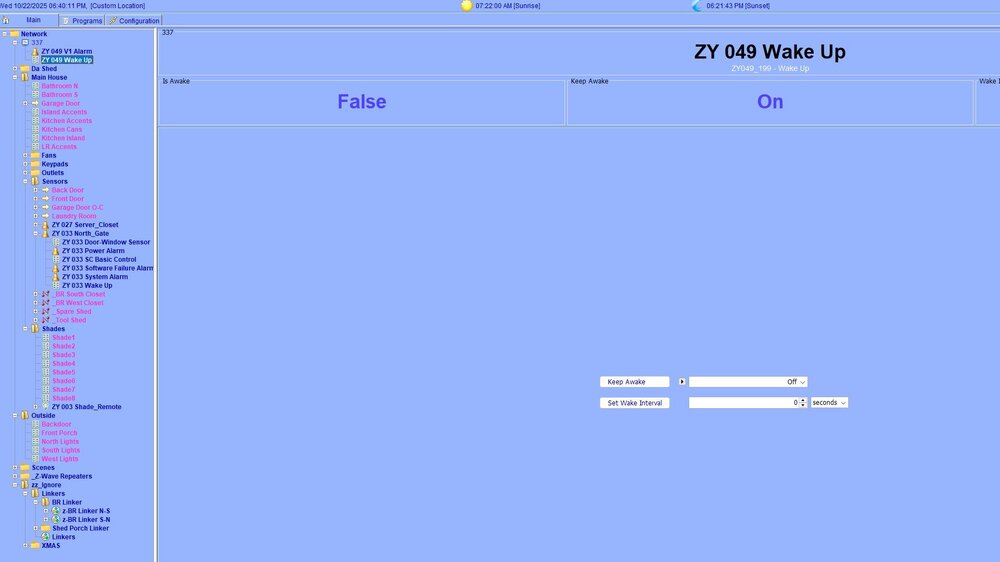
Have I posted to correct forum? Please direct me if not. TY Hi All, I have a few AEOTECT recessed door sensors and have always been able to get them discovered after a couple tries of adding and removing the device. In this case, I have two new sensors and no matter what I can think of trying, they show up as "ZY049 V1 Alarm" with sub-device "ZY 049 Wake UP". I expect to see the Door-Window Sensor, the Power Alarm, etc. (screenshot attached showing the new device at top, and existing device ZY 033 about midway down the device list. I have recently upgraded EISY to 6.0, but can't find anything in release notes to support the problem I'm having. I have Z-WAVE module 21100. A few notes: EISY occasionally hangs when I attempt to "Update with Interview", only hard reset brings it back (this problem is secondary) Java is updated to v8 build 471, but problem occurred before java update (cache was cleared) Other Z-Wave devices in the EISY work fine, including a sensor with same firmware and model Two different new sensors exhibit this behavior Looking for any help. Thanks folks. :walkman99
-
I don't have an answer for you, but I can share a few tidbits. Caveat is that I'm new to Z-Wave, so keep that in mind. I use the AEOTEC range extender for a door alarm that is too far away for the native EISY to reach. When I added it to the network, a side effect was that my shades became much more predictable. Unfortunately, I don't know how to tell if the shades are being reached natively or through the extender. I know they are not actively paired to the extender, they are paired directly with EISY. Not sure if this helps since you may have distance issues between blinds and EISY but the key for me to pair the shades to both the remote and the EISY was unlocked in this post. Hope some of this helps.
-
Thanks for the insight. Right now, Gates_ProgON can be fired with a second gate. That program has a different Then action. Should I create individual variables for each program, or is there a way to write the statements in each program so they do not fire each other off. (The second gate program is identical, using different sensors.) Also, can I import the updated text into EISY, or do I have to recreate it using the UI?
-
Am I writing this correctly? My intention is to trigger THEN if either of the /Main House/Sensors are tripped AND the $Gates_ProgON is 0. I wasn't sure if I needed the parenthesis around the separate pairs of conditions with an OR in between or not. North Gate OPEN - [ID 0019][Parent 0031] If 'Main House / Sensors / North Gate' is switched On And $Gates_ProgON is 0 Or 'Main House / Sensors / ZY 033 North_Gate' Access Control is Window/door is open And $Gates_ProgON is 0 Then $North_Gate_Open = 1 Run Program '_North Gate' (If) Else - No Actions - (To add one, press 'Action')
-
Unclear what the problem was. I cleared all sessions on the FW and forced EISY to get a new IP address and problem hasn't reoccurred. In hindsight, I should have done these things separately. Best bet - a "stuck" FW session or misapplied APP-ID (typical PAN stuff), or a duplicate IP address. Thanks for help troubleshooting.
-
From support: ssh to eisy sudo rm /var/isy/FILES/CONF/0.UCF sudo service isy restart Resets to the default admin/admin. Works like a charm.
-
Appreciate the investigation. Let's see if someone can shed some light.
-
Yes - you're right. Typed a bit too quickly. Unfortunately, this seems to only changes the password for the BASH shell. The console password was not affected.
-
Sudu command not found in the bash shell, and I think it would likely change the shell password - it is the java console I need access to. [admin@eisy ~]$ sudu passwd -bash: sudu: command not found Currently, I have access to both the portal and the CLI but despite multiple "three clicks" or the multipurpose button, I am unable to access console with admin/admin or any previous passwords.
-
Troubleshooting one problem, and I created another. I cannot complete authentication via Java console. I have access to the portal, and the CLI via SSH. I've tried hardware password reset via three clicks of reset button on device. I still fail auth. Is it possible to change PW via portal, or CLI? Any other suggestions? TY


