


oberkc
Members
-
Joined
-
Last visited
Everything posted by oberkc
-
This is not the case at my house. I have programs that are triggered by switched (control) conditions of virtual switches.
-
Normally, a program having a "status = xxx" is triggered when there is a change in status for that device.
-
Thanks for the update. I have certainly had my share of tickets, but never had I needed to hook up a monitor and keyboard. I am glad it is working for you.
-
How do you "check" the EISY? Are you able to log into the admin console? If so, I would be very tempted to reboot it from there. Otherwise, I tend to look for clues (or at least data points). Is the EISY connected to the network? Do I know the IP address? Can the IoX Launcher find it? Can I reach it from UDMobile or from a browser (requires v6.0). I know one can also attempt to log in from a computer terminal app, but I don't do this often enough to remember how to do this. In the end, however, it is a computer. If I run across computers in any form that seem to be stuck in some perpetually unusable state, I reboot them. I believe that this can be done from the button on the front, but I am usually too lazy to look up how to to this with the button, so I simply unplug it, wait a few seconds, and plug it back in.
-
From the google home app, find the matter device you want to share with another matter hub, such at the EISY. Once found, open the device settings (little gear on top right). In the settings, you should find "Linked Matter apps & services". Select that option and you should find another list, including "Link apps & services", in blue font. Select that and you should see a pairing code.
-
This has become my favorite approach for when I want to control a scene from UDMobile or the admin panel...create a virtual switch, include it in the scene as controller, then use the virtual switch in UDMobile. It acts as an indicator for the scene status, and can trigger programs when they are part of the condition. I expect that approach would work great here, but the virtual switch would have to be included as a fourth line in your program condition.
-
What does it mean when all my hue nodes have the little green "write pending" icon? There is no option to "write updates to devices" that one can find with most other nodes. The nodes otherwise seem to respond as normal. I have restarted the plugin (v1.07). Is this a problem? What action should I take in response?
-
I would consider the possibility that it is not the lock, itself, that is the root cause of your problems. I use one of the Schlage BE469 with zmatter dongle and it works quite well for me. Barring a faulty lock, I believe it is unlikely that your problems are due to some inherent incompatibility between the lock and EISY/Zmatter. I recently experienced some "flaky" zwave performance with some outlets and blinds. With much help from UD I isolated it to one failing zwave device that was causing the communication between other zwave devices to fail. Zwave appears to create communication path between the hub and each device, with specific devices acting as repeaters along that path. When one of those devices along the path fail, communication between the hub and other zwave devices for which the failed device is part of the communication path will also fail. Perhaps, in your case, the communication between the hub (EISY) and lock is compromised for some reason. Range? Other zwave devices? Batteries? I also became a little more comfortable with the function of network healing, neighbors, and the zwave log. You might experiment with watching the log while you exercise the lock from the EISY. Watch for errors to see if there are potential clues. You might try updating the neighbors or rewriting the device links to the lock. Of course, there are no guarantees that this will work, but it might provide some insight into why you are having some problems.
-
Out of curiosity, I checked the wiki. Unfortunately, it appears out of date. Regardless, it seems to say that one must use the method I suggested. I also have a vague recollection that using the generic "start linking" process did NOT work for me. I look forward to a report from @PapaBear
-
Well, I was not so sure that this is the case for the MSII. I had a recollection that for this device, it needed to be done a specific way. Perhaps I am wrong about this, but it certainly does not hurt to try.
-
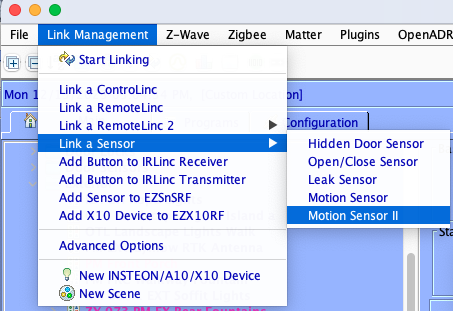
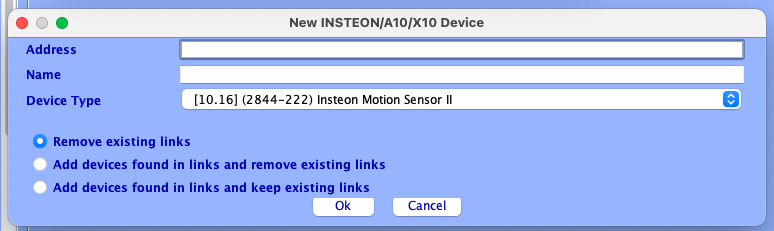
I continue to wonder if you are not doing it correctly. When I attempt to do so, the pop-up windows look differently than the ones you have. Here is how I believe it needs to be done: Choose "link Management" and navigate to Motion Sensor II, as shown below: You should get a pop-up that looks a little differently than the one you showed. The pop up is not "auto discover" but should have the device type prepopulated with the motion sensor II. Manually add your address in the top box. Choose "OK". Hopefully, it should find it.
-
I also recall that some have experienced communication problems when an Insteon device is protected by certain types or brands of GFCI outlets. Hopefully, that won't be the case here.
-
If I recall correctly, you must add some sensors a little differently. Rather than "start linking" option and pressing the set button (and hoping that the ISY can hear it), you must go to the drop-down menu and add the MSII by selecting it from the menu and manually entering the requested data.
-
I have understood that "matter" is in the early stages for UD and, as such, documentation and user manuals is not something we should expect. I have had some luck with matter devices over wifi, but matter devices over thread have not worked consistently for me. In fairness, the thread devices (nano leaf bulbs) I have tried also do not consistently work with echo or google, either, and am willing to consider the possibility that the problems might be with the nano leaf bulb, rather than with the EISY. I keep looking for other thread devices to try, but I don't see many around.
-
I suppose, now that we have a little bit of integration with Apple HomeKit through the matter plug-in, one could use siri as a voice assistant. This may not be quite as good due to the limited device support but may work for some people. The Hue plugin underwent an update to address a change in the API, I understand. Unless your plugin updated automatically, I am surprised that it stopped working for you. It has been rock solid for me. I unknowingly updated my plugin and broke it, but was able to get it working again. Unfortunately, it took a not-small amount of time. Between alexa and google home, I have settled upon alexa for a voice assistant, but mostly because that is what I started with. I have some google hub devices around and they seem to work fine as well. I just don’t want to take the time to maintain both systems. In both cases, it has taken me a while to get efficient at adding new devices and understanding of the difference between scenes and switches and lights and sensors and with navigating through the Alexa app. After time, it has gotten easier.
-
I understand that the new interface is a work in progress and does not have all the intended capability at this time. I do not believe one can see or modify programs at this point.
-
If you have this window, it sounds to me that the launcher is installed. So you have the launcher istalled, but it cannot find the ISY. I recall that, at one point, launchers were specific to the ISY software version but the current launcher version is ISY-agnostic. Does your launcher show a refresh or find (I don’t recall the Exact phrase) option? Did you try this? Do you know the ip address of your ISY? Do you recall the software version of the iISY?
-
Are you certain that you have no programs triggered by any of these devices?
-
To add support to the others' diagnosis, turning on a switch from the admin console will NOT cause linked devices to respond. This is normal. @paulbates and @Guy Lavoie have given you good feedback and viable options to which I add a third (requires the use of polyglot). This approach has become one that I like: Create a virtual switch from the applicable polyglot node server and add the virtual switch to your IoX scene, as a controller, that contains your keypad and two switches. Add the virtual switch to Alexa. Unlike real switches, I find that activating virtual switches from the admin console (or Alexa) do cause linked devices to respond.
-
'Twas not me. And, it turned out, I spoke too soon. Entering the geofence just now failed to trigger the action.
-
Update: In a further attempt to try different things to see if I could get this to work, I have created a virtual switch and used this instead of a variable. Now, my entry and exit criteria are simply turning this virtual switch off or on. (Prior to this, the entry and exit criteria was swapping a value for a variable between 0 and 1.). At this point, the geofence seems to work. I don't know for sure whether the geofence now working was related to the change in criteria, or whether this was coincidental to some other change that happened in the background of which I have no knowledge.
-
It's in my house, the duplicate nodes are a problem with devices beyond just insteon. I have seen duplicate nodes on new hue devices, new yolink devices, and I even see a scene that keeps coming back after I delete it. I even thought I have rebooted my eisy, but I will try again.
-
@Kentinada Those are known as "wago" connectors and are available at may typical home improvement stores. Otherwise, cut the end from an extension cord and add the connectors.
-
@TJF1960 I was a little premature in my proclamation that I do not get any errors. Just now I synchronized and received two errors: could not match ST paramName: AME could not match ST paramName: ST I see nothing about "let the dev know" or any reference to any node server. I don't know if this is new or whether I just missed it before.
-
I hope this fixes the problem. Thank you for the feedback. I will look forward to having my geofence back.

