


oberkc
Members
-
Joined
-
Last visited
Everything posted by oberkc
-
I assume this is unrelated, but I have been having ongoing problems with geolocation on android. Sometimes it works, sometimes it does not. Sometimes the entry and exit commands turn up missing. I do not believe that I have seen many cases of location permission (always on) changing. I have tried various options in the app to try to force location updates, without any impact that I can recognize. If this is not helpful, feel free to ignore.
-
I have started to play around with some of these parameters. Based on memory, if you define color temperature, you will generally get a “white”, with warmer ir cooler tones. I have also had some luck asking mr google what xy numbers one can use for a given color. My experience so far is that the admin panel may not reflect the actual status. I plan to contine to continue to explore this capability. Perhaps we can share notes with each other.
-
It is blue. Thanks for the clarification. I vaguely recall some short messages but they did not persist long enough for me to read them. Perhaps I just missed it. Thanks for all the work figuring it out and posting the instructions.
-
This worked for me. The only thing in the instructions that were a little ambiguous in my head were the notes about the notification. I assume you were talking about a notification from UD mobile.
-
Maybe it has been said, but my biggest fear of not updating would be the loss of access to the admin panel die to the loss of java. In my limited experience, this can happen quite suddenly and unexpectedly. If not actively moving towards the latest EISY-UI, i think you are risking making it much harder to upgrade in the future.
-
It is near certainty that it is a Mac issue. I lost mine a month or so ago. As far as I know, one must now use the eisy-ui.
-
FWIW, I am on Safari and I do not notice any flashing blue line or a clearing of any search results. I just now upgraded to 1.3.11_1 beta (not yet rebooted), however.
-
The recent past has brought me a lot of issues. I don't know if it was coincidental with my loss of the Java Admin console or something else. This program is one. A few of my PG3 (twinkly, govee, maybe others) have lost connection to some (but not all) devices. Less reliable and consistent device response. It is hard for me to imagine this being related to software updates, but it sure has been frustrating and time-consuming. On the other hand, the EISY_UI is really maturing and the login process is much less troublesome and much faster. I remain hopeful that the problems will work themselves out.
-
Whatever it was turns out to be fixed in the beta version released last night.
-
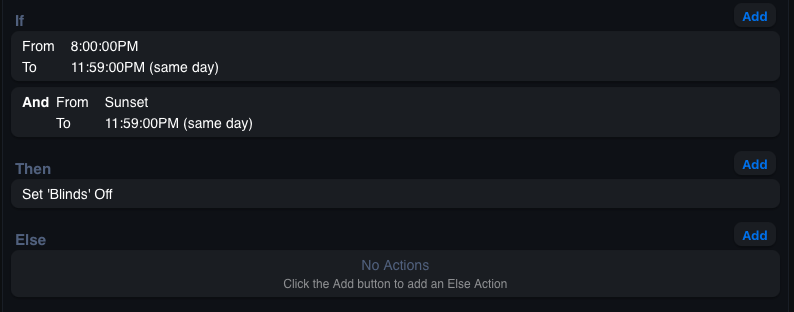
I am on the latest Beta version. At this point, I do not know how to check the time or sunset time or location from the EISY-UI, but I must assume EISY-US-predicted sunset was 7:36 and logs show that it ran at that time. I do not know why else it would have ran at that time. One of my questions is why, regardless of sunset, did it NOT run at 8pm?
-
I have not yet found a means to copy a program text on EISY-UI, so I have a screenshot. I have a program that has been in place for several years and has worked as expected. I wanted a program to close blinds at 8pm or sunset, whichever is later and this program has done so. It has even worked as recently as a few weeks ago. No changes have been made since first creating it. The program is below. I expect this program to trigger at sunset, 8pm, and 11:59pm. Tonight (it is now 9:41)The program shows last run at 7:36pm (presumably the calculated sunset time) and ran false (expected). I expected this program also to trigger at 8pm and evaluate true. Yet, it apparently did not. Blinds are still open. Last run at 7:36 was false. Did something change in the program logic execution recently? Am I missing something?
-
As am I.
-
On the java console, there was a means by which one could define the command for each device within a scene. For example, "default", "on", "set brightness". I don't see this capability in the new UI, nor do I see it in the upcoming builds. Am I missing it somewhere? Edit...nevermind. I found it.
-
That does not sound right to me. Is it, possibly, needed if one wants to use matter-over-thread?
-
Yes. Minor issues, but otherwise is a LOT of new capability compared to the production version. Beta still lacks a couple of key features that make it difficult for my purposes (cannot add nodes to groups or folders, cannot see node scene membership, missing network resources) but I can fill in some of the missing features with UDMobile.
-
My sunset-based programs appear to be working now, presumably a result of updating to UI 1.3.6
-
I fear that this may not be true. It has already quit working for me (MacOS). If I remember correctly, this is the fate that awaits us all unless we keep a computer at some state in time that supports Java, and it may happen sooner than we expect..
-
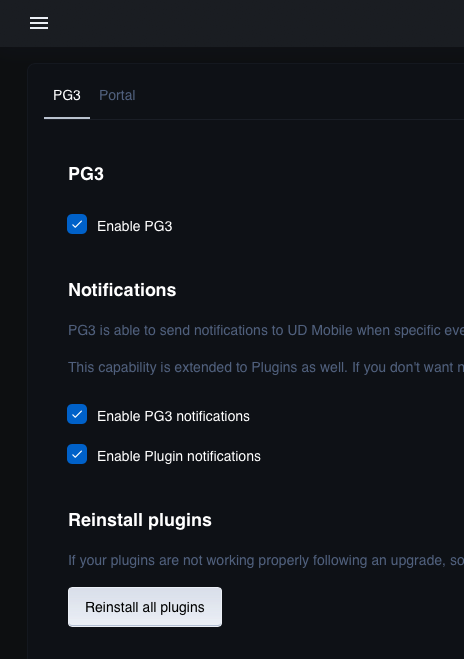
I think I found it. It is under the menu>>>settings:
-
I understand that time and sunset settings are not available to be seen or modified on the EISY-UI. Still, some of my programs with sunset-based conditions seem to work, but one program has quit triggering. Is this a known condition. Is anyone else experiencing sunset/sunrise conditions not triggering?
-
I tend to agree with this assessment. I suspect wifi is not the best protocol for much of the home automation system. I will add that I am not sure that higher-end wifi systems guarantees better results. Or, perhaps my netgear orbi system is not as high-end as I would have expected. I especially agree with the concerns about upgrading my wifi system. The thought of re-adding 60+ devices in my house, with all the static IP addresses is not something that I want to do. I have no plans to use matter switches, outlets, keypads, bulbs, or plug-in modules. My only current interest in matter is for specialty lighting devices such as some of the govee outdoor color lights and similar, unique specialty items. For the record, I am not casting blame on the EISY for my own problems with matter. I suspect it is a broader issue than any single element.
-
I just noticed that you are running EISY-UI. The suggestion (and method I used) was to reinstall all plugins from PG3X. Perhaps this matters.
-
I do not recall mine doing this. But...I often used two devices to do this. One had google home open. The other had UD Mobile open. Perhaps this matters. I have taken a break from matter. I have tried a handful of matter devices. I have eventually (Some took multiple attempts. Most required starting with google or Alexa first, then sharing. I was able to directly pair only two matter devices.) was able to get them all linked up. I have only a single Matter-over-thread devices. The rest use wifi. In 100% of the cases, matter connectivity eventually fails. Sometimes a device loses wifi connection, but other times wifi is still connected but matter control is "offline". Sometimes the offline condition of matter affects all controllers (google, Alexa, EISY), sometimes it affects only EISY. I have decided that it is not worth it for me to spend these hours trying to figure it out, or try to fix it when it fails. Matter devices are now controlled (on/off) via smart plug or equivalent.
-
Ugh. Do you suppose it is related to being a Polisy vs EISY? Well founded, in retrospect.
-
Hey, @Guy Lavoie , @sjenkins I ended up submitting a ticket. They responded quickly and asked whether I was on EISY-UI or PG3X (my problem appeared in either case) without explanation of why or how that mattered. I was also having simultaneous problems syncing various instances of UDMobile, but did not think to try to use UDMobile to solve this problem. Their suggestion was to "reinstall all plugins" from PG3X. This seemed to work. Hopefully, whatever caused the failure originally was not a new bug in the latest versions of the EISY. Oh, yes. FYI I had tried this without much.
-
Maybe. I am wondering if I should initiate a ticket for this.

