


oberkc
Members
-
Joined
-
Last visited
Everything posted by oberkc
-
I apologize for the misinformation. Queries are generally available for Insteon and zwave, but I guess some of the other nodes don't have it. I should have been more careful in my response.
-
In answer to your original question...yes, "query" is one of the choice in a program action.
-
If you have positively confirmed that there are no programs or scenes that causes this, then my temptation would be to restore the two (switch and panel) devices.
-
I had a time very near after migration (it turns out that this was coincidentally) to EISY that some of my zwave devices quit responding or responded quite slowly. In my case, there were a select few devices that were constantly a problem, while other zwave devices continued to operate just fine, if a little slowly. The cause of all this was a failed device that, I assume, was part of the signal path for some others. Until that point, I had not noticed or had not needed to use the "Capture Log" feature of the zwave tab. It was this log that revealed the failed signal path. If you have not tried it, I suggest doing so. Start the log, attempt to trigger some of your troublesome zwave devices, stop the log, then see if it reveals a problem.
-
YoLink sensors work well for me, as well. I agree with @dwengrovitz that the battery life is really good. But, you must be willing to put in the (little) extra effort for the node server and hub. Furthermore, unless you go with the higher-end hub, you will be cloud dependent.
-
Yes, I can reach it with the resideo app. But, now that you mention it, I am unsure whether I assigned a static IP address for the thermonstat. I will have to look into this.
-
After over a year working, my Honeywell plugging gives me this error. I have restarted the plugin several times and rebooted the EISY. Is anyone getting this error? Is anyone else's still working? Is anyone still using this?
-
I could not remember for certain, but I was thinking that matter-over-wifi could be directly added. It was only the matter-over-thread that I thought required another platform. Having said that, I don't even remember whether I have tried.
-
Is your dedicated Outlook on a separate circuit? I understand that the PLM is not on the surge suppressor, but the mere presence of surge suppressors and UPS can make it hard for insteon devices to communicate of whether the insteon devices are powered by the UPS or surge Suppressors.
-
Not at all. I am saying that this was different from my experience and that I have no explanation based upon my understanding and perceptions of how things work with our home automation system.
-
"Surge Protector" and :battery backup!!!??? Is this on a filterlinc? Those things have been a problem for me...enough that I put all mine on a filterlinc. And...you don't actually have to "move" things. Get an extension cord into which you can plug the PLM without much moving it. Take the other end of the extension cord into another outlet on a different circuit.
-
I believed this part, it was where the admin drop down boxes quit working that was so different from my experience:
-
I wonder if these six devices are simply experiencing communication problems during the restore process. How easy would it be to try moving the PLM to a different electrical outlet on a different circuit (a long extension cord can be useful)?
-
I am curious how you have done this? Have you unplugged the EISY or by a different method?
-
No. I don't believe that the load can be "on" and the backlight to be off.
-
I had a zwave device fail, impacting the response of many other zwave devices. Unlike you, I did NOT experience the impact to IoX or to the dongle. Mine continued to appear to operate normally. While I have come to understand why a single device failure would affect zwave communications, it makes no sense in my head that it would affect the EISY and admin console operation in the ways you describe. Still, I am glad you got it working again.
-
@hart2hart 's solution should work in your particular situation. If, for some reason, you cannot change the variable to an "integer" type, then allow me to expand upon @Techman 's suggestion to try a second program: if IF status Device_X is off AND status Device_Y is off AND status Device_Z is off then run a second program (if path) Second program (disabled): if variable Poll_Running =1 then do something
-
I think I would figure out why this is happening, rather than trying to create a bandaid program to correct the first error. I assume that you now have a program somewhere that is turning it on and now a program trying to turn it off. It sounds as if the first program is winning.
-
I have no experience or knowledge to supect that this is true, but maybe it is my turn to have a good day
-
I believe the solution from @dbwarner5 is the simplest (thus most elegant) solution. The program will be triggered upon chage of status of ANY of the six switches and evaluated based upon the entire program logic. Problem solved.
-
Well, in fact I DID get some ambition. Unfortunately, I must have recycled my -994. The only backup device I kept was the Polisy. Sorry.
-
I have the same recollection about needing the IR "module" for proper operation. If installed I expect it would show up under Help>>About>>Product. I also recall that the IR hardware could be added and removed but I don't remember enough about it to describe how one would recognize whether or not the hardware was installed. I think my old 994 had the IR module and, perhaps, still does. If I get ambitious, I will check.
-
I can also mean that there is something interfering with communication between valid linked devices. Hopefully, the advice from @paulbates will solve your problem. Troubleshooting communication problems is more trial-and-error, in my experience.
-
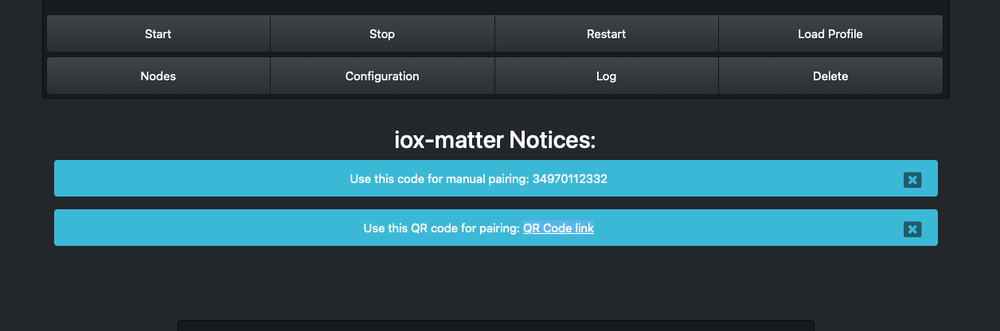
Yes, that is how I understand that the plug-ing should work. The notifications look a lot like this: I also recall that my notifications did not come up at first, but I don't remember what I did, if anything, to resolve that problem. I can tell you that restarting the node server and rebooting the EISY are often methods to solve such nuisances and maybe that was my solution. Once one has this code, I added it to apple home. The single code will add the Insteon devices in your system, but I recall that other devices (z-wave, govee, hue, etc....) may not add as part of the matter node server.
-
I experimented with adding a hue bulb via zigbee. I remember that it "worked" (I could add the device and it showed up in the admin console) but that the options for control were more limited than when using the hue hub and PG3 plugin. I don't specifically recall what options were missing from the zigbee method, but think it was color and scenes and groups and things along those lines. I am of the same thoughts as @Guy Lavoie ... I prefer the hub/PG3 method and see no compelling reason to change, so I don't closely follow the hue-via-zigbee methods.

