


Michaelco
Members
-
Joined
-
Last visited
-
Thank you - if I'm looking at is correctly, it would seem Trilife/Headrom's plugin (MQTT Nodeserver for Devices) would do what I want. Thoughts on any issues going this way?
-
I am developing a Raspberry Pi + ESP32 based control/monitoring system for irrigation wells, storage tanks, and pressure staging that needs to interface with my eisy controller. Under certain fault conditions detected by the Pi/ESP32 system, I want to notify the eisy by setting a small number of specific state variables. Those variables would then trigger existing eisy programs for visual alerts (room light flashing, notifications), irrigation lockout delays, etc.. My main question is about limiting permissions/scope. Is there a supported way to restrict what an external system (such as a Raspberry Pi using the REST interface, node server, network resource, etc.) is allowed to do on the eisy? Ideally, I would like the Pi to only be capable of: Reading or writing a very small set of designated state variables Not being able to modify programs, devices, configuration, or unrelated variables Not having broader administrative access to the controller I am trying to minimize the impact of software bugs or a compromised Pi system. What is the recommended architecture for accomplishing this on eisy?
-
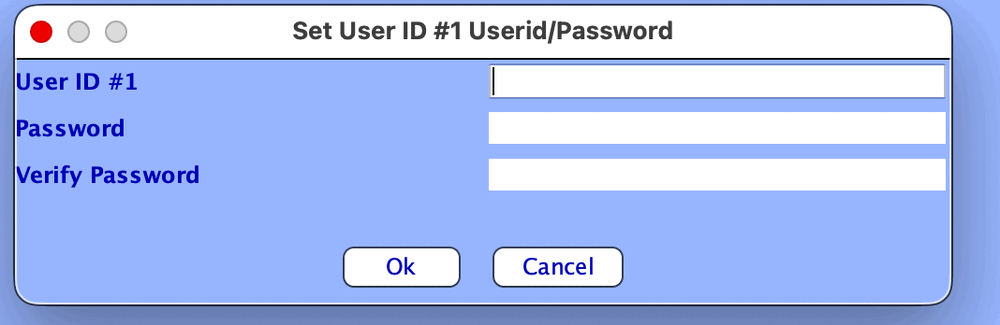
I want to create a second user for the Eisy, with limited rights/privilege . The uploaded screen shot appears to allow creating additional users, but when I try to login with new credentials if fails. So, is there another place I need to go to enable the user slot?
-
Thanks @Javi . I looked at the YoLink, and in particular the FlexFob which was the closest to do what I want. I like the range of the LORA approach, but if the Shelly beacon mode works advertising interval is short enough it is more akin to what I'm used to with HomeLink. If not, I can always give a single click of the button and it will send the packet to the gateway without delay. My thought is I have flexibility to locate the gateway anywhere around the gate - including right at the top of the entrance wall which should give line of sight down the road for at least 50'. I would think the bluetooth signal should be detectable at some point before I get to the gate. The other thing that I didn't like about the YoLink FlexFob was its size. There may be other LORA transmitters from other manufacturers in a smaller form factor., but the FlexFob was too large for what I want. The Shelly has a single button which supports multi click. So, I don't have to worry about hitting the correct button, and can single click to open the gate, and double click for the garage door. In any case, the order shipped Friday morning, so I should see it sometime next week.
-
Thanks @Javi . I was able to see the geofence work (at times), but performance varies from day to day - Thought about using the TeslaEv node server, but sounds like that solution has it's own issues. So, I'll see what issues come with the bluetooth approach. I ordered the Shelly Blu Gateway and a couple of the Shelly BLU Button Tough 1s, to play with (location and latency tests). Should be here end of next week. The only area I have tested, so far, was within Mac Terminal - e.g., the request for the Eisy to change a state variable - the time it took to encrypt the request, send it through my router, for the eisy to process the variable change, and for the confirmation to travel back to my Mac was .086 seconds. Haven't written Eisy code yet to see the delay for the gate to actually open the gate, but, I have a feel for that part when I use UD Mobile to open the gate. The only other thing I would want to do if the Shelly solution is satisfactory, is to convert the Shelly buttons to get power from the car's power instead of a CR2032 battery. Then I'd operate the Shelly button in the mode as a beacon. It still allows for me to use a button press in case the Advertising Interval is too long. Do you know of any additional things I should be checking? Thanks again for your insights.
-
Thanks - that's exactly what I've been looking at - I came to the same conclusion after reading @Javi post - no longer thinking geolocation is a reliable solution for my situation. Currently I’m using the Liinear RE-1 RF, it's keypad, and UD Mobile to open the entrance gates. I'll look at the YoLink, and open to any other suggestions - I've been looking at the Shelly BLU Gateway, with a Shelly BLU Button Tough 1, and it looks to be a good replacement for the RE1's RF. The Shelly BLU Button Tough 1 has two modes - Manual, and Beacon. Read the Beacon mode shortens battery life (from 2 years to 1). I would either remove the transmitter entries in the Liinear RE-1 entry system, or just change them to control the RE-1's relay 2 instead of relay 1. Relay 1 is currently connected to the gate, and I would monitor Relay 2 to detect if someone is using RF to try to access - This would be more for curiosity reasons In my current setup, the signal is a simple Remote → RE-1 (Relay). In the new setup, the signal path would be: Shelly Button Tough 1, would be in vehicle, outputs BLE Advertising Packets. Shelly Gateway (located at the gate), scans, identifies, and processes the script. Gateway initiates an HTTP request over my Wi-Fi (something like http://[eisy-IP]/rest/vars/set/2/46/1 ) eisy receives the REST command and updates the state variable 46. eisy evaluates the program logic and issues the Insteon command to the ioLinc I currently have in one of the gate operators. I don’t have any experience with the latency of this new multi-step "hop" approach compared to my current direct RF setup, so appreciate any feedback/thoughts from anyone who may have a feel for this, or any "gotchas" in this approach. I would anticipate using a custom mJS script on the Shelly BLU Gateway to fine-tune the BLE scan windows (thinking ~120ms intervals).
-
A couple weeks ago, there was a car that drove down our street, slowed in front of our entrance gates, and stopped just past the gate. The gates opened without our involvement - could be coincidental and some hardware glitch that I just happened to see, or something else. The Goal: I want "Smart Gate Monitoring" for a Linear RE-1 (318MHz MegaCode) integrated with an eisy. The Hardware: > * Linear RE-1: Triggered by car's HomeLink (RF) or handheld remotes. eisy: Connected to an Insteon I/O Linc on the gate to monitor status and fire the relay. The Challenge: The house is 250' away with multiple interior/exterior walls. The Problem: I want to get an alert if the gate opens without me or my wife being the cause. If I use UD Mobile (via ioLinc), the eisy knows it's authorized. If the Homelink or Remote (MegaCode RF) is used, the eisy doesn't know it was us, making it indistinguishable from a "code grabber" or "brute force" breach. Wi-Fi/GPS Geofencing has been unreliable for our situation. Does UD Mobile support iBeacons for setting variables, or is there another way to verify "Presence" at the gate (250' away) that can handshake with the eisy logic?
-
You read it correctly - Since the Cell reception is so unpredictable, I need to widen the geofence radius wider than I'd like in order for me to show up as being within range when I'm home. The downside is I could be in the area, but not heading home. The thought was, the iPhone detects when I come into wifi range, so I had hoped there was a way to take advantage of that.
-
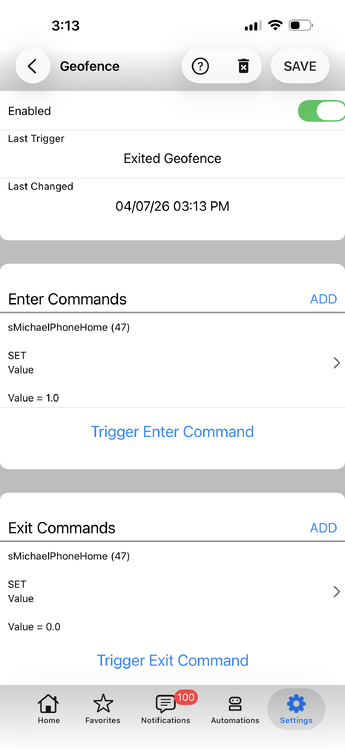
Thanks Javi. What you see at 3:13 pm, was done using "Trigger Exit Command" to verify the var would change. I had physically gone out of Wifi range, and back into wifi range without any change to the var. I repeated doing that yesterday afternoon, but this time I turned off cellular and used a browser to show I was connected to my Wifi, and once connected, looked at the state of the var and it was still unchanged. It's been over a day since I came back within Wifi range and still no change to the var. Repeated the test again this morning, but went a different direction - checked the logs, and they show no new entries. I have had both the IOS global setting and app Location Settings enabled - specifically,, UD Mobile app is set to Always. Has anyone had entering and exiting WiFi range trigger when running on and iPhone, and if so, what settings did it take to get it to work? Javi - Any other solution you can think of (other than using a beacon) to signal I'm within range? Normal geofencing has been unpredictable/unreliable, but generally close enough that when I'm near the house I should be within the geofence circle. I am outside the city and surrounded by hills, so cell towers are few, and we are relying on signals which are bouncing off of hills.
-
Thanks Javi. You mentioned a couple of things: "usually triggered when the device connects to a WiFi access point" "(including access points which do not belong to you)" Does "usually" mean it doesn't always trigger, when the device connects to WiFi? Or, is not predictable to when it changes the var? Does the second part mean I can't restrict UD Mobile setting the var only when it connects to my WiFi? If so, that may explain why I didn't see a way to set my WiFi SSID. Is this not possible to limit the trigger to only my WiFi? The attached capture is what I had set up over the weekend, but haven't seen it reliably changing var sMichaelPhoneHome - At this point, not even sure if it ever changed 🙂 Thanks again.
-
I want to set a State var to 1 when I come into wifi range, and 0 when I go out of range. Is this doable?
-
So, how would I know if the Restore Modem(PLM) worked correctly when I relied on plugging in the PLM at the time of the EISY reboot? Is repeating Restore Modem(PLM) with unplugging the EISY, feasible and useful to correct any issues if I hadn't plugged in the PLM in time?
-
Thanks for the instructions. I just finished swapping out the the PLM, and checked the operation of a number of devices. So far, all devices are working correctly, and the EISY is logging in complete device communications. The only substitution I did to the procedure in the pdf you provided was to reboot the EISY instead of pulling power. I'm surprised the process suggest to remove power.
-
I have a spare on hand, and latest backup is current. Just want to make sure I swap out the PLM in a reasonable way.
-
It's more than 5 years old, probably closer to 10. I see instructions on replacing a PLM connected to an ISY. The guide for the EISY has a link pointing to the ISY instructions which starts by saying "Unplug ISY from the power outlet" - this works for an ISY, but is problematic with an EISY. So, I'm thinking of Disconnecting the old PLM from the EISY, Unplug old PLM Plug in the new PLM, but don't initially connect to EISY Reboot the EISY, Connect the EISY to the new PLM Restore Modem(PLM) from the Admin Console "File" menu Is there a better way to replace a PLM with EISY?


