


sjenkins
Members
-
Joined
-
Last visited
Everything posted by sjenkins
-
@jkmcfadden , So above I updated the drivers & commands in the above post, found a "health" state which is different than the "server status". Health is connection to the MQTT, which server is connection to the Droplet cloud. By doing both of these it changes how you would set up the device in the yaml file a little bit (makes it simpler): MQTT Configuration Example: --------------------------- In your devices configuration, add a Droplet device with the base topic: - id: "droplet_kitchen" type: "droplet" status_topic: "droplet-ABCD" cmd_topic: "droplet-ABCD" Where ABCD is your Droplet's 4-character identifier. The NodeServer will automatically subscribe to: - droplet-ABCD/state - JSON with server, signal, flow, volume data - droplet-ABCD/health - Plain text "online" or "offline" status NOTE: I will push this to the non-production store later this evening after I get a chance to test it. It is called mqtt-poly, all lower case. You will have to put it in a different slot than the production version if you are using it for anything else; as this beta does not play well with the production version. @TriLife and I are working on transferring ownership of this plugin. @xKing wrote it originally, I took it on when I was using the devices a lot, then TriLife took the lead as his whole house used it. He is moving to different technology & so he asked me to take the lead again, which I am happy to do. During all this I want to make sure we stay stable for those users who depend on it. That is very important. I have done a rewrite of the plugin, including adding this device. I have tested it but need the user group to test before it goes into production. You are testing this as a new device so I just want you to know it may not make it into production for a few weeks.
-
@jkmcfadden , Understand the desire for "one node to rule them all", and that is the easiest to implement. Thanks for the link to the API, that will help a lot. So right now I would have these drivers & commands: """ UOMs: 2 = boolean 25 = index 35 = liter (L) 130 = Liters per hour (L/h) Note: Flow rate from Droplet is in L/min, so we multiply by 60 to convert to L/h Driver controls: ST: Server Connectivity Status (index: 0=Connected, 1=Connecting, 2=Disconnected) GV0: Signal Quality (index: 0=Initializing, 1=No Signal, 2=Weak Signal, 3=Strong Signal) GV1: Health Status (boolean: 0=Offline, 1=Online) - MQTT connection via LWT WVOL: Water Volume (liters) - point-to-point volume since last update WATERF: Water Flow Rate (L/h) """ drivers = [ {"driver": "ST", "value": 2, "uom": 25, "name": "Server Status"}, {"driver": "GV0", "value": 1, "uom": 25, "name": "Signal Quality"}, {"driver": "GV1", "value": 0, "uom": 2, "name": "Health Status"}, {"driver": "WVOL", "value": 0, "uom": 35, "name": "Volume"}, {"driver": "WATERF", "value": 0, "uom": 130, "name": "Flow Rate"}, ] """ Commands that this node can handle. Should match the 'accepts' section of the nodedef file. Below are receiving commands. DON / DOF will be sending commands """ commands = { "QUERY": query, }
-
@jkmcfadden , You’ve done what you can here. The mqtt plugin is not really set up as a general purpose mqtt interface, it has specific devices which are pointed to topics that device understands. It’s been rattling around in my brain that some kind of general purpose with fields like you are attempting would be fun to make. So currently what we need to do is make another device specifically for this. On first glance I think you have given us all needed to do this. The question a while back from the other Droplet user didn’t have the data you have provided here to go to the next step. I’m doing this on my phone and am pretty full with meetings today but could likely whip something up in the next few days. The json parameter will be simpler as the plugin parses JSON already just fine. So you would call this the Droplet-AE50 , correct? Also, I will need what the ranges or possible values of the fields are, like what is “not connected” “unconnected” or “low battery” “med battery”. I can collect and store unknown ones for now, but will need them eventually. The reason being is I need to parse them and turn them into an index which ISY uses another index to display. We don’t send the whole text to ISY with plugins.
-
@bmercier Good enough for me. I will offer, if you have scraps of notes on hints or anything you want to puke out of your brain on the subject, to update the hints docs on the wiki and/or the github. Maybe a link from the developer docs. A while ago @Michel Kohanim asked me to do some docs based on my plugin docs. I failed him on that due to my non-use of vscode. Happy to help with this an let you do the more "high value add" stuff.
-
You mentioned having many Insteon temp and leak sensors. I had my house covered with them and have moved to YoLink for temp, leak, and water valve control. The LoRa protocol is the main reason and local aspects of leak detection (even with the non-local hub, because of the ability to link locally), are a real seller. In addition getting a read on the Insteon batter sensors was a bit hit and miss ; don't get me wrong loved them as an option, but have moved to YoLink for these kind of devices. Also, have moved to the local hub to satisfy my tinfoil hat. I keep Insteon for switches, tried one YoLink switch for a Florida house & would not use everywhere. Things you don't need instant data but want reliable are the sweet spot for these. YMMV but some thoughts with a > 10yr Insteon and few year YoLinker.
-
@bmercier , sorry to bug on this one, but as I am looking at my hints across my plugins. I have been using the github docs at: GitHubhints/hint.yaml at master · UniversalDevicesInc/hintsNode Server device node hints specification. Contribute to UniversalDevicesInc/hints development by creating an account on GitHub. but digging a bit I see in the wiki there is a less complete, but labelled 0.2 version: https://wiki.universal-devices.com/Node_Hints_Documentation They are a fair bit different in their specifications. Your 4,8,x,x suggestion would give me wildly different answers depending on which one I use. Is there a third place you are getting this from? I do not see anything in the developers docs which are linked from the main UDI site and eisy-ui.
-
Dydns works great, part of my plumbing for 15years.
-
Should be producing control events too. Test out with a scene or program, the button will trigger a program but not always a scene. Why you say? No idea. Feel free to post here any anomaly on a device. I am using them except temp and know they work in the field but maybe there is an edge case.
-
@bmercier thanks, I was using a different one; I’ll give this one a shot and we will test and report back here for documentation.
-
So one new device, onOnly, use case when you only want the DON signal, which is often used for motion sensors. Mostly valuable in scenes where you only want it to turn the scene on and never off. I am using it to turn on a light which is turned off by a timer, so it is triggered by a scene which control comes from a door sensor. This filters out the closing of the door. The rest of the updates are back office, part of the modernising of the code. Comments, tests, refactoring. Should make the code easier to maintain by me or someone else if I get hit by the Beer truck. So far my device adds are selfishly those I use. I have been careful not to break those which I don't use. These include the Temperature, Dimmer/Generic. Temperature seems pretty clunky in its present form, I'm open for improvements or for splitting the functionality. For example I know its being used to check upper / lower values. We could split that into a new device and add control limits which trigger DON / DOF, or do some kind of average over time. Or if you are real fancy, send to csv file which can be plucked by the ISY's web page. Just ideas, again, not in my current use case, just saying its not hard to make happen. This is one of the rare plugins which is not just an interface to external hardware, its more about language extension for the ISY. Take a look at the docs please, I want some feedback if its clear with the "hat" of a new user: README & CONFIG Enjoy; try to break it, and let me know what you think! VERSION = "3.1.25" """ 3.1.25 DONE add onOnly device DONE update generic project files DONE Controller comments, refactor checkParams DONE change hints for temperature devices DONE testing added
-
Plugin developer question. How do you tell ISY and thus Alexa what kind of device your node is. The hints do not seem to be respected but I may not be using the correct ones. Specifically I am trying to tell her that the node is a temperature / thermostat, based on a user request. Let me know if you have any breadcrumbs.
-
@tazman, Is the value a temperature or just a generic value? If we wrote a device from scratch, what else would it do (nor not)? ex. Would you have alarm limits? If it hit those limits would you have the node send a CMD? Like DON at hight limit, DOF at low. This would mean it could be used in a program or a scene. There are some interesting possibilities in this little platform.
-
Hi Guy, Not a dumb question at all. So the temp devices have a history before me but I did for a time make use of it ; I think some of the features are a bit depreciated. As you can see there is conversion of F to C or other way and as its called raw. The temp conversion is not as useful as the ISY has that built in now. The raw is really a divide by 10 which can be handled by precision. This is one of the devices I would like to know if there are people using it ; and if its meeting there needs or could be enhanced. So far in my rework of the code I have kept it static, even though there could be improvements. It can be useful if you want to move from or to variables, val or init, on a periodic basis and give a nice display of the temperature. I have had issues with Alexa and device types, not with this but with contactors versus switches versus lights. Can be very frustrating. I do know that if we want to change this I will need to reach out to the guys at UDI and ask how that is done. Not sure if the hints have something to do with this or its something they need to hardwire. I just checked the hints for the temperature devices & they were not set. I set it to a temperature device & pushed to the non-production Store the change, its V3.1.25 and has some other minor changes. You can try that out, I don't have high confidence but would be the easiest path. Let me know. edit: you can install the non-production on top of your production and all will be fine. Then go back later. Not all the plugins will do that pain free.
-
@hart2hart is correct, was doing a lot of navel gazing for a bit to figure it out. Seems to be solved in eisy-ui v7.1
-
No worries @BHaus , everyone has been where you are. I am also sure we can get you where you want to go. You and @tlightne are correct, you don't use the AC. Since you installed the plug-in you must be able to get to the poly or eisy-ui menu, which the store was where you installed this plugin from. Go to the Dashboard, and then hit the Details button on the slot you installed the Virtual plugin. At the new menu you will hit the Configuration button. Here you can scroll down and read some documentation which will be real helpful to read. I would suggest starting with the Standard Configuration. Just make a switch. To do this go past all those instructions (really read those) you will find a section called Custom Configuration Parameters hit the button called Add Custom Parameter in key type in 10 in value type in switch now hit the button below called save changes now scroll all the way to the top and hit either Discover or Restart If you go back to the AC you should have a device called '10' which is a switch. READ THE INSTRUCTIONS FOR MORE, come on back here with more questions. have fun!
-
Same, installed the production on top of the renamed non-production v1.5.16 local ; no issues. Have now deleted my cloud Yo-Link, which was in another slot. Had written my programs to handle either local or cloud, now cleaned-up and running off the local. We are in the deep end. Thanks for all your work @Panda88 , Yo-Link devices are now my main Leak, water-valve, temp-humidity, power detection devices. Happy to have them locally based, keeping my tinfoil hat firmly on.
-
So three new devices, offDelay, onDelay, Toggle as well the ability with the JSON or YAML configuration to set initial default values Take a look at the docs please, I want some feedback if its clear with the "hat" of a new user: README & CONFIG Enjoy; try to break it, and let me know what you think! 3.1.24 DONE configuration based optional override initial default 3.1.23 DONE add onDelay, offDelay switch, update documentation DONE magic number scrub
-
You are right, about inside the AC & scene triggering. @hart2hart, you are right, I misunderstood the first time. @tazman, glad you like the timers. Sorry, about the new temp default, you are right of course. I will fix that.
-
@hart2hart, something odd with the Controller adding as a Responder. Only thing I can think off is the profile didn’t take. You may want to reinstall the plugin. And / or reboot the eisy. I can add as responder or controller.
-
Certainly scenes are a bit of fun; sometimes not in a great way. With the scene you describe above both the switch and offDelay device need to be controllers. Then turning on the switch should start the timer.
-
@hart2hart, So on the left in my pic, notice I am on the Insteon device controller for the scene, that is why I get the repeat field. You are on the scene itself ; you would get the same if you are on, for example, my offDelay device, or a z-wave device. Scenes are from the perspective of the Controller for the command they send. So if you fire the scene from a program, look at what the scene name sees. If you are firing from an Insteon switch it will send the commands to each of the receivers the way you set it up. So in mine, on the right, this is showing what the Insteon switch is sending to another Insteon switch. You can set the command to whatever you want, default means it just sends pass through whatever the Controller is sending. Makes it possible to send a DOF to one device in a scene. Appoligise if you knew most of all that, but I had treated scenes for a long time just as sending individual level commands, but they can do quite a bit more, if you want. Certain devices have limitations as well. Its why the VirtualSwitch devices wouldn't work in scenes so long, they were just status devices & didn't sent commands. Hope this helps.
-
This is what I meant by, in a scene, an Insteon controller can set retries. This can be set to a specific number or if the arrow is clicked, to a variable/plugin-value.
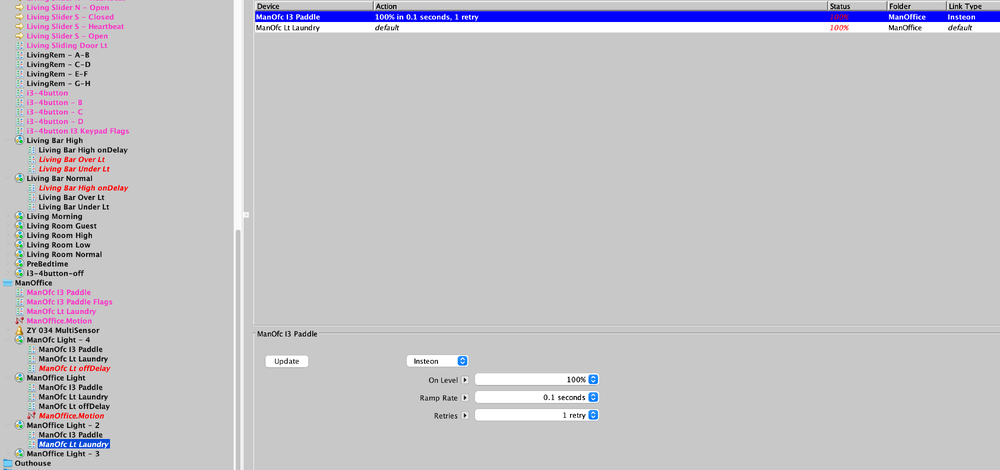
-
I’ll respond to the retry question when I get home with some screenshots. on the ratgdo, I wrote it originally kind of like the temp devices, with variables, because I was running the HA plugin, which communicated to the ISY through variables. Later I added the direct ESP client to this device and I don’t use the variable read/write feature, even tho it’s still an option. Currently it’s very solid, I use it for my main garage door, it integrates well to my programs. Even using an off delay for the light. let me know what you think.
-
So if you look at the temperature device, that is exactly what it does (one of my nagging questions is "does anyone use those devices that I just rewrote?). Takes/Puts the temperature to a specific variable. Yes it is possible. You also can just about as easily move a variable value in/out the delay (for example) parameter in a program. On the second question, yes you could have the plugin send the DON or DOF more than once based on a variable. If you look at the Insteon commands in a scene, they can be set this way (even from a variable). Unfortunately, normal commands do not have this option. No to the scene it would not know the difference that it came from a plugin.
-
Based on some of the dialogue on the previous version, this version allows the user in the JSON & YAML configuration versions to optionally override device defaults. This is not just for the new devices but applies to them all, but just certain parameters. Check the docs. FYI, this will only be applied when the plugin/EISY/POLISY is rebooted and/or discovery (just for the new node). I have it AFTER persistence, so it will override that. That is a choice, we may want it the other way around, looking for feedback. Take a look at the docs please, I want some feedback if its clear with the "hat" of a new user: README & CONFIG Enjoy; try to break it, and let me know what you think! VERSION = '3.1.24' """ 3.1.24 DONE configuration based optional override initial default """ 3.1.23 DONE add onDelay, offDelay switch, update documentation DONE magic number scrub 3.1.22 DONE generic/dimmer static/dynamic behaviour 3.1.21 DONE generic/dimmer to model dimmer ST & OL DONE name & address check using poly interface DONE consistent use of poly versus polyglot DONE fix nagging error check in main() DONE controller discover refactor DONE add notice for ISY authorized error (was only in logs) 3.1.20 DONE fix controller ST "status" on at start, off at stop / delete, "control" still heartbeat DONE garage send CMDs, motor, motion, obstruction ; get naming consistent DONE standardize startup sequence DONE rewrite checkParams, Discovery DONE add NumberOfNodes DONE switch/generic/dimmer/temp(R/C): nodes use polyglot persistence, delete old db files DONE swtich cmd TOGGLE add DONE consolidate temp, tempC, tempRC into one module DONE temp variable writing now with shortPoll (only upon change, considers precision) DONE refactor function naming DONE refactor garage, fix persistence, sse client DONE backfeed garage improvements to switch(done), generic(done), temperature()


