


GlowingHair
Members
-
Joined
-
Last visited
Everything posted by GlowingHair
-
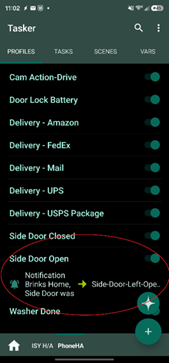
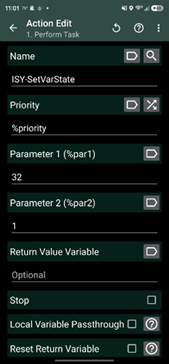
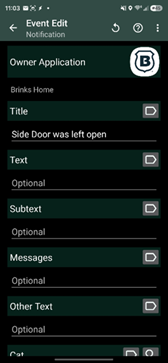
@wmcneil A beloved forum member created a great how-to on Tasker: http://wiki.universal-devices.com/index.php?title=ISY-99i_Series_INSTEON:Networking:Tasker. Once that was working, I set up profiles for the various activities. For example, I use "Side Door Open" plus whether it is raining or the AC has kicked on to remind me to close the door. (Precipitation and HVAC status are determined outside the ISY, then update the ISY.) I used the previous ISY-SetVarState task to set the ISY flag. After that, I set up the triggering event, a notification on my phone from the Brinks app (Brinks is my provider, but it’s managed on alarm.com). The title field is taken directly and exactly from the notification. If there is a timestamp, or variable text, an asterisk (*) acts as a wildcard. For example, I use 9* and Delivered, * as Title and Text, respectively, for USPS’ Informed Delivery of packages since specific information is included in each notification. From there, all logic, including resetting the flag, is handled by ISY programs. I don’t use UD mobile, as I’m still on ISY994, so you will have to take it from here. I don’t know how technical you are, but there is an API for alarm.com, so a simple Python script might get you what you want. I didn’t look into it too deeply because it doesn’t expose camera functions, which is what I want most, so I took the path of least resistance.
-
@wmcneil Exactly. It gets the job done for what I want.
-
I, too, have alarm.com. My method to update my ISY with information is to use Tasker to capture applicable notifications to set flags on the ISY, which then handles the logic. An issue I have with alarm.com is that, after dark, the cameras think rain, snow, fog, and cobwebs are people, vehicles, or animals. Given the clip limit before additional charges, this is unacceptable. With Tasker, I created a solution to turn the cameras off, since there is no access to the pause feature. I would prefer not to have the Tasker layer, but I appreciate what it offers in such situations. Let me know if you want details.
-
@mikewu99 Thank you for the response. Gives me something to plan.
-
@mikewu99 Nothing to add, but how is your window automated? I started this incredible journey with automating the (16) windows of my summer room in mind. I replaced the horrid windows with casement windows, but the original inspiration is unavailable/obsolete, so this project has been very back burner. Thanks.
-
@PapaBear It's been a while, but the last time I got the "cannot determine..." message it was because I was out of space. Once I upgraded to ISY pro version, this situation was resolved. Before the upgrade, I removed a seldom-used device entirely, and the problem device added just fine (I had to test my theory before upgrading). Your situation may be different, but I thought I would throw this out there.
-
@Ross It's pretty straightforward. To get the temperature from a Z-Wave sensor into an integer variable (60), Basic authorization was used.

-
@MBrzeski Not for this specific device, but I ran into the same situation with other devices and used a Network Resource and REST to get the values I wanted into variables. Have you tried that?
-
@JJJ I'm not familiar with Lutron switches, but in Insteon world, I believe using "switched" (control) in the if statement means just that, that the switch is switched, physically. Using "status" in the if statement would cover all possibilities, e.g., physically switching, Alexa/GH commands, etc. To cover all bases, status and control can both be used in the if statement.
-
@ThisIsTheWay Are you switching the device or the scene in the Admin Console? If it's the device, wouldn't just the device respond? If it's the scene, both the keypad button and device should respond - is that the case?
-
@mapeter I think all you have to do is follow the switch instructions to associate the switches directly with each other, no PLM or hub necessary.
-
Cool! It's been working for me now, too. (Didn't chime in before - seemed like enough you had it managed. Thanks)
-
@smokegrub 90% of the time, my finder is blank when starting. I hit refresh and it populates. Have you tried that? Also, I have saved the configuration so it can be loaded if necessary. If I recall, I've only had to do that 3-4 times.
-
My routines are triggering, but about 1-3 minutes after they should. Luckily, for me at least, they aren't for anything critical, just convenient.
-
@Techman Perfect! Thank you so much. Definitely going to bookmark this. Edited to add: I still wasn't satisfied, so did a little more searching, and what I found is to use http://ip.addr.of.isy/rest/nodes/ (thanks, @MrBill), and I added the specific address to that to return the specific device's properties. This is what I recall using before, but had forgotten.
-
@Techman Thanks, but I already know how to do that. What I need to know is how to list the properties so I know which property to assign to the variable. Of the three I listed in the original post, only two do I know off the top of my head (or by referring to existing NR); the third I found in my search of the forum, so could use that for my immediate need. However, I would like to be able to list all the available properties so it is easier to find what I need to use. Make sense?
-
I thought I had run across a way to list z-wave device node properties, like CLITEMP (temperature), CLIHUM (humidity), BATLVL (battery level), etc. Is there some command that can be issued in a browser to list he properties (that's what I seem to recall seeing, though I can't remember the details)? I tried several searches and couldn't find what I was looking for, although I did find the correct property in another post by accident so I could get my network resource working. Any help would be greatly appreciated. Thank you.
-
A New Day for Insteon! — Insteon
-
@TysonEwanchuk I have an ecobee and am pleased with. There is a Polyglot nodeserver for it; I don't use it, though, since my needs are too simple to bother.
-
It looks like you may be able to do it via an Alexa routine.
-
Since you have upgraded to the later z-wave board, I think you also need to upgrade the ISY to 5.3.x. IIRC, there were many issues in 5.2 and 5.1.
-
I think it's on Amazon's side, at least mostly. I have a routine NOT tied to ISY (it's ALL Amazon) that is failing, too.
-
I second wireless tags.
-
Like @larryllix, I still use KumoApps. My first use for these tags was to install them in my trash and recycle bins so I know when the trucks have emptied the bins, saving navigating a steep, sometimes slippery, driveway for no reason. The second use is carrying one in my handbag so the system knows if I'm home or not. The remaining tags just provide information that I haven't used yet.
-
Why not write a program to execute shortly after the ISY restarts to disable the problem programs? No harm/no foul if they are already disabled. That's assuming the ISY also loses power.


