


junkycosmos
Members
-
Joined
-
Last visited
-
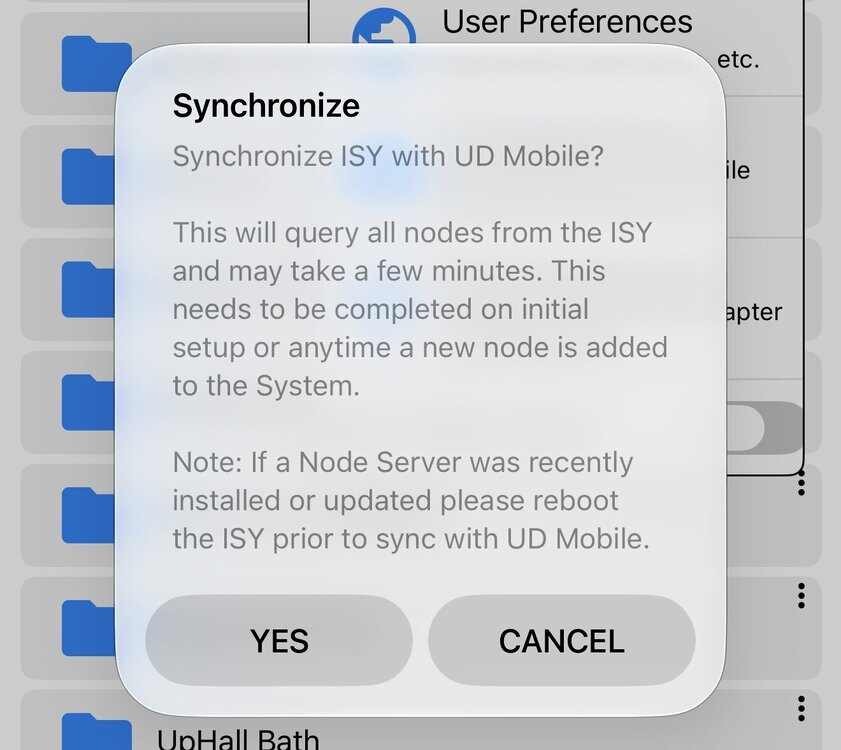
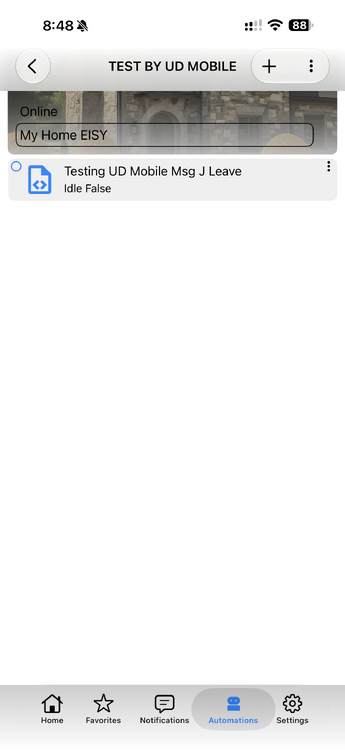
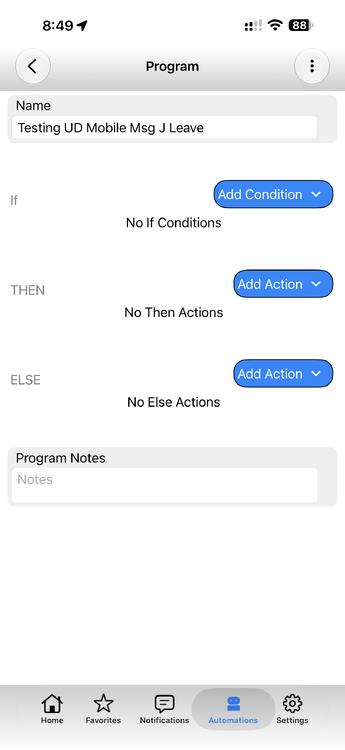
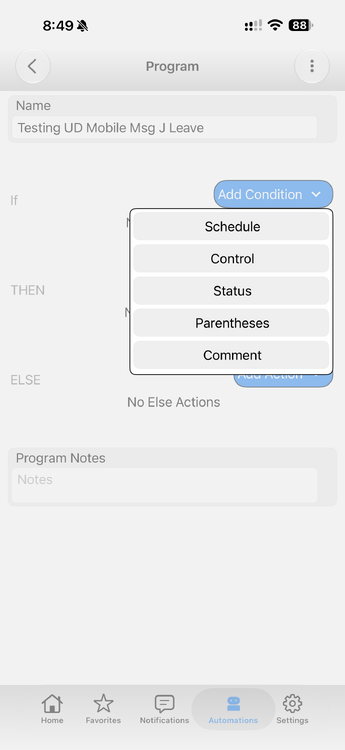
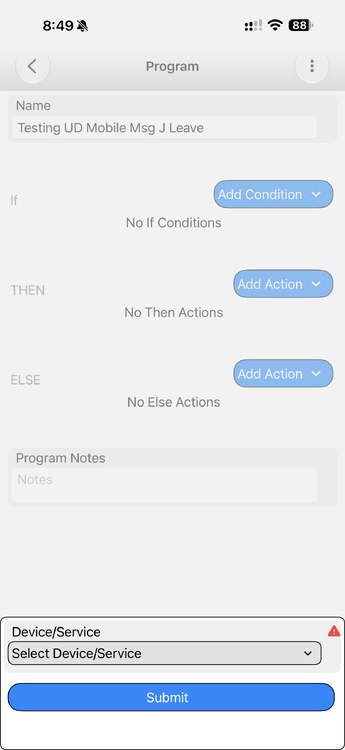
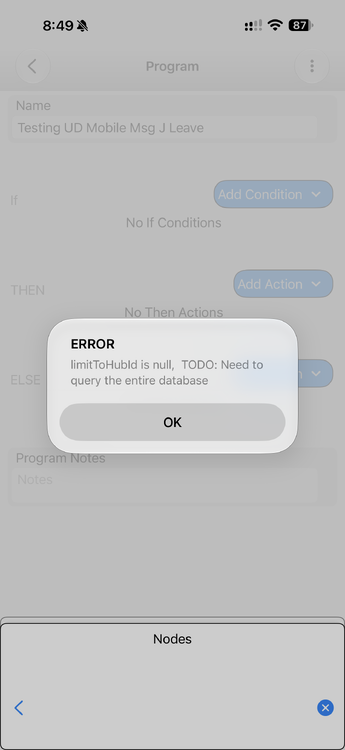
limitToHubld is null, TODO: Need to query the entire database Steps all on UD Moble Create new program folder, save, create new programs UD Full Sync - passed Edit Program - add condition - status Device/Service has red triangle ERROR limitToHubld is null, TODO: Need to query the entire database
-
@Guy Lavoie - that looks to be an interesting device. I have a few Shelly WIFI only devices and they work very solid. I hear ya on the IO linc and all on or all off PITA. BTW take your old IO and wire the Relay (latching mode) to the Sensor input so ie when the relay is triggers it triggers a state change on sensor. Then set a program to trigger when status of the state change happens. I have 2 IO linc wired this way (one I leave ON and one I leave OFF) - they catch 95% of the all on or all off events. EDIT: seems to be confusing details on Siren8 and Multisensor 8 page - both have FCC license for both radio freq of 908 (mesh) and 912/920 (LR) so both seem to support both. @Javi - thank you for the info on the pop up, that makes sense!
-
@Guy Lavoie no, I have not added any Long Range Devices yet. Was just hunting a good device to test with, open to suggestions. Looking at the Aeotec Multisensor 8 Aeotec Multisensor 8 or the Aeotec Siren 8 Aeotec Siren 8 Agreed on the LR "enabled" . one of the notes I did get back from Zwave-me email support after I had fixed made a comment that EISY "can apply" the LR license into the dongle. As above I can note my EISY had not applied the LR license into my dongle however I had not tried to enroll any LR devices .. (maybe EISY only applies LR into dongle when you try to enroll a LR device?) I do think this raises a few Qs about LR on EISY - a. do EISY users need to update Zmatter dongle to X firmware or only if XYZ (LR bugs? LR needed. or ???) b. do EISY users need to "purchase" (its free) but a separate step to "enable" the LR license to your USB dongle UUID c. IF something goes sideways on step b (enabling LR) is only way out is using Zsniffer tools as I did or when would the EISY push license into USB? - IF the EISY does not really push it to USB then would really recommend doing "Purchase" of LR on zwave-me via web tools / more options BEFORE using web tools to update firmware - since I was told doing a firmware update also pushes latest licenses into the USB dongle. Also agreed things changed on Firmware in Z-wave.me site / when I updated there were 2 versions of 7.46 but week later there was only a single and 7.47 with a caution of only using 7.47 with other setups.
-
Hi All Wanted to report back that I have had success adding in a few of my Zwave devices after going to the newer version. Have only tested with a few but all going smoothly. Even the adding the dreaded Schlage be469 locks, which appear to be working OK. All of that said I did want to post a comment here for others to please take caution on any of this USB Firmware updating - knowing it is pretty low level - and also do please read and pay attention to what @Javi very politely noted above of:: "I must emphasize, the only thing needed is in the provided Wiki instructions. I am unsure of outcomes if anything else on the dongle is changed. We have not tested other versions or other features." as a reference to others the direct link to instructions is https://wiki.universal-devices.com/Eisy:User_Guide#ZMatter_USB_Dongle_Firmware_Upgrade (no one asked me to post this caution but seemed to be prudent) - I do think this brings up an interesting Q on support guidelines and boundaries too and my usual thank you to the solid UD Gang
-
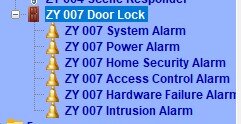
Was able to enroll a be469 ZWP lock on EISY via Admin consul, prompted for code and enrolled quickly. Question: For Schlage ZWP BE469 on EISY do we still need to perform these additional steps after install? 1) right+click Z-Wave | Compatibility Mode ON 2) right+click Z-Wave | Validation | OFF 3) right+click Z-Wave | Rewrite All Device Links I know EISY on 5.8 (with ZWave USB Dongle on 7.32) with BE469 (FW11.0 sticker) they were required to get EISY to see status changes on lock - However .. I just enrolled a new lock BE469 (FW12.4 sticker) on EISY 6.1 (with Zwave USB Dongle on 7.46) and the lock is reporting status in Event viewer without doing these steps. All I have done so far is enrollment and the lock is reporting status of manual handle turn, keypad lock and user code unlock. Did something change in EISY 5.8 to 6.1.2 for this ... ? (or maybe it is the newer Schlage FW or maybe the USB Dongle update ?) Couple quick details 1 EISY UI allows you to set a 4-10 digit code via UI however the lock does not actually take the code length until you manually set the config parameter to the length you want. UI there is a bit misleading as it prompts to set code 4-10 and will take a length wrong for lock setting without giving any error A pre step that must be performed set the parameter in lock to code length desired (default is 4 digit) IF someone wants to change their lock to use a 6 digit code instead of a 4 digit code then set Par number 16 to 6 - (lock now takes 6 digit user codes locally OR via users button on eISY Admin consul) 2 Easy mistake of using wrong pin/enrollment code when trying to enroll - do not get "wrong pin code" Wish I could edit my post on this thread of January 19, 2025 to note the secure enrollment code for ZWave Plus (the code you need to enroll the lock on your EISY) is NOT the 6 digit code on the sticker back of lock case but rather a 5 digit code that came on a card/instruction in the box. - I suspect some of the users here are incorrectly trying to use the "Programming code" on that sticker on lock as the security code during ZWave enrollment - I can confirm you get no error message with the wrong ZWPlus enrollment code - the lock just fails and the EISY adds a blank node. old reference thread - Schlage Be469 v5.8 (non Z-wave Plus) / trouble adding to Matter Z-Wave / Q on status S2 - ZMatter - Universal Devices Forum Both 1&2 could be quick addition to the wiki UD Mobile - Universal Devices, Inc. Wiki ************************ Here is how the nodes show after enrollment with the correct ZWP enrollment code (on the lock instruction card - not the code on the back case of the lock)
-
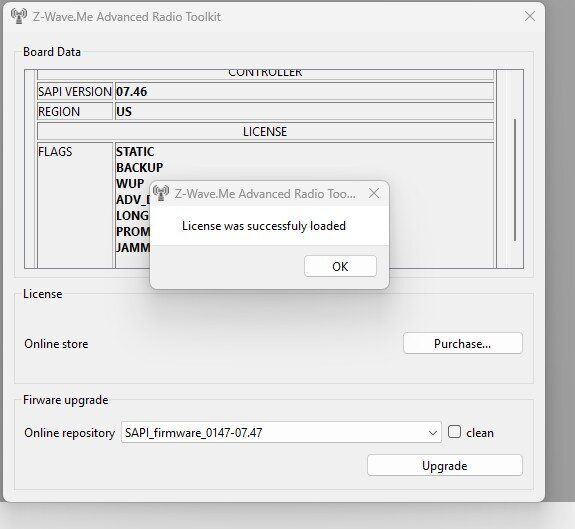
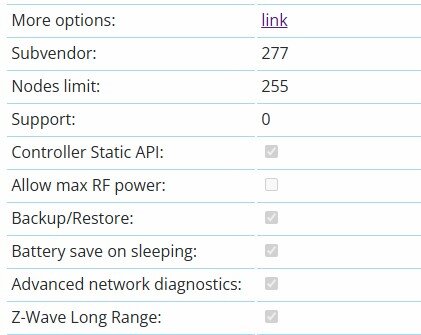
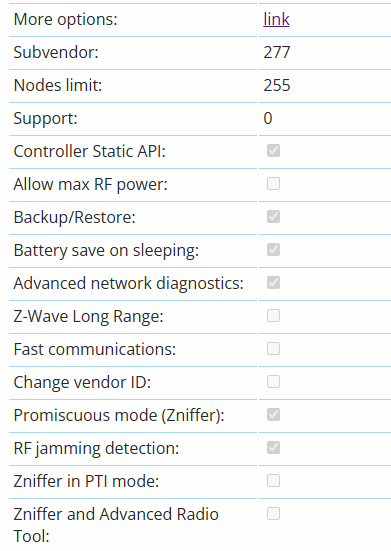
Hi All Per my own strange case where I tried to "enable" Long Range Support via https://z-wave.me/support/controller-tools but then had it fail and not push the license into my USB dongle - noting all of this was on the win11 pc (not EISY) Evidence of was that web tools https://z-wave.me/support/controller-tools shows LR as unchecked however going to move info https://z-wave.me/hardware-capabilities/?uuid=YOURUUIDHERE showed Long Range as enabled. The fix = download the Zniffer / Advanced Radio Tool https://z-wave.me/support/downloads/... use it to connect to your USB dongle (mine was at com4 port and baud 115200) , once you could see your UUID listed you know Zniffer sees your dongle, then click the i button and because the license was already provisioned on Zmatter server it a box popped up and downloaded the license. To confirm I closed radio tools and web back to web tools - and now finally Long Range shows X as enabled. Hopefully others do not run into this but polite reminders Webtools https://z-wave.me/support/controller-tools actually queries the USB card directly to pull what it knows is enabled Viewing "more info" or Hardware Capabilities https://z-wave.me/hardware-capabilities/?uuid=YOURUUIDHERE pulls the licensed data for that UUID from Zwave-me servers (not from your usb stick) @Javi - I do thank you for the reply and does sound like EISY might be able apply the license as well .. but it clearly had not as USB Dongle was in EISY online a few days in between my attempts here. However I did not try to add a ZW Long Range device as you suggested prior as I do not have one on hand. - Just noting for your info - I do appreciate the help.
-
@Guy Lavoie and @Javi The problem I have is my USB ZMatter Dongle does not have Long Range Enabled (as is verified by web tools and no checkmark on the LR option). However when I go into More Options link (which shows the options purchased for account belonging to UUID of USB) it shows Long Range shows as purchased. This mismatch is because I purchased it, received mail but the link in mail goes to "cannot find license" .... SO .. I am a bit stuck .. ? I cannot "re purchase it" since the option to purchase is gone .. but I do not know how to "enable it" on the actual USB Dongle. Have mail out to zwave-me but no response (sent Tuesday) Anyone with other ideas here ? Appreciate any suggestions
-
@wmcneil - I asked Gemini and it gave me those details. Surprised you could update to 7.45 but not 7.46 / did you confirm the bootloader version updated? You noted the failures are during the % # counting up? For some reason my guess what that the % counting up (was pretty slow for me) was download of firmware from their site to the USB dongle then the dongle restarting to load it. Only reason I think to note this is IF the DL process is still in the flow where you are seeing failures brings their servers back into factor. @Javi - Thank you for chiming in here. Have a question about your earlier statement (of EISY allows you to choose between Mesh and LR) and also what I see in EISY UI (in Zwave region of US or LR) - from what I read on LR it is listed as fully backward compatible to prior ZW. Is that incorrect, or more to the point - IF we set EISY to LR do we expect our mesh ZW devices to keep working as before? Also, in terms of enabling LR - on my EISY UI Zwave page I saw region was set to US LR - however - when I checked z-wave.me web tools page (with USB dongle in PC) the LR option showed unchecked (dongle on 7.46) - So with that in mind I did go to the more options link and "ordered" the option to enable LR, received the email which only included a link order # (no hex code and no QR code) . Clicking the link in the mail gives ""error":"License not found"}" https://service.z-wave.me/hardware/capabilities/checkout/?zme_order_id=##### (redacted my 5 digit order) AND of course, when I go back to the more options link their system shows that my UUID has the LR feature licensed. Any creative ideas on how to push the LR license into my USB dongle ? Thank you again for the inputs J ps. I do see that the web tools page now lists 7.47 but Gemini notes (pasting here since our G buddy can be rather wrong sometimes too) No, do NOT flash 00.00.07.47 - Controller if you intend to use this USB dongle with your Universal Devices eisy. Here is why: IoX Compatibility: Universal Devices' IoX engine on the eisy specifically expects the official Z-Wave 7.42 firmware. Newer Silicon Labs SDK builds (like 7.47) alter low-level Serial API definitions that will cause IoX to fail to initialize the Z-Wave chip or stop communicating with the stick.
-
Cannot speak to better performance or anything yet - my efforts here are in prep to "move" my old Insteon + Zwave network from ISY994 over to EISY. My current old Zwave stuff here is very old so will be "rebuilding" the zwave from scratch. I did the update on Windows 11 PC - installed the universal driver on the 1st link (in UD WIKI) and then ran the web tools from edge browser (links here ZMatter USB Dongle Firmware Upgrade - (Eisy:User Guide - Universal Devices, Inc. Wiki) /) Sorry cannot answer IF this wiped my controller as I also did a dongle factory reset afterwards
-
How are you handling multiple phones doing geofences on same 1 EISY with UD Mobile? What is best practice? requirements each phone can update unique variable on EISY 2-3 users/phones per site (each site single EISY) old world moving from the old world of Mobilinc where we had mobilinc on each phone going to ISY under 1 admin user but each phone would set its own geofence and control unique variable on ISY these variables are driving few different programs such as locks etc New World Question Can (should?) each users phone have a unique ID to login to UD Mobile ? - if so what is process to create multiple logins to EISY for UD Mobile Appreciate any suggestions here. I have a few (maybe) logical guesses here but rather hear tips from others in similar situations
-
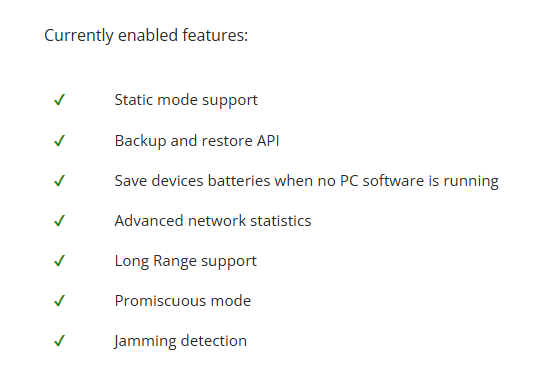
I found from EISY migration WIKI the directions to update ZMatter USB Dongle Firmware Upgrade - (Eisy:User Guide - Universal Devices, Inc. Wiki) / Easy enough process to unplug from EISY, then install windows driver, plug into usb port, then web updater) but I am wondering if this is common practice or if many others are doing this step my ZMatter board from UD was purchased early on along with EISY so I was not surprised when found to be on the initial version - but when I did a search on release notes I am wondering IS this Firmware on USB Dongle something EISY should be updating - ? How many of the fixed items are impacting other users around here ? Thoughts on enabling some of the other options- long range? My dongle was Firmware was on 00.00.07.32 so I did he sequential updates to 7.35 then 7.45 then tried 7.46 twice, no error message, download looked normal but when done board still reported as 07.45. Answer was to then update the boot loader from 2.01 to 2.04, unplug for 10 sec then update to 07.46 (1 of the duplicate 07.46 choices in menu Then there were more options in firmware choices too. Also under more options I see some available options such as long range Currently enabled features: ✔ Static mode support ✔ Backup and restore API ✔ Save devices batteries when no PC software is running ✔ Advanced network statistics ✔ Promiscuous mode ✔ Jamming detection You hardware additionally supports: Free Long Range support Add this feature Free UART communications on faster speed Add this feature 99 Zniffer and Advanced Radio Tool Add this feature Maximal power (+7 dBm) Upon request Change vendor ID in Serial API Upon request here is what my search turned on for release notes and such as notes for others Firmware 7.32Baseline SDK Release: Base Silicon Labs 700/800 series Z-Wave controller build handling core S2 security frames, SmartStart inclusions, and Long Range (LR) protocol capabilities. Primary Scope: Handles standard NVM storage management and standard routing table structures. Upgrade to 7.35Routing & Retry Improvements: Improved frame retry mechanics and route-repair efficiency across high-density mesh networks. Buffer & Memory Bug Fixes: Resolved heap allocation edge cases during rapid sequential commands (e.g., rapid scene execution involving multiple nodes). SmartStart Inclusions: Fixed intermittent timeout issues when including battery-powered S2 devices during initial provisioning. Upgrade to 7.45Z-Wave Long Range (LR) & Multi-Region Support: Fixes and enhancements to regional RF channel handling (US LR frequency shifts and European LR frequency preparation). OTA Firmware Transfer Reliability: Fixed controller-side packet-dropping issues when executing Over-The-Air (OTA) firmware updates to target Z-Wave end-devices. Network Recovery & NVM Safety: Enhanced Non-Volatile Memory (NVM) backup/restore reliability—reducing network table corruption during ungraceful reboots or power loss. Upgrade to 7.46Maintenance & Patch Build: Minor point release specifically aimed at stability fixes post-7.45. Serial API Stability: Resolved rare serial communication lockups between the host controller software (IoX / eisy) and the ZMatter radio chip under heavy packet bursts. S2 Boot Bootstrapping: Fixed rare failures during the S2 security key exchange process for 800-series end nodes. Key Takeaway for eisy/ZMatter UsersProgressing through these versions systematically resolves controller lockup issues, network routing drops, and S2 inclusion failures. Keep your eisy IoX software up-to-date alongside board updates, as IoX relies on matching controller driver commands to fully leverage these underlying protocol fixes. And when I searched on Bootloader version .. mine is on 02.01.00.00 The version sequence 02.01.00.00 $\rightarrow$ 02.04.00.05 corresponds to Silicon Labs' Gecko Bootloader (GBL v2.x) releases. While the Z-Wave application firmware handles network commands and mesh routing, the Gecko Bootloader handles hardware initialization, secure boot verification, and low-level serial communication. Moving from version 2.1.0 to 2.4.0.5 includes the following bootloader-level changes and fixes: Core Changes & EnhancementsEnhanced GBL Image Verification & Decompression: Improved validation of payload signatures and CRC checks before flashing application firmware, preventing partially downloaded or corrupted images from flashing. Added support for improved LZMA/LZ4 decompression routines for compressed firmware payloads. Improved UART DMA & Flow Control: Upgraded Direct Memory Access (DMA) handling for the UART serial driver. This resolves baud-rate synchronization glitches and packet overruns during high-speed serial updates between the eisy host processor and the ZMatter chip. Secure Boot & Hardware Root of Trust: Updated cryptographic libraries (upgraded mbed TLS integration) for hardware Root of Trust verification on Silicon Labs EFR32 Series 2 (800-series) chips. Shared SRAM Reset Info Handling: Fixed edge cases in how software reset reasons are stored in the first word of SRAM (0x20000000). This ensures that when the eisy sends a command to reboot the ZMatter board into bootloader mode, the board reliably registers the reset command without hanging. Power-On Reset & Stability Patches: Fixed stability bugs where specific brownout or low-power state transitions could cause the bootloader to trap in a boot loop instead of jumping to the main application image. Do You Need to Update It?If it came bundled with your controller firmware image: Modern flasher tools often bundle the matching bootloader image alongside application releases (e.g., SDK 7.45/7.46 streams). Flashing this updated bootloader is safe when updating via PC/web tools as long as the tool explicitly recommends or requires it. If everything is currently running fine: If your eisy successfully communicates with the ZMatter board and accepts OTA/firmware updates, you do not need to manually force a bootloader rewrite. AFTER update of bootloader unplugged from USB for 10 seconds to ensure it started back up on new bootloader. Why are there two identical 00.00.07.46 - Controller choices? When updating through the z-wave.me web flasher: First 00.00.07.46 - Controller: Standard production firmware release. Second 00.00.07.46 - Controller: Regional frequency variant (e.g., US LR vs. EU/AU static frequency configuration) or a duplicated channel build provided by the tool repository. 03.13.4709 - Z-Uno / repeater: DO NOT select this. That firmware is designed exclusively for Z-Uno custom developer boards acting as standalone sub-nodes/repeaters.
-
Is there not a way to see if the device provisions as LR in the device zwave details ?
-
following along here My own setup has a single KLF200 with 5 groups set / then I hard wired 5 Zwave I/O devices to the sense inputs of the KLF200 / assigned these 5 io sensors in my ISY as names that match my 5 groups. It's crude and it works but is only 1 way (the zwave control to KFL controlling the groups of Velux). While I did wire the KLF outputs to the input sensors on the zwave devices I found the "feedback" back to Zwave io to be unreliable. I suspect more of it being the Zwave io devices I used which are old gen1 zwave stuff. Recently was just looking at the KIX300 which would just put Velux directly on my phone w/o any home automation. Not ideal but I did want to mention if anyone picks up the effort to code a plugin interface with the KLF200 would be great since it has the flexibility but the KIX300 seems to be velux's "modern" gateway. Completely different hardware any no idea if there is an open API interface to call etc.
-
Figured the search showed at least a year old on the topic. Wanted to share that in last 3 months I have had 4 more ISY994 power supplies all die. All had been running continually for 8+ years, all were in ranging envs of heat but all in dry env. Last one was funny in that is browned out - ISY would periodically reboot every 3-12 hours for the last week. After doing an unplug and replug it ran for 3 more hours then died completely. Really kinda speaks to how well the ISY994 was build and its ability to be browned out on power then restarted multiple times with ZERO impact to long term run health. Such a bummer that the new hardware really cannot tolerate power cycles !!
-
Am I missing something here ? In UDI mobile I can edit or create Program Automations but do not see how to set with a variable. such as IF variable X is set to 1 i know we can do this on admin but not via UDI Mobile ?


